
Introduksjon
Thank you for choosing the NEC NP-MC372X Portable Projector. This manual provides essential information for the safe and efficient use of your projector. Please read these instructions thoroughly before operating the device and retain them for future reference. The NEC NP-MC372X is an XGA LCD projector designed for clear and bright presentations, offering 3700 lumens of brightness and a native resolution of 1024x768.
Sikkerhetsinformasjon
Følg alltid følgende sikkerhetsregler for å forhindre brann, elektrisk støt eller skade:
- Ikke blokker ventilasjonsåpningene. Sørg for tilstrekkelig plass rundt projektoren for riktig luftstrøm.
- Ikke se direkte inn i projektorlinsen når lamp er på, da det sterke lyset kan forårsake øyeskader.
- Ikke plasser projektoren på en ustabil vogn, stativ eller bord.
- Unplug the projector from the power outlet before cleaning. Use a dry cloth for cleaning.
- Overlat all service til kvalifisert servicepersonell.
Pakkeinnhold
Bekreft at alle varene som er oppført nedenfor er inkludert i pakken din:
- NEC NP-MC372X Portable Projector
- Strømkabel
- HDMI-kabel
- Fjernkontroll
Produkt overview
The NEC NP-MC372X is a versatile projector featuring an LCD display, 1024x768 native resolution, and 3700 lumens brightness. It includes a 1.2x zoom lens and offers a lamp life of up to 10,000 hours. Connectivity options include Dual HDMI, VGA, and USB.
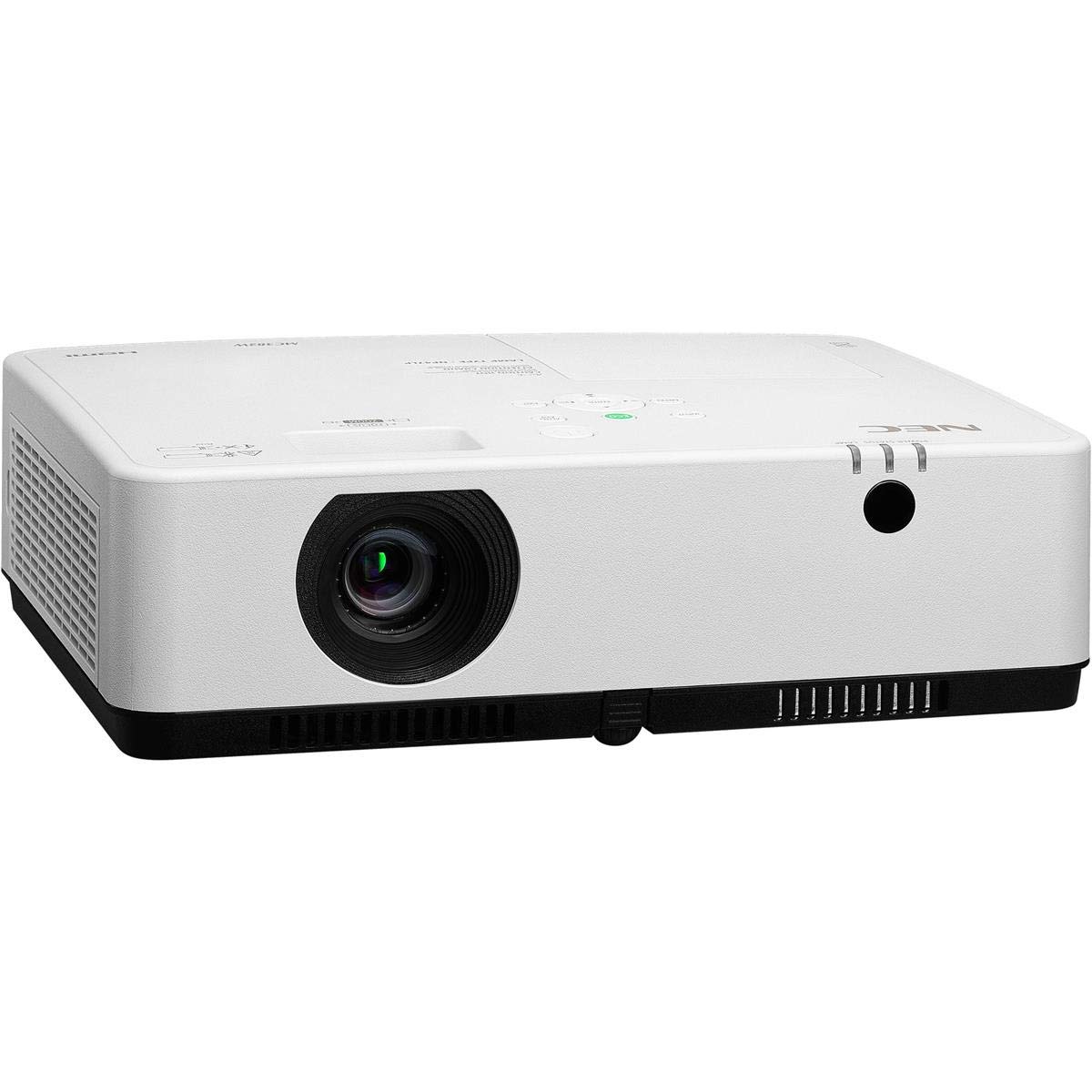
Figur 1: Foran og over view of the NEC NP-MC372X Portable Projector, showing the lens and control panel.

Figur 2: Foran view of the projector, highlighting the projection lens.

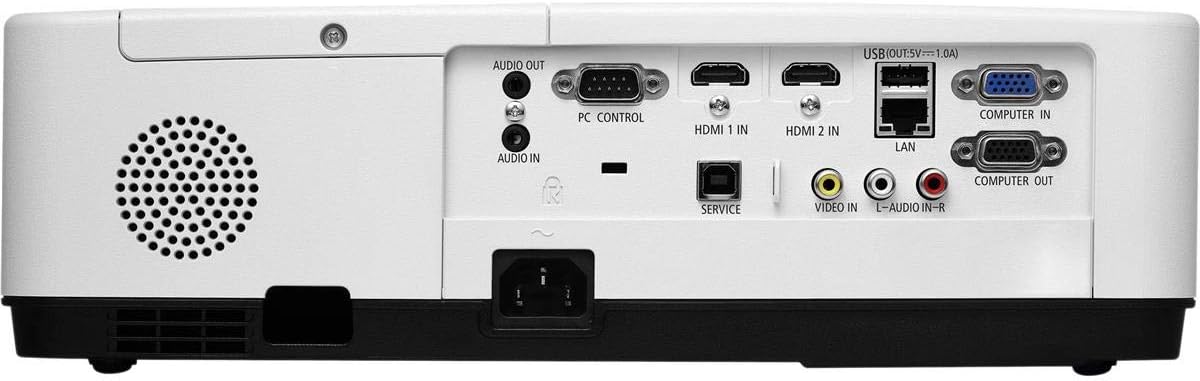
Figur 3: Bak view of the projector, displaying the various input and output ports including HDMI, VGA, USB, LAN, and audio connections.
Figur 4: Side view of the projector, showing the ventilation grille for heat dissipation.
Oppsett
Fysisk plassering
Place the projector on a stable, flat surface or mount it securely. Ensure the projector is positioned at an appropriate distance from the screen to achieve the desired image size. Maintain clear space around the projector for ventilation.
Koble til enheter
Refer to Figure 3 for port locations. Connect your source device (e.g., laptop, gaming console) to the projector using one of the following methods:
- HDMI: Use an HDMI cable to connect to either HDMI 1 IN or HDMI 2 IN.
- VGA: Use a VGA cable to connect to COMPUTER IN. For audio, connect a 3.5mm audio cable to AUDIO IN.
- USB: Connect a USB device to the USB port for direct media playback.
- LAN: Koble en Ethernet-kabel til LAN-porten for nettverkstilkobling.
Slår på/av
1. Connect the power cable to the projector and a power outlet.
2. Press the power button on the projector or the remote control to turn on the projector.
3. To turn off, press the power button again. Confirm shutdown when prompted.
Bruksanvisning
Grunnleggende bruk med fjernkontroll
Use the included remote control to navigate menus, select input sources, and adjust settings. Point the remote control towards the projector's remote sensor.
Valg av inngangskilde
Press the 'Input' button on the remote control or projector control panel to cycle through available input sources (HDMI 1, HDMI 2, Computer In, USB).
Bildejustering
- Fokus: Drei fokusringen på objektivet til bildet er skarpt.
- Zoom: Use the zoom ring on the lens to adjust the image size without moving the projector. The projector features a 1.2x optical zoom.
- Keystone-korreksjon: If the image appears trapezoidal, use the keystone correction function in the projector menu to square the image.
Spesielle funksjoner
- Multi Presenter: This feature allows multiple users to connect and display content wirelessly from their devices. Refer to the on-screen menu for setup instructions.
- USB Viewer Capability: Insert a USB drive into the USB port to directly view photos, videos, and documents without a connected computer.
- Skjult teksting: Enable closed captioning for compatible video sources through the projector's menu settings.
Vedlikehold
Lamp Erstatning
Projektoren lamp has an operating life of up to 10,000 hours. When the lamp reaches the end of its life, a warning message will appear. Consult a qualified service technician for lamp replacement to ensure proper installation and safety.
Rengjøring
- Ytre: Tørk av projektoren casinmed en myk, tørr og lofri klut. For gjenstridige merker, tørk lettampen kluten med vann.
- Linse: Use a professional lens cleaning kit or a soft, dry cloth specifically designed for optical lenses. Avoid harsh chemicals.
- Luftfilter: Regularly check and clean the air filter to prevent dust buildup, which can affect performance and lamp life. Refer to the projector's on-screen menu for filter usage time.
Feilsøking
Hvis du støter på problemer, kan du prøve følgende løsninger før du kontakter kundestøtte:
- Ikke noe bilde: Ensure all cables are securely connected. Verify the correct input source is selected. Check if the lens cap is removed.
- Ingen lyd: Confirm audio cables are connected (if applicable). Adjust volume on both the projector and the source device.
- Fjernkontrollen fungerer ikke: Check the batteries in the remote. Ensure there are no obstructions between the remote and the projector's sensor.
- Bildet er uskarpt: Juster fokusringen på linsen. Sørg for at projeksjonsflaten er flat.
- Advarsel om overoppheting: Ensure ventilation openings are not blocked. Clean the air filter if necessary.
Spesifikasjoner
| Trekk | Spesifikasjon |
|---|---|
| Merke | NEC |
| Modellnavn | MC372X |
| Modellnummer | NP-MC372X |
| Visningstype | LCD |
| Innfødt oppløsning | 1024 x 768 (XGA) |
| Lysstyrke | 3700 lumen |
| Tilkoblingsteknologi | HDMI, USB, VGA, LAN |
| Zoom | 1.2x optisk |
| Lyskildens levetid | 10,000 timer |
| Wattage | 267 watts (typical 120V) |
| Kontrollertype | Fjernkontroll |
| Varevekt | 7.1 pund |
| Voltage | 120 volt |
| UPC | 805736070248 |
Garanti og støtte
The NEC NP-MC372X Portable Projector comes with a 3 års begrenset garanti. For warranty claims or technical support, please contact NEC customer service. You can find contact information on the official NEC webnettstedet eller gjennom produktforhandleren din.