REMAX RB-M26 Multifunction Bluetooth Speaker with FM Radio and Alarm Clock
Brukerhåndbok
Introduksjon
Takk for kjøpetasing the REMAX RB-M26 Multifunction Bluetooth Speaker. This device combines a portable Bluetooth speaker, FM radio, and a dual alarm clock, with additional support for TF card and USB audio playback. This manual provides detailed instructions to help you set up and operate your speaker effectively.
Pakkeinnhold
REMAX RB-M26 Bluetooth Speaker
USB ladekabel
Lydkabel (AUX)
Brukerhåndbok
Produkt overview
Gjør deg kjent med høyttalerens komponenter og kontroller.
Figure 1: REMAX RB-M26 Clock Speaker retail packaging, showing the product and key features.
The speaker features a large LED display for time and mode information, along with intuitive buttons and a rotary knob for control. The top panel typically includes buttons for power, mode selection, play/pause, volume, and alarm settings. The rear or side panel houses ports for USB, TF card, AUX input, and charging.
Oppsett
1. Lading av høyttaleren
Koble den lille enden av USB-ladekabelen til ladeporten på høyttaleren.
Koble den store enden av USB-kabelen til en USB-strømadapter (ikke inkludert) eller en datamaskins USB-port.
The charging indicator will illuminate. It will turn off or change color once fully charged.
2. Slå på/av
To power on, press and hold the Power button until the display lights up.
For å slå av, trykk og hold inne av/på-knappen igjen til skjermen slår seg av.
3. Stille inn tid
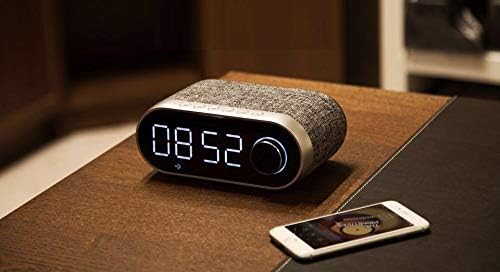
Figure 2: The REMAX RB-M26 speaker on a bedside table, showing the digital clock display.
In clock mode, press and hold the 'Time Set' button (or a similar button, refer to your specific unit's markings).
The hour digits will start flashing. Use the '+' and '-' buttons or the rotary knob to adjust the hour.
Press the 'Time Set' button again to move to minute adjustment. Adjust minutes similarly.
Press 'Time Set' once more to confirm and exit.
Bruksanvisning
1. Bluetooth-paring
Figure 3: The REMAX RB-M26 speaker connected via Bluetooth to a smartphone.
Power on the speaker. It will automatically enter Bluetooth pairing mode, indicated by a flashing Bluetooth icon on the display.
Aktiver Bluetooth på smarttelefonen, nettbrettet eller den bærbare datamaskinen din, og søk etter tilgjengelige enheter.
Select "REMAX RB-M26" from the list of devices.
Once paired, the Bluetooth icon will stop flashing and remain solid, and you will hear a confirmation tone.
2. FM-radiodrift
Trykk på «Modus»-knappen for å bytte til FM-radiomodus.
Trykk og hold inne «Spill av/pause»-knappen for å automatisk skanne og lagre tilgjengelige FM-stasjoner.
Use the 'Next/Previous' buttons to navigate between saved stations.
For manual tuning, short press the 'Next/Previous' buttons.
3. TF Card / USB Audio Playback
Insert a TF card (MicroSD) or a USB flash drive with MP3 audio files inn i det respektive sporet.
The speaker will automatically switch to TF card or USB mode and begin playback. If not, press the 'Mode' button to select the correct source.
Use the 'Play/Pause' button to control playback.
Use the 'Next/Previous' buttons to skip tracks.
4. AUX -inngang
Koble den ene enden av 3.5 mm lydkabelen til AUX-porten på høyttaleren.
Connect the other end to the audio output of your external device (e.g., MP3 player, computer).
Press the 'Mode' button to switch to AUX mode.
Audio playback will be controlled from your external device.
5. Vekkerklokkefunksjoner
Innstilling av alarm 1/2: In clock mode, short press the 'Alarm Set' button (or similar). The alarm time will flash. Use the '+' and '-' buttons or rotary knob to set the hour and minutes. Press 'Alarm Set' again to confirm. Repeat for a second alarm if desired.
Aktivere/deaktivere alarm: After setting, press the 'Alarm Set' button to toggle the alarm on/off. An alarm icon will appear/disappear on the display.
Snooze-funksjon: When the alarm sounds, press any button (except power off) to activate snooze. The alarm will sound again after a few minutes.
Stopper alarm: To stop the alarm completely, press and hold the 'Alarm Set' button when it is sounding.
Vedlikehold
Rengjør høyttaleren med en myk, tørr klut. Ikke bruk slipende rengjøringsmidler eller løsemidler.
Unngå å utsette høyttaleren for ekstreme temperaturer, direkte sollys eller høy luftfuktighet.
Ikke senk høyttaleren ned i vann.
Oppbevar høyttaleren på et kjølig og tørt sted når den ikke er i bruk over lengre tid.
Feilsøking
Problem
Løsning
Høyttaleren slår seg ikke på.
Sørg for at høyttaleren er ladet. Koble den til en strømkilde med USB-kabelen.
Ingen lyd fra høyttaleren.
Check the volume level on both the speaker and the connected device. Ensure the correct mode (Bluetooth, FM, TF, USB, AUX) is selected.
Bluetooth-paring mislykkes.
Ensure the speaker is in Bluetooth pairing mode. Turn off and on Bluetooth on your device. Move the device closer to the speaker.
FM-radiomottaket er dårlig.
Adjust the speaker's position. Extend any built-in antenna if available. Try scanning for stations again.
TF card/USB not playing.
Ensure the TF card/USB is inserted correctly and contains compatible audio files (e.g., MP3). Check if the speaker is in the correct mode.
Spesifikasjoner
Merke: REMAX
Modell: RB-M26
Tilkoblingsteknologi: Bluetooth
Monteringstype: Bordplate
Høyttalertype: Surround Sound
Spesielle funksjoner: FM Radio, Alarm Clock
Kompatible enheter: Tablet, Laptop, Smartphone
Kontrolltype: Integrated Buttons/Knob (Note: Some models may include a remote control, please check your package contents.)
Lydavspilling: Supports TF Card, USB Audio
Garanti og støtte
The REMAX RB-M26 speaker comes with a standard manufacturer's warranty. Please refer to the warranty card included in your package for specific terms and conditions. For technical support or service inquiries, please contact your local REMAX distributor or the retailer where you purchased the product.
Ask a question about this manual
Ask about setup, troubleshooting, compatibility, parts, safety, or missing instructions. Manuals+ will review the question and use this page’s manual context to help answer it.