
1. Introduksjon
This manual provides essential information for the safe and effective operation of your Retevis RT55 Marine Radio. Please read this manual thoroughly before using the device to ensure proper functionality and to prevent damage. The Retevis RT55 is a portable VHF marine transceiver designed for maritime communication, featuring IP67 waterproofing, floating capability, and vibration drainage.

Image 1.1: Retevis RT55 Marine Radio demonstrating its floating capability.
2. Pakkens innhold
Bekreft at alle varene som er oppført nedenfor er inkludert i pakken. Hvis noen varer mangler eller er skadet, vennligst kontakt forhandleren din.
- 1 x Retevis RT55 Marine Radio
- 1 x Antenne
- 1 x 1200mAh litium-ion-batteri
- 1 x strømadapter
- 1 x ladestasjon
- 1 x belteklips
- 1 x Nøkkelbånd
- 4 x skruer
- 1 x brukerhåndbok (dette dokumentet)

Image 2.1: All components included in the Retevis RT55 package.
3. Produktet er overview
Gjør deg kjent med radioens komponenter og kontroller.
3.1. Radiokomponenter

Image 3.1: Front panel of the Retevis RT55 Marine Radio with key controls labeled.
- Antenne: For sending og mottak av signaler.
- LCD-skjerm: Shows channel number, battery status, and other operational indicators.
- CH 16 Button: Quickly switches to Channel 16 (emergency channel).
- CH-knapp: Brukes til kanalvalg.
- TAG/FAV Button: Veksler mellom tagged/favorite channels.
- MUTE/VOL Button: Adjusts volume or mutes audio.
- MONI/SQL Button: Activates monitor function or adjusts squelch level.
- DUAL/SCAN Button: Activates dual watch or scan function.
- LOCK/H/L Button: Locks the keypad or switches between high/low power output.
- Pil opp/ned: Navigate menus and change channels.
- PTT (Push-to-Talk)-knapp: Located on the side, used to transmit.
4. Oppsett
4.1. Installasjon av batteri
- Sørg for at radioen er slått av.
- Juster batteripakken med batterirommet på baksiden av radioen.
- Skyv batteriet forsiktig på plass til det klikker på plass.

Image 4.1: The 1200mAh Lithium-ion battery pack for the RT55.
4.2. Antennefeste
- Skru antennen med klokken på kontakten øverst på radioen til den er håndstram. Ikke stram til for mye.
4.3. Lader batteriet
Before initial use, fully charge the battery. A full charge typically takes several hours.
- Koble strømadapteren til ladestasjonen.
- Koble strømadapteren til en vanlig stikkontakt.
- Place the radio (with battery installed) into the charging cradle. Ensure proper contact between the radio and the cradle's charging terminals.
- The charging indicator on the cradle will illuminate (e.g., red for charging, green for fully charged).
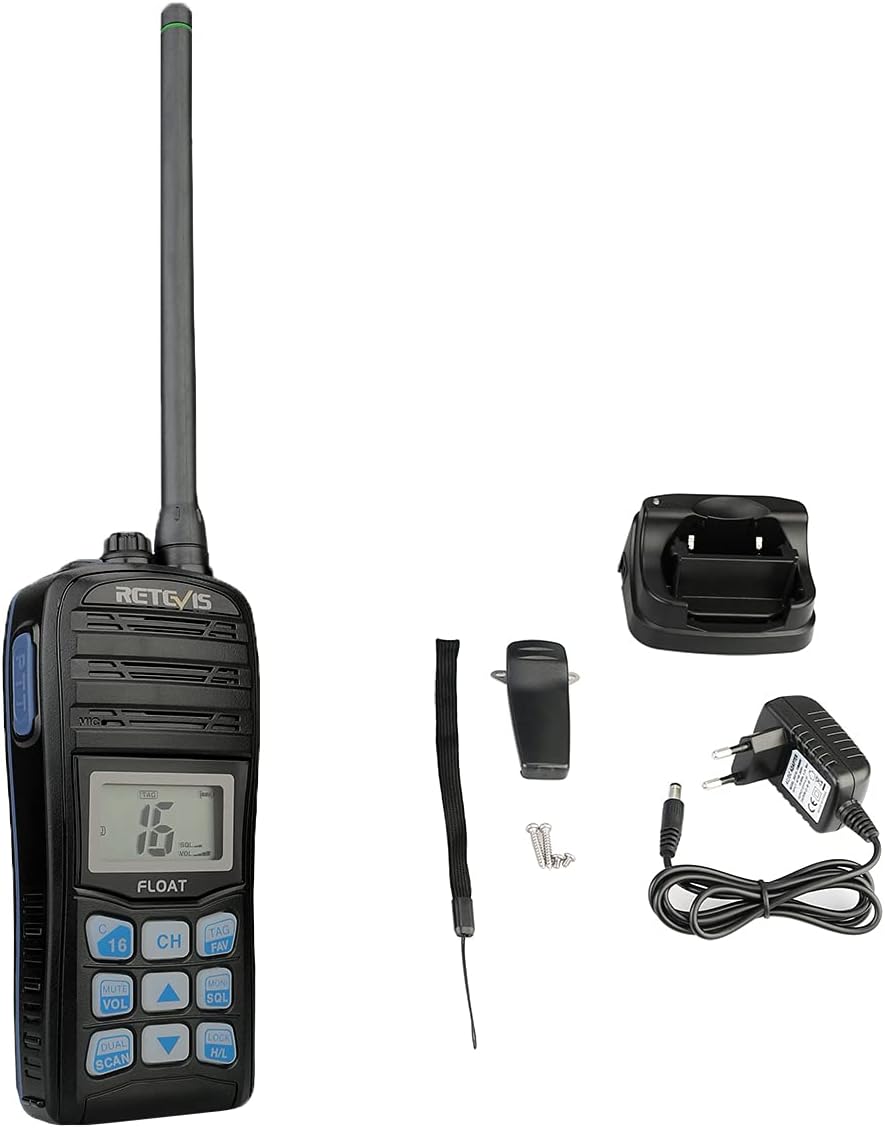
Image 4.2: The Retevis RT55 radio placed in its charging cradle.
5. Bruksanvisning
5.1. Slå på/av
- For å slå på, trykk og hold inne MAKT button (often integrated with the LOCK/H/L button or a dedicated button) until the display illuminates.
- For å slå av, trykk og hold nede MAKT knappen igjen til skjermen slås av.
5.2. Volumjustering
- Trykk på MUTE/VOL knapp.
- Bruk Pil opp / ned knappene for å øke eller redusere volumnivået.
- Pressen MUTE/VOL again to confirm or wait for the setting to auto-save.
5.3. Kanalvalg
The RT55 supports 88 international marine channels.
- Trykk på CH knapp.
- Bruk Pil opp / ned buttons to select the desired channel.
- Pressen CH again to confirm or wait for the setting to auto-save.
- To quickly access the emergency channel, press the dedicated CH 16 knapp.
5.4. Squelch Function
Squelch eliminates background noise when no signal is being received.
- Trykk på MONI/SQL knapp.
- Bruk Pil opp / ned buttons to adjust the squelch level (typically 0-9, where 0 is open squelch and 9 is maximum squelch).
- Pressen MONI/SQL igjen for å bekrefte.
5.5. Dual Watch / Tri-Watch
This feature allows monitoring multiple channels simultaneously.
- Dobbel klokke: Monitors the current working channel and Channel 16.
- Tri-Watch: Monitors the current working channel, Channel 16, and a designated call channel (e.g., Channel 9).
- Trykk på DUAL/SCAN button to activate or cycle through these modes.

Image 5.1: Visual representation of Dual-Watch and Tri-Watch channel monitoring.
5.6. Weather Channels
The RT55 can receive weather alerts on dedicated weather channels.
- Consult your local regulations for available weather channels.
- Access weather channels via the TAG/FAV button or a dedicated menu option.

Image 5.2: The radio displaying weather alert functionality.
5.7. Floating and Vibration Drainage
The RT55 is designed to float if dropped in water and features a vibration drainage function to clear water from the speaker.
- If the radio falls into water, it will float to the surface.
- To activate vibration drainage, typically press and hold a specific button (e.g., MONI/SQL or a dedicated drainage button) for a few seconds. The radio will emit a vibrating sound to expel water.

Image 5.3: The RT55 radio floating in water, highlighting its IP67 waterproof rating.

Image 5.4: The radio demonstrating its vibration drainage feature.
Video 5.1: Demonstration of the Retevis RT55's waterproofing, floating, and vibration drainage functions.
6. Vedlikehold
- Rengjøring: Rengjør radioens utside med en myk klutamp klut. Ikke bruk sterke kjemikalier eller skurende rengjøringsmidler.
- Lagring: Oppbevar radioen på et kjølig og tørt sted når den ikke er i bruk. Ta ut batteriet hvis den skal oppbevares over lengre tid.
- Batteripleie: Avoid fully discharging the battery frequently. Recharge before the battery is completely depleted to prolong its lifespan.
7. Feilsøking
| Problem | Mulig årsak | Løsning |
|---|---|---|
| Radioen slår seg ikke på | Batteriet er lavt eller ikke riktig installert. | Lad batteriet eller installer det riktig på nytt. |
| No reception or poor audio quality | Antenna loose or damaged; Squelch level too high; Out of range. | Check antenna connection; Adjust squelch level; Move closer to other radios or a repeater. |
| Kan ikke sende | Battery low; Incorrect channel selected; Keypad locked. | Charge battery; Select appropriate channel; Unlock keypad. |
| Water in speaker after submersion | Normal after water exposure. | Activate the vibration drainage function. |
8. Spesifikasjoner
| Trekk | Detalj |
|---|---|
| Merke | Retevis |
| Modellnummer | RT55 |
| Farge | Noir (svart) |
| Antall kanaler | 88 |
| Frekvensområde | VHF |
| Maksimal rekkevidde | 4 kilometer |
| Vannmotstandsnivå | IP67 (vanntett) |
| Spesielle funksjoner | Float, Monitor Function, IP67 Waterproof, Call Channel Programming, Automatic Backlight, Vibration Drainage |
| Batteritype | 1 x 1200mAh Lithium-ion (included) |
| Voltage | 7.4 volt |
| Produktdimensjoner (D x B x H) | 4.1P x 6.5L x 14H centimeter |
| Varevekt | 288 gram |
| Støynivå | 40 desibel |
| Kompatible enheter | Other two-way radios with the same band or channel, compatible accessories (headsets, earphones, external antennas) |
| Temperaturområde | -20℃ ~ +55℃ |
| Opprinnelsesland | Kina |
9. Garanti og støtte
Retevis offers the following warranty and support for the RT55 Marine Radio:
- Garantiperiode: 2 years for the radio body, 1 year for accessories.
- Returregler: 30 days for no-reason returns.
- Service etter garanti: Maintenance service is available beyond the warranty period. Buyers are responsible for associated costs.
For further assistance or technical support, please refer to the official Retevis webnettstedet eller kontakt din lokale forhandler.