
1. Introduksjon
Thank you for choosing the Dacom Athlete G05 Bluetooth Headset. This manual provides comprehensive instructions to help you set up, operate, and maintain your new wireless headphones. Please read this manual carefully before use to ensure optimal performance and longevity of your device.
2. Pakkens innhold
Bekreft at alle varene som er oppført nedenfor er inkludert i pakken din:
- 1 x Dacom Athlete G05 Bluetooth Headset
- 1 x USB-ladekabel
- 1 x brukerhåndbok (dette dokumentet)
3. Produktet er overview
The Dacom Athlete G05 is a wireless stereo earphone designed for sports and running, featuring a comfortable in-ear design with ear hooks for secure fit. It connects via Bluetooth V4.1.
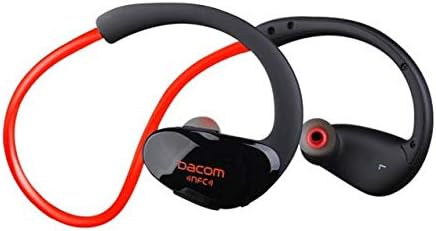
Figur 3.1: Front view of the Dacom Athlete G05 Bluetooth Headset, showing the earbud and ear hook design.
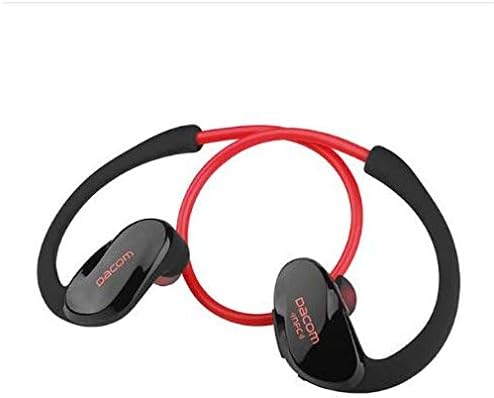
Figur 3.2: Bak view of the Dacom Athlete G05 Bluetooth Headset, illustrating the connecting cable between the two earbuds.
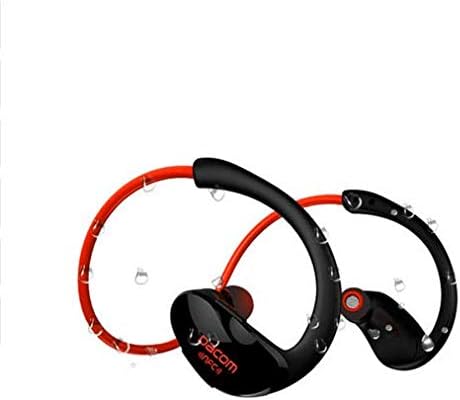
Figur 3.3: Dacom Athlete G05 Bluetooth Headset demonstrating water resistance, suitable for sports activities.
4. Oppsett
4.1 Lade hodesettet
Before first use, fully charge your Dacom Athlete G05 headset. A full charge typically takes approximately 1.5 to 2 hours.
- Connect the provided USB charging cable to the charging port on the headset.
- Connect the other end of the USB cable to a power adapter (DC5V 150mAh output recommended) or a computer's USB port.
- The battery indicator light will illuminate during charging and change color or turn off once fully charged.
A fully charged headset provides approximately 8 hours of talk time or music playback, and up to 180 hours of standby time.
4.2 Bluetooth-paring
To connect your headset to a Bluetooth-enabled device (e.g., smartphone, tablet):
- Sørg for at headsettet er fulladet og slått av.
- Press and hold the multi-function button on the headset until the Bluetooth indicator light flashes red and blue alternately, indicating it is in pairing mode.
- Aktiver Bluetooth på enheten din og søk etter tilgjengelige enheter.
- Select "Dacom Athlete G05" (or similar name) from the list of found devices.
- Hvis du blir bedt om et passord, skriv inn «0000» (fire nuller).
- Once paired, the Bluetooth indicator light will flash blue slowly or turn solid blue, and you will hear a confirmation tone.
The headset supports Bluetooth V4.1 and profiles such as Headset, Handsfree, A2DP, AVRC, and APT-X.
5. Bruksanvisning
5.1 Strøm på/av
- Strøm på: Press and hold the multi-function button for approximately 3 seconds until the indicator light flashes blue and you hear a power-on tone.
- Slå av: Press and hold the multi-function button for approximately 5 seconds until the indicator light flashes red and you hear a power-off tone.
5.2 Samtalehåndtering
- Svar på anrop: Short press the multi-function button when a call comes in.
- Avslutt samtale: Trykk kort på multifunksjonsknappen under en samtale.
- Avvis anrop: Press and hold the multi-function button for 2 seconds when a call comes in.
- Ring siste nummer på nytt: Dobbelttrykk på multifunksjonsknappen når du ikke er i en samtale.
5.3 Musikkavspilling
- Spill av/pause: Trykk kort på multifunksjonsknappen.
- Neste spor: Trykk lenge på Volum + -knappen.
- Forrige spor: Trykk lenge på volumknappen.
- Volum opp: Trykk kort på Volum + -knappen.
- Volum ned: Trykk kort på Volum --knappen.
Note: The headset features touch control for various functions.
6. Vedlikehold og stell
- Keep the headset dry. Do not expose it to extreme temperatures or humidity.
- Clean the earbuds and charging contacts regularly with a soft, dry cloth.
- Unngå å miste headsettet eller utsette det for harde støt.
- Oppbevar hodesettet på et kjølig, tørt sted når det ikke er i bruk.
- Ikke forsøk å demontere eller modifisere headsettet, da dette vil ugyldiggjøre garantien.
7. Feilsøking
| Problem | Mulig løsning |
|---|---|
| Hodesettet slår seg ikke på. | Sørg for at headsettet er fulladet. Koble til en strømkilde og prøv på nytt. |
| Kan ikke kobles til enheten. |
|
| Ingen lyd eller lavt volum. |
|
| Intermitterende forbindelse. |
|
8. Spesifikasjoner
| Trekk | Detalj |
|---|---|
| Produktnavn | Athlete sports Bluetooth headset |
| Modellnummer | G05 |
| Bluetooth-versjon | V4.1 |
| Bluetooth-klasse | Klasse 2 |
| Støttet Profiles | Headset, Handsfree, A2DP, AVRC, APT-X |
| Ladeinngang | DC5V 150mAh (Power adapter output) |
| Batteritype | High-performance lithium polymer battery |
| Taletid | Omtrent 8 timer |
| Spilletid | Omtrent 8 timer |
| Standby-tid | Omtrent 180 timer |
| Lydfrekvensområde | 20Hz-20kHz |
| BT Radio Frequency | 2.400–2.481 GHz |
| Utgangsimpedans | 16Ω 3mW |
| Følsomhet | 100-105dB |
| Hodetelefoner Form Factor | In Ear |
| Tilkoblingsteknologi | Trådløs |
| Kontrollmetode | Røre |
| Materiale | Plast |
| Farge | Rød |
9. Garanti og støtte
Dacom products are manufactured to the highest quality standards. For warranty information or technical support, please refer to the warranty card included with your purchase or visit the official Dacom webnettstedet. Vennligst ta vare på kjøpsbeviset for garantikrav.