
1. Introduksjon
This manual provides essential instructions for the safe and efficient operation of your Volkano Piston Series VK-3039-BK Bluetooth Hands-Free Car Kit. Please read this manual thoroughly before use and retain it for future reference.
Sikkerhetsinformasjon
- Ikke utsett enheten for ekstreme temperaturer, direkte sollys eller fuktighet.
- Ikke forsøk å demontere eller modifisere enheten.
- Oppbevares utilgjengelig for barn.
- Ensure the device is securely plugged into the car's 12V socket.
- Always prioritize safe driving. Do not operate the device in a way that distracts you from the road.
2. Produktet er overview
The Volkano Piston Series VK-3039-BK is a versatile Bluetooth hands-free car kit designed for in-car audio streaming and device charging. It features a durable metal housing and an LED display for status updates.
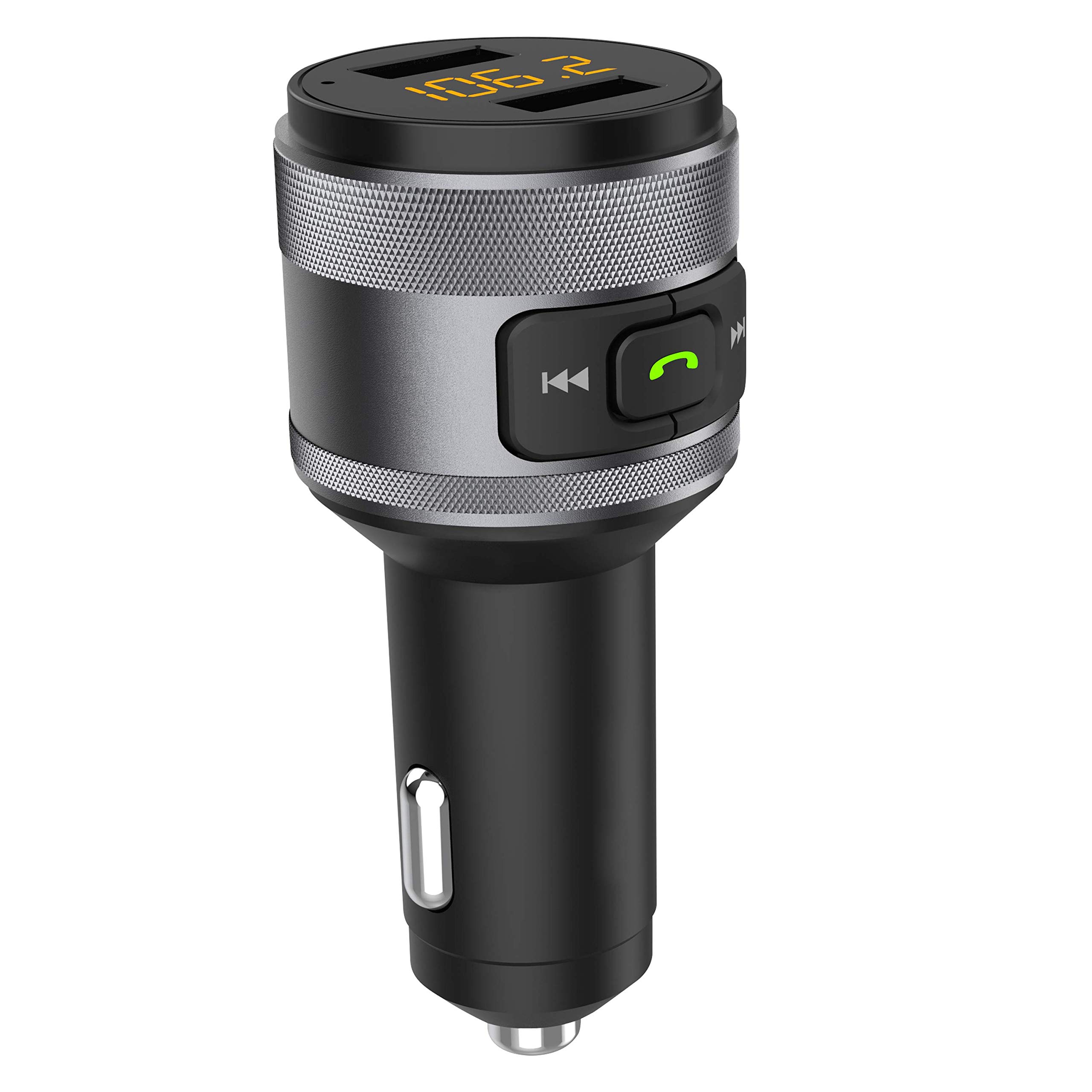
Bilde 1: Volkano Piston Series VK-3039-BK Bluetooth Hands-Free Car Kit. This image shows the device from a slightly angled front view, highlighting the LED display, control buttons, and dual USB charging ports at the top, and the 12V car adapter plug at the bottom.
Nøkkelfunksjoner:
- Durable metal housing for enhanced stability.
- Supports Quick Charge 3.0 (QC3) for rapid device charging.
- Integrated LED display for real-time information.
- Dual USB charging ports for simultaneous charging of two devices.
- USB input for music playback.
- Bluetooth-tilkobling for håndfrie samtaler og lydstrømming.
3. Oppsett
3.1 Installasjon av enhet
- Insert the Volkano Piston Series Car Kit into your vehicle's 12V power socket (cigarette lighter port).
- The LED display will illuminate, indicating the device is powered on.
3.2 Bluetooth-paring
- Aktiver Bluetooth på mobilenheten din.
- Søk etter available Bluetooth devices and select "VK-3039-BK" (or similar name) from the list.
- Når den er paret, vil enheten bekrefte tilkoblingen, og du kan begynne å strømme lyd.
3.3 FM Frequency Tuning
- Tune your car's FM radio to an unused frequency (one with static or no broadcast).
- Adjust the FM frequency on the Volkano Piston Series Car Kit to match your car's radio frequency. Refer to the device's controls for frequency adjustment (typically buttons or a dial).
- Once matched, audio from your paired Bluetooth device or USB drive will play through your car's speakers.
4. Bruksanvisning
4.1 Musikkavspilling
- Bluetooth-streaming: After successful Bluetooth pairing, play music on your mobile device. The audio will transmit to your car's speakers via the selected FM frequency.
- USB-avspilling: Sett inn en USB-minnepinne som inneholder MP3/WMA-lyd files into the designated USB input port. The device will automatically detect and play the music.
- Kontroller: Use the device's buttons to skip tracks forward/backward and pause/play music.
4.2 Håndfri telefonering
- Besvare anrop: When a call comes in, press the designated call button (often indicated by a phone icon) on the device to answer.
- Avslutte samtaler: Press the call button again to end the conversation.
- Avvise samtaler: Press and hold the call button to reject an incoming call.
- Ringing på nytt: Dobbelttrykk på ringeknappen for å ringe det siste nummeret på nytt.
4.3 Enhetslading
- Connect your device's charging cable to one of the USB charging ports on the car kit.
- The device supports Quick Charge 3.0 for compatible devices, providing faster charging speeds.
- The dual charging ports allow two devices to be charged simultaneously.
5. Vedlikehold
- Rengjør enheten med en myk, tørr klut. Ikke bruk slipende rengjøringsmidler eller løsemidler.
- Ensure the 12V power socket and USB ports are free from dust and debris.
- Oppbevar enheten på et kjølig og tørt sted når den ikke er i bruk over lengre tid.
6. Feilsøking
| Problem | Mulig årsak | Løsning |
|---|---|---|
| Ingen strøm til enheten. | Not properly inserted into 12V socket; vehicle power off. | Ensure the car kit is fully inserted. Check if the vehicle's ignition is on. |
| Kan ikke pares via Bluetooth. | Bluetooth not enabled on mobile device; device too far; incorrect pairing mode. | Ensure Bluetooth is active on your phone. Move closer to the car kit. Restart both devices and try pairing again. |
| Audio interference/static. | FM-frekvensforstyrrelser; svakt signal. | Find a clearer, unused FM frequency on your car radio and match it on the car kit. Avoid frequencies used by strong local radio stations. |
| Slow charging or no charging. | Cable issue; device not compatible with Quick Charge 3.0; dirty USB port. | Try a different USB cable. Ensure your device supports QC3 for fast charging. Clean the USB ports. |
7. Spesifikasjoner
| Modell | VK-3039-BK |
| Merke | Volkano |
| Tilkoblingsteknologi | Bluetooth |
| Spesielle funksjoner | Fast Charging (Quick Charge 3.0), LED Display, Dual USB Ports |
| Materiale | Metall |
| Varevekt | 100 g |
| Produktdimensjoner | 21L x 10.3B x 7H centimeter |
| Strømkilde | Corded Electric (12V Car Socket) |
8. Garanti og støtte
The Volkano Piston Series VK-3039-BK is covered by a 1-year limited warranty. You can extend this coverage by an additional 12 months, for a total of 24 months, by registering your product.
For product support or warranty inquiries, please contact Volkano customer service via their official channels. Refer to the Volkano brand page on Amazon for contact information.