
1. Introduksjon
Thank you for choosing the Jansite 10 Inch Full Touch Screen Mirror Dash Cam. This device is designed to enhance your driving safety and provide reliable recording of your journeys. Featuring dual 1080P HD cameras for both front and rear views, super night vision, and a responsive full touch screen, it offers comprehensive surveillance and ease of use. This manual provides detailed instructions for installation, operation, maintenance, and troubleshooting to ensure optimal performance of your dash cam.
2. Hva er i esken
Vennligst sjekk innholdet i pakken din for å sikre at alle varene er til stede:
- 1 x 1080P Mirror Dash Cam (Main Unit)
- 1 x 1080P Rear Camera
- 1 x 10m Backup Camera Cable (33ft)
- 1 x billader
- Rubber Straps for mounting
- Brukerhåndbok
3. Oppsett og installasjon
3.1. Sette inn SD-kortet
Before installation, insert a compatible Micro SD card (up to 128GB, not included) into the designated slot on the main dash cam unit. Ensure the card is inserted correctly until it clicks into place.
3.2. Installing the Mirror Dash Cam
- Place the mirror dash cam over your existing rearview speil.
- Use the provided rubber straps to securely fasten the dash cam to your existing mirror. Ensure it is tightly secured to prevent movement during driving.
- Adjust the front camera lens to capture the desired view of the road ahead. The stretchable front cam allows for flexible positioning.

3.3. Montering av bakkameraet
- Mount the IP68 waterproof rear camera on the back of your car, typically above the license plate. If you prefer to mount it inside on the rear windshield, an extra bracket may be required (not included).
- Route the 10-meter (33ft) backup camera cable from the rear camera to the main mirror dash cam unit. Carefully tuck the cable along the car's headliner, A-pillar, and door gaps to conceal it and prevent interference.
- Connect the red wire of the rear camera cable to the positive lead of your car's reversing light. This enables the parking assist feature when reversing.
- Plug the rear camera cable into the designated port on the main mirror dash cam unit.

3.4. Strømtilkobling
- Connect the car charger to the main mirror dash cam unit.
- Plug the car charger into your vehicle's cigarette lighter port.
- Start your vehicle to power on the dash cam. It should automatically begin recording.
3.5. Installasjonsvideoveiledning
For en visuell veiledning om installasjonsprosessen, se videoen nedenfor:
4. Bruksanvisning
4.1. Slå på/av
- Dashkameraet slår seg automatisk på og begynner å ta opp når kjøretøyet starter.
- To manually turn off the display screen while recording continues, short press the Power button.
4.2. Berøringsskjermgrensesnitt
The 10-inch full touch screen provides intuitive control:
- Bytter Views: Slide left and right on the screen to switch between front camera view, bakkamera view, or a split-screen display of both.
- Justering View Vinkel: Scroll up and down on the touchscreen to adjust the vertical viewinnstillingsvinkelen til det aktive kameraet.
- Justering av lysstyrke: Slide left and right on the screen (when not switching views) to adjust the display brightness.

4.3. Recording Modes & Features
- Sløyfeopptak: Ensures continuous recording by overwriting the oldest files når minnekortet er fullt.
- G-sensor: Automatically detects sudden collisions or impacts and locks the current video footage for å hindre at den blir overskrevet.
- 24-timers parkeringsmonitor: When enabled (requires an extra ACC hardwire kit, not included), the dash cam will automatically start recording a locked video for approximately 20 seconds if it detects a collision while parked.
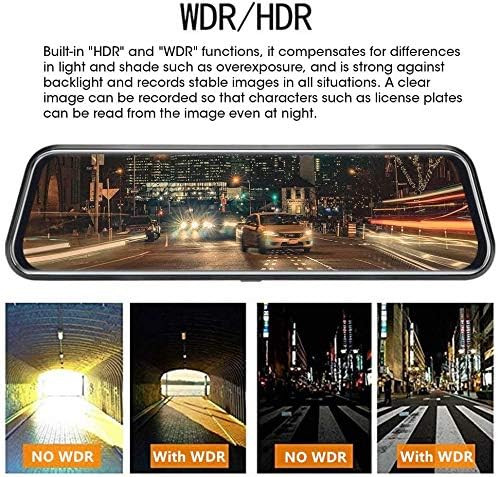
- Super nattsyn: Both front and rear 1080P cameras provide enhanced night vision in low-light conditions, utilizing WDR/HDR technology and a Starvis sensor with a 6-glass lens for clearer images.
- Parkeringsassistent: When shifting into 'R' (reverse) gear, the screen automatically displays the rear camera's perspective with guidelines to assist with safe parking.

4.4. Stemmekontroll
The dash cam supports voice commands for hands-free operation. Refer to the video below for a demonstration of voice control features:
4.5. Playback & File Ledelse
Access recorded videos and images directly on the touch screen. Files are typically organized by date and time. Locked files (from G-sensor activation or parking monitor) are stored separately to prevent accidental deletion.
5. Vedlikehold
- Rengjøring: Use a soft, dry cloth to clean the screen and camera lenses. Avoid abrasive materials or harsh chemicals.
- SD-kortformatering: Regularly format your Micro SD card (at least once a month) to ensure optimal performance and prevent data corruption. This can usually be done through the dash cam's settings menu.
- Fastvareoppdateringer: Check the Jansite official webnettstedet regelmessig for å se om det finnes tilgjengelige fastvareoppdateringer for å forbedre ytelsen og legge til nye funksjoner.
6. Feilsøking
- Dash-kameraet slår seg ikke på: Ensure the car charger is securely connected to both the dash cam and the car's cigarette lighter port. Check if the vehicle's power outlet is functioning.
- Opptaksproblemer: Verify that the Micro SD card is inserted correctly and has sufficient free space. Format the SD card if necessary. Check the loop recording settings.
- Ryggekamera viser ikke: Ensure the rear camera cable is securely connected to both the rear camera and the main unit. Check the wiring to the reverse light if the parking assist feature is not working.
- Skjermen fryser/svarer ikke: Try resetting the device (if a reset button is available, use a thin pin). If the issue persists, contact customer service.
- Dårlig nattsyn: Ensure camera lenses are clean. Verify that WDR/HDR settings are enabled in the menu.
7. Spesifikasjoner
| Trekk | Spesifikasjon |
|---|---|
| Merke | Jansite |
| Modellnavn | RM |
| Skjermstørrelse | 10 tommer |
| Visningstype | LCD |
| Kontrollmetode | Røre |
| Frontvideooppløsning | 1080p HD |
| Bakre videooppløsning | 1080p HD |
| Front Field of View | 170 grader |
| Rear Field of View | 140 grader |
| Spesielle funksjoner | Loop Recording, Night Vision (WDR/HDR), G-Sensor, Parking Monitor, Parking Assist |
| Tilkoblingsteknologi | USB |
| Støttet lagring | Micro SD-kort opptil 128 GB (ikke inkludert) |
| Lengde på bakre kamerakabel | 10 meter (33 fot) |
| Varevekt | 64 gram |
| Batterier | 1 Lithium Ion batteri kreves (inkludert) |
| UPC | 741376144744 |
8. Garanti og støtte
Jansite is committed to providing high-quality products and excellent customer service. Your Jansite Mirror Dash Cam comes with a standard warranty (please refer to your purchase documentation for specific terms and duration).
For any questions, technical support, or warranty claims, please do not hesitate to contact our customer service team. We offer 24-hour customer service to assist you.
- Kundeservice: Tilgjengelig 24/7
- Kontaktinformasjon: Please refer to your product packaging or the official Jansite webnettstedet for den mest oppdaterte kontaktinformasjonen.