
1. Produktet er overview
This manual provides instructions for the Timex Intelligent Quartz Compass Chronograph Analog Watch, model TW2T76500. This timepiece features an analog display with Intelligent Quartz technology, integrating a compass and chronograph function. It is designed for durability with a stainless steel case, mineral dial glass, and a fabric band.
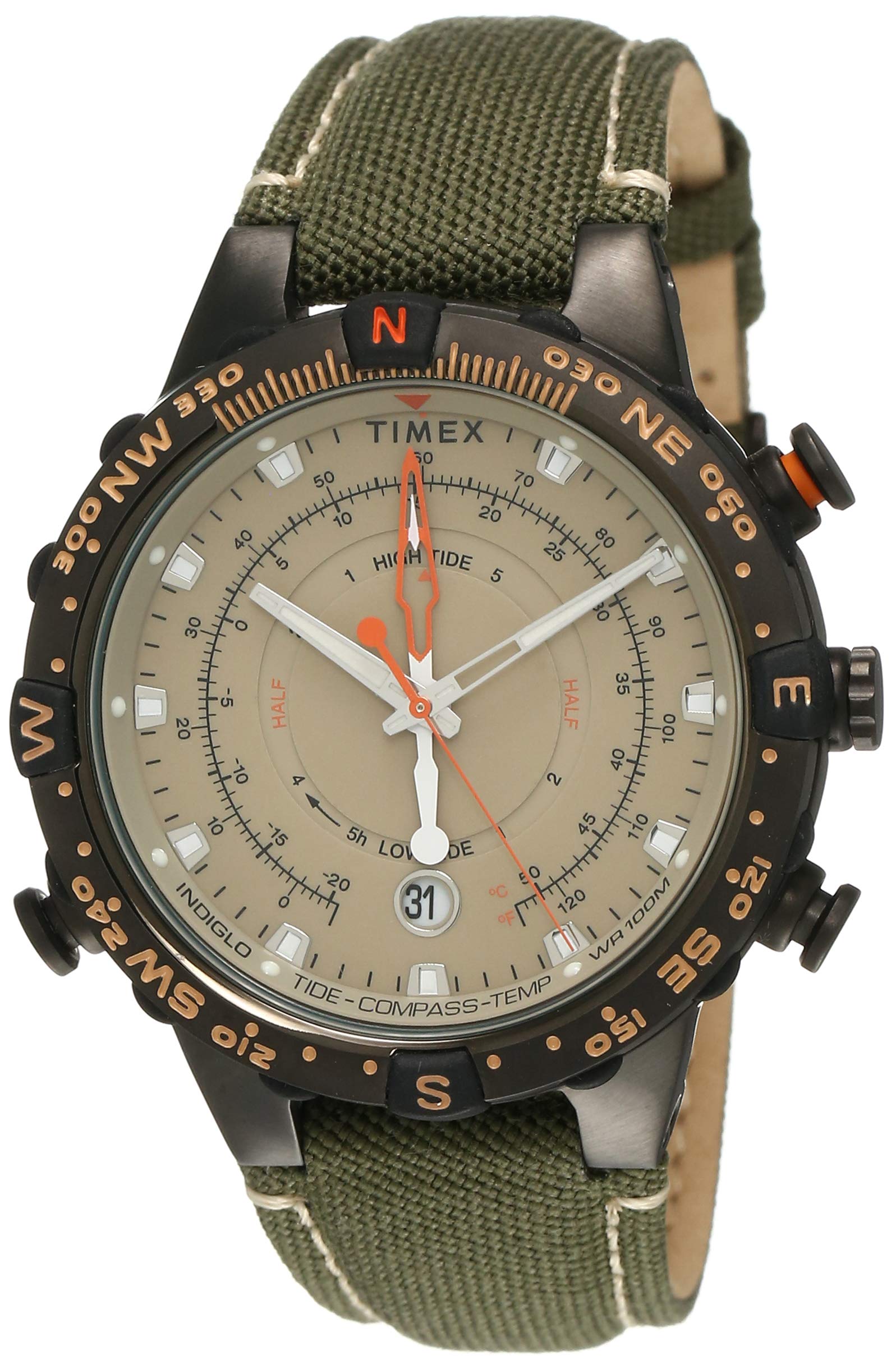
Figure 1.1: Timex Intelligent Quartz Compass Chronograph Watch (Model TW2T76500) on a wrist.

Figure 1.2: Close-up of the watch dial, showing chronograph subdials and compass markings.
2. Første oppsett
Upon receiving your watch, perform the following steps to ensure proper function:
- Unboxing: Ta klokken forsiktig ut av emballasjen. Undersøk om den har synlige skader.
- Crown Protector: If present, remove any plastic crown protector.
- Tidsinnstilling: Pull the crown (the knob on the side of the watch) out to its outermost position. Rotate the crown to set the correct time. Push the crown back in completely to start the watch movement.
- Date Setting (if applicable): If your watch includes a date function, pull the crown out to the middle position and rotate it to set the correct date. Push the crown back in completely.

Figure 2.1: The Timex watch is supplied in a protective box.
3. Bruksanvisning
3.1. Stille inn tid og dato
- Tid: Pull the crown to the outermost position. Rotate the crown clockwise or counter-clockwise to adjust the hour and minute hands. Once set, push the crown back to the normal operating position.
- Dato: Pull the crown to the middle position. Rotate the crown to advance the date. Avoid setting the date between 9 PM and 3 AM to prevent damage to the movement. Once set, push the crown back to the normal operating position.
3.2. Bruk av kronograffunksjonen
Kronografen gir presis timing av hendelser.
- Start: Trykk på den øvre knappen for å starte kronografen. Kronografens sekundviser vil begynne å bevege seg.
- Stopp: Press the upper pusher again to stop the chronograph. The elapsed time will be displayed on the chronograph subdials.
- Tilbakestille: After stopping, press the lower pusher to reset the chronograph hands to their zero positions.
- Mellomtid (hvis aktuelt): Some chronographs allow for split time measurement. Consult the specific watch diagram for your model if this feature is present.
3.3. Using the Compass Function
The Intelligent Quartz compass feature provides directional guidance.
- Activate Compass: Typically, the compass function is activated by pressing a specific pusher (often the lower pusher) or by pulling the crown to a specific position. Refer to your watch's specific markings.
- Calibrate (if necessary): For accurate readings, the compass may require calibration. This usually involves rotating the watch in a figure-eight pattern or following on-screen prompts if a digital display is present.
- Read Direction: Hold the watch horizontally. The compass hand will point North. The bezel may be rotated to align with North for easier navigation.
- Deactivate Compass: Press the pusher again or push the crown back to its normal position to return to timekeeping mode.
4. Vedlikehold
4.1. Rengjøring
- Tørk av klokkekassen og glasset med en myk, tørr klut.
- For fabric bands, a damp cloth with mild soap can be used, but ensure the band is thoroughly dry before wearing.
- Unngå å bruke sterke kjemikalier eller slipende materialer, da disse kan skade klokkens overflate.
4.2. Vannmotstand
This watch is water-resistant. Refer to the specifications for the exact water resistance level.
- Ikke bruk kronen eller trykknappene når klokken er våt eller under vann.
- Avoid exposing the watch to hot water, steam, or extreme temperature changes, as this can compromise the seals.
- If the watch is exposed to saltwater, rinse it with fresh water and dry thoroughly.

Figure 4.1: Illustration of water resistance, indicating care instructions.
4.3. Batteribytte
When the watch stops or the second hand begins to jump in 2-second intervals, it indicates a low battery. Battery replacement should be performed by a qualified watch technician to ensure proper sealing and function. The watch uses a standard button cell battery.
5. Feilsøking
| Problem | Mulig årsak | Løsning |
|---|---|---|
| Klokken går ikke | Battery depleted; Crown not pushed in; Watch needs service. | Replace battery; Push crown in completely; Contact service center. |
| Tiden er feil | Time not set correctly; Watch stopped. | Reset time as per instructions; Check battery. |
| Kronografviserne nullstilles ikke | Requires calibration; Mechanical issue. | Consult service center for calibration or repair. |
| Compass reading is inaccurate | Needs calibration; Magnetic interference. | Recalibrate compass; Move away from strong magnetic fields (e.g., electronics). |
| Moisture under crystal | Water resistance compromised; Exposure to extreme temperature changes. | Immediately take to a service center to prevent further damage. |
6. Spesifikasjoner
| Trekk | Detalj |
|---|---|
| Modellnummer | TW2T76500 |
| Merke | TIMEX |
| Bevegelsestype | Kvarts |
| Visningstype | Analog |
| Skivefarge | Beige |
| Koffertmateriale | Rustfritt stål |
| Kassediameter | 45 millimeter |
| Sakstykkelse | 18 millimeter |
| Materiale for glassskiven | Mineral |
| Bandmateriale | Stoff |
| Båndfarge | Brun |
| Lukketype | Spenne |
| Spesielle funksjoner | Chronograph, Compass |
| Vannmotstandsnivå | Vannbestandig |
| Varevekt | 300 g (0.3 kilogram) |
| Batteri | 1 Watch Battery (included) |
7. Garanti og støtte
Your Timex watch comes with a 1-year manufacturer warranty from the date of purchase.
7.1. How to Avail Warranty
- To claim your warranty, you must present either the original bill copy/invoice or the warranty card at any authorized Timex service center.
7.2. Kontaktinformasjon
- For any service-related inquiries or feedback, please contact Timex India toll-free number: 1800 419 2727.
- Operating hours: Monday to Sunday, 10:00 AM to 7:00 PM (except government holidays).
- You may also send an email to: custservice@timexindia.com or feedback@timexindia.com.