
GLIDiC TW-5000s
GLIDiC Sound Air TW-5000s True Wireless Earbuds Instruction Manual
Model: TW-5000s
1. Introduksjon
Takk for kjøpetasing the GLIDiC Sound Air TW-5000s True Wireless Earbuds. This manual provides essential information for the safe and effective use of your device. Please read it thoroughly before use and retain it for future reference.
2. Sikkerhetsinformasjon
- Ikke utsett øreproppene eller ladeetuiet for ekstreme temperaturer, direkte sollys eller høy luftfuktighet.
- Avoid dropping, impacting, or disassembling the device. This may cause damage and void the warranty.
- Keep the device away from water and liquids. While sweatproof, immersion can cause damage.
- Bruk kun den medfølgende ladekabelen eller en tilsvarende sertifisert kabel.
- Langvarig lytting på høyt volum kan forårsake hørselsskade. Juster volumet til et trygt nivå.
- Be aware of your surroundings when using earbuds, especially in traffic or hazardous environments.
3. Pakkens innhold
Bekreft at alle varene er til stede i pakken din:
- GLIDiC Sound Air TW-5000s True Wireless Earbuds (Left and Right)
- Ladeetui
- USB-ladekabel (type A til mikro-USB)
- Ørespisser i flere størrelser (S, M, L)
- Bruksanvisning (dette dokumentet)
4. Produktet er overview
Familiarize yourself with the components of your GLIDiC Sound Air TW-5000s earbuds and charging case.

Figure 4.1: GLIDiC Sound Air TW-5000s Earbuds and Charging Case. The image displays the black charging case with the GLIDiC logo on top, positioned next to the two black earbuds.
Øreproppkomponenter
- Multifunksjonsknapp: Located on the outer surface of each earbud, used for playback control, call management, and voice assistant activation.
- LED-indikator: Provides status information (pairing, charging, power).
- Mikrofon: For voice calls and voice assistant commands.
- Ladekontakter: Located on the underside of each earbud, for charging within the case.
- Øretupp: Silicone tip for in-ear comfort and sound isolation.
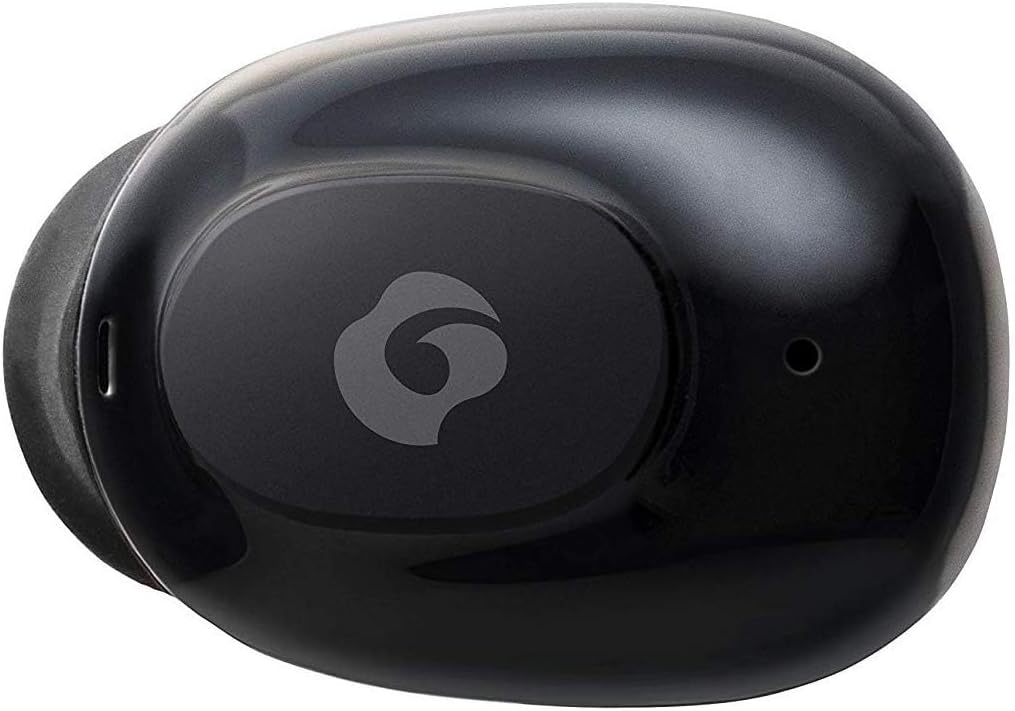
Figur 4.2: Nærbilde view of a single GLIDiC earbud, highlighting the multifunction button with the GLIDiC logo and the microphone opening.
Komponenter i ladeetuiet
- Ladestasjoner: Internal contacts for earbuds, external port for case charging.
- Deksel LED-indikator: Shows charging status of the case.
- Lokk: Protects earbuds and secures them during charging.
5. Oppsett
5.1 Innledende lading
- Place both earbuds into the charging case. Ensure they are correctly seated, and the LED indicators on the earbuds illuminate.
- Koble USB-ladekabelen til ladeporten på etuiet, og koble den andre enden til en USB-strømkilde (f.eks. datamaskin, veggadapter).
- The case LED indicator will show charging status. Allow approximately 2 hours for a full charge of both earbuds and the case.
- Once fully charged, disconnect the charging cable. The earbuds offer up to 60 days of standby time when stored in the fully charged case.
5.2 Paring med en Bluetooth-enhet
- Sørg for at øreproppene er ladet.
- Åpne ladeetuiet. Øreproppene vil automatisk gå inn i paringsmodus, og LED-indikatorene vil blinke.
- Gå til Bluetooth-innstillingene på den Bluetooth-aktiverte enheten din (smarttelefon, nettbrett osv.).
- Søk etter available devices. Select "GLIDiC TW-5000s" from the list.
- Once connected, the earbud LED indicators will stop flashing and may show a solid light or turn off, depending on the model. A voice prompt may also confirm the connection.
- If pairing fails, place the earbuds back in the case, close the lid, wait a few seconds, and then repeat the steps.
6. Bruksanvisning
6.1 Strøm på/av
- Strøm på: Open the charging case, or press and hold the multifunction button on each earbud for approximately 3 seconds.
- Slå av: Place the earbuds back into the charging case and close the lid, or press and hold the multifunction button on each earbud for approximately 5 seconds.
6.2 Musikkavspilling
- Spill av/pause: Trykk én gang på multifunksjonsknappen på en av øreproppene.
- Neste spor: Dobbelttrykk på multifunksjonsknappen på den høyre ørepluggen.
- Forrige spor: Dobbelttrykk på multifunksjonsknappen på venstre ørepropp.
- Volum opp: Triple-press the multifunction button on the right earbud.
- Volum ned: Triple-press the multifunction button on the left earbud.
6.3 Samtalehåndtering
- Svar/avslutt samtale: Trykk én gang på multifunksjonsknappen på en av øreproppene.
- Avvis anrop: Press and hold the multifunction button on either earbud for approximately 2 seconds.
6.4 Stemmeassistent
- Aktiver stemmeassistent: Press and hold the multifunction button on either earbud for approximately 2 seconds (when not on a call).
6.5 Multi-Communication Mode
The GLIDiC Sound Air TW-5000s features a multi-communication mode that allows select ambient sounds to be heard without compromising audio quality. This enhances user awareness and safety.
- Activate/Deactivate Multi-Communication Mode: Consult the specific instructions provided with your device, as activation methods can vary. Typically, this involves a specific press sequence on the multifunction button or an option within a companion app if available.
7. Vedlikehold
7.1 Rengjøring
- Tørk av øreproppene og ladeetuiet med en myk, tørr og lofri klut.
- Ikke bruk slipende rengjøringsmidler, alkohol eller kjemiske løsemidler.
- Gently remove ear tips and clean them with mild soap and water if necessary. Ensure they are completely dry before reattaching.
- Bruk en tørr bomullspinne til å rengjøre ladekontaktene på både øreproppene og etuiet forsiktig.
7.2 Oppbevaring
- Når de ikke er i bruk, oppbevar øreproppene i ladeetuiet for å beskytte dem og sikre at de holder seg ladet.
- Oppbevar enheten på et kjølig og tørt sted, unna direkte sollys og ekstreme temperaturer.
8. Feilsøking
If you encounter issues with your GLIDiC Sound Air TW-5000s, refer to the following common problems and solutions:
| Problem | Mulig løsning |
|---|---|
| Øreproppene slår seg ikke på. | Ensure earbuds are charged. Place them in the charging case and connect the case to a power source. |
| Øreproppene kobles ikke til enheten. |
|
| Bare én øreplugg har lyd. |
|
| Ladeetuiet lader ikke. |
|
| Lydkvaliteten er dårlig eller uregelmessig. |
|
9. Spesifikasjoner
| Trekk | Detalj |
|---|---|
| Modellnavn | TW-5000s |
| Tilkoblingsteknologi | Trådløs (Bluetooth) |
| Bluetooth-rekkevidde | 10 meter |
| Frekvensområde | 20 Hz–20 000 Hz |
| Battery Life (Carrying Case Standby) | Opptil 60 dager |
| Vannmotstandsnivå | Vannbestandig (svettebestandig) |
| Kontroll Type | Mediekontroll, berøring, stemme |
| Spesielle funksjoner | Microphone Included, Noise Cancellation, Multi-communication mode |
| Materiale | Plastic, TPE, and Silicone |
| Dimensjoner (ørepropper) | 0.98 x 0.67 x 0.91 tommer (omtrentlig) |
| Varevekt | 9.6 unser (total pakkevekt) |
| UPC | 811559030024 |
10. Garanti og støtte
GLIDiC products are designed for reliability and performance. For specific warranty details, please refer to the warranty card included with your purchase or visit the official GLIDiC website. If you require technical support or have questions not covered in this manual, please contact GLIDiC customer service through their official channels.
Ta vare på kjøpsbeviset for garantikrav.
Ask a question about this manual
Ask about setup, troubleshooting, compatibility, parts, safety, or missing instructions. Manuals+ will review the question and use this page’s manual context to help answer it.