
1. Produktet er overview
The Alecto WS-1560 is a wireless weather station designed to provide accurate indoor and outdoor environmental data. Featuring a clear color display and a remote outdoor sensor, it offers comprehensive weather information and additional useful functions for your home.
Nøkkelfunksjoner:
- Measures indoor and outdoor temperature and humidity.
- Long-range wireless outdoor sensor (up to 100 meters).
- 5.7-inch well-lit color display with animated weather forecast icons.
- Temperature and ice alarm functions.
- Vekkerklokke med slumrefunksjon.
- Memory function for latest and highest readings.
- Moon phase indicator, date, day, and time display.
- Battery-operated main unit and outdoor sensor with backup batteries.

Figure 1.1: Alecto WS-1560 Main Unit and Wireless Outdoor Sensor.
2. Pakkens innhold
Ensure all components are present and in good condition upon unpacking:
- Alecto WS-1560 Main Unit (Indoor Display)
- Trådløs utendørs sensor
- Brukerhåndbok
- (Power adapter and batteries may be included depending on package)
Video 2.1: Illustrative video showing typical weather station components and basic setup. (Note: This video is for a related product and may not show the exact Alecto WS-1560 model.)
3. Oppsett og installasjon
3.1. Installasjon av batteri
Both the main unit and the outdoor sensor require batteries for operation. Ensure you use the correct type and polarity.
- Utendørs sensor:
- Open the battery compartment on the back of the wireless outdoor sensor.
- Insert 2x AA batteries (not included) according to the polarity markings (+/-).
- Lukk batterirommet godt.
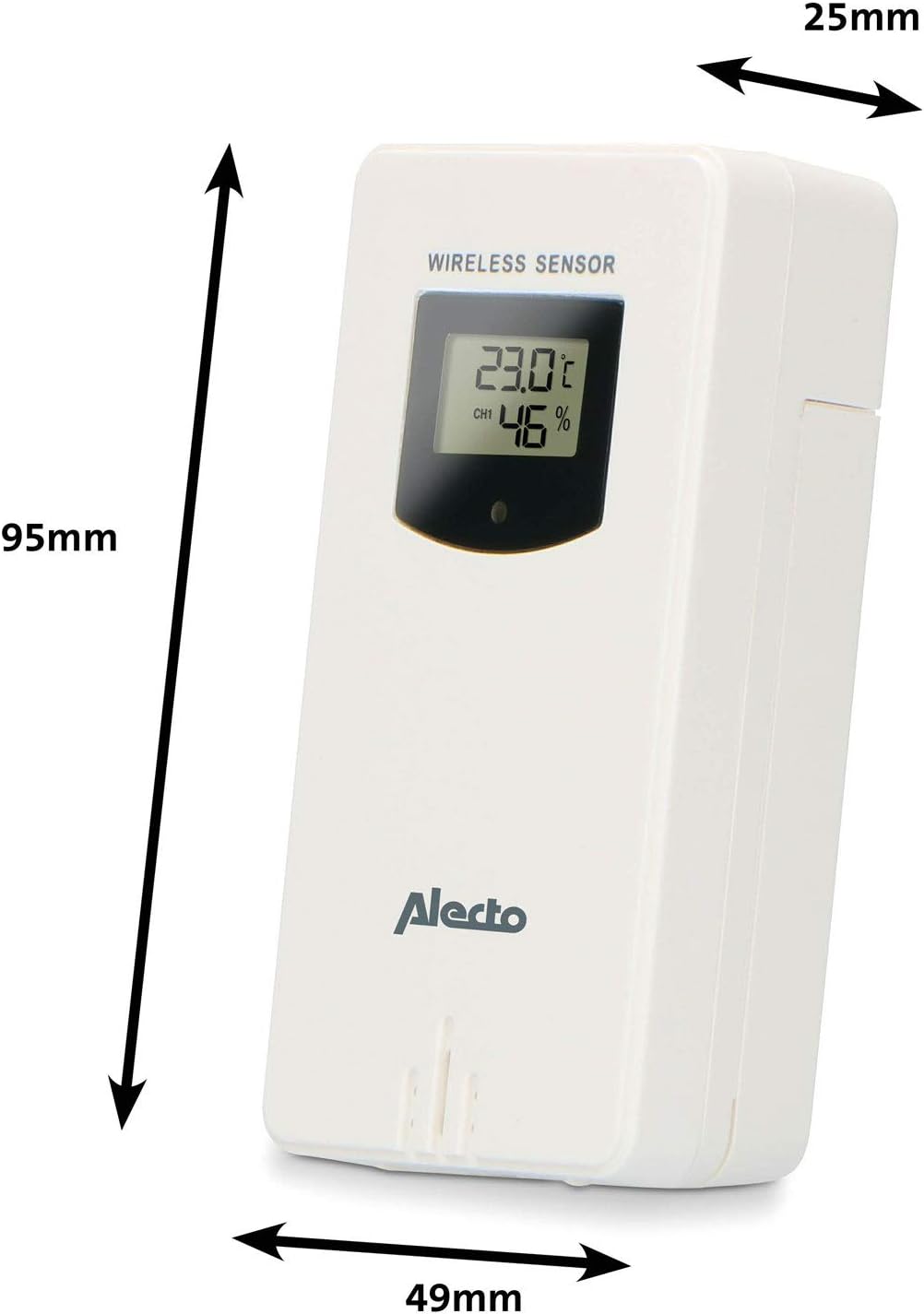
Figure 3.1: Wireless Outdoor Sensor dimensions and battery compartment location.
- Hovedenhet:
- Open the battery compartment on the back of the main unit.
- Insert 2x AA batteries (not included) according to the polarity markings (+/-). These serve as backup batteries.
- Lukk batterirommet godt.
- Connect the main unit to a power outlet using the provided power adapter (if included).

Figure 3.2: Main Unit dimensions and power input.
3.2. Sensorplassering
For accurate outdoor readings, proper placement of the wireless sensor is crucial:
- Place the sensor in a shaded area, away from direct sunlight, to prevent inaccurate temperature readings.
- Ensure good air circulation around the sensor.
- Mount the sensor vertically, approximately 1.5 to 2.5 meters (5 to 8 feet) above the ground.
- Avoid placing the sensor near heat sources (e.g., vents, windows) or moisture sources.
- The maximum transmission range is 100 meters (328 feet) in open air. Walls and other obstacles will reduce this range.

Figur 3.3: Eksample of outdoor sensor placement on a wall.
3.3. Pairing the Sensor with the Main Unit
The main unit and sensor should automatically pair once both are powered on. If pairing does not occur:
- Sørg for at begge enhetene har nye batterier og er innenfor rekkevidde.
- Press the "TX" button inside the outdoor sensor's battery compartment to manually send a signal.
- On the main unit, you may need to initiate a search for the outdoor sensor (refer to the "Operation" section for specific button functions).
4. Drift
4.1. Vis layout
Den 5.7-tommers fargeskjermen gir et tydelig overblikkview of all measured data. Key areas include:
- Utendørs temperatur og fuktighet: Displays current outdoor conditions.
- Innendørs temperatur og fuktighet: Viser gjeldende innendørsforhold.
- Animated Weather Forecast: Icons predict upcoming weather (sunny, partly cloudy, cloudy, rainy, snowy).
- Tid og dato: Gjeldende tid, dag og dato.
- Barometrisk trykk: Nåværende atmosfærisk trykk.
- Måne fase: Grafisk fremstilling av gjeldende månefase.
- Temperature/Ice Alarm Indicators: Alerts for specific temperature thresholds or potential ice conditions.

Figur 4.1: Detaljert view of the main unit's color display.
4.2. Knappefunksjoner
The main unit features several buttons for setting and adjusting functions. Common buttons include:
- SETT: Enters setup mode for time, date, and other settings.
- Veibeskrivelse: Veksler mellom visningsmoduser eller bekrefter innstillinger.
- OPP/NED (eller +/-): Adjusts values during setup or cycles through channels.
- ALARM: Stiller inn eller aktiverer alarmfunksjonen.
- MEM: Displays maximum/minimum temperature and humidity records. Long press to clear records.
- SNOOZE / LIGHT: Activates snooze during an alarm or adjusts backlight brightness.
Video 4.2: Illustrative video demonstrating various features and settings of a weather station. (Note: This video is for a related product and may not show the exact Alecto WS-1560 model.)
4.3. Stille inn tid og dato
- Press and hold the "SET" button until the time display starts flashing.
- Use the "UP" or "DOWN" buttons to adjust the hour, then press "SET" to confirm and move to minutes.
- Gjenta for minutter, år, måned og dag.
- Press "SET" again to exit the setting mode.
4.4. Alarminnstillinger
- Press the "ALARM" button once to view alarmtidspunktet.
- Press and hold the "ALARM" button until the alarm time starts flashing.
- Use the "UP" or "DOWN" buttons to set the desired alarm hour and minute.
- Trykk på «ALARM» for å bekrefte.
- To activate/deactivate the alarm, press the "ALARM" button briefly when the alarm time is displayed. An alarm icon will appear/disappear.
4.5. Max/Min Records
The weather station automatically records the maximum and minimum temperature and humidity values over a 24-hour period.
- Press the "MEM" button briefly to view de maksimale registrerte verdiene.
- Press "MEM" again to view de minste registrerte verdiene.
- Trykk på «MEM» en tredje gang for å gå tilbake til gjeldende avlesninger.
- To clear the records, press and hold the "MEM" button for a few seconds.
5. Vedlikehold
- Rengjøring: Wipe the display and unit surfaces with a soft, damp klut. Ikke bruk skurende rengjøringsmidler eller løsemidler.
- Batteribytte: Replace batteries in both the main unit and the outdoor sensor when the low battery indicator appears on the display. Always replace all batteries at the same time with new ones of the same type.
- Sensorpleie: Periodically check the outdoor sensor for debris or obstructions that might affect its readings. Ensure it remains in a shaded, well-ventilated area.
6. Feilsøking
| Problem | Mulig årsak | Løsning |
|---|---|---|
| No outdoor temperature/humidity reading (or "---" displayed) |
|
|
| Unøyaktige temperatur-/fuktighetsavlesninger |
|
|
| Skjermen er svak eller tom |
|
|
7. Spesifikasjoner
| Modellnummer | WS-1560 |
| Merke | Alecto |
| Strømkilde (hovedenhet) | Power Adapter (if included) + 2x AA batteries (backup) |
| Strømkilde (utendørs sensor) | 2x AA batterier |
| Produktmål (hovedenhet) | 5.1 x 16.5 x 12.3 cm |
| Produktvekt | 440 g |
| Trådløs sensorrekkevidde | Opptil 100 meter (friluft) |
| Skjermstørrelse | 5.7 tommer / 14.5 cm |
| Opprinnelse | Kina |
8. Garanti og støtte
For garantiinformasjon, teknisk støtte eller serviceforespørsler, se garantikortet som følger med produktet, eller besøk den offisielle Alecto-siden. webnettstedet. Ta vare på kjøpskvitteringen som kjøpsbevis.
Alecto Webnettsted: www.alecto.nl (General Alecto webnettsted, spesifikk støtteside kan variere)


