
1. Introduksjon
The UTRAI Jstar 5 is a versatile multi-function device designed for automotive emergencies and outdoor activities. It combines a powerful jump starter, an electric air compressor, a mobile power bank, and an emergency LED light. This manual provides essential information for safe and effective operation, maintenance, and troubleshooting.
2. Sikkerhetsinformasjon
Les og forstå alle sikkerhetsadvarsler og instruksjoner før du bruker dette produktet. Unnlatelse av å følge disse instruksjonene kan føre til elektrisk støt, brann eller alvorlig skade.
- Always connect the smart clamps correctly to the vehicle battery terminals (red to positive, black to negative).
- Ikke rør den røde og svarte klamps together to avoid short circuits.
- Once the engine starts, disconnect the battery clamps fra bilbatteriet og hoppestarteren innen 30 sekunder.
- Avoid using the device in extreme cold or humid conditions (-20℃ to 60℃ is the operating range). Performance may be reduced outside this range.
- Do not use the device if the vehicle battery is severely degraded or damaged.
- If the vehicle battery is completely discharged, use the boost mode as described in the operating instructions.
- For long-term storage, recharge the device every 3 months to prolong battery life.
- Hold enheten unna barn.
- Ensure proper ventilation when using the air compressor; it can generate heat.
3. Pakkens innhold
Bekreft at alle varene er til stede i pakken din:
- UTRAI Jstar 5 Jump Starter and Air Compressor Unit
- Smart batteri Clamps
- USB-C ladekabel
- DC Car Charger Adapter
- Air Nozzle Adapters (3 pieces)
- Brukerhåndbok
- Oppbevaringsboks

4. Produktfunksjoner
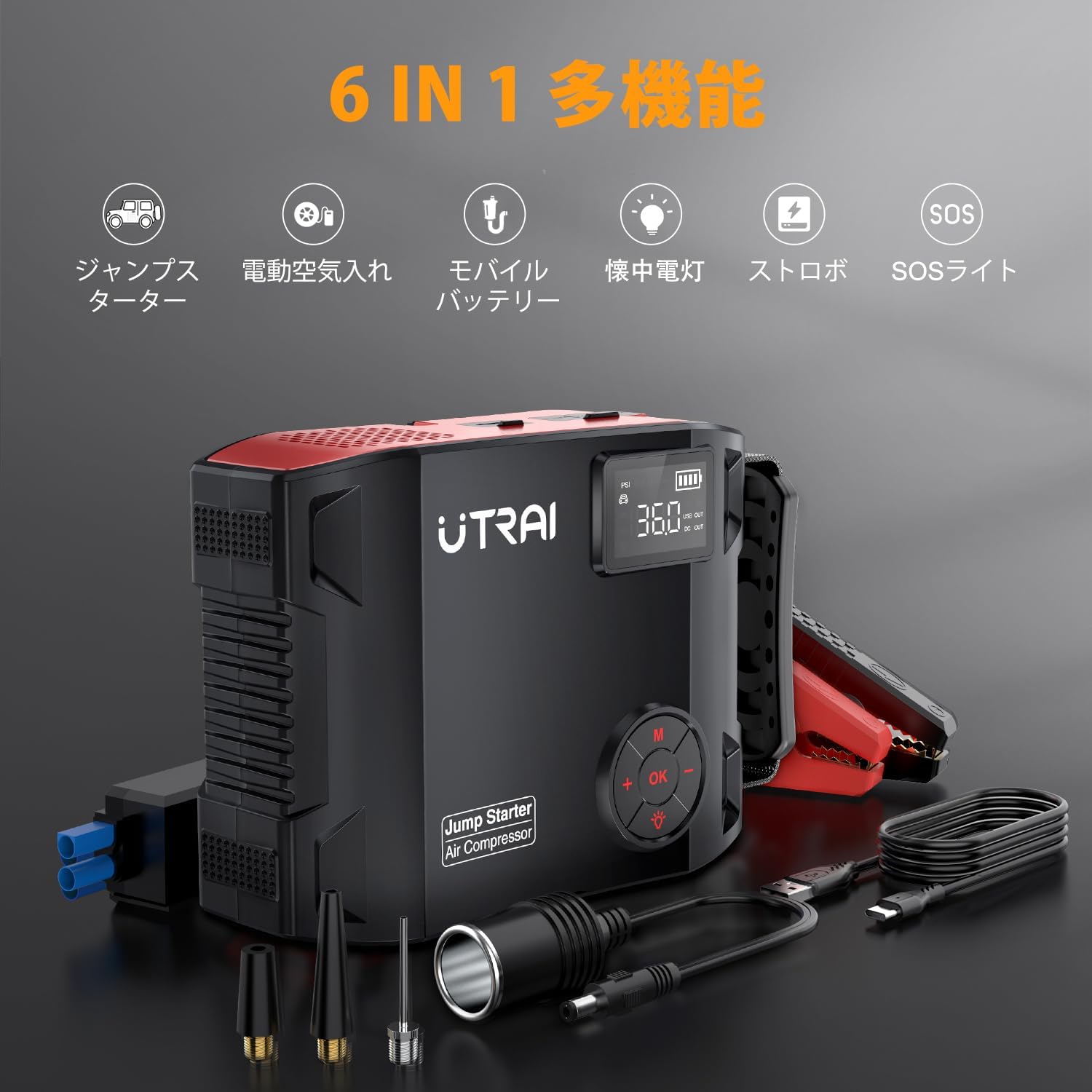
The UTRAI Jstar 5 offers multiple functionalities:
- Starthjelp: 5000A peak current, capable of starting all gasoline vehicles and diesel vehicles up to 8L.
- Luftkompressor: Built-in electric air compressor with a maximum pressure of 150 PSI, suitable for tires, balls, and inflatables. Features automatic stop when preset pressure is reached.
- Mobile Power Bank: 27000mAh capacity with USB (5V/2.4A) and QC3.0 fast charging output ports for charging smartphones, tablets, and other electronic devices. Includes a DC output port (12V-16V/10A) for car accessories.
- LED nødlys: Equipped with a bright LED light offering illumination, warning (strobe), and SOS modes for various emergency situations.
- Sikkerhetsbeskyttelse: Features 9 types of protection including short circuit, reverse connection, over-discharge, over-current, reverse current, low voltage, høy voltage, temperature, and overcharge protection. PSE certified.
- Digital LCD-skjerm: Clear display for battery level, tire pressure, and output status.
5. Oppsett
Before first use, fully charge the UTRAI Jstar 5 unit. Connect the provided USB-C charging cable to the device and a suitable power source. The LCD display will indicate the charging status.
6. Bruksanvisning
6.1. Hoppstart av et kjøretøy
- Ensure the jump starter is sufficiently charged.
- Sett inn smartbatteriet clamp plug completely into the jump start port on the UTRAI Jstar 5. The red and green lights on the clamp vil blinke vekselvis.
- Koble til den røde clamp til den positive (+) polen på bilbatteriet og den svarte clamp til den negative (-) terminalen.
- Once connected correctly, the green light on the smart clamp will illuminate steadily, and a click sound may be heard.
- Start your vehicle's engine within 60 seconds.
- After the engine starts, remove the battery clamps from the car battery and then from the jump starter within 30 seconds.

Video 6.1: Demonstration of the UTRAI Jstar 5 jump starting a car.
6.2. Bruk av luftkompressoren
- Remove the air hose from its storage slot on the device.
- Press the 'OK' button to activate the display, then press the 'M' button to cycle through air inflation modes (car, motorcycle, bicycle, ball).
- Use the '+' and '-' buttons to set the desired air pressure. Refer to your vehicle's manual or tire sidewall for recommended pressure.
- Securely connect the air hose to the tire valve. The current tire pressure will be displayed on the LCD.
- Press the 'OK' button to start inflation. The compressor will automatically stop when the preset pressure is reached.
- Disconnect the air hose from the tire valve and store it back in the unit.

6.3. Bruk som mobil powerbank
The UTRAI Jstar 5 can charge various electronic devices:
- Connect your device's USB charging cable to one of the USB output ports (5V/2.4A or QC3.0) on the Jstar 5.
- For 12V car accessories, connect the DC car charger adapter to the DC output port (12V-16V/10A) and then to your accessory (e.g., car vacuum, car refrigerator).

6.4. Bruk av LED-lyset
Det integrerte LED-lyset har flere moduser for ulike situasjoner:
- Press the light button (usually indicated by a light bulb icon) on the control panel to cycle through modes: Illumination, Strobe (warning), and SOS.
- The bright light is useful for working in dark engine bays or as a campmed lys.
- Strobe and SOS modes are for emergency signaling.

7. Vedlikehold
- Lader: To maintain optimal battery health, fully charge the Jstar 5 every three months, especially during long periods of inactivity.
- Rengjøring: Tørk av enheten med en tørr, myk klut. Ikke bruk sterke kjemikalier eller slipende materialer.
- Lagring: Store the device in a cool, dry place, away from direct sunlight and extreme temperatures. Use the provided storage case for protection.
8. Feilsøking
If you encounter issues with your UTRAI Jstar 5, refer to the following common problems and solutions:
| Problem | Mulig årsak | Løsning |
|---|---|---|
| Kjøretøyet starter ikke | Low charge on jump starter, incorrect clamp connection, severely discharged vehicle battery. | Ensure jump starter is fully charged. Recheck clamp connections (red to +, black to -). If vehicle battery is completely flat, use boost mode (refer to full manual for specific instructions). |
| Smart klamp indicator light is red or flashing red/green rapidly | Short circuit, reverse polarity, over-temperature, or other safety protection activated. | Koble fra umiddelbartamps. Check for correct polarity. Allow device to cool down if it was recently used. Ensure clamps are not touching each other. |
| Luftkompressoren blåser seg ikke opp | Air hose not securely connected, incorrect pressure setting, device not powered on. | Ensure air hose is tightly screwed onto the tire valve. Verify the device is powered on and the desired pressure is set. Check battery level. |
| Enheten lader ikke | Faulty charging cable/adapter, power source issue. | Try a different USB-C cable and power adapter. Ensure the power source is active. |
9. Spesifikasjoner
| Trekk | Spesifikasjon |
|---|---|
| Modellnummer | JS 5 |
| Toppstrøm | 5000 Amperes |
| Batterikapasitet | 27000mAh |
| Batteritype | Litium polymer |
| Voltage | 12 volt |
| Air Compressor Max Pressure | 150 PSI (1035 kPa) |
| Kompatible kjøretøytyper | All gasoline engine vehicles, diesel engine vehicles up to 8L |
| Produktdimensjoner | 20 x 16 x 8 cm |
| Produktvekt | 2 kilo |
| Driftstemperatur | -20℃ til 60℃ |
10. Garanti og støtte
The UTRAI Jstar 5 comes with a 12-month warranty. If you encounter any issues with the product or have questions, please contact UTRAI customer support directly for assistance. Provide your purchase details and a description of the problem for prompt service.