
Introduksjon
This manual provides essential information for the setup, operation, and maintenance of your DIYmall Mini PiTFT 1.14" LCD Display. This compact color TFT add-on is designed for use with Raspberry Pi computers, offering a 135x240 pixel IPS display with high contrast and visibility. It connects via the SPI interface and operates at 3.3V, utilizing the ST7789 driver.
Oppsett
The Mini PiTFT display is designed to snap directly onto the GPIO pins of your Raspberry Pi. Ensure proper alignment before gently pressing the display onto the pins. The display uses the SPI interface for communication.
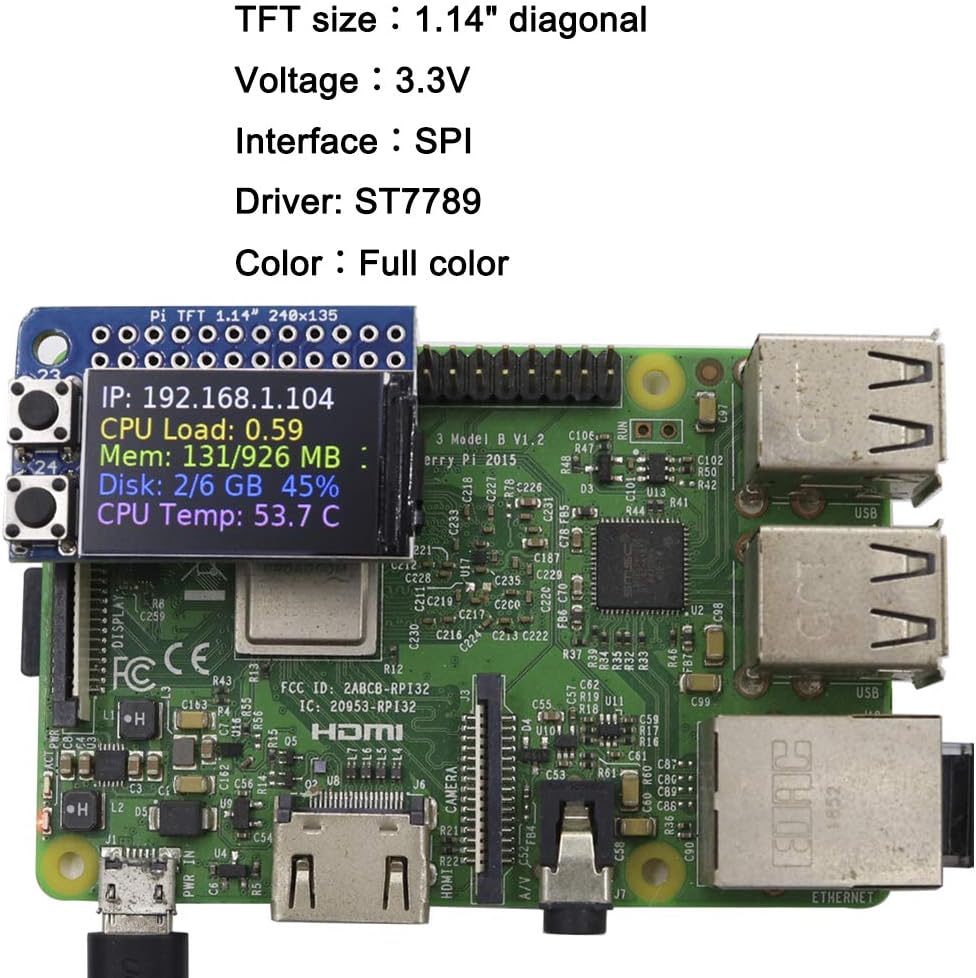
Image: The Mini PiTFT display connected to a Raspberry Pi, displaying system status information.
For detailed usage instructions, including driver installation and software configuration, please refer to the official documentation available online. A comprehensive guide can be found at: https://github.com/IOT-MCU/Mini-PiTFT-for-Raspberry-Pi/wiki/Usage
Bruksanvisning
Once correctly set up and configured with the necessary drivers and software, the Mini PiTFT display will function as a small output screen for your Raspberry Pi. Its IPS technology ensures good readability and high contrast from various viewing angles, despite its compact 1.14" diagonal size.
The display can be programmed to show various types of information, such as system statistics (IP address, CPU load, memory usage, disk space, CPU temperature), custom messages, or graphical elements, depending on your application and software implementation.

Bilde: En detaljert view of the Mini PiTFT module.
Vedlikehold
To ensure the longevity and optimal performance of your Mini PiTFT display, follow these maintenance guidelines:
- Rengjøring: Use a soft, dry, lint-free cloth to gently wipe the display surface. Avoid using liquid cleaners or abrasive materials, which can damage the screen.
- Håndtering: Handle the display by its edges to avoid touching the screen or the electronic components.
- Lagring: Store the display in a cool, dry environment, away from direct sunlight and extreme temperatures.
- Makt: Always ensure the Raspberry Pi is powered off before attaching or detaching the display to prevent electrical damage.
Feilsøking
If you encounter issues with your Mini PiTFT display, consider the following troubleshooting steps:
- Skjermen lyser ikke:
- Verify that the display is correctly seated on the Raspberry Pi's GPIO pins.
- Ensure the Raspberry Pi is powered on and functioning correctly.
- Confirm that the necessary drivers and software are installed and configured as per the online usage guide.
- Feil skjermutgang:
- Check your software configuration and scripts for errors.
- Ensure the correct display driver (ST7789) is being used in your software.
- Fysisk skade: Inspect the display and its connections for any visible damage. If damage is present, contact the seller for assistance.
For more advanced troubleshooting or specific software issues, refer to the online documentation or community forums related to Raspberry Pi and ST7789 displays.
Spesifikasjoner
| TFT Size | 1.14" diagonal |
| Oppløsning | 135 x 240 piksler |
| Voltage | 3.3V |
| Grensesnitt | SPI |
| Sjåfør | ST7789 |
| Farge | Full farge |
| Visningstype | IPS |
| Produktdimensjoner | 1.97 x 1.18 x 1.18 tommer |
| Varevekt | 2.39 unser |
Garantiinformasjon
For specific warranty details regarding your DIYmall Mini PiTFT 1.14" LCD Display, please refer to the purchase documentation or contact the seller directly. Warranty terms may vary based on the point of purchase and regional regulations.
Støtte
If you require further assistance or have questions not covered in this manual, please utilize the following resources:
- Online dokumentasjon: The GitHub wiki page provides detailed technical information and usage examples: https://github.com/IOT-MCU/Mini-PiTFT-for-Raspberry-Pi/wiki/Usage
- Selgerstøtte: Contact DIYmall directly through their official channels or the platform where the product was purchased for product-specific inquiries.
- Fellesskapsfora: Raspberry Pi and electronics enthusiast communities often provide valuable insights and solutions for similar display modules.