
Refoss RGR545
Brukerhåndbok for trådløst garasjeporttastatur til Refoss
Model: RGR545
Produkt overview
The Refoss Wireless Garage Door Keypad provides keyless entry for your garage, offering convenience and security. This keypad is designed to work specifically with garage door openers featuring a purple learn button, operating on a 315 MHz frequency. It supports control of up to three individual garage doors with unique PINs.

Image: Refoss Wireless Garage Door Keypad. This image displays the keypad with its protective cover lifted, revealing the numeric buttons and the specific compatibility label for purple learn buttons.
Kompatibilitet
This Refoss Wireless Garage Door Keypad is only compatible with garage door openers that have a PURPLE learn button. It works with Security+ 315 MHz Chamberlain, LiftMaster, and Craftsman garage openers manufactured between 2006 and 2014. Please verify your garage door opener's learn button color before proceeding with installation or programming.
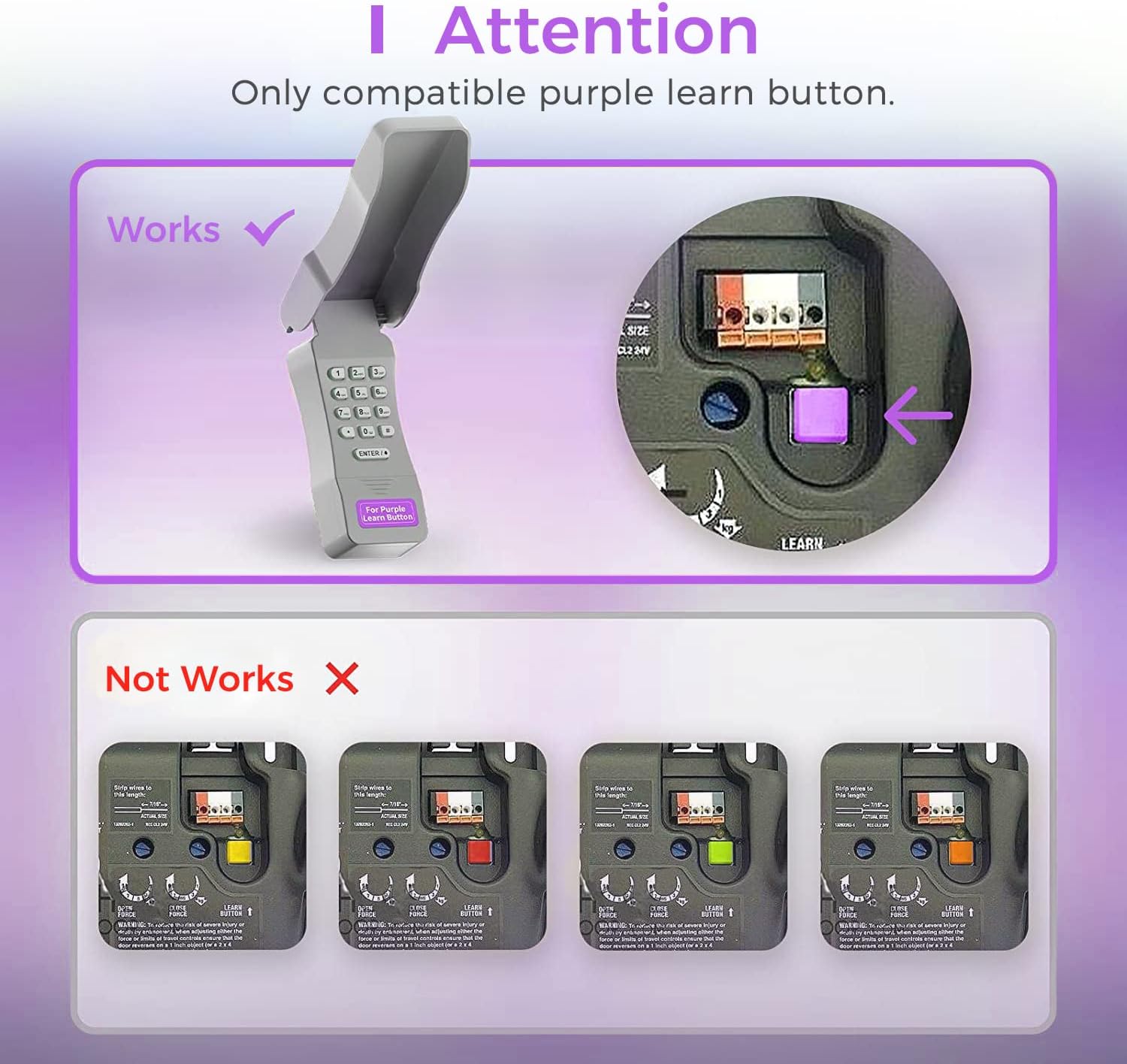
Image: Compatibility Diagram. This visual guide illustrates the correct purple learn button for compatibility and shows examples of incompatible learn button colors (red, orange, green, yellow).
Pakkeinnhold
Before beginning installation, ensure all components are present in the package:
- 1 x Refoss Wireless Keypad
- 1 x brukerhåndbok (dette dokumentet)
- 4 x skruer
- 4 x skrueankere
- 4 x 3M dobbeltsidig tape
- 1 x 9V batteri

Image: Package Contents. This illustration details all items included in the product box, ensuring users can verify they have everything needed for installation.
Oppsett og programmering
The Refoss Wireless Keypad is designed for easy, wireless programming. Follow these steps carefully to set up your keypad and program it to your garage door opener.
Trinn 1: Installer batteriet
- Open the battery compartment on the back of the keypad.
- Sett inn det medfølgende 9V-batteriet, og sørg for riktig polaritet.
- Lukk batterirommet godt.
Trinn 2: Programmer tastaturet
This keypad can control up to three garage doors. Each door requires its own unique PIN.
- Finn PURPLE Learn Button on your garage door opener motor unit. This button is typically found on the back or side panel of the motor.
- Trykk og slipp umiddelbart PURPLE Learn Button. The learn indicator light on the opener will glow steadily for 30 seconds.
- Within 30 seconds, enter your desired 4-digit PIN on the Refoss keypad.
- Trykk og hold inne ENTER / # -knappen på tastaturet til garasjeportåpnerlysene blinker eller du hører to klikk. Dette indikerer vellykket programmering.
- Test tastaturet ved å taste inn PIN-koden din og trykke på ENTER / #Garasjeporten skal aktiveres.
To program additional garage doors (up to three), repeat Step 2 for each door, using a different 4-digit PIN for each.
Bruksanvisning
Opening/Closing a Garage Door
- Enter your 4-digit PIN for the desired garage door.
- Trykk på ENTER / # knapp.
- The garage door will open or close.
Controlling Multiple Doors
The keypad supports individual PINs for up to three garage doors. Simply enter the specific PIN for the door you wish to operate.

Image: One Keypad for Three Doors. This image visually represents the keypad's capability to manage up to three distinct garage doors using individual access codes.
Vedlikehold
Batteribytte
The keypad uses one 9V alkaline battery. When the keypad backlight dims or the keypad becomes unresponsive, it is time to replace the battery.
- Open the battery compartment on the back of the keypad.
- Fjern det gamle 9V-batteriet.
- Sett inn et nytt 9V alkalisk batteri, og sørg for riktig polaritet.
- Lukk batterirommet godt.
Rengjøring
Tørk av tastaturoverflaten med en myk klutamp klut. Ikke bruk skurende rengjøringsmidler eller løsemidler.
Værbeskyttelse
The keypad features a weatherproof protective cover designed to shield it from various weather conditions. Ensure the cover is properly closed when not in use to maximize its protective capabilities.

Image: Weatherproof and Fluorescent Features. This image demonstrates the keypad's durability against outdoor elements and its illuminated keys for visibility in low-light conditions.
Feilsøking
| Problem | Mulig årsak | Løsning |
|---|---|---|
| Tastaturet svarer ikke. | Død eller lavt batteri. | Bytt ut 9V batteriet. |
| Garasjeporten åpnes/lukkes ikke etter at PIN-koden er tastet inn. | Keypad not programmed correctly or incompatible opener. |
|
| Keypad backlight is dim. | Lavt batteri. | Bytt ut 9V batteriet. |
| Cannot program multiple doors. | Incorrect programming sequence for additional doors. | Ensure you are using a unique PIN for each door and repeating the programming steps for each. |
Spesifikasjoner
- Modell: RGR545
- Kompatibilitet: Chamberlain, LiftMaster, Craftsman garage door openers with PURPLE learn button (Security+ 315 MHz, manufactured 2006-2014)
- Hyppighet: 315 MHz
- Number of Doors Supported: Opp til 3
- Strømkilde: 1 x 9V alkalisk batteri
- Dimensjoner: Omtrent 2 x 6 x 1 tommer
- Vekt: Omtrent 7.8 gram
- Spesielle funksjoner: Weatherproof, Fluorescent Keypad
Garantiinformasjon
This Refoss Wireless Garage Door Keypad comes with a 1 års garanti fra kjøpsdatoen. Denne garantien dekker material- og produksjonsfeil ved normal bruk. Den dekker ikke skader forårsaket av feil bruk, ulykker, uautorisert modifikasjon eller feil installasjon.
Ta vare på kjøpsbeviset for garantikrav.
Kundestøtte
For any questions, technical assistance, or support regarding your Refoss Wireless Garage Door Keypad, please contact our customer support team. We offer caring customer support 7 days a week.
Refer to the product packaging or the Refoss official webnettstedet for den mest oppdaterte kontaktinformasjonen.
Relaterte dokumenter - RGR545
 |
Universal Garage Door Keypad JP-MAX Programming and Operation Guide A comprehensive guide to programming, installing, and troubleshooting the JP-MAX Wireless Keyless Garage Door Keypad. Learn how to set PIN codes, connect to various garage door opener brands, and resolve common issues. |
 |
Universal garasjeportåpner trådløst tastatur JP-LT manual Brukerhåndbok for det trådløse tastaturet JP-LT til den universelle garasjeportåpneren, som dekker programmering, installasjon, feilsøking og sikkerhet for ulike merker av garasjeportåpnere som Chamberlain, Genie, LiftMaster og flere. |
 |
JP-LT Flip Cover Type Garage Door Wireless Keypad: Programming & Installation Guide Instructions for programming and installing the JP-LT Flip Cover Type Garage Door Wireless Keypad. Covers compatibility with various garage door opener brands and types (Smart/Learn Button or DIP Switches), programming steps, PIN changes, installation, troubleshooting, and warranty information. |
 |
Universell fjernkontroll for garasjeportåpner – programmeringsveiledning for RC-111-MAX Instruksjoner og spesifikasjoner for den universelle fjernkontrollen til garasjeportåpneren (modell RC-111-MAX), med detaljer om programmeringstrinn, kompatibilitet og garantiinformasjon for LiftMaster-, Chamberlain- og Craftsman-åpnere. |
 |
J-877MAX Universal Garage Door Wireless Keypad User Manual Comprehensive guide to programming, installing, and operating the J-877MAX Universal Garage Door Wireless Keypad for various garage door opener brands. Includes instructions for programming types 1 and 2, changing PINs, temporary PINs, installation, operation, and FCC compliance. |
 |
Genie Universal Keypad Programming and Installation Guide Step-by-step guide to programming and installing the Genie Universal Keypad (GUK2). Learn how to connect with various garage door opener brands like Genie, Chamberlain, LiftMaster, and Craftsman. Includes compatibility chart, mounting instructions, and PIN management. |
Ask a question about this manual
Ask about setup, troubleshooting, compatibility, parts, safety, or missing instructions. Manuals+ will review the question and use this page’s manual context to help answer it.