
Introduksjon
This manual provides detailed instructions for the setup, operation, and maintenance of your groov e Atlas Radio Alarm Clock with Wireless Charger. Please read this manual thoroughly before using the device to ensure proper function and to maximize your user experience. Keep this manual for future reference.
Pakkeinnhold
Bekreft at alle varene er til stede i pakken:
- groov e Atlas Radio Alarm Clock
- Strømadapter
- Brukerhåndbok
Produktfunksjoner
- Wireless Charging (5W): Conveniently charge compatible smartphones by placing them on the top surface.
- FM-radio: Tune into your favorite FM stations.
- LED display: Tydelig digital tidsvisning.
- Strømforsyning: Reliable power supply for continuous operation.
- USB-ladestasjon: Additional USB port for charging other devices.
- Dobbel alarm: Set two independent alarms for different wake-up times.
- Skjermdimmer: Juster lysstyrken på LED-skjermen.
Oppsett
- Koble til strøm: Insert the power adapter into the 'DC IN' port on the back of the alarm clock, then plug the adapter into a wall outlet. The display will light up.
- Still inn tid:
- Press and hold the 'TIME SET' button located on the back of the unit.
- Use the 'TUN-' or 'TUN+' buttons on the top panel to adjust the hour.
- Press 'TIME SET' again to confirm the hour and move to minutes.
- Use 'TUN-' or 'TUN+' to adjust the minutes.
- Press 'TIME SET' once more to confirm and exit time setting.
- To switch between 12-hour and 24-hour format, press the '12/24H' button on the back.

Bilde: Bak view of the groov e Atlas alarm clock, highlighting the DC IN power input and the USB charging port. The '12/24H TIME SET' and 'SLEEP' buttons are also visible.
Bruksanvisning
Setting Alarms (ALM1 / ALM2)
- Press the 'ALM1' or 'ALM2' button to select the alarm you wish to set. The alarm icon will flash on the display.
- Use the 'TUN-' or 'TUN+' buttons to adjust the alarm hour.
- Press the 'ALM1' or 'ALM2' button again to confirm the hour and move to minutes.
- Use 'TUN-' or 'TUN+' to adjust the alarm minutes.
- Press the 'ALM1' or 'ALM2' button a third time to confirm the alarm time. The alarm icon will remain lit, indicating the alarm is active.
- To deactivate an alarm, press the corresponding 'ALM1' or 'ALM2' button until the alarm icon disappears from the display.
FM-radiodrift
- Slå på/av: Press the 'ON/OFF' button to turn the radio on or off.
- Automatisk skanning: Press the 'SCAN' button to automatically scan and save available FM stations.
- Manuell innstilling: Use the 'TUN-' or 'TUN+' buttons to manually adjust the frequency. Press and hold for faster tuning.
- Forhåndsinnstilte stasjoner: Use 'MEM-' or 'MEM+' to cycle through saved preset stations.
- Juster volum: Use the 'VOL-' or 'VOL+' buttons to control the radio volume.
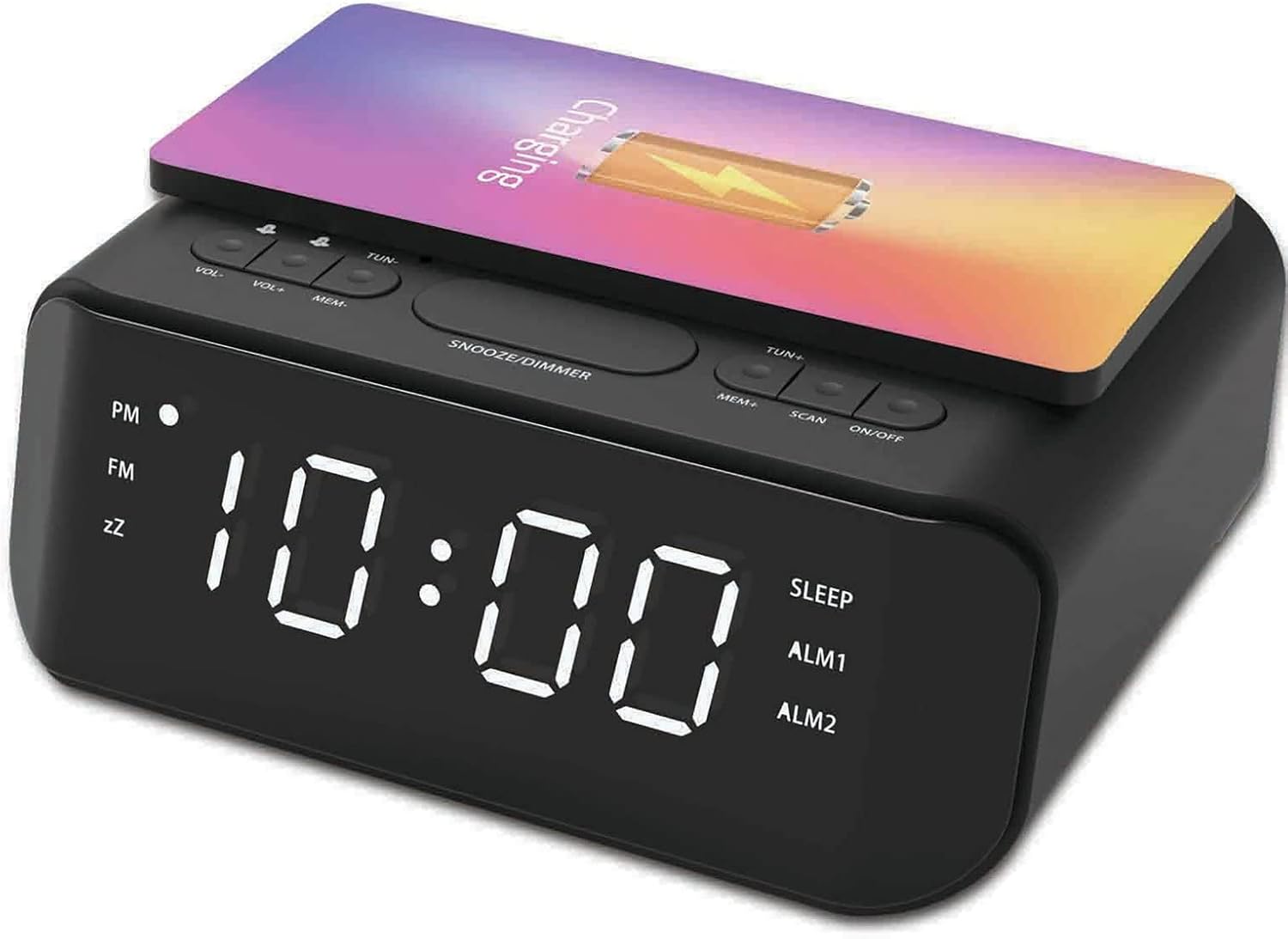
Bilde: Topp view of the groov e Atlas alarm clock, illustrating the layout of the control buttons for volume, tuning, memory, scan, and power.
Trådløs lading
- Ensure your smartphone is compatible with 5W Qi wireless charging.
- Place your compatible smartphone centrally on the wireless charging pad located on the top surface of the alarm clock.
- The phone's display should indicate that charging has begun. If not, adjust the phone's position.

Image: A smartphone placed on the groov e Atlas alarm clock's top surface, showing the charging indicator on the phone's screen, confirming wireless charging is active.
USB-lading
- Connect a USB charging cable (not included) to the USB port on the back of the alarm clock.
- Koble den andre enden av kabelen til enheten.
- Enheten din vil begynne å lade.
Skjermdimmer
Press the 'SNOOZE/DIMMER' button to cycle through different brightness levels for the LED display. This allows you to adjust the display to your preferred visibility, especially in dark environments.
Vedlikehold
- Rengjøring: Bruk en myk, tørr klut til å rengjøre overflaten på vekkerklokken. Ikke bruk flytende rengjøringsmidler eller slipende materialer.
- Lagring: Når enheten ikke er i bruk i lengre perioder, koble fra støpselet og oppbevar den på et kjølig, tørt sted.
- Sikkerhet: Do not expose the device to water, high humidity, or extreme temperatures. Avoid dropping or subjecting the device to strong impacts.
Feilsøking
| Problem | Mulig årsak | Løsning |
|---|---|---|
| Enheten slås ikke på. | Strømadapteren er ikke tilkoblet, eller stikkontakten er defekt. | Sørg for at strømadapteren er ordentlig koblet til enheten og en fungerende stikkontakt. Prøv en annen stikkontakt. |
| Trådløs lading fungerer ikke. | Phone not Qi-compatible or not positioned correctly. | Verify your phone supports Qi wireless charging. Reposition the phone centrally on the charging pad. Remove any thick phone cases. |
| Alarmen lyder ikke. | Alarmen er ikke aktivert, eller volumet er for lavt. | Check if the alarm icon is lit on the display. Increase the alarm volume using the 'VOL+' button. |
| Radiomottaket er dårlig. | Svakt signal eller antenneposisjon. | Extend and adjust the position of the FM antenna wire on the back of the unit for better reception. |
Spesifikasjoner
- Modellnummer: GVWC06BK
- Merke: spor e
- Farge: Svart
- Visningstype: Digital LED
- Strømkilde: Mains Powered (AC Adapter included)
- Trådløs ladeutgang: 5W
- USB -ladeutgang: 5V/1A
- Alarmfunksjoner: Dual Alarm, Snooze
- Radio: FM
- Materiale: Akrylnitrilbutadienstyren (ABS)
- Form: Rektangulær
- Monteringstype: Bordfeste
- Bevegelsestype: Kvarts
- Batterier: Not included (requires 1 battery for backup, type not specified in data)
Garanti og støtte
Your groov e Atlas Radio Alarm Clock GVWC06BK comes with a standard manufacturer's warranty. Please refer to the warranty card included in your package for specific terms and conditions, including the warranty period and coverage details.
For technical support, troubleshooting assistance, or warranty claims, please contact groov e customer service through their official webnettstedet eller kontaktinformasjonen som er oppgitt på garantikortet ditt.
Vennligst ta vare på kjøpsbeviset for eventuelle garantirelaterte spørsmål.