
GTMEDIA N4
GTMEDIA N4 Digital Infrared Night Vision Binoculars User Manual
Modell: N4
1. Introduksjon
The GTMEDIA N4 Digital Infrared Night Vision Binoculars are designed for enhanced visibility in low-light and complete darkness conditions. Featuring advanced infrared technology, high-resolution photo and video capabilities, and versatile mounting options, this device is ideal for outdoor activities such as hunting, camping, animal observation, and security monitoring.
2. Pakkens innhold
Vennligst sjekk at alle varene som er oppført nedenfor er inkludert i pakken din. Hvis noen varer mangler eller er skadet, vennligst kontakt kundestøtte.

Image: All components included in the GTMEDIA N4 package, including the night vision device, head strap, storage bag, USB cable, 32GB TF card, card reader, lens cloth, and cloth bag.
- 1 x GTMEDIA N4 Night Vision Binoculars
- 1 x justerbar hodestropp
- 1 x Oppbevaringspose
- 1 x USB-A til USB-C-kabel
- 1 x 32 GB TF-minnekort
- 1 x-kortleser
- 1 x linseklut
- 1 x tøyveske
- 1 x håndleddsstropp
- 1 x brukerhåndbok (dette dokumentet)
3. Produktfunksjoner
The GTMEDIA N4 Night Vision Binoculars offer a range of features designed for optimal performance in various conditions:
- Kraftig nattsyn: Equipped with 3W 850nm infrared LEDs (7-level brightness adjustable) and an F1.2 large aperture lens for clear observation up to 984ft (300m) in total darkness.
- HD Video and Photos: Records crisp 1080p video and 10MP photos.
- Integrert skjerm: 1.54" TFT display (320x320 circular screen) for instant review av mattage.
- 5x digital zoom: Allows for closer observation of distant subjects.
- Allsidig bruk: Can be used handheld, head-mounted (head strap included), or helmet-mounted (helmet/mount not included).
- Oppladbart batteri: Built-in 3.7V 2000mAh rechargeable lithium battery provides up to 5 hours of continuous use with IR on, and up to 10 hours with IR off.
- Slitesterk design: IPX6 waterproof rating protects against rain, rainstorm, humidity, and other harsh environments.
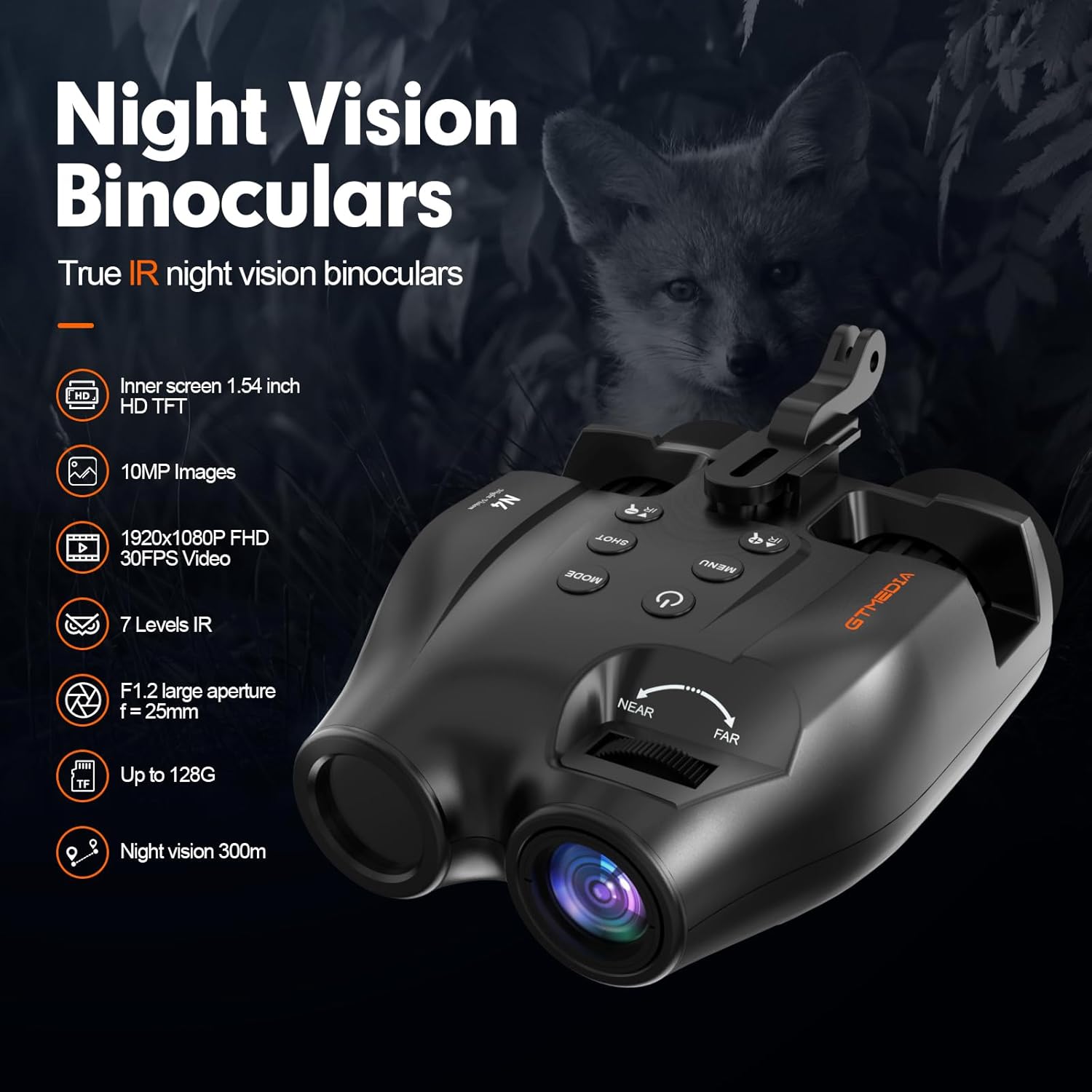
Bilde: Overview of the GTMEDIA N4 Night Vision Binoculars highlighting features such as 1.54 inch HD TFT screen, 10MP images, 1920x1080P FHD 30FPS video, 7 levels IR, F1.2 large aperture, up to 128G memory support, and 300m night vision range.

Image: Illustration demonstrating the powerful 7-level infrared illumination and 5x digital zoom capabilities of the GTMEDIA N4, showing how it enhances visibility in dark environments.

Image: Comparison of day and night use with the GTMEDIA N4, showing clear color images during the day and detailed black and white infrared images at night, with time and resolution stamps.
4. Oppsett
4.1 Lading av enheten
Before first use, fully charge the night vision binoculars. Connect the included USB-A to USB-C cable to the device's charging port and a compatible USB power source (e.g., computer, wall adapter). The charging indicator light will show charging status.
4.2 Sette inn minnekortet
The device supports a TF (microSD) card for storing photos and videos. Locate the memory card slot, typically protected by a rubber cover. Insert the 32GB TF card (included) into the slot until it clicks into place. Ensure the card is inserted in the correct orientation.
4.3 Feste hodestroppen
For hands-free operation, attach the adjustable head strap to the night vision binoculars. Align the mounting bracket on the device with the head strap's attachment point and secure it firmly. Adjust the straps for a comfortable and stable fit on your head.

Image: Demonstrates three ways to use the GTMEDIA N4: head-mounted with the included strap, handheld for quick observation, and helmet-mounted (helmet not included) for tactical applications.
5. Bruksanvisning
5.1 Strøm på/av
- For å slå på, trykk og hold inne Strømknapp (symbol: sirkel med vertikal linje) til displayet lyser.
- For å slå av, trykk og hold nede Strømknapp again until the display turns off.
5.2 Adjusting Infrared (IR) Brightness
- In night vision mode, press the IR + knapp (symbol: IR with plus sign) to increase IR brightness (7 levels available).
- Trykk på IR- knapp (symbol: IR with minus sign) to decrease IR brightness.
- Adjust IR brightness based on ambient light conditions for optimal visibility.
5.3 Ta bilder og ta videoer
- Trykk på MODE-knapp to switch between Photo, Video, and Playback modes.
- I fotomodus trykker du på SHOT-knapp (symbol: camera icon) to take a picture.
- I videomodus trykker du på SHOT-knapp to start recording. Press again to stop recording.
5.4 Fokusering
Roter fokushjul located on the top of the device (marked "NEAR" and "FAR") to achieve a clear image of your subject. Adjust as needed for different distances.

Bilde: Ovenfra og ned view of the GTMEDIA N4 Night Vision Binoculars, clearly showing the power button, mode button, shot button, menu button, IR adjustment buttons, and the near/far focus wheel.
5.5 Menynavigasjon
- Trykk på MENU-knappen for å få tilgang til innstillinger.
- Bruk IR + og IR- knapper for å navigere gjennom menyalternativer.
- Trykk på SHOT-knapp for å bekrefte et valg.
- Trykk på MENU-knappen igjen for å gå ut av menyen.
5.6 Viewing on Display
The integrated 1.54" TFT display provides a clear view of your surroundings and recorded media. Adjust the eyepiece focus for personal comfort.

Image: A user holding the GTMEDIA N4 Night Vision Binoculars, illustrating the view through the eyepieces which shows the 1.54-inch high-definition TFT circular screen for clear viewing.
6. Vedlikehold
6.1 Rengjøring
- Use the included lens cloth to gently wipe the lenses and display screen. Do not use abrasive materials or harsh chemicals.
- For the body of the device, use a soft, damp klut.
- Sørg for at enheten er tørr før oppbevaring.
6.2 Oppbevaring
- Store the night vision binoculars in the provided storage bag when not in use to protect them from dust and scratches.
- Oppbevar enheten på et kjølig og tørt sted, unna direkte sollys og ekstreme temperaturer.
6.3 Batteristell
- For å forlenge batterilevetiden, unngå å utlade batteriet helt ofte.
- Lad enheten regelmessig, selv om den ikke er i bruk, for å opprettholde batterilevetiden.

Image: The GTMEDIA N4 Night Vision Binoculars shown with water droplets, illustrating its IPX6 waterproof rating, indicating protection against rain, rainstorms, humidity, and other harsh outdoor environments.
7. Feilsøking
| Problem | Mulig årsak | Løsning |
|---|---|---|
| Enheten slås ikke på. | Lavt batteri; enhetsfeil. | Lad enheten helt opp. Kontakt kundestøtte hvis problemet vedvarer. |
| Bildet er uskarpt. | Improper focus; dirty lens. | Adjust the focus wheel. Clean the lens with the provided cloth. |
| IR illumination is weak or not working. | IR brightness level too low; battery low. | Increase IR brightness using the IR+ button. Ensure battery is charged. |
| Kan ikke ta opp bilder/videoer. | Minnekortet er fullt eller ikke satt inn riktig; feil modus. | Sjekk innsetting av minnekort. Slett gammelt files or replace card. Ensure device is in Photo or Video mode. |
8. Spesifikasjoner
| Trekk | Detalj |
|---|---|
| Merke | GTMEDIA |
| Modellnavn | N4 |
| Night Vision Range | Opptil 984 fot (300 m) |
| Infrarøde lysdioder | 3W 850nm (7-level adjustable) |
| Digital zoom | 5x |
| Bildeoppløsning | 10 MP |
| Videooppløsning | 1080p FHD 30FPS |
| Skjerm | 1.54" TFT (320x320 circular) |
| Batteri | Innebygd 3.7V 2000mAh oppladbart litiumbatteri |
| Battery Life (IR on) | Opptil 5 timer |
| Battery Life (IR off) | Opptil 10 timer |
| Vanntett vurdering | IPX6 |
| Lagring | Supports TF (microSD) card (32GB included) |
| Varevekt | 350 gram |
| Materiale | Plast |
9. Garanti og støtte
The GTMEDIA N4 Night Vision Binoculars come with a 2-year warranty from the date of purchase, covering manufacturing defects. Please retain your proof of purchase for warranty claims.
For technical support, troubleshooting assistance, or warranty inquiries, please contact GTMEDIA customer service through the retailer where the product was purchased or visit the official GTMEDIA webnettsted for kontaktinformasjon.
Offisiell produktvideo:
Video: An introduction to the GTMEDIA N4 Night Vision Goggle accessories, demonstrating the unboxing and various components included in the package.
Ask a question about this manual
Ask about setup, troubleshooting, compatibility, parts, safety, or missing instructions. Manuals+ will review the question and use this page’s manual context to help answer it.