
1. Introduksjon
Takk for kjøpetasing the BESTISAN 28-inch Soundbar. This manual provides detailed instructions for setting up, operating, and maintaining your new soundbar to ensure optimal performance and an immersive audio experience. Please read this manual thoroughly before use and retain it for future reference.
2. Pakkens innhold
Bekreft at alle varene som er oppført nedenfor er inkludert i pakken din:
- Soundbar
- Fjernkontroll
- Strømadapter
- Digital optisk kabel
- Stereo RCA til 3.5 mm lydkabel
- Brukerveiledning
- Mount Kits (Wall mount template, Mount screws, Wall mount brackets)

3. Produktet er overview
3.1. Kontroller og indikatorer på frontpanelet

- Strømknapp: Short press to turn on, long press for 2 seconds to turn off. Short press to switch modes (BT-HDMI-AUX-OPT-BT).
- Volume + / Next Button: Short press to increase volume step by step, long press for the next song (in Bluetooth mode).
- Volume - / Previous Button: Short press to decrease volume step by step, long press for the previous song (in Bluetooth mode).
- Spill / pause-knapp: Short press to play/pause songs (in Bluetooth mode).
- Mode LED Indicator: Displays the current input mode (Standby, Bluetooth, Optical, ARC, AUX, USB).
3.2. Tilkoblinger på bakpanelet
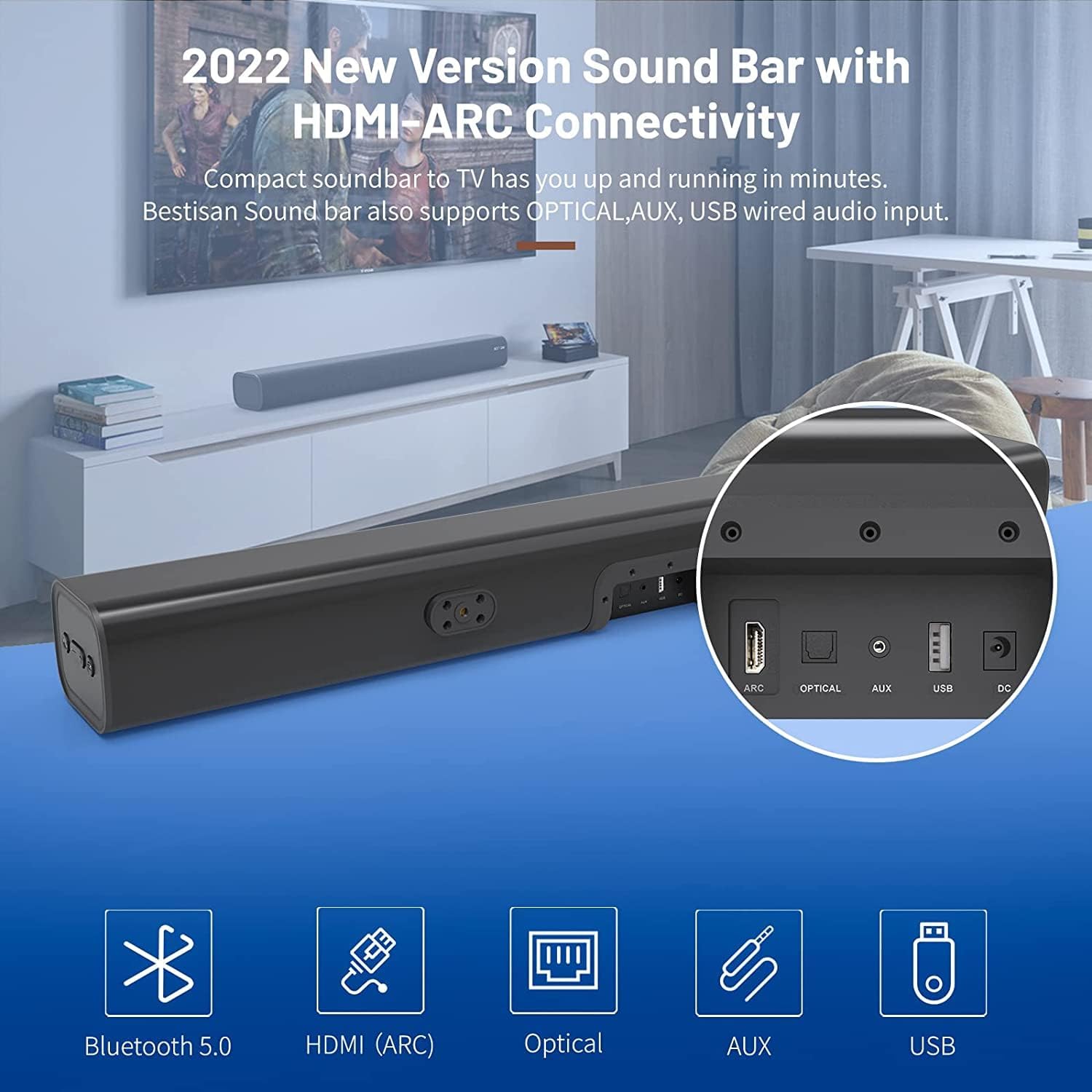
- HDMI ARC (TV): Connects to your TV's HDMI ARC port for high-quality audio transmission.
- OPTISK: Digital optisk lydinngang.
- AUX IN: 3.5 mm ekstra lydinngang.
- USB: USB-inngang for avspilling av media.
- DC IN: Strøminngang for lydplanken.
4. Oppsett
4.1. Plasseringsalternativer
The BESTISAN Soundbar offers flexible placement options to suit your home theater setup:
- Desktop plassering: Place the soundbar on a flat surface in front of your TV. Ensure it does not obstruct the TV's remote sensor.
- Veggmontering: Use the included wall mount kit to securely attach the soundbar to the wall below your TV. A wall mounting template is provided for easy installation.


4.2. Slå på
- Connect the power cord to the DC IN port on the back of the soundbar.
- Koble den andre enden av strømledningen til et strømuttak.
- Press the Power button on the soundbar or the remote control to turn it on. The LED indicator will light up.
Video 1: This video demonstrates the easy setup process for the soundbar, including connecting the power adapter and turning on the device. It highlights the various input options available on the back of the soundbar.
5. Koble til TV-en
The soundbar offers multiple connection options for your TV. Choose the method that best suits your TV's available ports.
5.1. HDMI ARC Connection
- Connect one end of the HDMI cable (not included) to the HDMI ARC port on the soundbar.
- Connect the other end of the HDMI cable to your TV's HDMI ARC port.
- On your TV settings, set the audio output to "HDMI ARC" and the digital sound format to "PCM" or "Passthrough".
5.2. Optisk tilkobling
- Connect one end of the Digital Optical Cable (included) to the OPTICAL port on the soundbar.
- Connect the other end of the Digital Optical Cable to your TV's optical audio output port.
- On your TV settings, set the audio output to "Optical" and the digital sound format to "PCM".
5.3. AUX-tilkobling
- Connect one end of the Stereo RCA to 3.5mm Audio Cable (included) to the AUX IN port on the soundbar.
- Connect the RCA ends of the cable to your TV's RCA audio output ports (usually red and white).
- On your TV settings, ensure the audio output is set to "External Speakers" or "Headset".
5.4. Bluetooth-tilkobling
- Turn on the soundbar and press the "BT" button on the remote or the mode button on the soundbar until the LED indicator flashes blue, indicating Bluetooth pairing mode.
- Aktiver Bluetooth på mobilenheten din (smarttelefon, nettbrett osv.).
- Søk etter "BESTISAN" or "ST08" in the list of available Bluetooth devices and select it to pair.
- Når den er koblet til, lyser LED-indikatoren konstant blått.
6. Betjening av lydplanken
6.1. Bruke fjernkontrollen
The included remote control provides full functionality for your soundbar:
- Makt: Slå lydplanken av/på.
- Stum: Mute/unmute the sound.
- Volum +/-: Juster volumnivået.
- Spill av/pause: Play or pause audio (Bluetooth mode).
- Forrige neste: Skip to the previous or next track (Bluetooth mode).
- Mode Selection (OPT, BT, ARC, AUX, USB): Bytt mellom inngangskilder.
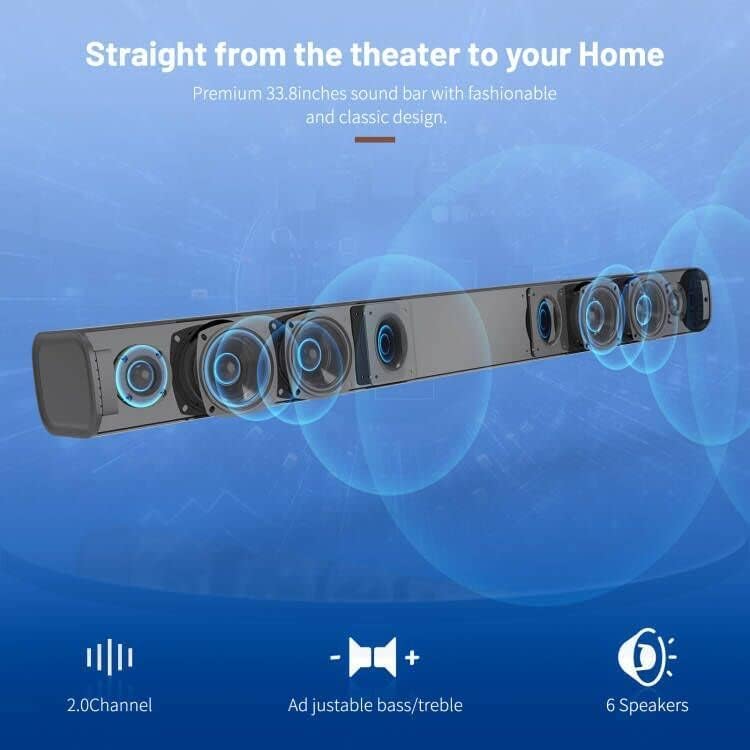
- Sound Modes (Movie, Music, Dialogue): Select optimized equalizer settings for different content types.
- Diskant +/-: Juster diskantnivåene.
- Bass +/-: Juster bassnivåene.
6.2. Sound Modes (DSP Technology)
The soundbar features DSP (Digital Signal Processing) technology with three preset equalizer modes:
- Filmmodus: Enhances cinematic audio with dynamic range and impactful bass.
- Musikkmodus: Optimizes audio for music playback, providing balanced sound.
- Dialogmodus: Clarifies speech, making conversations easier to understand.

7. Vedlikehold
- Clean the soundbar with a soft, dry cloth. Do not use liquid cleaners or aerosols.
- Avoid exposing the soundbar to extreme temperatures, humidity, or direct sunlight.
- Ikke forsøk å demontere eller reparere enheten selv. Kontakt kundestøtte for å få hjelp.
8. Feilsøking
| Problem | Mulig løsning |
|---|---|
| Ingen strøm | Sørg for at strømadapteren er ordentlig koblet til lydplanken og et fungerende strømuttak. |
| Ingen lyd |
|
| Problemer med Bluetooth-paring |
|
| Fjernkontrollen virker ikke |
|
9. Spesifikasjoner
- Merke: BESTISAN
- Modellnavn: ST08, SE08
- Høyttalertype: Soundbar
- Tilkoblingsteknologi: HDMI (ARC), Optical, Aux, USB, Bluetooth 5.0
- Lydutgangsmodus: Stereo
- Høyttaler Maksimal utgangseffekt: 100 watt
- Produktdimensjoner: 3.4" D x 33.79" B x 4.4" H
- Varevekt: 5.19 pund
- Monteringstype: Veggfeste
- Spesialfunksjon: Bass Boost, DSP Technology (Dialogue, Movie, Music modes)
10. Garanti og støtte
For warranty information, technical support, or customer service inquiries, please refer to the contact details provided in your User's Guide or visit the official BESTISAN webnettstedet.
Produsent: Bestisan
Dato først tilgjengelig: 3. november 2020