
1. Introduksjon
This manual provides essential information for the safe and efficient use of your iiyama G2470HSU-B1 23.8-inch IPS Full HD 165Hz Gaming Monitor. Please read these instructions thoroughly before operating the device and retain them for future reference.
2. Sikkerhetsinformasjon
- Ikke utsett skjermen for regn eller fuktighet for å unngå brann- eller støtfare.
- Ikke åpne skjermen casing. Det er ingen deler inni som brukeren kan reparere. Overlat all service til kvalifisert servicepersonell.
- Sørg for tilstrekkelig ventilasjon. Ikke blokker ventilasjonsåpningene.
- Bruk kun strømledningen som følger med skjermen.
- Plasser skjermen på en stabil, flat overflate for å hindre at den faller ned.
- Unngå å plassere tunge gjenstander på strømledningen.
3. Pakkens innhold
Bekreft at alle varene som er oppført nedenfor er til stede i pakken din:
- iiyama G2470HSU-B1 Monitor
- Skjermstativ (base og hals)
- Strømkabel
- HDMI-kabel
- DisplayPort-kabel
- USB oppstrømskabel
- Brukerhåndbok (dette dokumentet)
4. Oppsett
4.1 Montering av stativet
- Plasser skjermen forsiktig med forsiden ned på en myk, ren klut for å unngå riper.
- Fest stativhalsen til baksiden av skjermen. Sørg for at den klikker ordentlig på plass.
- Attach the stand base to the neck and tighten the screw at the bottom of the base.

Figur 4.1: Foran view of the monitor with stand.
4.2 Koble til skjermen
Koble skjermen til datamaskinen eller andre enheter med de riktige kablene.
- Videoinngang: Connect either an HDMI cable or a DisplayPort cable from your computer's graphics card to the corresponding port on the monitor.
- USB-hub: Connect the USB upstream cable from your computer to the USB-B port on the monitor to enable the monitor's USB 2.0 ports.
- Lydutgang: If desired, connect headphones or external speakers to the 3.5mm audio output jack.

Figure 4.2: Monitor input ports.
4.3 Strømtilkobling
Koble strømkabelen til skjermens strøminngang, og koble deretter den andre enden til en jordet stikkontakt.
5. Bruksanvisning
5.1 Strøm på/av
Press the power button located on the rear of the monitor to turn it on or off. The power indicator light will illuminate when the monitor is on.
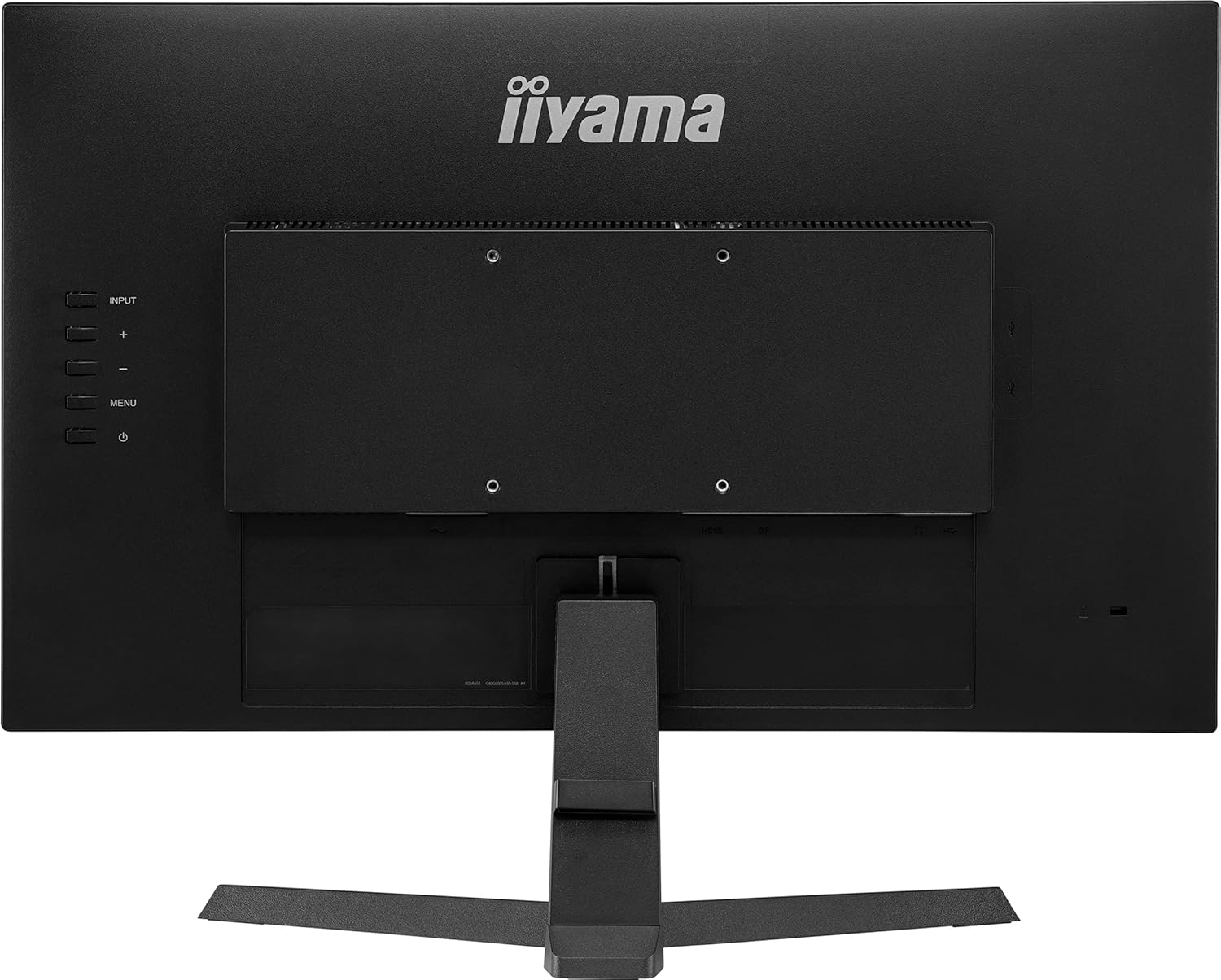
Figur 5.1: Bak view med kontrollknapper.
5.2 On-Screen Display (OSD)-meny
The OSD menu allows you to adjust various monitor settings. Use the buttons on the rear of the monitor to navigate and select options.
- Inndata: Select the video input source (HDMI, DisplayPort).
- Bilde: Juster lysstyrke, kontrast, skarphet og fargetemperatur.
- Lyd: Control volume and mute settings.
- OSD-oppsett: Configure OSD language, position, and timeout.
- Spillinnstillinger: Access features like Black Tuner, FreeSync, and response time overdrive.
5.3 Adjusting Refresh Rate
To utilize the 165Hz refresh rate, ensure your graphics card and connection cable (DisplayPort recommended) support it. Adjust the refresh rate through your computer's display settings:
- Windows: Right-click on the desktop > Display settings > Advanced display settings > Display adapter properties > Monitor tab > Screen refresh rate.
- MacOS: System Settings > Displays > Refresh Rate.
5.4 FreeSync Technology
This monitor supports AMD FreeSync technology, which synchronizes the monitor's refresh rate with your graphics card's frame rate to reduce screen tearing and stuttering. Ensure FreeSync is enabled in the monitor's OSD menu and your graphics card software.
6. Vedlikehold
6.1 Rengjøring av skjermen
Tørk forsiktig av skjermen med en myk, lofri klut. For gjenstridige merker, dampen the cloth with a mild, non-abrasive screen cleaner. Do not spray cleaner directly onto the screen.
6.2 Rengjøring av Casing
Bruk en myk, tørr klut til å rengjøre skjermen casing. Avoid using strong detergents or solvents.
7. Feilsøking
| Problem | Mulig årsak | Løsning |
|---|---|---|
| Intet bilde på skjermen | Strømkabel frakoblet; Videokabel frakoblet; Feil inngangskilde valgt. | Sjekk strøm- og videokabeltilkoblingene; velg riktig inngangskilde via OSD-menyen. |
| Bildet er uskarpt eller forvrengt | Feil oppløsning; problem med grafikkdriveren. | Sett oppløsningen til 1920x1080; Oppdater grafikkdriverne. |
| Skjermen flimrer | Refresh rate mismatch; Cable issue; FreeSync not properly configured. | Ensure refresh rate is set correctly (165Hz); Try a different video cable; Verify FreeSync settings. |
| Ingen lyd fra høyttalere/hodetelefoner | Volume too low; Audio cable disconnected; Incorrect audio output selected on PC. | Adjust volume in OSD and PC; Check audio cable connection; Select monitor as audio output on PC. |
8. Spesifikasjoner
| Trekk | Spesifikasjon |
|---|---|
| Merke | iiyama |
| Modellnummer | G2470HSU-B1 |
| Skjermstørrelse | 24 tommer (23.8 tommer) viewstand) |
| Visningstype | IPS lysdioder |
| Oppløsning | 1920x1080 (Full HD) |
| Oppdateringsfrekvens | 165 Hz |
| Responstid | 0.8 millisekunder |
| Aspektforhold | 16:9 |
| Kontrastforhold | 1100:1 |
| Lysstyrke | 250 cd/m² |
| Viewing vinkel | 178 Degrees (Horizontal/Vertical) |
| Tilkobling | 1x HDMI, 1x DisplayPort, 2x USB 2.0, Audio Out |
| Adaptiv synkronisering | FreeSync |
| Ekstra funksjoner | Flicker-Free, Black Tuner |
| Monteringstype | Veggmontering (VESA-kompatibel) |
| Varevekt | 3.2 kilo |
| Strømforbruk | 20 watt |
8.1 Energiinformasjon

Figure 8.1: Energy Label.
For detailed product information and energy efficiency data, please refer to the official EPREL database: https://eprel.ec.europa.eu/qr/160426
9. Garanti og støtte
The iiyama G2470HSU-B1 monitor comes with a limited warranty. Please refer to the warranty card included in your package or visit the official iiyama webnettstedet for detaljerte garantivilkår.
For technical support, service inquiries, or further assistance, please contact iiyama customer support through their official channels.