
SNOOZ SNOOZ-G1-Charcoal
SNOOZ Go - Portable White Noise Machine User Manual
Model: SNOOZ-G1-Charcoal
Introduksjon
The SNOOZ Go is an ultra-portable white noise machine and Bluetooth speaker designed to create an optimal sleep environment wherever you are. It features a rechargeable battery, multiple sound options, and a soft night light, making it ideal for travel, home use, or any situation where you need to mask unwanted noise.
Nøkkelfunksjoner
- Lang batterilevetid: Up to 20 hours of continuous use on a single charge, perfect for travel, camping, og makt outages. Recharges via USB-C.
- Dobbel funksjonalitet: Functions as a high-quality Bluetooth speaker for music and podcasts during the day, and a white noise machine at night.
- Six High-Quality Sounds: Choose from white noise, fan sounds, and pink noise to create your ideal sleep environment. Suitable for babies, children, adults, and even pets.
- Ultra-bærbar design: Compact size (9.7 cm) for easy transport in hand luggage, suitcases, or backpacks.
- Støymaskering: Effectively masks unwanted noises such as loud neighbors, slamming doors, street noise, and outdoor disturbances.
- Mykt nattlys: Provides a gentle, warm glow for additional illumination. Easily turn on/off with a long press of the power button.
Produkt overview
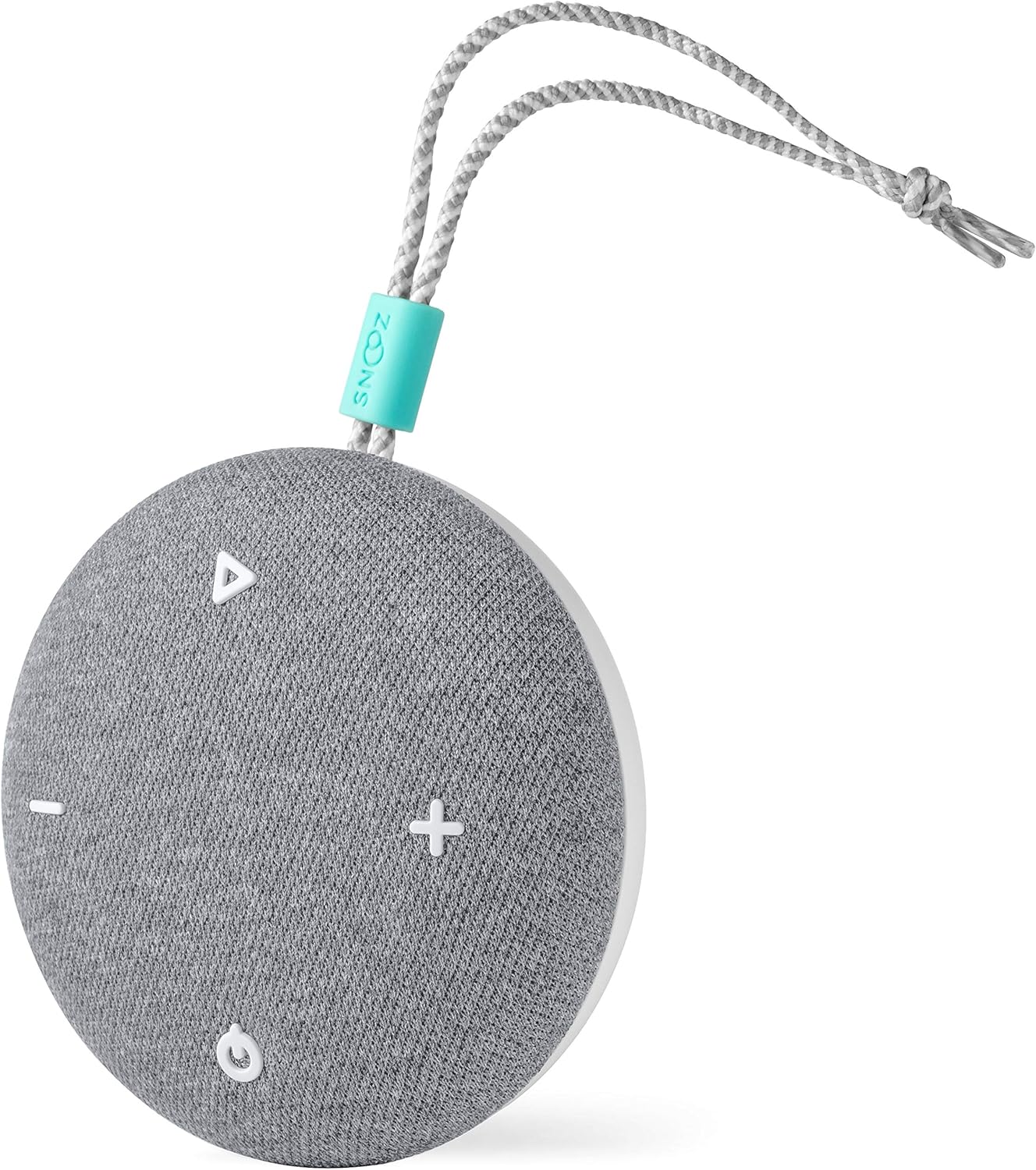


Oppsett
Lader enheten
- Locate the USB-C charging port on the SNOOZ Go.
- Connect the included USB-C cable to the device.
- Koble den andre enden av USB-C-kabelen til en kompatibel USB-strømadapter (ikke inkludert) eller en datamaskins USB-port.
- Ladeindikatorlampen vil lyse for å vise at enheten lader.
- En full lading gir opptil 20 timers bruk.
Slår på/av
- For å slå på strømmen, trykk og hold inne av/på-knappen (⏻) i 2 sekunder.
- To power off, press and hold the power button (⏻) i 2 sekunder.
Bruksanvisning
Lydvalg
- Press the sound selection button (△) to cycle through the six available sound profiles: White Noise, Fan Sound 1, Fan Sound 2, Pink Noise, Fan Sound 3, Fan Sound 4.
Volumjustering
- Press the volume up button ( + ) for å øke volumet.
- Press the volume down button ( - ) for å redusere volumet.
Bluetooth-høyttalermodus
- Ensure the SNOOZ Go is powered on.
- Trykk på Bluetooth-knappen (☊) to enter Bluetooth pairing mode. The indicator light will flash.
- On your device (smartphone, tablet, etc.), enable Bluetooth and search for "SNOOZ Go".
- Select "SNOOZ Go" from the list of available devices to pair.
- Once paired, the indicator light will become solid, and you can play audio through the SNOOZ Go.
- To disconnect Bluetooth, press the Bluetooth button (☊) igjen.
Nattlysfunksjon
- To turn the night light on or off, press and hold the power button (⏻) for approximately 3 seconds while the device is powered on.
Vedlikehold
- Rengjøring: Wipe the exterior of the SNOOZ Go with a soft, dry cloth. Do not use liquid cleaners or abrasive materials.
- Lagring: Oppbevar enheten på et kjølig, tørt sted når den ikke er i bruk.
- Batteripleie: For å forlenge batterilevetiden, unngå å utlade batteriet helt ofte. Lad enheten regelmessig, selv om den ikke er i konstant bruk.
Feilsøking
| Problem | Mulig årsak | Løsning |
|---|---|---|
| Enheten slås ikke på. | Batteriet er utladet. | Lad enheten med USB-C-kabelen. |
| Ingen lyd eller lavt volum. | Volume is too low or muted. Incorrect sound profile valgt. | Increase volume using the '+' button. Cycle through sound profiles using the '△' button. |
| Kan ikke koble til via Bluetooth. | Device not in pairing mode. Bluetooth disabled on source device. Interference. | Press the Bluetooth button to enter pairing mode. Ensure Bluetooth is enabled on your device. Move closer to the SNOOZ Go and away from other wireless devices. |
| Night light does not turn on/off. | Feil varighet på knappetrykk. | Ensure the device is powered on. Press and hold the power button for approximately 3 seconds. |
Spesifikasjoner
- Modellnummer: SNOOZ-G1-Charcoal
- Dimensjoner (L x B x H): 9.65 x 9.65 x 4.32 cm (3.8 x XUMX x 3.8 inches)
- Vekt: 160 gram (0.35 lbs)
- Strømkilde: Batteridrevet (1 litiumpolymerbatteri inkludert)
- Batterilevetid: Opptil 20 timer
- Ladeport: USB-C
- Lydspor: 6 (White Noise, Pink Noise, 4 Fan Sounds)
- Farge: Kull
- UPC: 860003757215
Garanti og støtte
For warranty information and customer support, please visit the official SNOOZ website or contact their customer service team. Keep your proof of purchase for any warranty claims.
Note: Specific warranty terms may vary by region. Please refer to the documentation included with your purchase or the manufacturer's webnettstedet for de mest nøyaktige og oppdaterte garantidetaljene.
Ask a question about this manual
Ask about setup, troubleshooting, compatibility, parts, safety, or missing instructions. Manuals+ will review the question and use this page’s manual context to help answer it.