
1. Introduksjon
Welcome to your Apple iPhone 12 Pro Max. This manual provides essential information for setting up, operating, maintaining, and troubleshooting your device. The iPhone 12 Pro Max is a powerful smartphone featuring a 6.7-inch Super Retina XDR OLED display, A14 Bionic chip, and an advanced triple-camera system. This particular device is a renewed unit, thoroughly inspected to ensure full functionality and a minimum battery capacity of 80%.
2. Produktet er overview
Familiarize yourself with the physical components and controls of your iPhone 12 Pro Max.
2.1 Foran View

Bilde: Foran view of the iPhone 12 Pro Max, highlighting the Super Retina XDR display and the TrueDepth camera system within the notch.
2.2 Bak View

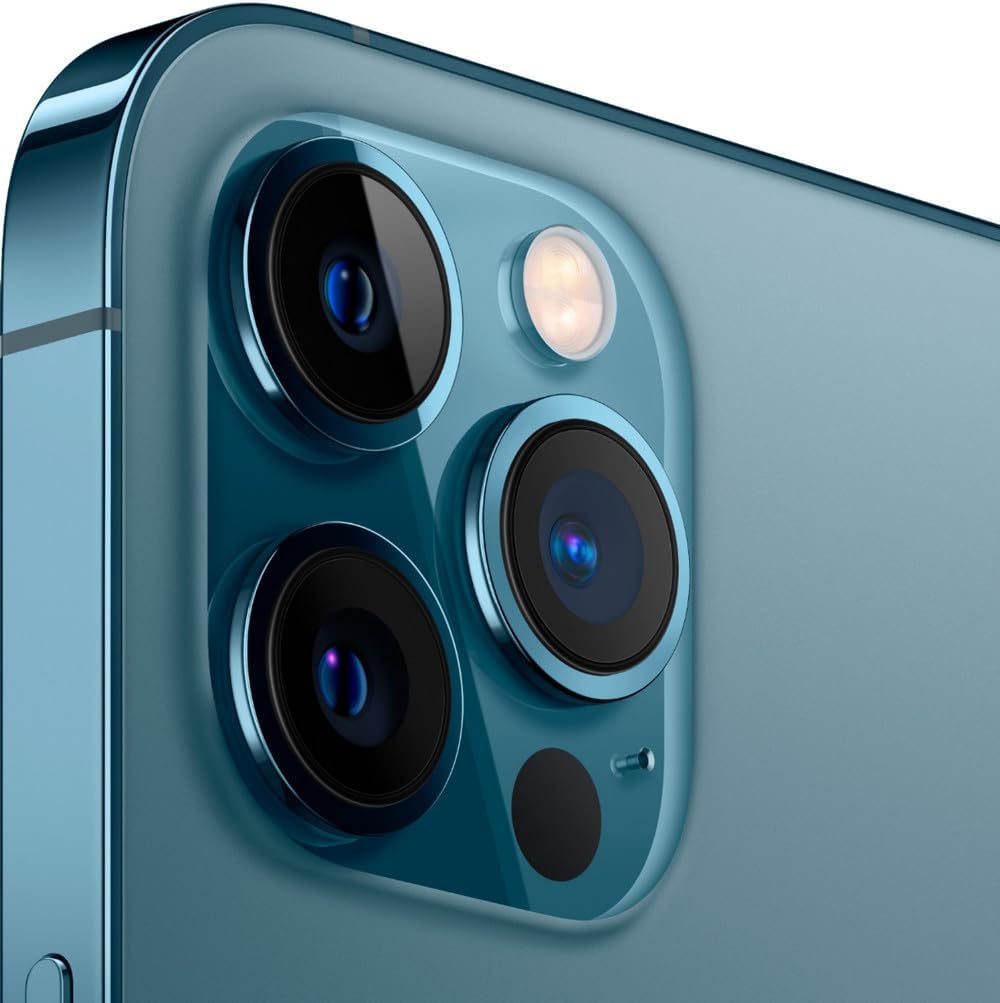
Bilde: Bak view of the iPhone 12 Pro Max in Pacific Blue, featuring the prominent triple-lens camera module and the iconic Apple logo.
2.3 Side Views og havner

Bilde: Sideprofffile of the iPhone 12 Pro Max, illustrating the placement of the volume up/down buttons, the Ring/Silent switch, and the Side button.

Bilde: Detaljert view of the top edge of the iPhone 12 Pro Max, showing the earpiece speaker and microphone.
Bilde: Detaljert view of the bottom edge of the iPhone 12 Pro Max, featuring the Lightning connector, microphone, and speaker grilles.
3. Oppsett
Follow these steps to set up your iPhone 12 Pro Max for the first time.
- Strøm på: Trykk og hold inne sideknappen på høyre side av enheten til Apple-logoen vises.
- Innledende konfigurasjon: Følg instruksjonene på skjermen for å velge språk og region, og koble til et Wi-Fi-nettverk.
- Dataoverføring (valgfritt): If you have an existing iPhone, you can transfer your data during setup using Quick Start or iCloud backup.
- Face ID & Passcode: Set up Face ID for secure unlocking and authentication, and create a strong passcode.
- Apple ID: Sign in with your Apple ID or create a new one to access App Store, iCloud, and other Apple services.
- Programvareoppdateringer: Ensure your device is running the latest iOS version for optimal performance and security. Navigate to Innstillinger > Generelt > Programvareoppdatering.
4. Bruksanvisning
This section covers basic operations and gestures for navigating your iPhone 12 Pro Max.
- Hjemmeskjerm: Sveip opp fra den nederste kanten av skjermen for å gå til startskjermen.
- App Switcher: Sveip opp fra den nederste kanten og stopp midt på skjermen for å view åpne apper.
- Kontrollsenter: Swipe down from the top-right corner of the screen to access Control Center for quick settings.
- Notifikasjons senter: Sveip ned fra øverste venstre hjørne eller midten av skjermen for å view varsler.
- Siri: Say "Hey Siri" or press and hold the Side button to activate Siri.
- Volumkontroll: Bruk volum opp- og volum ned-knappene på venstre side av enheten.
- Ring/lydløs-bryter: Use the switch above the volume buttons to quickly toggle between Ring and Silent modes.
5. Kamerafunksjoner
The iPhone 12 Pro Max features an advanced triple-camera system for high-quality photography and videography.
- Triple 12MP Camera System: Includes a Wide (f/1.6), Ultra Wide (f/2.4), and Telephoto (f/2.2 with 2.5x optical zoom) lens.
- LiDAR-skanner: Enhances autofocus in low light and enables next-level AR experiences.
- Nattmodus: Automatically activates in low-light conditions for brighter, more detailed photos.
- Deep Fusion: Improves detail and reduces noise in medium to low-light scenes.
- Smart HDR 3: Balances elements in a shot for more natural-looking images.
- Dolby Vision HDR Video Recording: Capture cinematic-quality video at up to 4K at 60fps.
Kamera overview Video
Video: En detaljert beskrivelseview of the Apple iPhone 12 Pro Max, including a comprehensive look at its camera capabilities and features.
6. Batteri og lading
The iPhone 12 Pro Max is equipped with a 3687 mAh Lithium-Ion battery, offering up to 18 hours of average use. This renewed device is guaranteed to have a minimum battery capacity of 80%.
- Lader: Use the provided USB cable and a compatible power adapter to charge your device.
- Rask lading: Supports fast charging, allowing you to reach up to 50% charge in approximately 30 minutes with a 20W or higher power adapter (sold separately).
- MagSafe: Compatible with MagSafe wireless charging accessories for convenient and efficient charging.
- Batterihelse: Monitor your battery's health and optimize its performance by going to Innstillinger > Batteri > Batteritilstand og lading.
7. Vedlikehold
Proper maintenance ensures the longevity and optimal performance of your iPhone.
- Rengjøring: Bruk en myk, lofri klut til å rengjøre iPhonen din. Unngå slipende materialer eller sterke kjemikalier.
- Programvareoppdateringer: Regularly update iOS to the latest version to receive security patches and new features.
- Lagringsadministrasjon: Periodically check and manage your device storage via Innstillinger > Generelt > iPhone-lagring for å sikre jevn drift.
- backup: Regularly back up your iPhone data to iCloud or a computer to prevent data loss.
- Unngå ekstreme temperaturer: Do not expose your iPhone to extreme heat or cold, as this can affect battery life and performance.
8. Feilsøking
Denne delen tar for seg vanlige problemer og løsningene på disse.
- Enheten svarer ikke: Hvis iPhonen din ikke reagerer, utfør en tvungen omstart: Trykk og slipp raskt volum opp-knappen, trykk deretter og slipp raskt volum ned-knappen, og trykk deretter og hold inne sideknappen til Apple-logoen vises.
- Tilkoblingsproblemer: For Wi-Fi or cellular problems, try toggling Airplane Mode on and off, or reset network settings (Innstillinger > Generelt > Overfør eller tilbakestill iPhone > Tilbakestill > Tilbakestill nettverksinnstillinger).
- Appkrasj: Close and reopen the app. If the issue persists, delete and reinstall the app.
- Batteritømming: Sjekke Innstillinger> Batteri to identify apps consuming the most power. Adjust settings or restrict background activity as needed.
- Screen Issues (Renewed Device): As a renewed device, minimal cosmetic damage not noticeable at arm's length is expected. If screen issues significantly impact functionality, refer to warranty information.
Renewed Condition Overview Video
Video: An unboxing and review of a renewed Apple iPhone 12 Pro Max, detailing the condition of the device and included accessories.
9. Spesifikasjoner
| Merke | Eple |
| Modellnavn | iPhone 12 Pro Max |
| Operativsystem | iOS 16 |
| CPU modell | Apple A14 Bionic |
| RAM-minne | 6 GB |
| Minnelagringskapasitet | 256 GB |
| Skjermstørrelse | 6.7 tommer |
| Oppløsning | 2778 x 1284 piksler |
| Mobilteknologi | 5G |
| Trådløs leverandør | Låst opp for alle transportører |
| Batterikapasitet | 3687 mAh (vanlig) |
| Gjennomsnittlig batterilevetid | 18 timer |
| Varevekt | 0.41 pund |
| Farge | Stillehavsblått |
10. Hva er i esken
Your Apple iPhone 12 Pro Max package includes:
- Apple iPhone 12 Pro Max (fornyet)
- USB Cable (compatible, may not be original Apple)
- SIM-utkasterverktøy (hvis aktuelt)
Note: Accessories may not be original Apple but are guaranteed to be compatible and fully functional. Product may come in a generic box.
11. Garanti og støtte
Your renewed Apple iPhone 12 Pro Max comes with a 90 dagers garanti. For any issues or support needs, please contact the seller or refer to the Amazon Renewed program details for assistance.
For ytterligere støtte, besøk Official Apple iPhone Support Page.