
Introduksjon
This manual provides instructions for the operation and maintenance of your WIITHINK Portable CD Boombox, model WTB771. This device features multiple audio playback options including CD, FM radio, Bluetooth, USB, and AUX input, designed for versatile use.

Bilde: Foran view of the WIITHINK Portable CD Boombox WTB771, black color, showing the display, control buttons, speakers, and handle.
Pakkeinnhold
- 1 x WIITHINK Portable CD Radio Boombox (WTB771)
- 1 x strømkabel
- 1 x AUX-linje
- 1 x brukerhåndbok
- 1 x fjernkontroll
Oppsett
Strømforsyning
The boombox can be powered by AC power or batteries.
- Vekselstrøm: Connect the provided power cable to the AC port on the back of the unit and plug it into a standard wall outlet (AC voltage: 220V / 50Hz, 110V / 60Hz).
- Batteristrøm: For portable use, insert 4 C-sized batteries (not included) into the battery compartment located on the bottom of the unit. Ensure correct polarity.
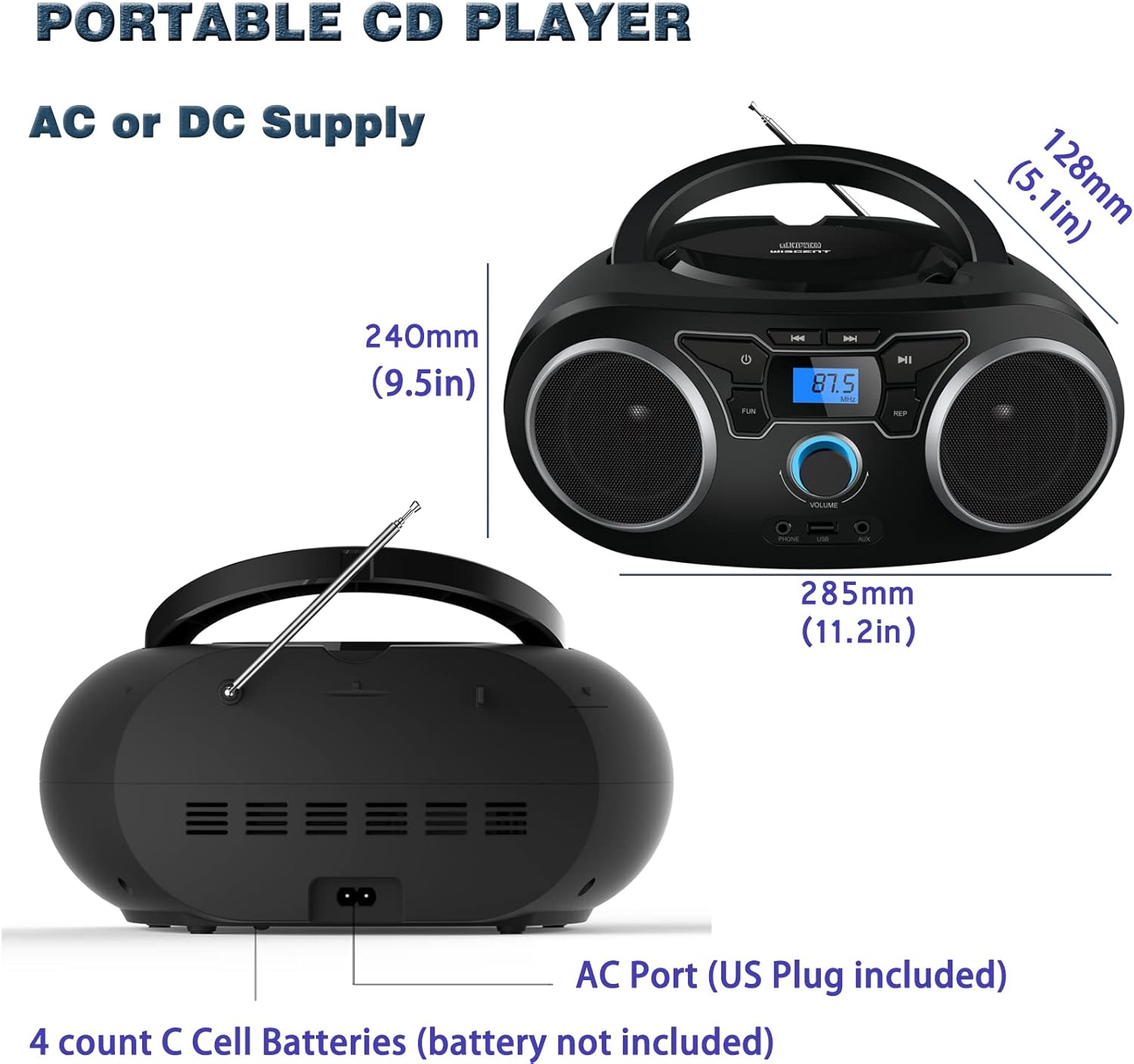
Bilde: Bak view of the boombox, highlighting the AC power port and the battery compartment for 4 C-sized batteries.
Bruksanvisning
Generelle kontroller
The unit features a digital LCD screen and various control buttons and knobs. The main volume control is a rotary knob on the front. A remote control is also included for convenient operation.

Bilde: Ovenfra og ned view of the boombox, showing the CD compartment, control buttons, and volume knob.
1. CD-avspilling
- Åpne lokket til CD-skuffen som er plassert på toppen av enheten.
- Place a CD (CD, CD-R, CD-RW, MP3-CD) onto the spindle with the label side facing up.
- Lukk lokket til CD-rommet.
- Trykk på MODUS -knappen for å velge CD -modus.
- Trykk på SPILL/PAUSE knappen for å starte avspilling.
- Bruk HOPP / SØK knapper for å navigere mellom spor.
- De GJENTA button allows for repeating a single track or all tracks.
- De PROGRAM function allows you to create a custom playback order for tracks.
The boombox supports MP3 and WMA audio formats on compatible discs.
2. FM-radiodrift
- Trekk ut teleskopantennen for optimalt mottak.
- Trykk på MODUS -knappen for å velge FM-radiomodus.
- For å automatisk skanne og lagre stasjoner, trykk og hold inne SKANNING button. The unit will automatically search for and store up to 30 FM stations.
- For å stille inn manuelt, bruk TUNING knott eller HOPP / SØK buttons to find desired frequencies.
- Bruk FORHÅNDSINNSTILLING for å navigere gjennom lagrede stasjoner.
Video: A user demonstrating the FM radio tuning function on the WIITHINK Portable CD Boombox WTB771, showing the digital display changing frequencies.
3. Bluetooth-tilkobling
- Trykk på MODUS button to select Bluetooth mode. The display will indicate "BT" and the unit will enter pairing mode.
- On your Bluetooth-enabled device (e.g., smartphone, tablet), search for available devices and select "WTB771".
- Når den er paret, kan du strømme lyd trådløst fra enheten din til boomboxen.
Video: En kort innledningview demonstrating Bluetooth connectivity, showing a smartphone wirelessly connected to the boombox.
4. USB-avspilling
- Sett inn en USB-flash-stasjon som inneholder MP3 files inn i USB-porten foran på enheten.
- Trykk på MODUS for å velge USB-modus.
- Enheten vil automatisk oppdage og begynne å spille av MP3-filer. files fra USB-stasjonen.
- Use the playback controls (PLAY/PAUSE, SKIP/SEARCH) to manage your music.
5. AUX -inngang
- Connect an external audio device (e.g., MP3 player, laptop) to the AUX input jack on the front of the unit using the provided 3.5mm AUX cable.
- Trykk på MODUS -knappen for å velge AUX-modus.
- Lyd fra den tilkoblede enheten spilles nå av gjennom boombox-høyttalerne. Kontroller avspillingen fra den eksterne enheten din.
Kontroller og porter overview
| Trekk | Beskrivelse |
|---|---|
| Strømknapp | Slår enheten av/på. |
| MODE-knapp | Switches between CD, FM, Bluetooth, USB, and AUX modes. |
| Volumknapp | Adjusts the audio output level (up to 32 levels). |
| PLAY/PAUSE -knapp | Starts or pauses playback in CD, USB, and Bluetooth modes. |
| HOPP OVER/SØK-knapper | Navigates tracks in CD/USB mode; tunes frequencies in FM mode. |
| REPEAT-knapp | Repeats current track or all tracks in CD/USB mode. |
| PROGRAM-knapp | Sets a custom playback order for CD/USB tracks. |
| FM-antenne | Telescopic antenna for FM radio reception. |
| USB-port | Connects USB flash drives for MP3 playback. |
| AUX inngangskontakt | 3.5 mm-inngang for tilkobling av eksterne lydenheter. |
| Hodetelefonuttak | 3.5 mm utgang for privat lytting. |
| Fjernkontroll | Provides wireless control over all functions. |

Image: Close-up of the front panel, showing the USB port, AUX input, and headphone jack.
Vedlikehold
- Rengjør enheten med en myk, tørr klut. Ikke bruk slipende rengjøringsmidler eller løsemidler.
- Hold CD-skuffen ren og fri for støv.
- Unngå å utsette enheten for ekstreme temperaturer, fuktighet eller direkte sollys.
- When not in use for extended periods, remove batteries and unplug the AC power cable.
Feilsøking
| Problem | Løsning |
|---|---|
| Ingen strøm |
|
| Ingen lyd |
|
| CD Skipping/Not Playing |
|
| Dårlig FM-mottak |
|
| Problemer med Bluetooth-paring |
|
Spesifikasjoner
- Modell: WTB771
- Produktdimensjoner: 7 x 10 x 4.8 tommer (17.8 x 25.4 x 12.2 cm)
- Varevekt: 2.64 pund (1.2 kg)
- Strømutgang: 2 x 2W RMS
- Tilkobling: Hjelpeenhet, Bluetooth, USB
- Høyttalertype: Innebygd
- Strømforsyning: AC (220V/50Hz, 110V/60Hz) or 4 x C batteries (not included)
- Støttede platetyper: CD, CD-R, CD-RW, MP3-CD
- Støttede lydformater: MP3, WMA
- Forhåndsinnstillinger for FM-radio: Opptil 30 stasjoner
Garanti og støtte
WIITHINK offers an 18-month after-sales service for this product. For any inquiries or technical support, please contact WIITHINK customer service through your purchase platform. Lifetime technical support is provided.
For further assistance, you may refer to the "Your Orders" section on Amazon, locate your order, and contact "WIITHINK Direct".
Image: Graphic illustrating WIITHINK's customer support, including 18-month replacement and lifetime technical support.