
Bytech BY-AU-BS-152-BK
Bytech True Wireless Bluetooth Boost Link True Speaker User Manual
Model: BY-AU-BS-152-BK
Introduksjon
Takk for kjøpetasing the Bytech True Wireless Bluetooth Boost Link True Speaker. This manual provides essential information for setting up, operating, and maintaining your new speakers. Please read this manual thoroughly before use to ensure proper operation and to maximize your listening experience. These speakers feature True Wireless Stereo (TWS) functionality, Bluetooth connectivity, FM Radio, and Bass Boost for rich audio.
Sikkerhetsinformasjon
- Do not expose the speakers to extreme temperatures, humidity, or direct sunlight.
- Unngå å miste høyttalerne eller utsette dem for harde støt.
- Do not disassemble, repair, or modify the speakers yourself. Refer all servicing to qualified personnel.
- Keep the speakers away from water and other liquids.
- Bruk kun den spesifiserte ladekabelen og strømadapteren.
- Rengjør høyttalerne med en myk, tørr klut. Ikke bruk slipende rengjøringsmidler eller løsemidler.
- Listen at moderate volume levels to avoid hearing damage.
Pakkeinnhold

Image: The Bytech Boost Link True Wireless Speakers shown in their retail packaging, highlighting the two speakers and the Bluetooth connectivity feature.
Vennligst sjekk at alle varene er til stede og i god stand:
- 2 x Bytech Boost Link True Wireless Speakers
- 1 x ladekabel (USB)
- 1 x brukerhåndbok (dette dokumentet)
Produkt overview

Bilde: En nærbilde foran view of the two Bytech Boost Link True Wireless Speakers, showing the speaker grilles and control buttons at the bottom.
Gjør deg kjent med høyttalerens komponenter og kontroller:
- Høyttalergitter: Protects the speaker driver.
- Kontrollknapper:
- Strømknapp: Power On/Off, Play/Pause.
- Modusknapp: Switch between Bluetooth, FM Radio, etc.
- Forrige spor/volum ned-knapp: Kort trykk for forrige spor, langt trykk for volum ned.
- Neste spor/volum opp-knapp: Kort trykk for neste spor, langt trykk for volum opp.
- Ladeport: For tilkobling av USB-ladekabelen.
- LED-indikator: Shows power status, charging status, and pairing status.
Oppsett
Lading av høyttalerne
Before first use, fully charge both speakers. Connect the supplied USB charging cable to the charging port on each speaker and plug the other end into a USB power adapter (not included) or a computer's USB port. The LED indicator will show charging status and turn off or change color when fully charged.
Slår på/av
- For å slå på: Press and hold the Power button on each speaker until the LED indicator lights up and you hear a power-on prompt.
- Slik slår du av: Press and hold the Power button on each speaker until the LED indicator turns off and you hear a power-off prompt.
Bruksanvisning
Bluetooth Pairing (Single Speaker Mode)
- Sørg for at høyttaleren er slått på og i Bluetooth-paringsmodus (LED-indikatoren blinker).
- Aktiver Bluetooth på enheten din (smarttelefon, nettbrett, bærbar PC) og søk etter tilgjengelige enheter.
- Select "BYTECH BOOST LINK" (or similar name) from the list.
- Once paired, the LED indicator will stop flashing and remain solid, and you will hear a confirmation sound.
True Wireless Stereo (TWS) Pairing (Two Speakers)
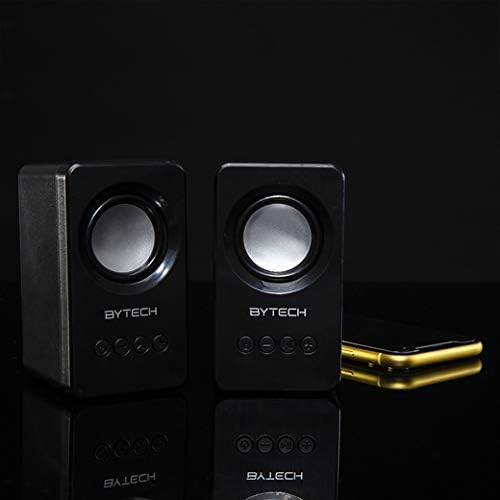
Image: The two Bytech Boost Link True Wireless Speakers positioned next to a smartphone, symbolizing their ability to connect wirelessly to each other and a device for stereo sound.
For a true stereo sound experience, you can pair both speakers together:
- Power on both Bytech Boost Link speakers. Do not connect them to your Bluetooth device yet.
- The speakers will automatically attempt to pair with each other. You will hear a confirmation sound when they are successfully linked for TWS. One speaker will become the master (left channel) and the other the slave (right channel).
- Once TWS paired, the master speaker will enter Bluetooth pairing mode (LED flashing).
- On your device, enable Bluetooth and search for "BYTECH BOOST LINK". Connect to this single entry.
- Begge høyttalerne vil nå spille av lyd i stereo.
- Note: If the speakers do not automatically pair, try double-pressing the Mode button on one of the speakers to initiate TWS pairing.
FM-radiodrift
- Power on the speaker(s).
- Trykk på Modus knappen gjentatte ganger til du hører FM-radiomeldingen.
- For å automatisk skanne og lagre stasjoner, trykk og hold inne Spill av/pause button. The speaker will scan and store available FM stations.
- Bruk Forrige spor og Neste spor knapper for å navigere mellom lagrede stasjoner.
Lydavspilling og volumkontroll
- Spill av/pause: Trykk kort på strømknappen.
- Neste spor: Short press the Next Track/Volume Up button.
- Forrige spor: Short press the Previous Track/Volume Down button.
- Volum opp: Long press the Next Track/Volume Up button.
- Volum ned: Long press the Previous Track/Volume Down button.
Vedlikehold
- Rengjøring: Use a soft, dry, lint-free cloth to clean the surface of the speakers. Do not use liquid cleaners, aerosols, or solvents.
- Lagring: Når høyttalerne ikke er i bruk over lengre tid, bør de oppbevares kjølig og tørt, unna direkte sollys og ekstreme temperaturer.
- Batteripleie: To prolong battery life, avoid fully discharging the battery frequently. Charge the speakers regularly, even if not in use.
Feilsøking
| Problem | Mulig årsak | Løsning |
|---|---|---|
| Høyttaleren slår seg ikke på. | Lavt batteri. | Lad høyttaleren helt opp. |
| Kan ikke pares via Bluetooth. | Høyttaleren er ikke i paringsmodus; Enhetens Bluetooth er av; For langt fra enheten. | Ensure speaker LED is flashing; Turn on Bluetooth on your device; Move speaker closer to device (within 10 meters). |
| Ingen lyd. | Volume too low; Speaker not connected; Incorrect mode. | Increase volume on speaker and device; Re-pair Bluetooth; Ensure correct mode (Bluetooth/FM). |
| TWS-paring mislykkes. | Speakers already connected to a device; Speakers too far apart. | Disconnect speakers from any device; Power off and on both speakers, then try TWS pairing again; Ensure speakers are close to each other. |
| Dårlig FM-radiomottak. | Svakt signal; Interferens. | Relocate the speaker to an area with better reception; Extend the charging cable (can act as an antenna). |
Spesifikasjoner
- Modell: BY-AU-BS-152-BK
- Merke: Bytech
- Tilkoblingsteknologi: Trådløs (Bluetooth)
- Lydutgangsmodus: Omgi
- Høyttalertype: Surround Sound
- Spesielle funksjoner: Wireless Bluetooth, Bass Boost, FM Radio, True Wireless Stereo (TWS)
- Anbefalt bruk: For musikkspillere
- Kompatible enheter: Laptop, nettbrett, smarttelefon
- Kontrolltype: On-device buttons
- Pakkedimensjoner: 20.7 x 16 x 9 cm
- Vekt: 560 g
Garanti og støtte
Bytech products are designed and manufactured to the highest quality standards. For information regarding warranty coverage, technical support, or service inquiries, please refer to the warranty card included with your purchase or visit the official Bytech webnettstedet. Vennligst ta vare på kjøpsbeviset for garantikrav.
For further assistance, please contact Bytech customer support.
Ask a question about this manual
Ask about setup, troubleshooting, compatibility, parts, safety, or missing instructions. Manuals+ will review the question and use this page’s manual context to help answer it.