
ALFAJR CW-15
ALFAJR CW-15 Automatic Islamic Azan Prayer Clock User Manual
Model: CW-15 | Brand: ALFAJR
Introduksjon
This manual provides comprehensive instructions for setting up and operating your ALFAJR CW-15 Automatic Islamic Azan Prayer Clock. Designed for both wall mounting and table placement, this digital clock automatically calculates and plays the Azan five times a day based on your set location. Please read this manual carefully to ensure proper use and to fully utilize all features of your new clock.
Pakkeinnhold
Vennligst sjekk at alle varene er til stede i pakken:
- 1 x ALFAJR CW-15 Azan Clock
- 4 x AA batterier
- 1 x bruksanvisning (dette dokumentet)
Produktfunksjoner
- Automatic Azan for all five daily prayers.
- Multiple Azan reciters (Makkah, Madina, Egypt, AlQuds, Riyadh).
- Automatic Azan time adjustment after initial city/time setup.
- Gregorian and Hijri calendar display.
- Temperaturvisning i Celsius eller Fahrenheit.
- Daylight Saving Time (DST) option.
- English and Arabic display languages.
- Wall-mountable or table-standing design.
- Dimensions: Approximately 9 inches (width) x 8.5 inches (height).
- Powered by 4 AA batteries (included) or USB-C (cable not included).
Oppsettveiledning
1. Installasjon av batteri
The ALFAJR CW-15 clock operates on 4 AA batteries. These are included in your package.
- Finn batterirommet på baksiden av klokken.
- Åpne batteridekselet.
- Insert the 4 AA batteries, ensuring correct polarity (+ and -).
- Lukk batteridekselet godt.
Alternatively, the clock can be powered via a USB-C cable (not included) connected to a compatible power adapter.
2. Initial Power On and Display Overview
Upon inserting batteries or connecting USB-C power, the clock will power on. The display will show the current time, date, and temperature. Familiarize yourself with the buttons on the side/back of the clock: UP, SETT, og NED.

Figur 1: Foran view of the ALFAJR CW-15 clock, showing the digital display with time, date, and temperature. The speaker grilles are visible at the bottom.
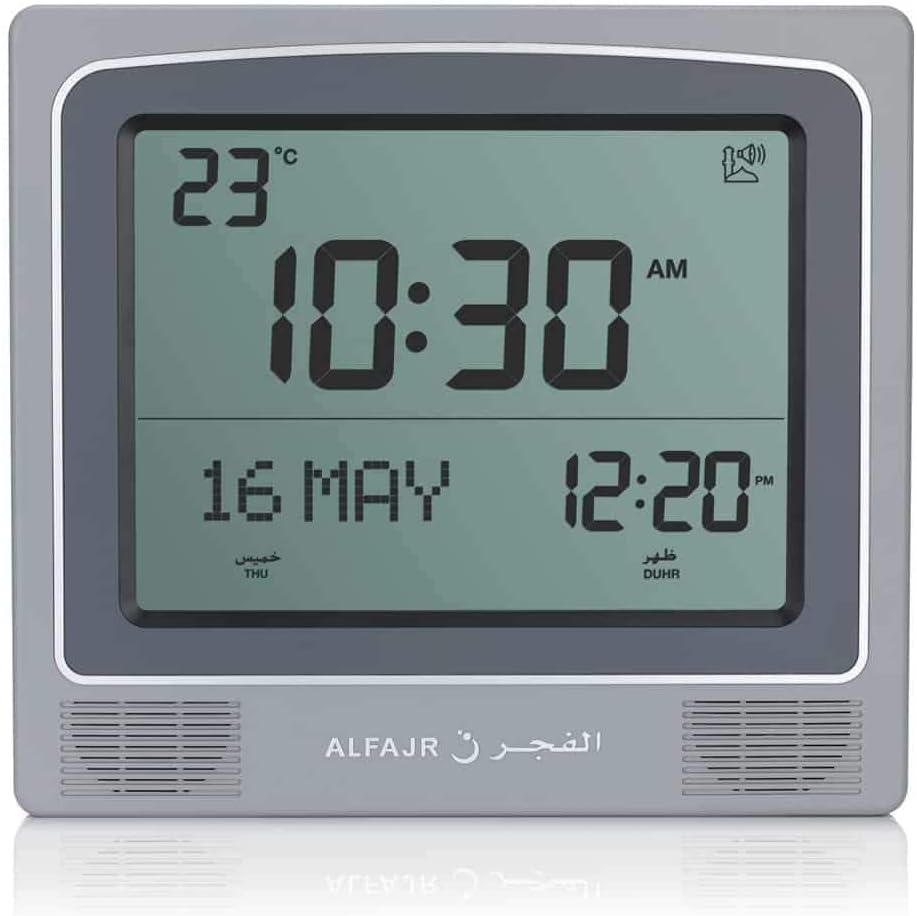
Figur 2: Foran view of the ALFAJR CW-15 clock, similar to Figure 1, but with the ALFAJR brand logo visible at the bottom center.
3. Stille inn tid og dato
- Trykk og hold inne SETT -knappen i omtrent 3 sekunder til tidsdisplayet begynner å blinke.
- Bruk UP og NED knappene for å justere timen. Trykk på SETT for å bekrefte og gå til minutter.
- Juster minutter med UP og NED, og trykk deretter på SETT.
- Continue this process to set the year, month, and day.
- After setting the date, press SETT to exit the time/date setting mode.
4. Setting Location (City or Coordinates)
Accurate Azan times depend on correct location settings. You can select a pre-programmed city or enter latitude/longitude.
- Trykk på SETT button once (short press) to enter the main menu.
- Bruk UP or NED to navigate to the "CITY" or "LOCATION" setting.
- Pressen SETT to enter the location setting.
- Option A: Select Pre-programmed City: Bruk UP or NED to scroll through the list of cities. Once your city is displayed, press SETT for å bekrefte.
- Option B: Enter Latitude/Longitude: If your city is not listed, select the option to enter coordinates. Use UP og NED to adjust the values for latitude, longitude, and time zone offset (GMT). Press SETT etter hver verdi.
- After confirming your location, the clock will automatically calculate the Azan times.
5. Azan Calculation Method
The clock supports various Azan calculation methods. Consult local Islamic authorities for the recommended method in your region.
- From the main menu (short press SETT), navigate to "CALC. METHOD".
- Pressen SETT å gå inn.
- Bruk UP or NED to select the desired calculation method (e.g., Muslim World League, Umm Al-Qura, Egyptian General Authority of Survey, etc.).
- Pressen SETT for å bekrefte.
6. Sommertid (DST)
If your region observes Daylight Saving Time, enable this feature.
- From the main menu, navigate to "DST".
- Pressen SETT.
- Bruk UP or NED to toggle between "ON" and "OFF".
- Pressen SETT for å bekrefte.
7. Temperaturenhet
You can choose to display temperature in Celsius or Fahrenheit.
- From the main menu, navigate to "TEMP UNIT".
- Pressen SETT.
- Bruk UP or NED to select "C" (Celsius) or "F" (Fahrenheit).
- Pressen SETT for å bekrefte.
8. Calendar Display
The clock can display either the Gregorian or Hijri calendar.
- From the main menu, navigate to "CALENDAR".
- Pressen SETT.
- Bruk UP or NED to select "GREGORIAN" or "HIJRI".
- Pressen SETT for å bekrefte.
Bruksanvisning
1. Adjusting Azan Volume
The clock features adjustable Azan volume. The volume buttons are typically located on the side or back of the unit.
- During an Azan, press the UP or NED knappene for å øke eller redusere volumet.
- Alternatively, some models may have a dedicated volume switch or buttons on the back. Refer to the physical clock for exact button placement.
2. Changing Azan Reciter
You can select from five different Azan reciters.
- From the main menu (short press SETT), navigate to "AZAN VOICE" or "RECITER".
- Pressen SETT å gå inn.
- Bruk UP or NED to cycle through the available reciters (Makkah, Madina, Egypt, AlQuds, Riyadh).
- Pressen SETT for å bekrefte valget ditt.
3. Daily Alarms
The clock includes daily alarm functions in addition to the Azan. These can be set for specific times.
- From the main menu, navigate to "DAILY ALARM".
- Pressen SETT.
- Bruk UP or NED to set the desired alarm time (hour and minute).
- Pressen SETT to confirm and enable the alarm.
- To disable, navigate back to "DAILY ALARM" and set the time to "OFF" or a similar option.
4. Visningsmoduser
The clock typically cycles through different display information or allows manual switching.
- The default display shows time, date, and temperature.
- Kort trykk på UP or NED buttons outside of menu mode may cycle through additional information like next prayer time or Qibla direction (if available on this model).
Monteringsmuligheter
The ALFAJR CW-15 clock is designed for versatile placement, either on a wall or a flat surface.
1. Veggmontering
To mount the clock on a wall:
- Locate the keyhole slot on the back of the clock.
- Velg et passende sted på veggen.
- Install a screw (not included) into the wall, leaving a small portion protruding. Ensure the screw head fits into the keyhole slot.
- Carefully hang the clock onto the screw, ensuring it is securely seated.
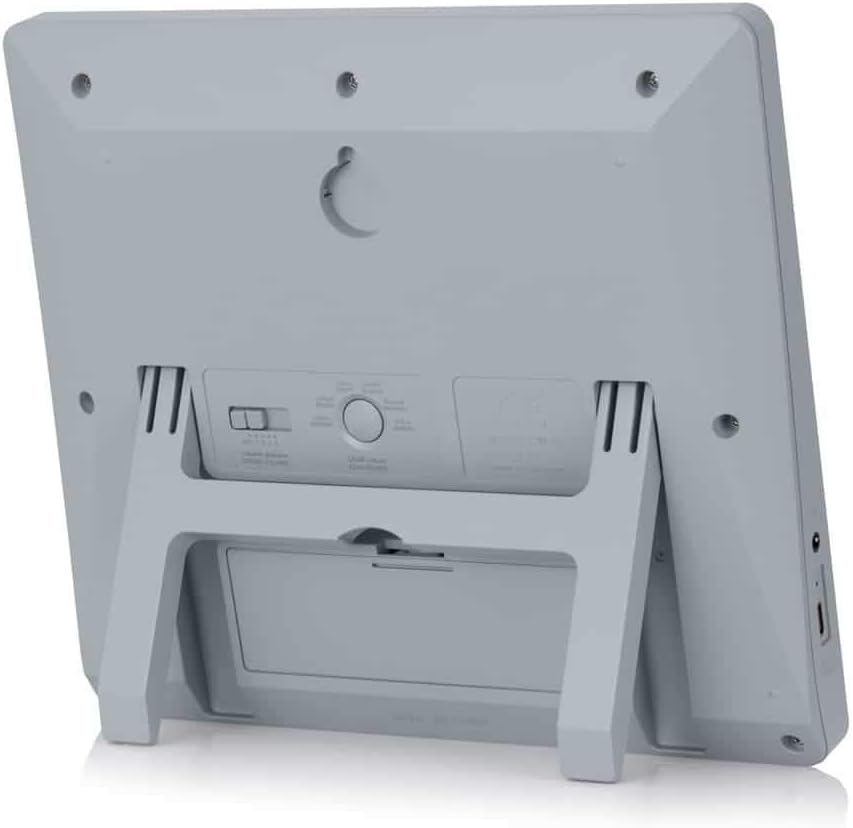
Figur 3: Bak view of the ALFAJR CW-15 clock, highlighting the keyhole for wall mounting and the battery compartment.
2. Table Placement
For table or desk placement:
- Locate the integrated stand on the back of the clock.
- Pull out the stand until it locks into position.
- Plasser klokken på en flat, stabil overflate.

Figur 4: Side view of the ALFAJR CW-15 clock, showing the integrated kickstand extended for stable table placement.
Vedlikehold
1. Rengjøring
To maintain the appearance and functionality of your clock:
- Tørk av klokkens overflate med en myk, tørr klut.
- Ikke bruk slipende rengjøringsmidler, løsemidler eller kjemiske sprayer, da disse kan skade skjermen ellerasing.
- Avoid getting moisture into the clock's openings.
2. Batteribytte
When the display dims or the clock functions become erratic, it's time to replace the batteries.
- Åpne batterirommet på baksiden av klokken.
- Ta ut de gamle AA-batteriene.
- Insert four new AA batteries, observing correct polarity.
- Lukk batterirommet.
- You may need to re-enter the time and location settings after battery replacement.
Feilsøking
| Problem | Mulig årsak | Løsning |
|---|---|---|
| Klokken slår seg ikke på. | Batteries are dead or incorrectly inserted. No USB-C power. | Check battery polarity. Replace with new batteries. Ensure USB-C cable (if used) is connected and power source is active. |
| Azan-tidene er feil. | Incorrect city/location settings. Wrong calculation method. DST setting incorrect. | Verify city, latitude, longitude, and GMT offset. Select the correct Azan calculation method for your region. Check DST setting. |
| Azan sound is too low or too high. | Voluminnstillingen må justeres. | Adjust the volume using the dedicated buttons or through the menu. |
| Skjermen er svak eller flimrer. | Lav batteristrøm. | Bytt ut alle 4 AA-batteriene med nye. |
| Clock resets unexpectedly. | Intermittent power loss or very low batteries. | Ensure batteries are fresh and securely seated. If using USB-C, check the connection and power source stability. |
Spesifikasjoner
- Modell: CW-15
- Merke: ALFAJR
- Visningstype: Digital
- Farge: Grå
- Materiale: Plast
- Produktdimensjoner: 8.5 tommer (B) x 9 tommer (H)
- Varevekt: 3 unser
- Strømkilde: 4 AA batteries (included) or USB-C (cable not included)
- Monteringstype: Veggfeste / Bordstativ
- Spesielle funksjoner: Automatic Azan, Multiple Azan Reciters, Gregorian/Hijri Calendar, Temperature Display, Daylight Saving Time
- Språk: engelsk, arabisk
Garanti og støtte
Begrenset garanti
The ALFAJR CW-15 Azan Clock comes with a limited warranty. Please refer to the warranty card included in your original packaging for specific terms, conditions, and duration. This warranty typically covers manufacturing defects under normal use.
Kundestøtte
For technical assistance, troubleshooting not covered in this manual, or warranty claims, please contact ALFAJR customer support through their official website or the retailer from whom you purchased the product. Please have your model number (CW-15) and purchase date available when contacting support.