
Produkt overview
The ANJANK AC190-DE is a versatile digital radio alarm clock designed to enhance your daily routine. It features a 10W fast wireless charger, a convenient USB charging port, and a clear, dimmable LED display. Enjoy your favorite stations with its integrated FM radio, complete with a programmable sleep timer. For private listening, a 3.5mm audio jack is included. The device operates on mains power and includes a battery backup system to retain settings during power interruptions.

The ANJANK AC190-DE Digital Radio Alarm Clock, showcasing its wooden finish and clear LED display.

This infographic highlights the three primary functions of the device: an alarm clock, an FM radio, and a wireless charger.
Oppsettinstruksjoner
- Strømtilkobling: Connect the provided DC 9V power adapter to the "DC9V" port on the back of the unit. Plug the adapter into a standard wall outlet.
- Reserve batteri: For retaining time and alarm settings during power outages, insert two AAA batteries (not included) into the battery compartment located on the bottom of the unit.
- FM-antenne: For optimal FM radio reception, fully extend the integrated FM antenna.
Betjening av enheten
Kontrollene er overview
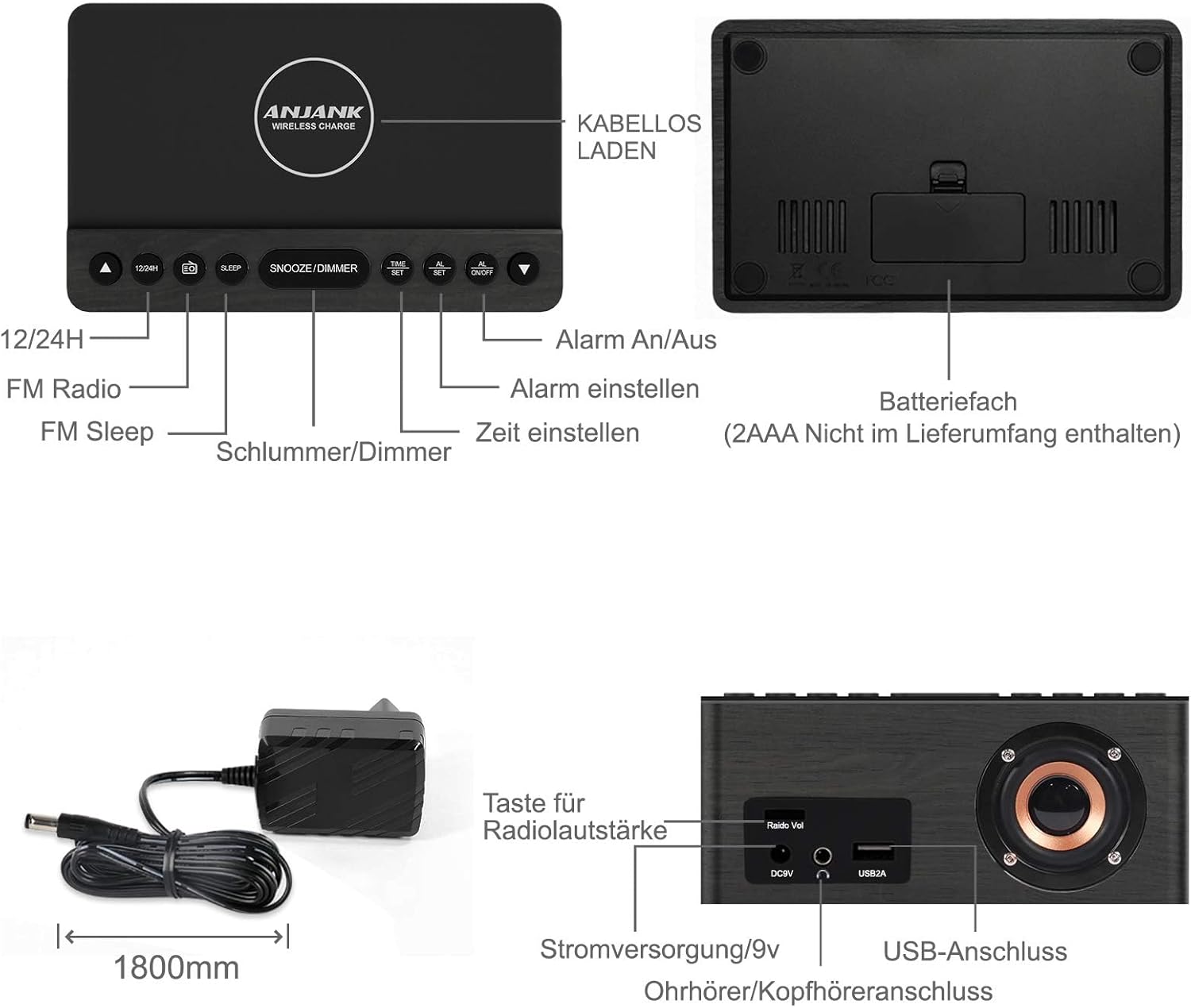
This diagram illustrates the location and function of the control buttons on the top panel and the ports on the rear of the ANJANK AC190-DE Digital Radio Alarm Clock. Key controls include 12/24H, FM Radio, Sleep, Snooze/Dimmer, Alarm On/Off, Time Set, and Alarm Set. Rear ports include DC9V power input, 3.5mm headphone jack, and USB 2A charging port.
Stille inn tiden
- Trykk og hold inne TIDEN SATT knappen. Timetallene vil begynne å blinke.
- Bruk UP or NED knapper for å justere timen.
- Pressen TIDEN SATT again to confirm the hour and proceed to minute adjustment.
- Bruk UP or NED knapper for å justere minuttene.
- Pressen TIDEN SATT for å lagre gjeldende tid.
- For å bytte mellom 12-timers og 24-timers format, trykk på 12/24H button. In 12-hour format, "AM" or "PM" indicators will be displayed.
Stille inn alarmer
Enheten støtter to uavhengige alarmer (AL1 og AL2).
- Trykk og hold inne ALARM SETT button. "AL1" will flash, and the hour digits will begin to flash.
- Bruk UP or NED buttons to set the desired alarm hour for Alarm 1.
- Pressen ALARM SETT for å bekrefte timen og gå videre til minuttjustering.
- Bruk UP or NED buttons to set the desired alarm minutes for Alarm 1.
- Pressen ALARM SETT to select the alarm source: Buzzer or FM Radio. Use UP or NED å velge.
- Pressen ALARM SETT to set the alarm volume (for FM Radio alarm). Use UP or NED å justere.
- Pressen ALARM SETT to save Alarm 1 settings.
- Repeat steps 1-7 for Alarm 2 by pressing ALARM SETT until "AL2" flashes.
- For å aktivere eller deaktivere en alarm, trykk på ALARM PÅ / AV button repeatedly until the desired alarm indicator (AL1 or AL2) appears or disappears on the display.
- Snooze-funksjon: Når en alarm lyder, trykk på SNOOZE/DIMMER button to temporarily silence it for 9 minutes. The alarm will sound again after 9 minutes.
- Stoppe en alarm: To stop an alarm completely, press any button other than SNOOZE/DIMMER. The alarm will reset for the next day.
FM-radiodrift

This image highlights the FM radio capabilities of the ANJANK AC190-DE, including its frequency range of 87.5-108 MHz, adjustable volume, sleep timer (10-120 minutes), and support for headphones.
- Slå på/av: Trykk på FM-radio -knappen for å slå radioen av eller på.
- Automatisk skanning: Trykk og hold inne FM-radio button to automatically scan and save available FM stations. The device can store up to 30 stations.
- Manuell innstilling: Bruk UP or NED buttons to manually tune to a specific frequency.
- Volumkontroll: Bruk Radiovolum knob on the back of the unit to adjust the radio volume.
- Sleep Timer: Mens radioen spiller, trykk på SOVE -knappen gjentatte ganger for å stille inn en sovetimer (10–120 minutter). Radioen slår seg automatisk av etter den valgte varigheten.
- Bruk av hodetelefoner: Connect 3.5mm headphones to the headphone jack on the back for private listening.
Trådløs lading
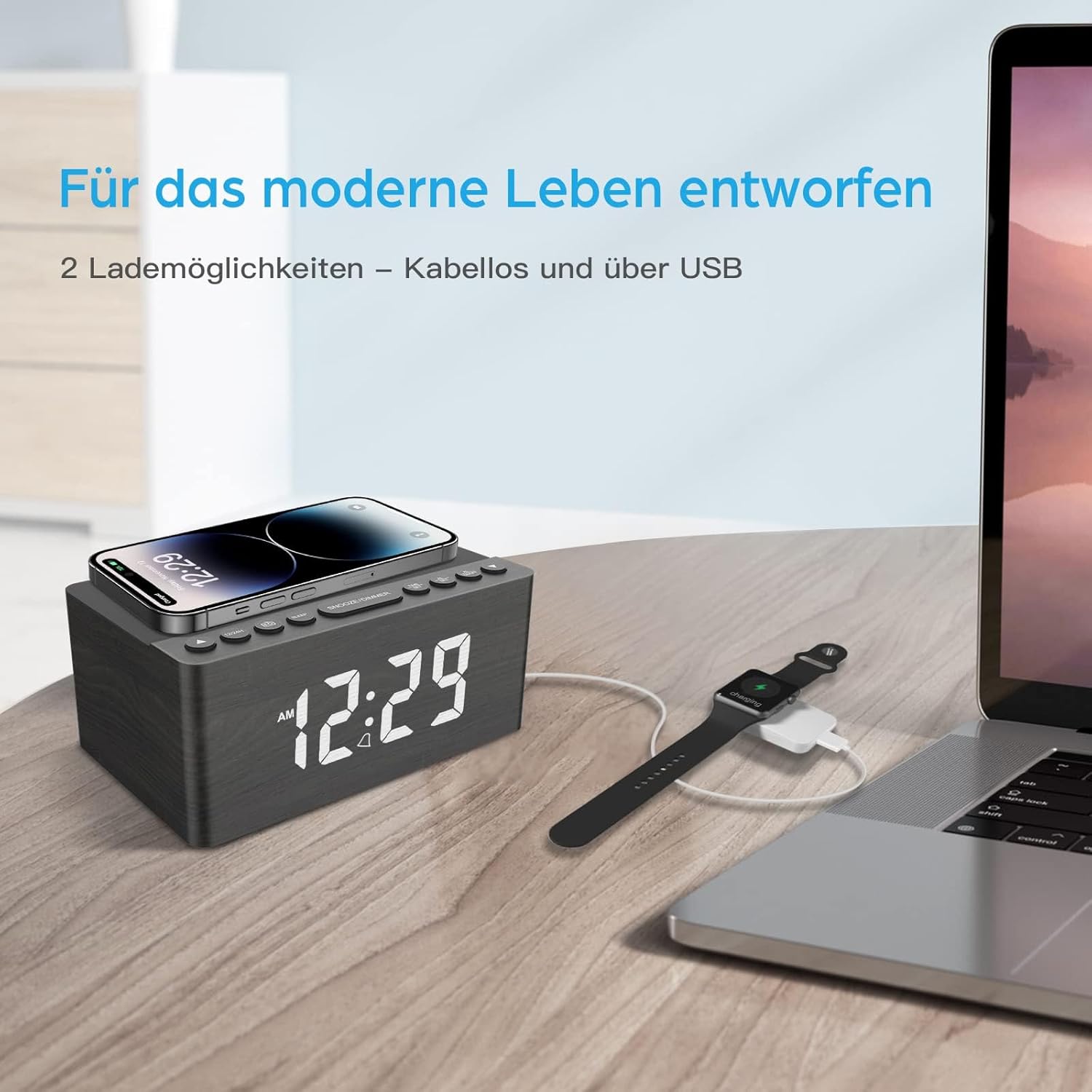
This image demonstrates the dual charging capabilities of the ANJANK AC190-DE, showing a smartphone being wirelessly charged on the top pad and a smartwatch connected to a laptop via USB, illustrating the convenience of charging multiple devices.
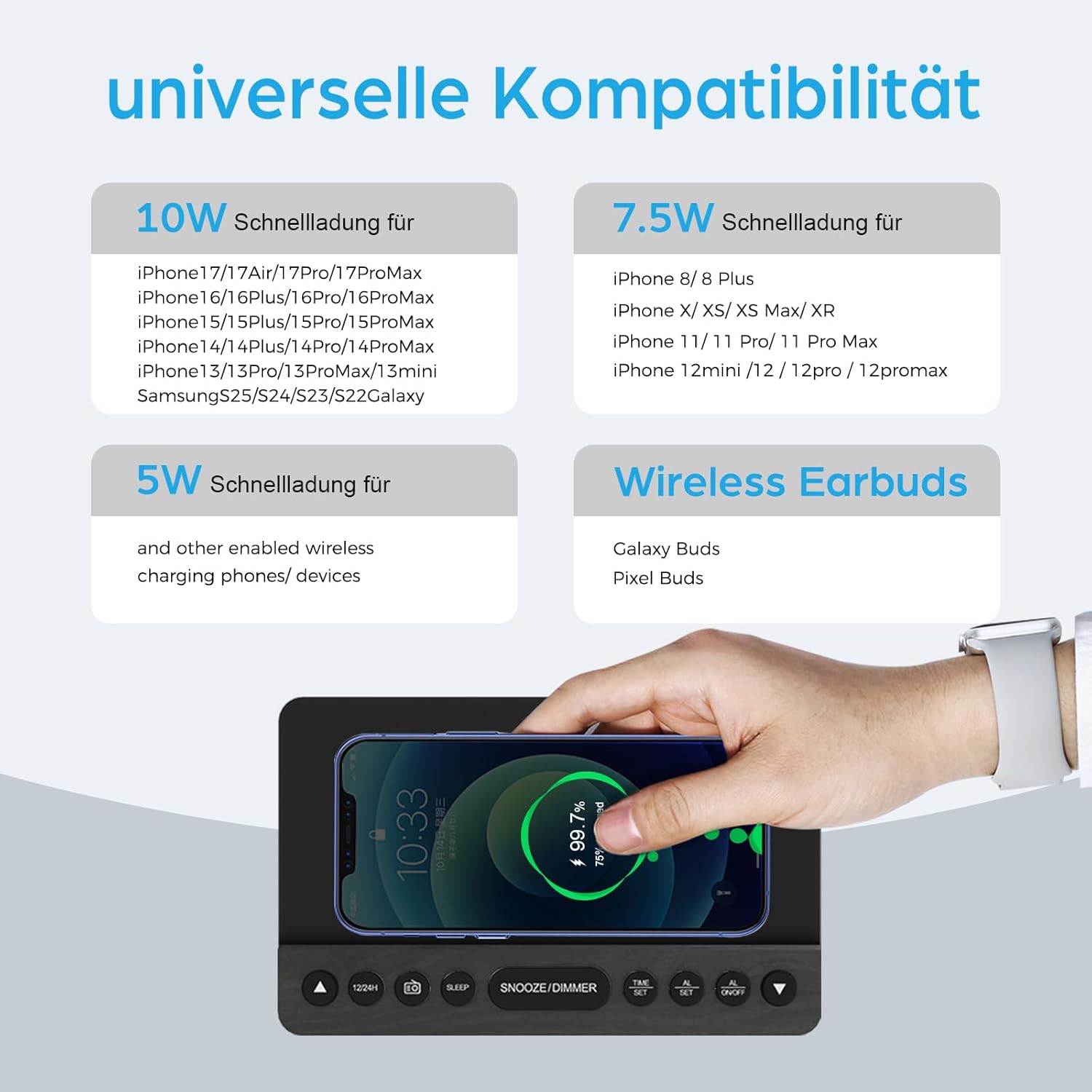
This infographic provides details on the universal compatibility of the wireless charging feature, specifying 10W fast charging for newer iPhone and Samsung models, 7.5W for other iPhone models, and 5W for other wireless charging phones and devices, including wireless earbuds.
- Place your Qi-compatible smartphone or device on the wireless charging pad located on the top surface of the clock.
- Sørg for at enheten er sentrert på ladeplaten for optimal lading.
- The charging indicator on the clock (if available) or on your device will confirm charging status.
- The charger supports 5W, 7.5W, and 10W adaptive charging.
USB-lading
- Connect your device's USB charging cable to the USB2A port on the back of the clock.
- This port provides 2A output for charging other electronic devices like a second phone, power bank, or smartwatch.
Skjermdimmer

This image demonstrates the 5-level dimmer function of the ANJANK AC190-DE, allowing users to adjust the LED display brightness from maximum to completely off, ensuring comfort in various lighting conditions.
- Trykk på SNOOZE/DIMMER button (when no alarm is sounding) to cycle through the 5 brightness levels of the LED display.
- Select the brightness level that is most comfortable for your environment.
Vedlikehold
- Rengjøring: Tørk av enheten med en myk, tørr klut. Ikke bruk flytende rengjøringsmidler eller slipende materialer.
- Plassering: Avoid placing the unit in direct sunlight, near heat sources, or in areas with high humidity.
- Makt: Koble fra strømadapteren hvis enheten ikke skal brukes over lengre tid.
Feilsøking
- Ingen strøm/skjerm av:
- Sørg for at strømadapteren er ordentlig koblet til enheten og en fungerende stikkontakt.
- Check if the display dimmer is set to the lowest (off) level. Press SNOOZE/DIMMER for å øke lysstyrken.
- Verify battery backup if applicable.
- Trådløs lading fungerer ikke:
- Ensure your device is Qi-compatible and properly centered on the charging pad.
- Remove any thick phone cases or metallic objects between the phone and the charging pad.
- Check if the clock is powered on.
- Dårlig FM-radiomottak:
- Fully extend and reposition the FM antenna.
- Try moving the unit to a different location to improve signal.
- Utfør en automatisk skanning på nytt for å finne sterkere stasjoner.
- Alarmen går ikke:
- Ensure the alarm is activated (AL1 or AL2 indicator visible on the display).
- Check if the alarm volume is set appropriately (for radio alarm).
- Verify the time and alarm settings are correct.
Spesifikasjoner
| Trekk | Detalj |
|---|---|
| Merke | ANJANK |
| Modellnummer | AC190-DE |
| Farge | Grey + FM |
| Produktdimensjoner | 12.3 x 3.81 x 10.2 cm |
| Varevekt | 720 gram |
| Strøm/Wattage | 10 watt |
| Materiale | Tre |
| Spesielle funksjoner | Adjustable Brightness, Adjustable Volume, Alarm, Charging Port, Charging Station, Programmable, Radio, Snooze, Timers |
| Strømkilde | Kablet |
| Gjenstandsform | Rektangulær |
| Tema | Musikk |
| Rammemateriale | Tre |
| Batterier inkludert | No (Requires 2x AAA for backup) |

This image provides the physical dimensions of the ANJANK AC190-DE Digital Radio Alarm Clock.
Garantiinformasjon
ANJANK offers a 30-day return policy for this product. Please refer to your purchase documentation or retailer's policy for specific terms and conditions regarding returns and warranty claims.
Kundestøtte
For any inquiries or assistance, ANJANK provides 24-hour customer service. Please refer to the product packaging or the official ANJANK webnettstedet for kontaktinformasjon og ytterligere støtteressurser.