
1. Introduksjon
Takk for kjøpetasing the Blackstar ID:Core Stereo 10 Sugar Skull V2 Limited Edition amplifier. This 10-watt (2x5W) stereo combo amplifier is designed to provide a versatile and high-quality sound experience for electric guitarists. It features Blackstar's patented ISF (Infinite Shape Feature) control, a range of voices, and built-in effects, making it ideal for practice, recording, and small performances. This manual provides essential information for safe and effective use of your amplivligere.
2. Viktige sikkerhetsinstruksjoner
- Les instruksjoner: Les alle sikkerhets- og bruksanvisninger før du bruker dette produktet.
- Ta vare på instruksjonene: Ta vare på disse instruksjonene for fremtidig referanse.
- Vær oppmerksom på advarsler: Følg alle advarsler på produktet og i bruksanvisningen.
- Vann og fuktighet: Ikke bruk dette apparatet i nærheten av vann.
- Rengjøring: Rengjør kun med en tørr klut.
- Ventilasjon: Ikke blokker noen ventilasjonsåpninger. Installer i samsvar med produsentens instruksjoner.
- Varme: Ikke installer i nærheten av varmekilder som radiatorer, varmeelementer, ovner eller andre apparater (inkludert ampløftere) som produserer varme.
- Strømledningsbeskyttelse: Beskytt strømledningen mot å bli tråkket på eller klemt, spesielt ved støpsler, stikkontakter og punktet der de kommer ut av apparatet.
- Koble fra under stormer: Koble fra dette apparatet under tordenvær eller når det ikke skal brukes i lengre perioder.
- Service: Overlat all service til kvalifisert servicepersonell. Service er nødvendig når apparatet har blitt skadet på noen måte, for eksempel strømledning eller støpsel er skadet, væske har blitt sølt eller gjenstander har falt inn i apparatet, apparatet har vært utsatt for regn eller fuktighet, ikke fungerer normalt , eller har blitt droppet.
3. Pakkens innhold
Vennligst kryss av i boksen for følgende elementer:
- Blackstar ID:Core Stereo 10 Sugar Skull V2 Limited Edition Amplivligere
- Strømforsyningsenhet
- USB-kabel
- Brukerhåndbok (dette dokumentet)
4. Kontroller og funksjoner
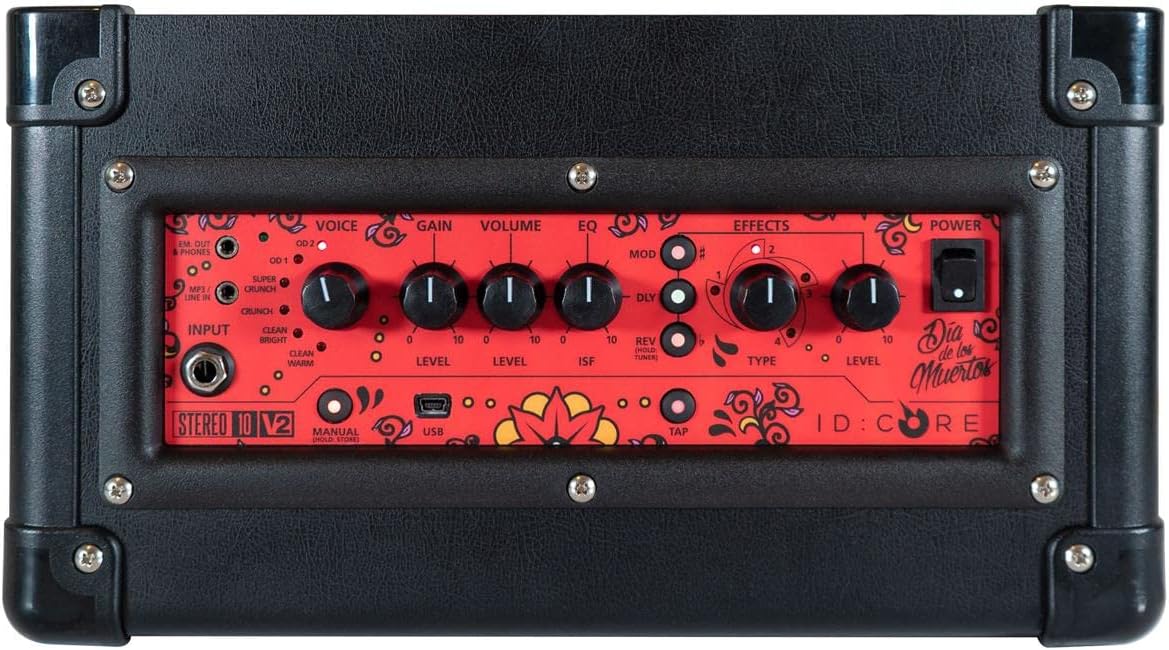
Bilde: Topp view av amplifier's control panel, showing all knobs, buttons, and input/output jacks.
Kontroller på frontpanelet:
- Inndata: 6.35mm (1/4") jack for connecting your guitar.
- Stemme: Rotary switch to select one of six Blackstar voices: Clean Warm, Clean Bright, Crunch, Super Crunch, OD 1, OD 2.
- Gevinst: Kontrollerer mengden overdrive eller distortion.
- Volum: Justerer det totale utgangsnivået til amplivligere.
- EQ: Tonekontroll.
- ISF (uendelig formfunksjon): Patented control that shifts the tone stack response between a USA-style (counter-clockwise) and a UK-style (clockwise) amplivligere.
- Mod (modulering): Rotary switch to select and adjust the level of modulation effects (Chorus, Flanger, Phaser, Tremolo).
- Dly (Delay): Rotary switch to select and adjust the level of delay effects (Linear, Analogue, Tape, Multi).
- Rev (Reverb): Rotary switch to select and adjust the level of reverb effects (Room, Hall, Spring, Plate).
- Type: Selects the specific effect type within the Mod, Dly, or Rev categories.
- Nivå: Justerer det generelle nivået for den valgte effekten.
- Trykk på: Button to set the tempo for time-based effects (Delay, Tremolo).
- Makt: Av/på-bryter for amplivligere.
- USB: USB-B port for connecting to a computer for recording and using Blackstar's Architect software.
- Em. Out / Phones: 6.35mm (1/4") jack for headphones or direct recording output with speaker emulation.
- MP3 / Line In: 3.5mm (1/8") stereo jack for connecting external audio devices like MP3 players or phones.

Bilde: Foran view of the Blackstar ID:Core Stereo 10 ampløft, showcasing the unique Sugar Skull V2 design on the speaker grille.
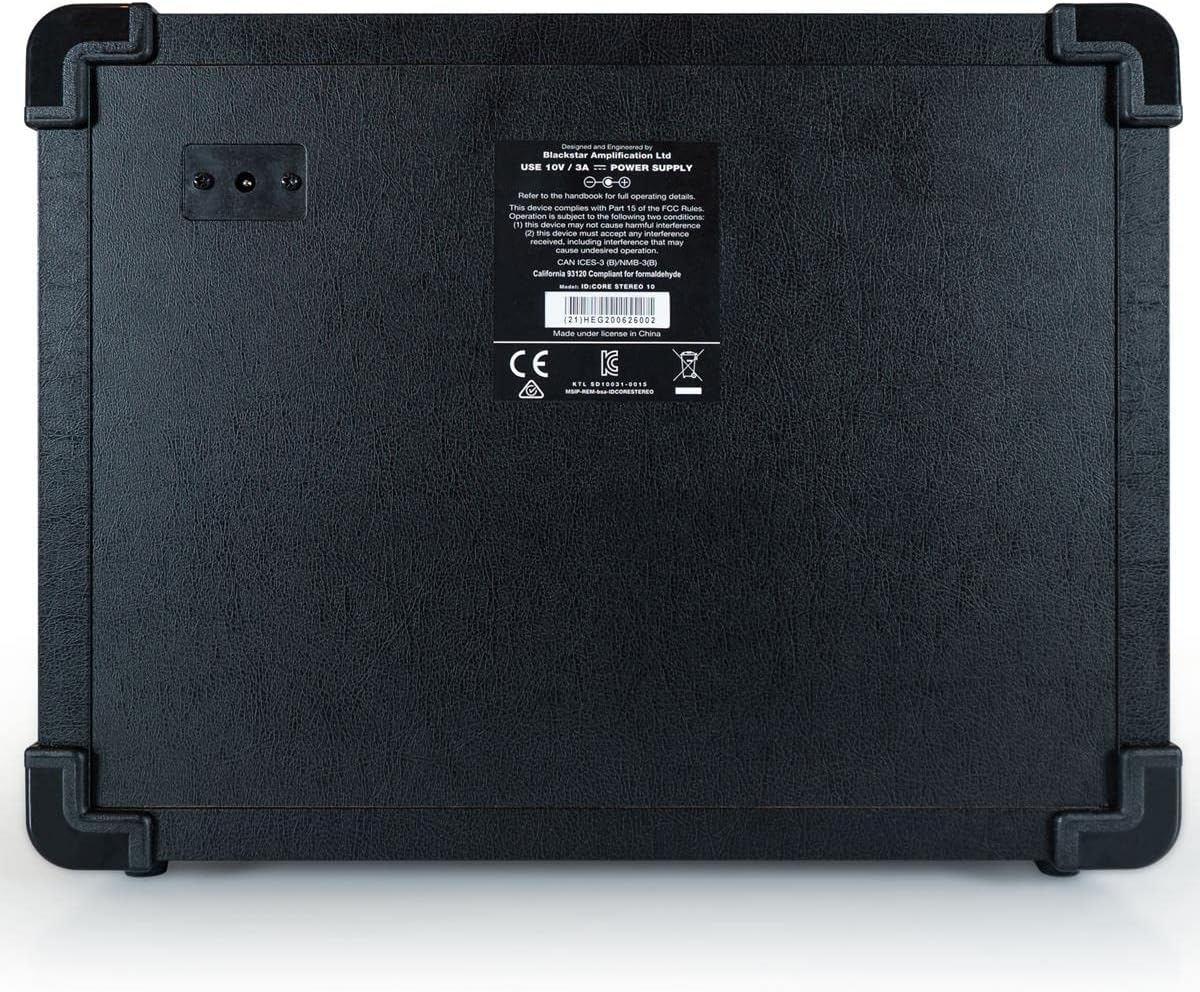
Bilde: Bak view of the Blackstar ID:Core Stereo 10 amplifier, displaying the product information label and power input.
5. Oppsett
- Utpakking: Fjern forsiktig amplifier and all accessories from the packaging. Retain the packaging for future transport or storage.
- Plassering: Plasser ampPlasser apparatet på en stabil, flat overflate. Sørg for tilstrekkelig ventilasjon rundt enheten. Unngå å plassere det i nærheten av varmekilder eller i direkte sollys.
- Strømtilkobling: Connect the supplied power supply unit to the DC input jack on the rear of the amplifier. Plug the power supply into a suitable mains outlet. Ensure the ampSørg for at strømbryteren på lifteren er i AV-posisjon før du kobler til.
- Gitartilkobling: Koble den elektriske gitaren din til Inndata jack on the front panel using a standard 6.35mm (1/4") instrument cable.
- External Audio (Optional): To play along with music, connect an MP3 player, phone, or other audio source to the MP3 / Line In jack using a 3.5mm stereo cable.
- USB-tilkobling (valgfritt): For recording or using the Blackstar Architect software, connect the amplifier to your computer using the supplied USB cable.
6. Bruksanvisning
- Strøm på: Ensure all connections are secure, then switch the Makt button to the ON position. The power indicator light will illuminate.
- Still inn volum: Start med Volum knob at a low setting to avoid sudden loud sounds.
- Velg stemme: Roter Stemme switch to choose your desired amplifier type (e.g., Clean Warm, Crunch, OD 1).
- Juster forsterkning: Bruk Gevinst knob to control the amount of drive. Lower settings provide cleaner tones, while higher settings introduce more distortion.
- Shape Tone with EQ and ISF: Juster EQ knob for general tone shaping. Experiment with the ISF control to blend between American (tight low-end, aggressive mids) and British (woodier, less aggressive) amputslippsegenskaper.
- Bruk effekter:
- Select a modulation, delay, or reverb effect using the Mod, Dly, eller Rev rotary switches.
- Bruk Type knob to select a specific effect within that category (e.g., Chorus, Flanger for Mod).
- Adjust the effect's intensity with the Nivå knott.
- For time-based effects (Delay, Tremolo), press the Trykk på button repeatedly at your desired tempo to synchronize the effect.
- Headphone/Recording Output: Koble hodetelefoner til Em. Out / Phones jack for silent practice. This output also provides a speaker-emulated signal for direct recording.
- USB -lyd: When connected to a computer via USB, the amplifier acts as an audio interface, allowing you to record your guitar directly into a DAW or use the Blackstar Architect software for deeper editing and patch management.
- Slå av: Når du er ferdig, slår du på Volum down, then switch the Makt knappen til AV-posisjon.
7. Vedlikehold
- Rengjøring: Rengjør amplifier's exterior with a soft, dry cloth. Do not use abrasive cleaners, solvents, or waxes.
- Lagring: Når den ikke er i bruk over lengre tid, oppbevar den ampOppbevar væsken på et tørt og kjølig sted, unna direkte sollys og ekstreme temperaturer.
- Ventilasjon: Ensure that the ventilation openings are always clear to prevent overheating.
- Kabelpleie: Always handle power and instrument cables carefully. Avoid bending or kinking them sharply.
8. Feilsøking
| Problem | Mulig årsak | Løsning |
|---|---|---|
| Ingen lyd fra amplivligere |
|
|
| Poor sound quality / Buzzing noise |
|
|
| Effekter fungerer ikke |
|
|
9. Spesifikasjoner
- Modell: IDCORE10 V3
- Utgang Wattage: 10 Watts (2 x 5W Stereo)
- Høyttalere: 2 x 3" Blackstar Speakers
- Stemmer: 6 (Ren Varm, Ren Lys, Sprø, Supersprø, OD 1, OD 2)
- Effekter: Modulation (Chorus, Flanger, Phaser, Tremolo), Delay (Linear, Analogue, Tape, Multi), Reverb (Room, Hall, Spring, Plate)
- Kontroller: Voice, Gain, Volume, EQ, ISF, Mod, Dly, Rev, Type, Level, Tap, Power
- Innganger: Guitar Input (6.35mm jack), MP3/Line In (3.5mm stereo jack), USB-B
- Utganger: Emulated Out/Headphones (6.35mm jack)
- Strømkilde: Elektrisk med ledning
- Kompatible enheter: Elektrisk gitar
- Varevekt: 10 pund (4.54 kg)
- Produktdimensjoner: 16 x 18 x 14 tommer (40.6 x 45.7 x 35.6 cm)
- ASIN: B08Z88WN8T
10. Garanti og støtte
Blackstar Amplification products are designed and manufactured to the highest standards. For detailed warranty information specific to your region and product, please refer to the warranty card included with your purchase or visit the official Blackstar Amplifikasjon website. For technical support or service inquiries, please contact your authorized Blackstar dealer or Blackstar customer support directly.
Nettressurser:
- Blackstar AmpOffisiell opplysning Webnettsted: www.blackstaramps.com
- Blackstar Architect Software: www.blackstaramps.com/arkitekt