
1. Introduksjon
This manual provides detailed instructions for the safe installation, operation, and maintenance of your Lumi LPA36-463A Full-Motion TV Wall Mount. Please read this manual thoroughly before installation and retain it for future reference. This wall mount is designed to securely hold most LED and LCD televisions ranging from 37 to 70 inches, with a maximum weight capacity of 45 kg (99 lbs).
The full-motion design allows for maximum extension, tilt, and rotation of your television, providing optimal viewing angles from various positions within a room. The mount can extend up to 475 mm from the wall and retract to a slim profile på 95 mm.
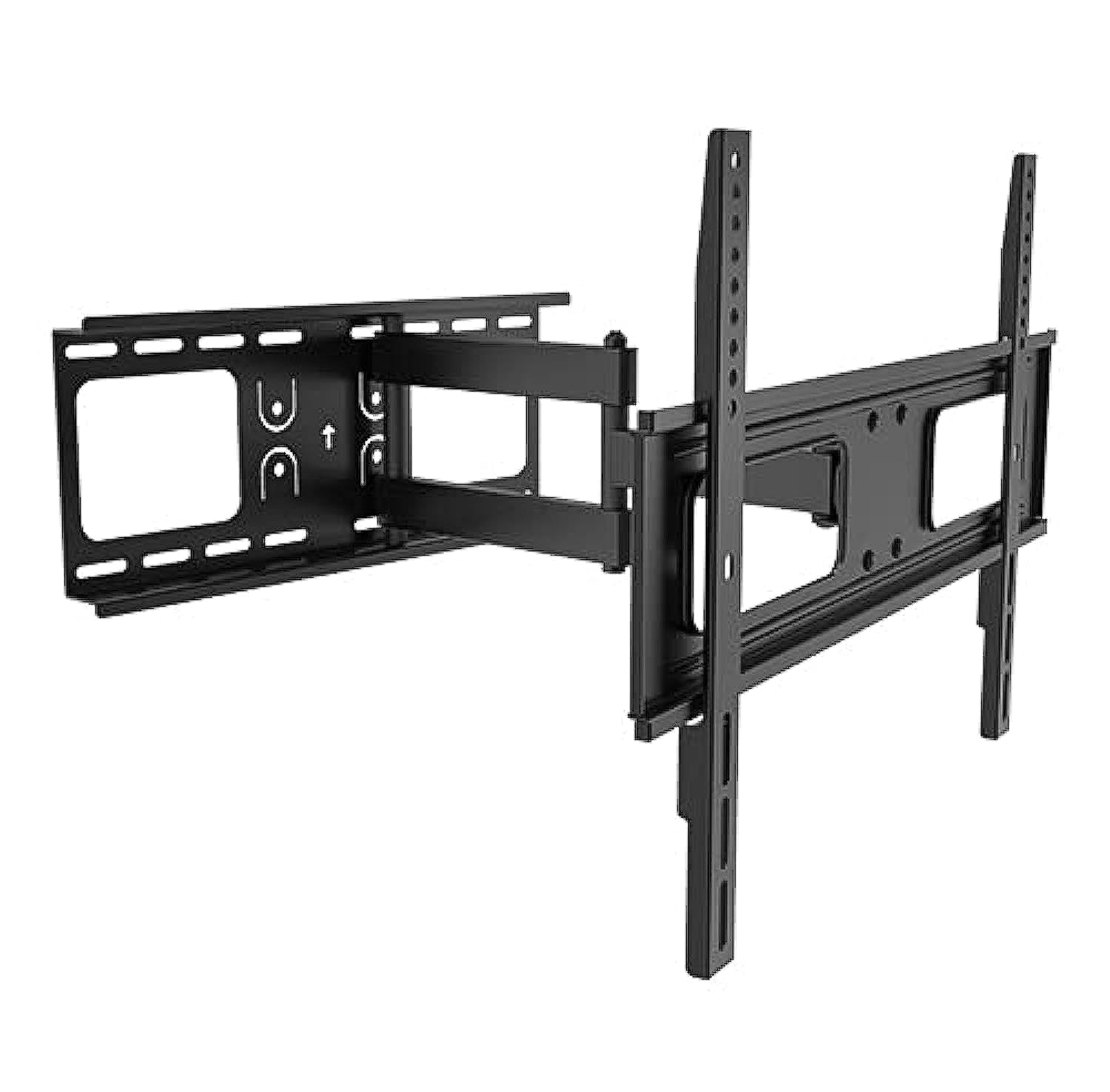
Image 1.1: The Lumi LPA36-463A Full-Motion TV Wall Mount, showing its articulated arm and VESA plate.
2. Sikkerhetsinformasjon
ADVARSEL: Unnlatelse av å lese og følge disse instruksjonene kan føre til alvorlig personskade, materielle skader eller ugyldiggjøring av garantien. Hvis du ikke forstår disse instruksjonene eller er i tvil om installasjonssikkerheten, vennligst kontakt en kvalifisert installatør.
- Ikke overskrid den maksimale vektkapasiteten på 45 kg (99 lbs).
- This mount is designed for installation on solid concrete walls, brick walls, or wood stud walls. Do not install on drywall alone.
- Sørg for at veggkonstruksjonen trygt kan bære den kombinerte vekten av festet og TV-en.
- Use only the mounting hardware provided. Do not use power tools to tighten screws, as this may strip threads.
- Hold alle små deler unna barn.
- Always have at least two people for installation to prevent injury or damage.
- Sjekk alle tilkoblinger med jevne mellomrom for å sikre at de forblir sikre.
3. Pakkens innhold
Verify that all components are present and undamaged before beginning installation. If any parts are missing or defective, contact your retailer for assistance.
| Del | Beskrivelse | Mengde |
|---|---|---|
| Montering av veggplate | Main wall mounting bracket with articulated arm. | 1 |
| TV Bracket (VESA Plate) | Bracket that attaches to the back of the TV. | 1 |
| Monteringsmaskinvaresett | Includes various screws, washers, and anchors for wall and TV attachment. | 1 sett |
| Nivå | For ensuring horizontal alignment during installation. | 1 |
| Bruksanvisning | Dette dokumentet. | 1 |
4. Oppsett og installasjon
Before you begin, ensure you have the necessary tools: pencil, drill, stud finder (for wood studs), measuring tape, and a Phillips head screwdriver. It is highly recommended to have two people for installation.
4.1. Bestem monteringssted
- Choose a location on the wall that can support the weight of the TV and mount.
- For wood stud walls, locate the center of the studs using a stud finder.
- For concrete or brick walls, ensure there are no hidden pipes or electrical wires.
- Mark the desired height for the top of your TV.
4.2. Attach Wall Plate to Wall
- Position the wall plate assembly against the wall at the desired height. Use the integrated level to ensure it is perfectly horizontal.
- Mark the drill holes through the wall plate onto the wall with a pencil.
- Bor pilothull:
- For wood studs: Use a 5.5mm (7/32") drill bit.
- For concrete/brick: Use a 10mm (3/8") masonry drill bit and insert wall anchors.
- Secure the wall plate to the wall using the provided lag bolts and washers. Tighten firmly but do not overtighten.
4.3. Attach TV Brackets to TV
- Plasser TV-en forsiktig med forsiden ned på en myk, ren overflate.
- Identify the VESA mounting holes on the back of your TV. This mount supports VESA patterns up to 400x400 mm.
- Select the appropriate screws (M4, M6, or M8) and washers from the hardware kit that fit your TV's mounting holes.
- Attach the TV brackets to the back of your TV, ensuring they are centered and securely fastened. Do not overtighten.
4.4. Mount TV to Wall Plate
- With assistance, carefully lift the TV and hook the TV brackets onto the wall plate assembly.
- Sørg for at TV-en er godt festet på veggplaten.
- Engage any safety locking mechanisms (if present) to prevent accidental dislodgement.
5. Bruksanvisning
The Lumi LPA36-463A mount offers full-motion capabilities for optimal viewing fleksibilitet.
5.1. Adjusting Extension and Retraction
- Gently pull the TV away from the wall to extend the arm. The mount can extend up to 475 mm.
- Push the TV back towards the wall to retract the arm. The mount can retract to a minimum distance of 95 mm from the wall.
- Always move the TV smoothly and avoid sudden jerks.
5.2. Adjusting Tilt
- The mount allows for vertical tilt adjustment. Loosen the tilt adjustment knobs (if present, refer to diagram in physical manual) on the TV brackets.
- Adjust the TV to the desired upward or downward angle.
- Tighten the tilt adjustment knobs to secure the TV in position.
5.3. Adjusting Swivel (Rotation)
- The articulated arm allows for horizontal swivel of the TV up to 90 degrees left and right.
- Gently push or pull the side of the TV to rotate it to your preferred viewing vinkel.
- No locking mechanism is typically required for swivel; the friction of the joints holds the position.
6. Vedlikehold
Regelmessig vedlikehold sikrer lang levetid og sikker drift av TV-veggfestet.
- Rengjøring: Tørk av festet med en myk, tørr klut. Ikke bruk slipende rengjøringsmidler eller løsemidler.
- Periodisk inspeksjon: Every 3-6 months, check all screws and bolts to ensure they are tight and secure. Retighten if necessary.
- Leddsmøring: If the arm movement becomes stiff, a small amount of silicone-based lubricant can be applied to the pivot points. Avoid oil-based lubricants.
- Skadesjekk: Inspect the mount for any signs of damage, wear, or corrosion. If any damage is found, discontinue use and contact customer support.
7. Feilsøking
If you encounter issues with your Lumi LPA36-463A TV mount, refer to the following common problems and solutions.
| Problem | Mulig årsak | Løsning |
|---|---|---|
| TV-en er ikke i vater etter installasjon. | Wall plate not perfectly horizontal. | Carefully loosen wall plate bolts, adjust with a level, and retighten. Some mounts have post-installation leveling adjustments; check your specific model. |
| Festet føles løst eller ustø. | Mounting bolts are not tight enough or incorrect wall anchors were used. | Ensure all wall bolts and TV attachment screws are securely tightened. Verify correct anchors for your wall type. If problem persists, consult a professional. |
| TV cannot tilt or swivel smoothly. | Joints are too tight or require lubrication. | Check if any adjustment knobs are overtightened. Apply a small amount of silicone-based lubricant to the moving joints. |
| TV-en passer ikke til festet. | Feil VESA-mønster eller TV-størrelse/vekt. | Verify your TV's VESA pattern and weight against the mount's specifications. This mount supports VESA up to 400x400mm and TVs up to 45kg (99lbs). |
8. Spesifikasjoner
| Trekk | Detalj |
|---|---|
| Modellnummer | LPA36-463A |
| Merke | Lumi |
| Monteringstype | Full-Motion Wall Mount |
| Materiale | Metall |
| Skjermstørrelseskompatibilitet | 37" - 70" |
| Vekt kapasitet | 45 kg (99 lbs) |
| VESA-kompatibilitet | Opptil 400x400 mm |
| Forlengelse fra vegg | 95 mm (retracted) to 475 mm (extended) |
| Tilt Range | Adjustable (vertical) |
| Svingbar rekkevidde | Up to 90 degrees left/right |
| Forsendelsesdimensjoner | 51.4 x 22.2 x 7 cm; 2.52 kg |
9. Garanti og støtte
Lumi products are manufactured with quality and durability in mind. For specific warranty details, please refer to the warranty card included with your product or visit the official Lumi webnettstedet. Ta vare på kjøpskvitteringen som kjøpsbevis.
For technical support, missing parts, or any questions regarding the installation or operation of your Lumi LPA36-463A TV Wall Mount, please contact your local retailer or Lumi customer service.
Kontaktinformasjon: (Please refer to your product packaging or Lumi's official webnettstedet for den mest oppdaterte kontaktinformasjonen.)