
Emporia V221-4g_001
Emporia Active Glam 4G
Brukerhåndbok
1. Introduksjon
This user manual provides detailed instructions for the proper setup, operation, maintenance, and troubleshooting of your new Emporia Active Glam 4G mobile phone. Please read this manual carefully before using the device to ensure optimal performance and longevity. Keep this manual for future reference.

Figure 1.1: Emporia Active Glam 4G mobile phone, closed view displaying both front and back panels.
2. Oppsett
2.1 Utpakking og komponenter
Kontroller at alle komponentene er tilstede i pakken:
- Emporia Active Glam 4G Mobile Phone
- Litium-ion-batteri
- Ladeholder
- USB Type-C-kabel
- Strømadapter
2.2 Installasjon av batteri
- Fjern forsiktig bakdekselet på telefonen.
- Align the contacts of the Lithium-ion battery with the contacts in the battery compartment.
- Trykk batteriet forsiktig på plass til det sitter ordentlig på plass.
- Sett bakdekselet på plass igjen, og sørg for at det klikker på plass.
2.3 Innsetting av SIM-kort
The Emporia Active Glam 4G uses a standard SIM card. Ensure the phone is powered off before inserting or removing the SIM card.
- Remove the back cover and battery (if not already done).
- Finn SIM -kortsporet.
- Sett inn SIM-kortet med gullkontaktene ned og det avkuttede hjørnet på linje med sporet.
- Skyv SIM-kortet forsiktig inn til det klikker på plass.
- Sett på batteriet og bakdekselet igjen.
2.4 Lading av enheten
Before first use, fully charge the phone. The charging cradle provides a convenient way to charge your device.

Figure 2.1: The Emporia Active Glam 4G phone securely placed in its dedicated charging cradle.
- Connect the USB Type-C cable to the charging cradle and the power adapter.
- Koble strømadapteren til en stikkontakt.
- Place the phone into the charging cradle, ensuring it is properly seated and the charging indicator appears on the screen.
- En full lading tar vanligvis omtrent 2–3 timer.
2.5 Slå på/av
- For å slå på: Trykk og hold inne av/på-knappen til skjermen lyser opp.
- Slik slår du av: Trykk og hold inne av/på-knappen, og velg deretter «Slå av» fra alternativene på skjermen.
3. Bruksanvisning
3.1 Foreta og motta anrop

Figure 3.1: The Emporia Active Glam 4G phone opened, revealing its clear display and large, easy-to-use keypad.
- Slik ringer du: Slå nummeret med tastaturet og trykk på den grønne ringeknappen.
- Slik svarer du på et anrop: Trykk på den grønne ringeknappen når telefonen ringer.
- Slik avslutter du en samtale: Trykk på den røde avslutt-knappen.
3.2 Sende og motta meldinger
- Naviger til menyen «Meldinger» ved hjelp av navigasjonstastene.
- Velg «Ny melding» for å skrive en tekstmelding.
- Skriv inn mottakerens nummer eller velg fra kontakter, og skriv deretter meldingen din.
- Trykk «Send» for å sende meldingen.
3.3 Bruk av kameraet
Telefonen er utstyrt med et 3 megapikselkamera.
- Åpne telefonen og naviger til «Kamera»-appen.
- Ram inn motivet ved hjelp av skjermen.
- Press the designated camera button or 'OK' to capture a photo.
3.4 SOS-nødanropfunksjon
The Emporia Active Glam 4G features a dedicated SOS button for emergencies, located on the back of the device.
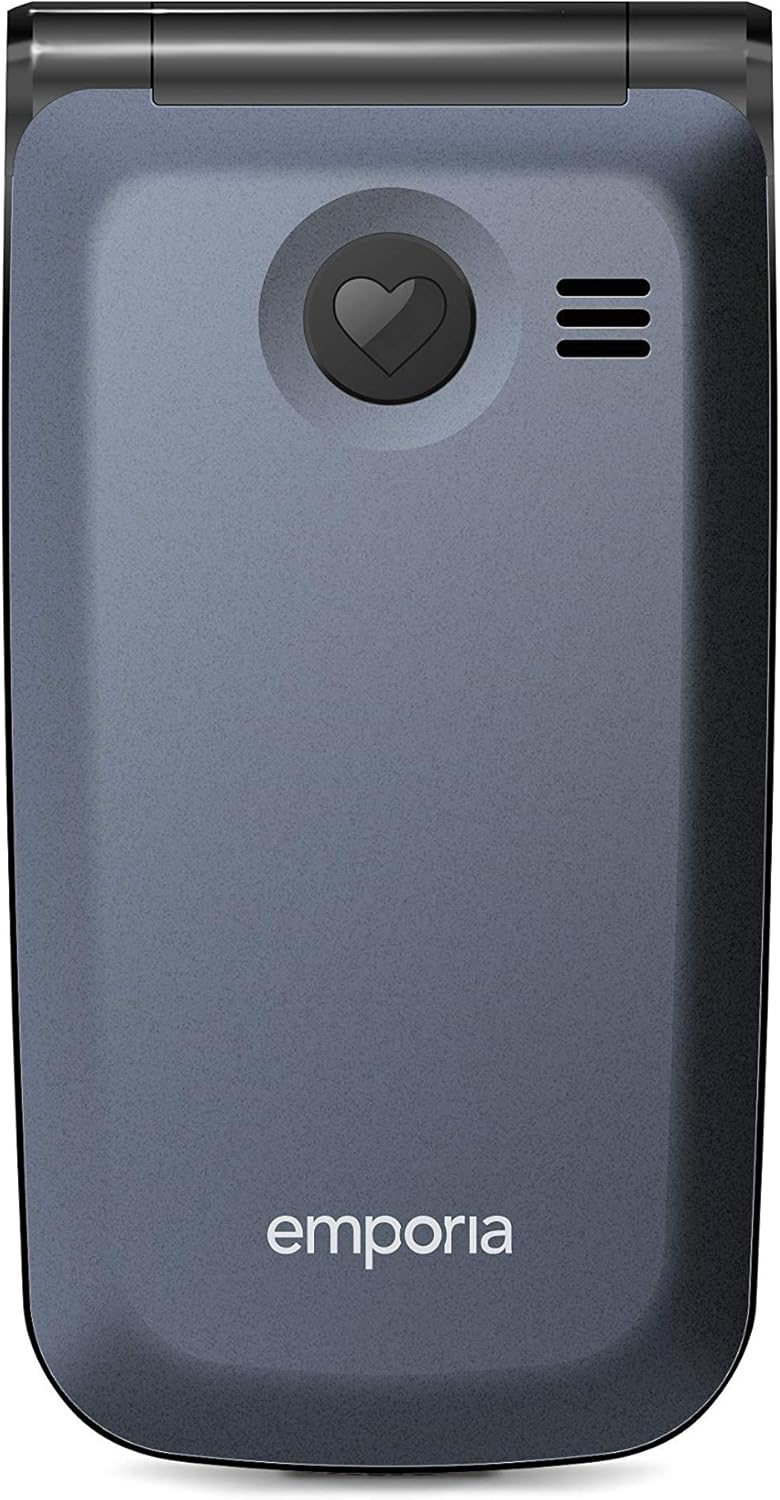
Figur 3.2: Bak view of the Emporia Active Glam 4G, highlighting the prominent SOS emergency call button.
- Oppsett: Before using, configure up to five emergency contacts in the 'SOS Settings' menu. These contacts will be called sequentially until one answers.
- Aktivering: I en nødsituasjon, trykk og hold inne SOS-knappen på baksiden av telefonen i noen sekunder.
- The phone will automatically dial the pre-set emergency numbers and send an emergency SMS message to them.
3.5 Keypad and Display Navigation
The phone features a clear display and a tactile keypad for easy navigation.
- Bruk retningsnavigasjonstastene (opp, ned, venstre, høyre) for å navigere gjennom menyer og alternativer.
- Press the 'OK' or 'Select' button in the center of the navigation keys to confirm a selection.
- The 'Back' or 'Clear' button (often marked with an arrow or 'C') allows you to return to the previous screen or delete characters.
3.6 Connectivity (Bluetooth, Wi-Fi)
The phone supports Bluetooth and Wi-Fi connectivity.
- Bluetooth: Go to 'Settings' > 'Bluetooth' to enable, search for, and pair with other Bluetooth devices like headsets or car kits.
- Wi-Fi: Go to 'Settings' > 'Wi-Fi' to enable, scan for available networks, and connect to a Wi-Fi network by entering the password if required.
4. Vedlikehold
4.1 Rengjøring av enheten
For å holde telefonen i god stand:
- Bruk en myk, lofri klut til å tørke av skjermen og telefonens kropp.
- Unngå bruk av sterke kjemikalier, rengjøringsspray eller slipende materialer.
- Ikke utsett telefonen for overdreven fuktighet.
4.2 Batteristell
Riktig batteripleie kan forlenge levetiden:
- Unngå ekstreme temperaturer, både varme og kalde.
- Ikke la telefonen lade over lengre tid etter at den er fulladet.
- If the phone will not be used for a long time, store it with a partial charge (around 50%).
4.3 Programvareoppdateringer
While specific software update information is not available, it is generally recommended to keep your device's software updated to ensure optimal performance, security, and access to new features. Check the phone's settings periodically for any available updates.
5. Feilsøking
If you encounter issues with your Emporia Active Glam 4G, refer to the following common problems and solutions:
| Problem | Mulig løsning |
|---|---|
| Telefonen slår seg ikke på | Ensure the battery is correctly installed and charged. Connect the phone to the charger and try again. |
| Ingen nettverkssignal | Sjekk om SIM-kortet er satt inn riktig. Flytt til et område med bedre nettverksdekning. Start telefonen på nytt. |
| Kan ikke ringe eller motta anrop | Verify network signal strength. Check if call barring is enabled. Ensure sufficient credit/plan if applicable. |
| Dårlig lydkvalitet under samtaler | Adjust the call volume. Ensure the microphone and speaker are not obstructed. Move to a quieter environment. |
| Batteriet tømmes raskt | Reduce screen brightness. Close unused applications. Limit background data usage. Consider replacing the battery if it's old. |
If the problem persists after trying these solutions, please contact Emporia customer support for further assistance.
6. Spesifikasjoner
Key technical specifications for the Emporia Active Glam 4G (Model: V221-4g_001):
| Trekk | Detalj |
|---|---|
| Merke | Emporia |
| Modellnummer | V221-4g_001 |
| Farge | Blåbær |
| Produkttype | Vend telefon |
| Operativsystem | Android 10.0 |
| Skjermstørrelse | 2.2 tommer |
| Oppløsning | 320 x 240 piksler |
| RAM-størrelse | 512 MB |
| CPU-hastighet | 1.3 GHz |
| Tilkobling | Bluetooth, USB Type-C, Wi-Fi |
| Mobilteknologi | 4G |
| Effektiv stilloppløsning | 3 megapiksler |
| Batterisammensetning | Litium-ion (1 inkludert) |
| Spesielle funksjoner | USB, Camera, Keypad, Flash, Touch (implied by OS), Wi-Fi |
7. Garanti og støtte
7.1 Garantiinformasjon
Your Emporia Active Glam 4G mobile phone is covered by a manufacturer's warranty. Please refer to the warranty card included in your product packaging or visit the official Emporia webnettstedet for detaljerte vilkår og betingelser angående garantidekning, varighet og kravprosedyrer.
7.2 Kundestøtte
For technical assistance, troubleshooting beyond this manual, or warranty inquiries, please contact Emporia customer support. Contact details can typically be found on the official Emporia webnettstedet eller i produktdokumentasjonen.
Nettressurser: Visit the official Emporia website for FAQs, updated manuals, and support forums.
Kontaktnummer: Refer to your regional Emporia support contact information.