
1. Produktet er overview
Discover the ForceClima 12300 Connected Heating portable air conditioner, designed to adapt to your needs at any time with its portable design and five operating modes. It ventilates, cools, heats, and dehumidifies any room in your home, or allows for peaceful rest with its night mode. Featuring Wi-Fi control, a remote control, a touch panel, and an LED screen, it ensures you can enjoy the optimal environment with maximum comfort.

Bilde 1.1: Foran view of the Cecotec ForceClima 12300 portable air conditioner.

Image 1.2: Another perspective of the Cecotec ForceClima 12300 portable air conditioner.
2. Sikkerhetsadvarsler
Please read all safety warnings and instructions carefully before using the appliance to prevent personal injury or damage to the product. Keep this manual for future reference.
- Utpakking: Remove the product from its box and remove all packaging materials. Ensure all components are present and undamaged.
- Plassering: Place the unit on a stable, flat surface. Ensure adequate clearance around the unit for proper airflow.
- Strømforsyning: Koble kun apparatet til en jordet stikkontakt med riktig volum.tage som angitt på produktetiketten.
- Barn og kjæledyr: Hold barn og kjæledyr unna apparatet under bruk.
- Vedlikehold: Ikke forsøk å reparere eller modifisere apparatet selv. Kontakt kvalifisert servicepersonell for reparasjoner.
- Vann: Do not immerse the appliance in water or other liquids. Avoid spilling liquids on the unit.
- Ventilasjon: Ensure the exhaust hose is properly installed and vented outdoors to prevent heat buildup.
3. Produktfunksjoner
- High Cooling/Heating Capacity: Portable air conditioner with a powerful 12000 BTU capacity, suitable for quickly and efficiently reaching desired temperatures in areas up to approximately 25 m². Features a heat pump for effective heating during winter.
- Wi-Fi-tilkobling: Configure the appliance remotely via Wi-Fi connection, allowing full control from your smartphone from anywhere.
- Flere hastigheter: Three fan speeds (Low, Medium, High) to adapt operation according to immediate needs.
- Fjernkontroll: Includes a remote control for convenient operation from any location without needing to approach the unit.
- Intuitive Display and Control: LED screen displays all possible configurations and highlights current settings for easy control. The top touch control panel provides practical and simple operation.
- Fem driftsmoduser: Offers Fan mode, Cooling mode, Heating mode, Dehumidification mode, and Night mode.
- Høy avfuktingskapasitet: Dehumidification mode can capture up to 26 liters per day, contributing to a healthier environment in your home.

12000 BTU Capacity

Oppvarming og kjøling

Wi-Fi-kontroll

Fjernkontroll og berøringskontroll

LED-skjerm

5 Driftsmoduser

3 viftehastigheter

avfukting
4. Oppsett og installasjon
Proper setup is crucial for the optimal performance of your portable air conditioner. Follow these steps for installation:
- Pakke ut: Carefully remove the air conditioner and all accessories from the packaging. Ensure you have the unit, exhaust hose, window kit, and remote control.
- Plassering: Place the unit on a firm, level surface near a window and a grounded electrical outlet. Ensure there is at least 20 cm (8 inches) of space around the unit for proper air circulation.
- Installer vindussett:
- Monter tetningsplatene for vindu i henhold til vindustypen din (skyvevindu eller karmvindu).
- Fest vindussettet i det åpne vinduet, og sørg for at det er tett for å forhindre luftlekkasje.
- Fest eksosslangen:
- Koble den ene enden av avtrekksslangen til luftuttaket på baksiden av enheten.
- Connect the other end of the exhaust hose to the adapter in the window kit. Extend the hose as little as possible and avoid sharp bends to maximize efficiency.
- Drainage (Dehumidification/Cooling): For continuous drainage during dehumidification or cooling in high humidity, connect a drain hose (not included) to the continuous drain port and lead it to a floor drain or suitable container. Otherwise, the internal water tank will collect condensate and require manual emptying.
- Strømtilkobling: Koble strømledningen til en jordet 230 volts stikkontakt.

Image 4.1: Proper placement of the unit with the exhaust hose connected to a window.
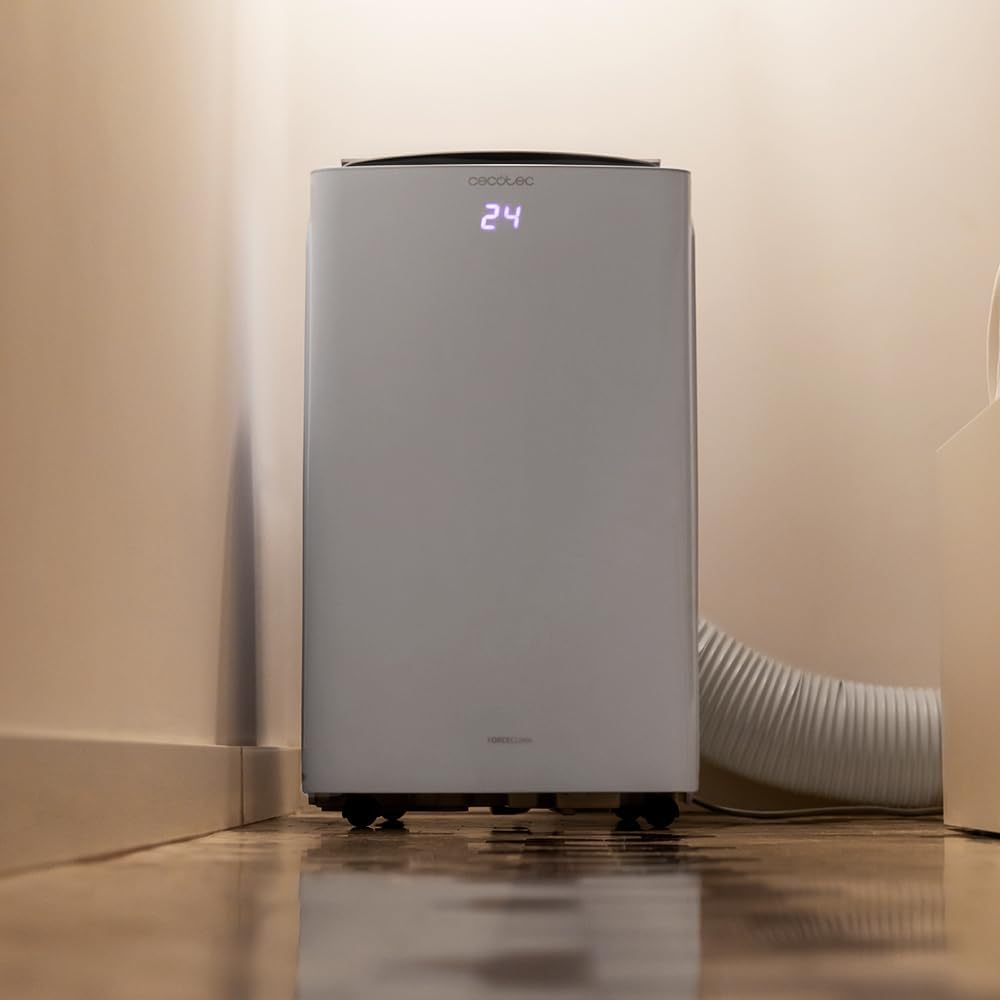
Image 4.2: Close-up of the exhaust hose connection at the base of the unit.
5. Bruksanvisning
Your ForceClima 12300 offers various ways to control its functions:
5.1. Betjening av kontrollpanelet
Berøringspanelet på toppen av enheten gir direkte tilgang til alle funksjoner.

Image 5.1: User interacting with the top control panel of the air conditioner.
- Strømknapp: Trykk for å slå enheten PÅ eller AV.
- Modusknapp: Cycle through the 5 operating modes: Cooling, Heating, Fan, Dehumidification, and Night.
- Viftehastighetsknapp: Select desired fan speed: Low, Medium, or High.
- Temperaturjustering: Bruk opp/ned-pilene for å stille inn ønsket temperatur.
- Timerknapp: Still inn en timer for automatisk PÅ/AV-drift.
5.2. Fjernkontrolldrift
The included remote control provides convenient operation from a distance.

Image 5.2: Remote control for the Cecotec ForceClima 12300.
- All functions available on the control panel can be accessed via the remote control.
- Ensure the remote control is pointed towards the receiver on the unit.
- Install batteries (not included) as per the markings inside the battery compartment.
5.3. Wi-Fi og appkontroll
Control your air conditioner from anywhere using the dedicated smartphone application.

Image 5.3: Smartphone displaying the Cecotec control application.
- Last ned den offisielle Cecotec-appen fra smarttelefonens appbutikk.
- Follow the in-app instructions to pair your ForceClima 12300 unit with your Wi-Fi network.
- Once connected, you can remotely adjust modes, temperature, fan speed, and set schedules.

Image 5.4: The air conditioner seamlessly integrated into a home environment.
6. Vedlikehold
Regelmessig vedlikehold sikrer klimaanleggets levetid og effektiv drift.
- Rengjøring av luftfilteret:
- Slå av og koble fra enheten før rengjøring.
- Remove the air filter (location typically on the back or side, refer to diagrams in the full manual if available).
- Clean the filter with a vacuum cleaner or wash it gently with lukewarm water and mild detergent. Rinse thoroughly and allow it to air dry completely before reinserting.
- Clean the air filter every two weeks or more frequently if the unit is used often or in dusty environments.
- Dreneringsvann:
- When the internal water tank is full, the unit will stop operating and an indicator light will illuminate.
- Plasser en grunn panne eller et brett under dreneringsporten nederst bak på enheten.
- Fjern tappepluggen slik at vannet kan renne ut. Sett pluggen tilbake når tanken er tom.
- Rengjøring av enhetens utside: Tørk av utsiden med en myk, damp klut. Ikke bruk sterke kjemikalier, slipemidler eller løsemidler.
- Lagring: If storing the unit for an extended period, ensure the water tank is completely drained and the unit is clean and dry. Store it in a cool, dry place, preferably in its original packaging.
7. Feilsøking
Før du kontakter kundestøtte, vennligst se på følgende vanlige problemer og løsninger:
| Problem | Mulig årsak | Løsning |
|---|---|---|
| Enheten slår seg ikke på. | Ingen strøm, strømledningen er koblet til, og sikringen er utløst. | Sjekk strømtilkoblingen, tilbakestill sikringen. |
| Unit is running but not cooling/heating. | Air filter dirty, exhaust hose blocked/disconnected, room too large, doors/windows open. | Clean air filter, check hose connection, close doors/windows, ensure unit is sized for the room. |
| Vannlekasje. | Drain plug loose, continuous drain hose blocked or improperly connected, water tank full. | Ensure drain plug is secure, check drain hose, empty water tank. |
| Enheten er støyende. | Enheten står ikke på en jevn overflate, vifteblokkering. | Plasser på en jevn overflate, sjekk for hindringer i vifteområdet. |
| Fjernkontrollen virker ikke. | Batteriene er døde eller satt inn feil, eller det er en blokkering mellom fjernkontrollen og enheten. | Replace batteries, ensure clear line of sight to unit's receiver. |
8. Spesifikasjoner
Detailed technical specifications for the Cecotec ForceClima 12300 Connected Heating Portable Air Conditioner:
| Spesifikasjon | Verdi |
|---|---|
| Merke | Cecotec |
| Modellnummer | 05959 |
| Produktdimensjoner (L x B x H) | 47.5 x 40.5 x 88 cm |
| Vekt | 27 kilo |
| Energieffektivitetsvurdering | A |
| Årlig energiforbruk | 1.1 kilowattimer |
| Kjølekapasitet | 12000 XNUMX BTU |
| Makt | 1350 watt |
| Voltage | 230 volt |
| Støynivå | 65 dB |
| Avfuktingskapasitet | Opptil 26 liter/dag |
| Dekningsområde | Ca. 25 m² |
| Installasjonstype | Vindu |
| Type | Bærbar |
| Spesielle funksjoner | Dehumidifier, Heating, Wi-Fi Control, Remote Control, LED Display |
| Farge | Hvit |
| Materiale | Plast |
| Inkluderte komponenter | 1 x Air conditioner; 1 x Window kit; 1 x Remote control; 1 x User manual |

Image 8.1: EU Energy Label for the ForceClima 12300, showing A-rated energy efficiency.
9. Garanti og støtte
For warranty information, technical support, or spare parts availability, please refer to the warranty card included with your product or contact Cecotec customer service directly. Information regarding spare parts availability was not provided at the time of this manual's creation.
You can typically find contact details for Cecotec customer support on their official webnettstedet eller i produktemballasjen.