
XINMENG Z1 Phone Cooler
XINMENG brukerhåndbok for mobiltelefonradiator
Model: Z1 Phone Cooler
Introduksjon
Takk for kjøpetasing the XINMENG Mobile Phone Radiator. This portable phone fan and heatsink is designed to provide fast cooling for your mobile device, enhancing performance during gaming, video watching, and other demanding tasks. Its compact and quiet design makes it an ideal accessory for all types of cell phones with widths ranging from 2.63 to 3.46 inches.
Viktig sikkerhetsinformasjon
Please read all safety instructions carefully before use.
- When the radiator is operating, it is normal for water droplets to condense on the surface of the thermally conductive silicone pad. This is a result of the cooling process and does not indicate a malfunction.
- After connecting the power supply, do not leave the power supply unnecessarily. Always disconnect the power when not in use or when leaving the device unattended for extended periods.
- Since this device has a built-in ceramic semiconductor, avoid high temperatures. Choose a place with low humidity and temperature for storage and operation.
- Do not subject the device to strong impacts or drops, as this may damage the internal components, especially the ceramic semiconductor.
Pakkeinnhold
Vennligst sjekk at alle varene er til stede i pakken din:
- XINMENG Mobile Phone Radiator (Z1 Phone Cooler)
- USB Data Cable (approximately 1.5 meters)
- Brukerhåndbok (dette dokumentet)
Oppsettveiledning
- Pakk ut enheten: Carefully remove the XINMENG Mobile Phone Radiator and its accessories from the packaging.
- Legg ved telefon: The cooler features a retractable back clip. Gently extend the clip and attach it to your mobile phone. Ensure your phone's width is between 2.63 and 3.46 inches (67-89 mm) for a secure fit. The cooling pad should be centered on the back of your phone for optimal heat dissipation.

Image: The XINMENG Mobile Phone Radiator securely attached to the back of a smartphone, demonstrating its compact design and how it clips onto the device. The fan with RGB lighting is visible.
- Koble til strøm: Connect the provided 1.5m USB data cable to the cooler's USB port. Plug the other end of the USB cable into a 5V USB power source (e.g., a wall adapter, power bank, or computer USB port). The cooler will automatically turn on and begin cooling upon power connection.

Bilde: En detaljert view of the cooler's retractable buckle design and the USB power input, highlighting its ease of use and universal compatibility.
Bruksanvisning
The XINMENG Mobile Phone Radiator is designed for simple, plug-and-play operation.
- Automatisk kjøling: Once connected to a 5V power source, the cooler will immediately activate its cooling fan and ceramic semiconductor, rapidly reducing your phone's temperature.
- Effektiv varmespredning: The cooler is capable of reducing phone temperature by 9-25°C within a short period, preventing overheating during intensive use.

Image: A visual comparison illustrating the effectiveness of the cooler, showing a phone's temperature at 53.7°C without the cooler versus 25.7°C with the cooler after 30 minutes of gaming.
- Stille drift: The cooler features a noise reduction design, ensuring a quiet environment for gaming, watching videos, or making calls.
- RGB belysning: The integrated RGB LED lights illuminate the fan blades, providing a dynamic and immersive e-sports atmosphere during use. The lights cycle through various colors including red, green, blue, purple, yellow, and rainbow.
Vedlikehold
To ensure the longevity and optimal performance of your XINMENG Mobile Phone Radiator, follow these maintenance guidelines:
- Rengjøring: Use a soft, dry cloth to wipe down the exterior of the cooler. Do not use liquid cleaners or abrasive materials.
- Støvfjerning: Periodically check the fan blades and vents for dust accumulation. Use a can of compressed air or a soft brush to gently remove any dust to maintain airflow.
- Lagring: Når kjøleren ikke er i bruk, oppbevar den på et kjølig og tørt sted, unna direkte sollys og ekstreme temperaturer.
- Håndteres med forsiktighet: Unngå å miste enheten eller utsette den for harde støt, da dette kan skade interne komponenter.
Feilsøking
If you encounter any issues with your XINMENG Mobile Phone Radiator, please refer to the following common problems and solutions:
| Problem | Mulig årsak | Løsning |
|---|---|---|
| Kjøleren slår seg ikke på. | No power connection or insufficient power. | Ensure the USB cable is securely connected to both the cooler and a 5V power source. Try a different USB port or power adapter. |
| Kjøleytelsen er dårlig. | Improper placement, dust accumulation, or phone case interference. | Ensure the cooler's cooling pad is centered on the phone's back. Clean any dust from the fan and vents. Remove thick phone cases that might hinder heat transfer. |
| Water droplets on cooling pad. | Normal condensation due to cooling process. | This is normal and expected. Wipe away any excess moisture with a dry cloth if desired. |
| Cooler does not fit phone. | Phone width outside compatible range. | Verify your phone's width is between 2.63 - 3.46 inches (67 - 89 mm). The cooler is not designed for devices outside this range. |
Spesifikasjoner
| Merke | XINMENG |
| Modell | Z1 Phone Cooler |
| Kompatibel telefonbredde | 67–89 mm (2.63–3.46 tommer) |
| Strøminngang | 5 volt (USB-drevet) |
| Kjøleteknologi | Ceramic Semiconductor, Turbo Fan |
| Vekt | 4.6 unser (ca. 130 g) |
| Kabellengde | 1.5 meter |
| Funksjoner | Quiet Operation, RGB LED Lighting, Retractable Clip |
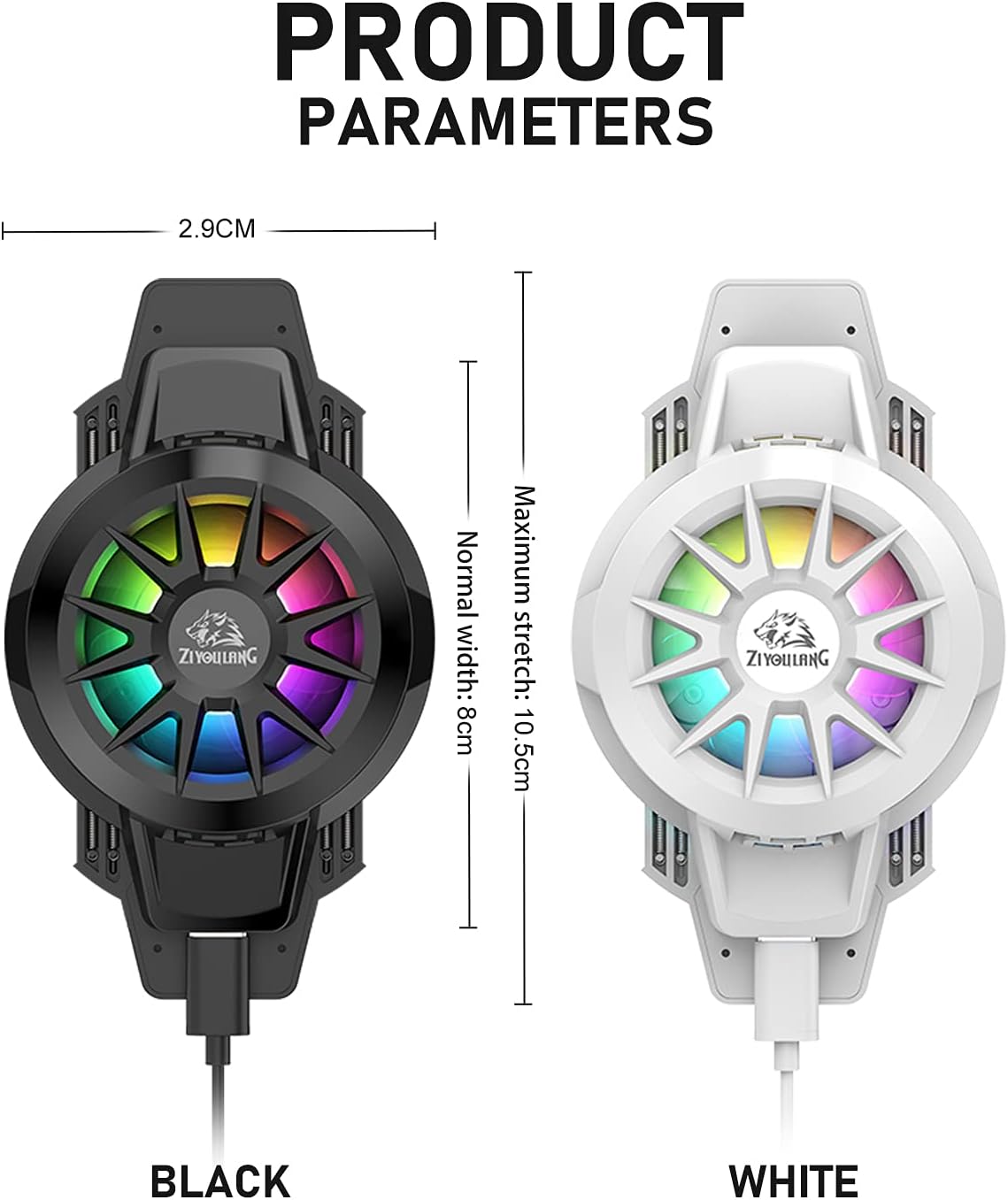
Image: A diagram illustrating the product dimensions and available colors (Black and White) of the XINMENG Mobile Phone Radiator.
Garanti og støtte
For warranty information and technical support, please contact XINMENG customer service through the retailer where you purchased the product or visit the official XINMENG store page on Amazon:
Visit the XINMENG Store on Amazon
Please have your purchase receipt and product model information (Z1 Phone Cooler) ready when contacting support.
Ask a question about this manual
Ask about setup, troubleshooting, compatibility, parts, safety, or missing instructions. Manuals+ will review the question and use this page’s manual context to help answer it.