
1. Introduksjon
This manual provides detailed instructions for the setup, operation, and maintenance of your WISE TIGER LED Digital Alarm Clock (Model CK-LED1302). Please read this manual thoroughly before use to ensure proper functionality and to maximize your product experience.

Image 1.1: WISE TIGER LED Digital Alarm Clock and its remote control.
2. Pakkens innhold
Vennligst sjekk at alle varene er til stede i pakken din:
- WISE TIGER LED Digital Alarm Clock (Model CK-LED1302)
- Fjernkontroll
- USB strømkabel
- Brukerhåndbok (dette dokumentet)
- Fixed Bracket (for desk placement)
3. Produktet er overview
The WISE TIGER LED Digital Alarm Clock features a modern 3D design, offering clear time display and multiple functions for various environments.
3.1 Nøkkelfunksjoner
- Tidsvisning: 12-hour or 24-hour format.
- Kalendervisning: Shows date.
- Alarm Clock: With snooze function.
- Temperaturvisning: Shows ambient temperature.
- Justerbar lysstyrke: Automatic brightness sensor and manual adjustment via remote control.
- Nattlysfunksjon: Gir myk belysning.
- Minnefunksjon: Built-in battery retains time settings for 4-8 hours during power disconnection.
- Allsidig plassering: Suitable for desk or wall mounting.

Image 3.1: Visual representation of the clock's main functions.
3.2 Komponenter
Se diagrammet nedenfor for en oversiktview of the clock's components and connection points.
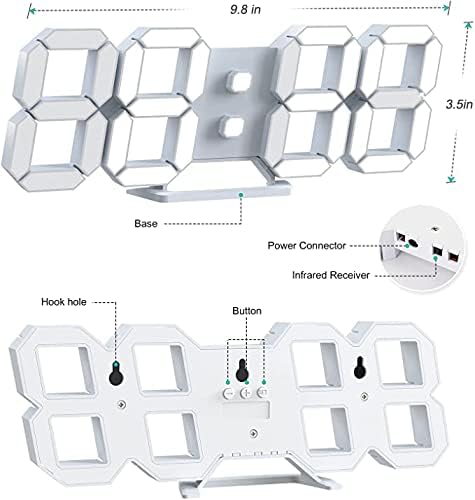
Bilde 3.2: Bakside view and dimensions of the clock, highlighting the power connector, infrared receiver, and mounting options.
- Utstilling: Large 3D LED digits for time, date, and temperature.
- Base: Removable stand for desk placement.
- Strømkontakt: USB port for power input.
- Infrarød mottaker: For fjernkontrollsignaler.
- Hook Holes: For veggmontering.
- Kontrollknapper: Located on the back for basic settings (Power, Up, Down, Set).
4. Oppsett
4.1 Strømtilkobling
- Connect the provided USB power cable to the power connector on the back of the clock.
- Koble den andre enden av USB-kabelen til en standard USB-strømadapter (ikke inkludert) eller en USB-port på datamaskinen.
- The clock will power on and display the time.
The clock is powered by the USB cable only. A built-in battery serves to record time settings when power is disconnected, ensuring settings are retained for 4-8 hours.

Image 4.1: Explanation of the clock's power and memory function.
4.2 Plasseringsalternativer
The clock can be used as a desk clock or a wall clock.
- Skrivebordsplassering: Attach the fixed bracket to the bottom of the clock. The angle of the bracket can be adjusted for optimal viewing.
- Veggmontering: Remove the fixed bracket if attached. Use the installation slots (hook holes) on the back of the clock to hang it securely on a wall using appropriate fasteners (not included).

Image 4.2: The clock configured for wall mounting and desk placement.
5. Bruksanvisning
The clock's functions are primarily controlled using the included remote control. Basic settings can also be adjusted via the buttons on the back of the clock.
5.1 Stille inn tid og dato
- Trykk på TID button on the remote control to enter time setting mode.
- Bruk UP og NED arrows to adjust the hour.
- Pressen TID again to move to minute setting, then use UP og NED å justere.
- Fortsett å trykke TID for å bla gjennom innstillinger for år, måned og dag, og justere hver med UP og NED.
- Pressen TID one last time or wait a few seconds for the settings to save automatically.
5.2 12/24 timers format
For å bytte mellom 12-timers og 24-timers tidsformat, trykk på 12/24H knappen på fjernkontrollen.

Bilde 5.1: Eks.ample of 12-hour and 24-hour time display.
5.3 Stille inn alarmen
- Trykk på ALARM button on the remote control to enter alarm setting mode.
- Bruk UP og NED arrows to set the desired alarm hour.
- Pressen ALARM again to move to minute setting, then use UP og NED å justere.
- Pressen ALARM one last time or wait for the settings to save.
- For å aktivere/deaktivere alarmen, trykk på ALARM -knappen kort utenfor innstillingsmodus. Et alarmikon vil vises/forsvinne fra displayet.
5.4 Slumrefunksjon
Når alarmen går, trykker du på SLUM button on the remote control to temporarily silence the alarm. The alarm will sound again after a set interval (typically 5-10 minutes).

Image 5.2: The snooze alarm function in use.
5.5 Justering av lysstyrke
The clock features both automatic and manual brightness control.
- Automatisk lysstyrke: The built-in sensor automatically adjusts the display brightness based on ambient light conditions.
- Manuell lysstyrke: Trykk på LYS button on the remote control to cycle through different brightness levels (e.g., high, medium, low).

Image 5.3: Automatic brightness adjustment based on ambient light.

Image 5.4: Manual adjustment through three brightness levels.
5.6 Temperaturvisning
The clock automatically displays the ambient temperature. No manual adjustment is typically required for this function.
6. Vedlikehold
To ensure the longevity and optimal performance of your WISE TIGER LED Digital Alarm Clock, follow these maintenance guidelines:
- Rengjøring: Bruk en myk, tørr klut til å tørke av skjermen ogasing. Avoid abrasive cleaners, solvents, or spray cleaners directly on the clock.
- Makt: Always use the provided USB cable for power. Ensure the power source is stable.
- Miljø: Hold klokken unna ekstreme temperaturer, direkte sollys og høy luftfuktighet.
- Fjernkontroll: Store the remote control in a safe place to prevent loss or damage. Ensure batteries are replaced when needed (typically 2 Lithium Ion batteries, included).
7. Feilsøking
If you encounter issues with your clock, refer to the following common problems and solutions:
| Problem | Mulig årsak | Løsning |
|---|---|---|
| Klokken slår seg ikke på | Ingen strøm eller løs tilkobling | Ensure USB cable is securely connected and power source is active. Try a different USB port or adapter. |
| Fjernkontrollen virker ikke | Remote batteries are dead or remote is out of range/blocked | Replace remote control batteries. Ensure remote is pointed at the clock's infrared receiver (refer to Image 3.2) and within 8 meters. Remove any obstructions. |
| Tiden er unøyaktig | Time was not set precisely | Reset the time carefully, ensuring you set it at the exact second of the desired time. |
| Display is too dim or too bright | Brightness setting needs adjustment | Trykk på LYS button on the remote to cycle through manual brightness levels. Check if automatic brightness is functioning correctly in different light conditions. |
| Alarmen høres ikke | Alarmen er ikke aktivert eller feil innstilt | Ensure the alarm is set and activated (alarm icon visible). Verify the alarm time is correct. |
8. Spesifikasjoner
| Trekk | Detalj |
|---|---|
| Merke | KLOK TIGER |
| Modellnummer | CK-LED1302 |
| Visningstype | Digital |
| Farge | Hvit |
| Produktdimensjoner | 9.7 cm B x 3.5 cm H |
| Strømkilde | Elektrisk med ledning (USB) |
| Minnebatteri | 2 Lithium Ion batteries (included), retains settings for 4-8 hours |
| Monteringstype | Wall Mount, Desk Mount |
| Spesielle funksjoner | Adjustable Brightness, Alarm Clock, Temperature Display, Date Display, 12/24 Hour Format |
| Materiale | Akrylonitrilbutadienstyren |
| Varevekt | 0.317 unser (ca. 9 gram) |
| UPC | 728990655931 |
9. Garanti og støtte
For warranty information or technical support, please refer to the product packaging or contact the retailer where the product was purchased. Keep your purchase receipt as proof of purchase.