
Introduksjon
This instruction manual provides comprehensive guidance for the 8Bitdo Media Remote (White Short Edition), designed for seamless media control on your Xbox One, Xbox Series X, and Xbox Series S consoles. This remote offers dedicated media playback buttons, Xbox system navigation, and motion-activated backlighting for enhanced usability.
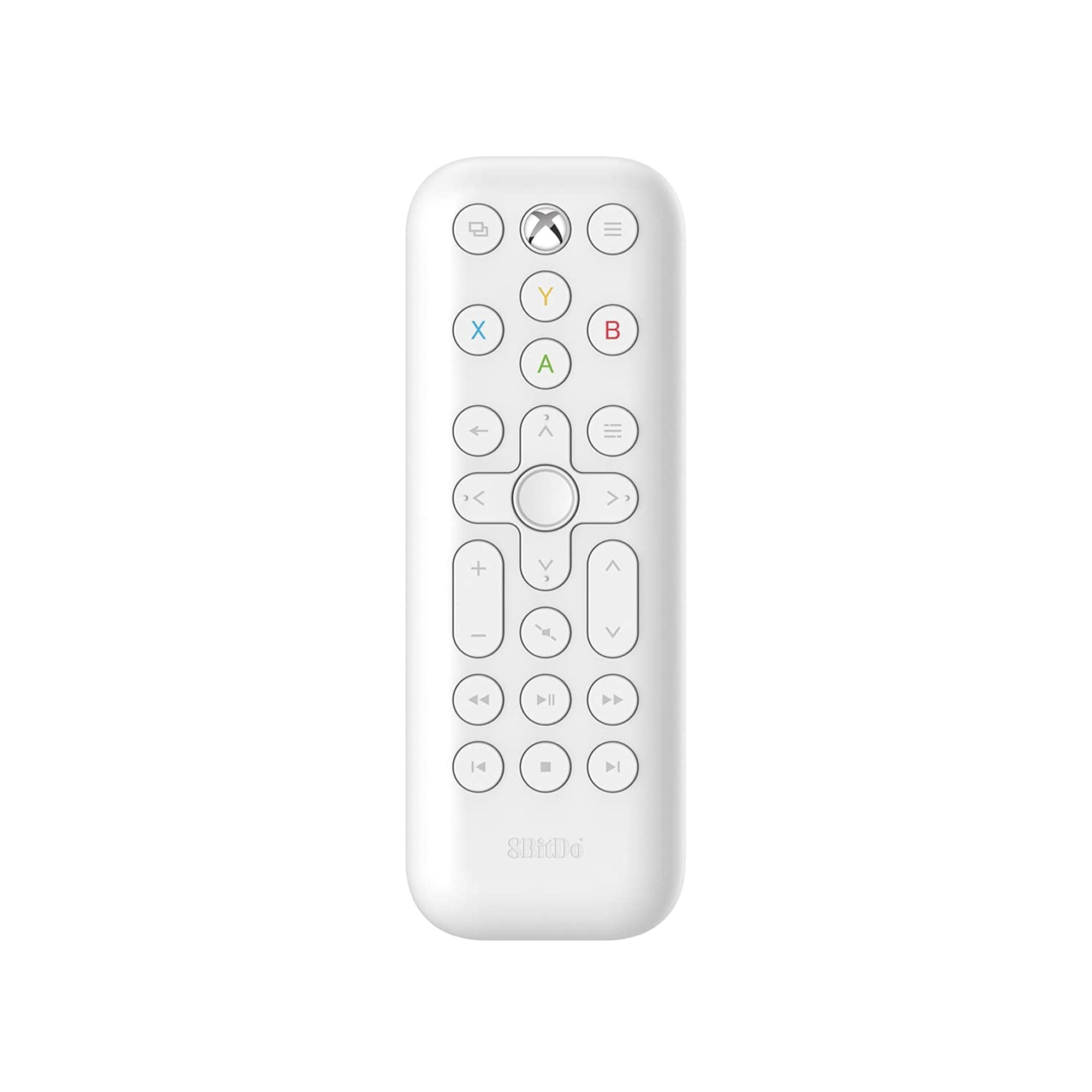
Image: The 8Bitdo Media Remote in White, Short Edition, showcasing dens kompakte design og knappeoppsett.
Oppsett
1. Installasjon av batteri
The 8Bitdo Media Remote requires two AAA batteries for operation. These are typically included with your purchase.
- Finn batteridekselet på baksiden av fjernkontrollen.
- Skyv dekselet nedover for å åpne rommet.
- Sett inn to AAA-batterier, og sørg for at polariteten (+ og -) er riktig.
- Skyv batteridekselet tilbake på plass til det klikker ordentlig.

Image: A hand demonstrating how to open the battery compartment and insert AAA batteries into the remote.
2. Første tilkobling
The 8Bitdo Media Remote uses infrared (IR) technology. No manual pairing is required. Simply ensure a clear line of sight between the remote's IR emitter (located at the top) and your Xbox console's IR receiver.

Image: A user holding the 8Bitdo Media Remote, pointing it towards an Xbox Series S console, illustrating the line-of-sight requirement for infrared communication.
Bruksanvisning
1. Slå av/på og navigere
- Dedicated Home Button: Press the Xbox Home button (located at the top center) to instantly wake your Xbox console.
- Retningstast (D-pad): Use the circular D-Pad for navigating menus and selecting items.
- A/B/X/Y-knapper: These colored buttons correspond to standard Xbox controller functions for menu selection and interaction.

Image: The 8Bitdo Media Remote being used to wake an Xbox console, highlighting the dedicated Home button functionality.
2. Medieavspillingskontroller
The remote features a full suite of media playback buttons:
- Spill av/pause: Start eller pause medieavspilling.
- Spol fremover/bakover: Skip forward or backward through content.
- Volum opp/ned: Adjust the volume of your media.
- Stum: Slå av eller på lyden.
3. Motion-Activated Backlight
The buttons on the remote are motion-activated and will illuminate when the remote is picked up or moved, making it easy to use in low-light conditions.
4. OneGuide Button Customization
The OneGuide button (three horizontal lines icon) can be customized to launch a specific application on your Xbox. To configure this:
- On your Xbox, go to Innstillinger.
- Naviger til Devices & connections, og velg deretter Medie fjernkontroll.
- Choose the desired action or app to launch when the OneGuide button is pressed.
5. TV Volume Control (HDMI-CEC)
Your Xbox can control your TV's volume if your TV supports HDMI-CEC (Consumer Electronics Control). To enable this:
- Press the Xbox button on your controller to open the guide.
- Gå til Innstillinger > General > TV & display options.
- Velge Enhetskontroll > HDMI-CEC and enable all options.
- Consult your TV manufacturer's manual for specific HDMI-CEC settings.
Vedlikehold
1. Batteribytte
Replace the AAA batteries when the remote's performance diminishes or the backlight becomes dim. Refer to the 'Battery Installation' steps in the Setup section.
2. Rengjøring
Wipe the remote with a soft, dry cloth. Avoid using harsh chemicals or abrasive materials that could damage the finish or buttons.
Feilsøking
- Fjernkontrollen svarer ikke:
- Sørg for at nye batterier er riktig installert.
- Verify a clear line of sight between the remote and your Xbox console. Obstructions can block the infrared signal.
- Confirm your Xbox console is powered on and not in a deep sleep mode that disables IR reception.
- Backlight constantly active:
- The backlight is motion-activated. Any movement will trigger it. This is normal operation.
- If battery life is a concern due to frequent backlighting, consider using rechargeable AAA batteries.
- TV volume control not working:
- Ensure your TV supports HDMI-CEC and that it is enabled in your TV's settings.
- Verify HDMI-CEC settings are correctly configured on your Xbox console (Settings > General > TV & display options > Device control > HDMI-CEC).
Spesifikasjoner
| Modell | 6922621501848 (White Short Edition) |
| Merke | 8Bitdo |
| Tilkobling | Infrarød (IR) |
| Kompatibilitet | Xbox Series X, Xbox Series S, Xbox One |
| Strømkilde | 2 x AAA-batterier (inkludert) |
| Dimensions (Short Edition) | 134.25 x 48 x 18.8 mm |
| Varevekt | 2.88 unser |

Image: A visual comparison of the 8Bitdo Media Remote in both short and long editions, detailing their respective dimensions.

Image: An illustration showing the 8Bitdo Media Remote's compatibility with Xbox One, Xbox Series X, and Xbox Series S consoles.
Garanti og støtte
8Bitdo is committed to producing high-quality gaming hardware. For specific warranty information, product support, or to access the latest firmware updates, please visit the official 8Bitdo webnettstedet eller kontakt kundeservicen deres direkte. Ta vare på kjøpsbeviset for garantikrav.
For ytterligere ressurser og produktinformasjon kan du besøke 8Bitdo-butikken på Amazon.
Produkt overview Video
Video: En offisiell overview of the 8Bitdo Media Remote for Xbox One and Xbox Series X|S, demonstrating its features and functionality.