
1. Introduksjon
Thank you for choosing the FLEXISPOT E9 Electric Standing Desk. This manual provides essential information for the safe and efficient assembly, operation, and maintenance of your new desk. Please read it thoroughly before use and keep it for future reference.
The FLEXISPOT E9 is designed for easy assembly with minimal parts, ensuring a smooth setup experience. It offers a wide height adjustment range from 73 cm to 123 cm, with a swift adjustment speed of 25mm/s for a stress-free transition between sitting and standing positions. Its robust design supports up to 50 kg, allowing you to safely adjust the desk height with your equipment in place.
The desk features a smart touch panel for intuitive one-touch operation, enabling you to effortlessly switch between sitting and standing postures to optimize your workspace for health and activity. The compact 60 cm x 120 cm tabletop provides ample workspace while harmonizing with various room aesthetics. Its minimalist design makes it suitable for home offices, studies, or even as a versatile dining or hobby table in your living room.

Image: The FLEXISPOT E9 Electric Standing Desk, highlighting its adjustable height from 73-123cm and 120cm width.
2. Oppsett og montering
The FLEXISPOT E9 desk is designed for straightforward assembly. Follow these steps to set up your desk:
- Pakk ut komponenter: Ta forsiktig alle delene ut av emballasjen og kontroller mot delelisten i den medfølgende håndboken.
- Attach the Beam: The desk's beam is pre-attached to the tabletop. Simply rotate the support columns into place.
- Installer føtter: Securely attach the desk feet to the support columns using the provided screws and tools.
- Koble til fjernkontroll: Connect the remote control cable to the control box under the desk.
- Strømtilkobling: Plug the power cable into the control box and then into a wall outlet.
All necessary assembly tools are included in the package. Assembly typically requires one person and can be completed in approximately 15 minutes.
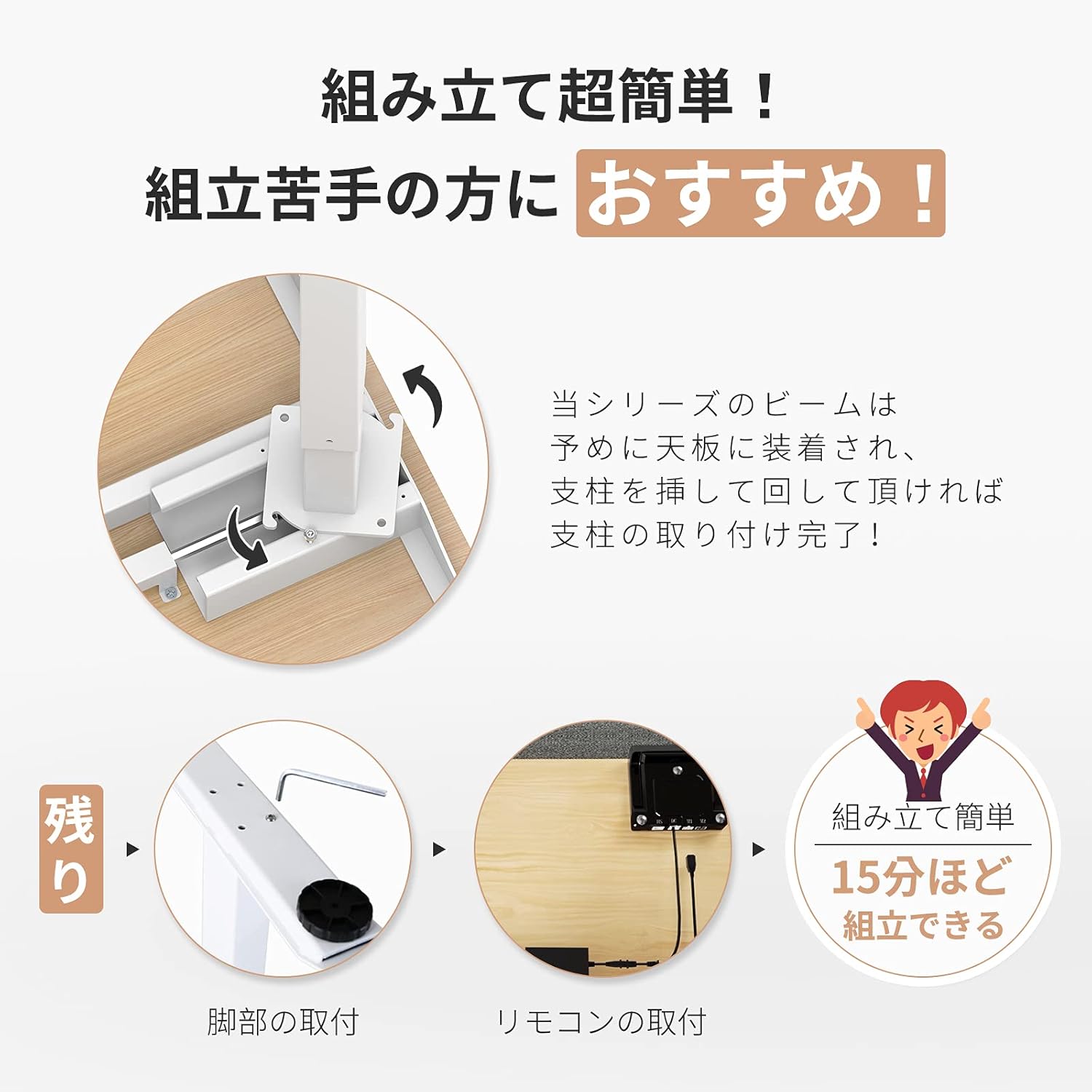
Image: Visual guide demonstrating the simple assembly process, including beam rotation, foot attachment, and remote control connection.
3. Bruksanvisning
The FLEXISPOT E9 features an intuitive control panel for easy height adjustment and memory functions.
3.1 Kontrollpanel overview

Image: The control panel, indicating the LED panel, up button, down button, and four height memory preset buttons.
- LED-panel: Viser gjeldende skrivebordshøyde.
- Opp/ned-knapper (▲ / ▼): Press and hold to adjust the desk height upwards or downwards. Release to stop at the desired height.
- Memory Preset Buttons (1, 2, 3, 4): Store and recall preferred height settings.
3.2 Setting Memory Presets
- Juster skrivebordet til ønsket høyde ved hjelp av opp/ned-knappene.
- Press and hold one of the memory preset buttons (1, 2, 3, or 4) until the LED panel flashes or beeps, indicating the height has been saved.
3.3 Recalling Memory Presets
Simply press the desired memory preset button (1, 2, 3, or 4). The desk will automatically move to the saved height.
3.4 Safety Features (Anti-Collision)
The desk is equipped with a built-in sensor to detect obstacles during height adjustment. If an obstruction is encountered, the desk will automatically stop and reverse slightly to prevent damage or injury.
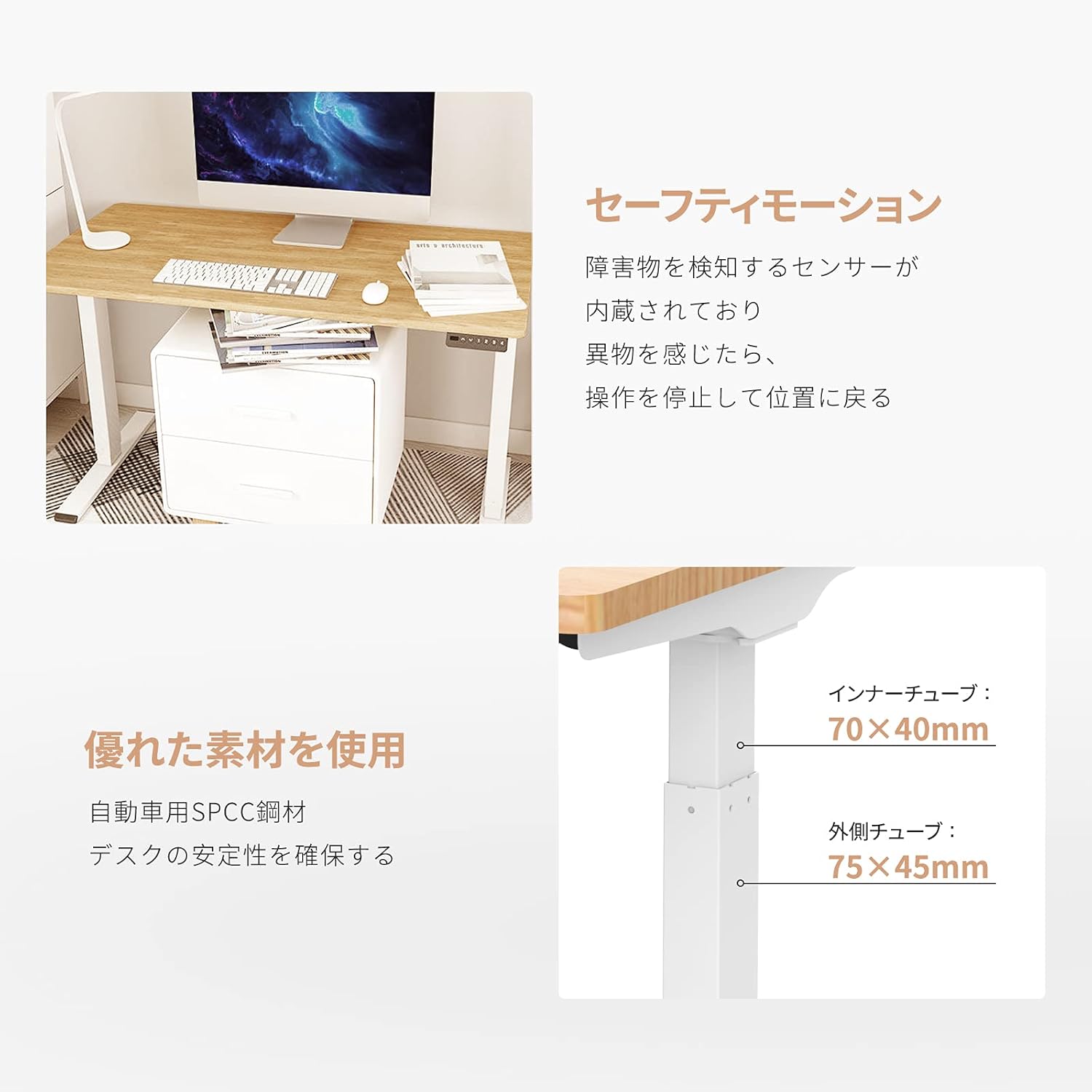
Image: Explanation of the safety motion feature, where the desk stops and reverses upon detecting an obstacle. Also shows inner tube (70x40mm) and outer tube (75x45mm) dimensions.
4. Vedlikehold
To ensure the longevity and optimal performance of your FLEXISPOT E9 Electric Standing Desk, follow these maintenance guidelines:
- Regelmessig rengjøring: Tørk av skrivebordsoverflaten og bena med en myk klutamp klut. Unngå slipende rengjøringsmidler eller sterke kjemikalier som kan skade overflaten.
- Kabeladministrasjon: Ensure all cables are neatly organized and not tangled or pinched, especially during height adjustments. Use cable ties or management trays if necessary.
- Sjekk tilkoblinger: Periodically check that all screws and connections are secure. Tighten if any looseness is detected.
- Unngå overbelastning: Ikke overskrid den maksimale vektkapasiteten på 50 kg.
- Miljøforhold: Keep the desk in a dry environment and avoid extreme temperatures or direct sunlight.
5. Feilsøking
If you encounter any issues with your FLEXISPOT E9 Electric Standing Desk, please refer to the following common troubleshooting steps:
- Skrivebordet beveger seg ikke:
- Sjekk om strømkabelen er ordentlig koblet til både skrivebordet og stikkontakten.
- Sørg for at det ikke er noen hindringer som hindrer bevegelse.
- Try resetting the desk by unplugging it for 30 seconds and then plugging it back in.
- Ujevn bevegelse:
- Sørg for at skrivebordet er plassert på en jevn overflate.
- Verify that the weight on the desk is evenly distributed.
- Error Codes on LED Display:
- Refer to the full product manual (if provided separately) for specific error code meanings and solutions.
- Often, an error can be cleared by resetting the desk (unplugging and replugging).
If these steps do not resolve the issue, please contact FLEXISPOT customer support for further assistance.
6. Spesifikasjoner
Detailed technical specifications for the FLEXISPOT E9 Electric Standing Desk:
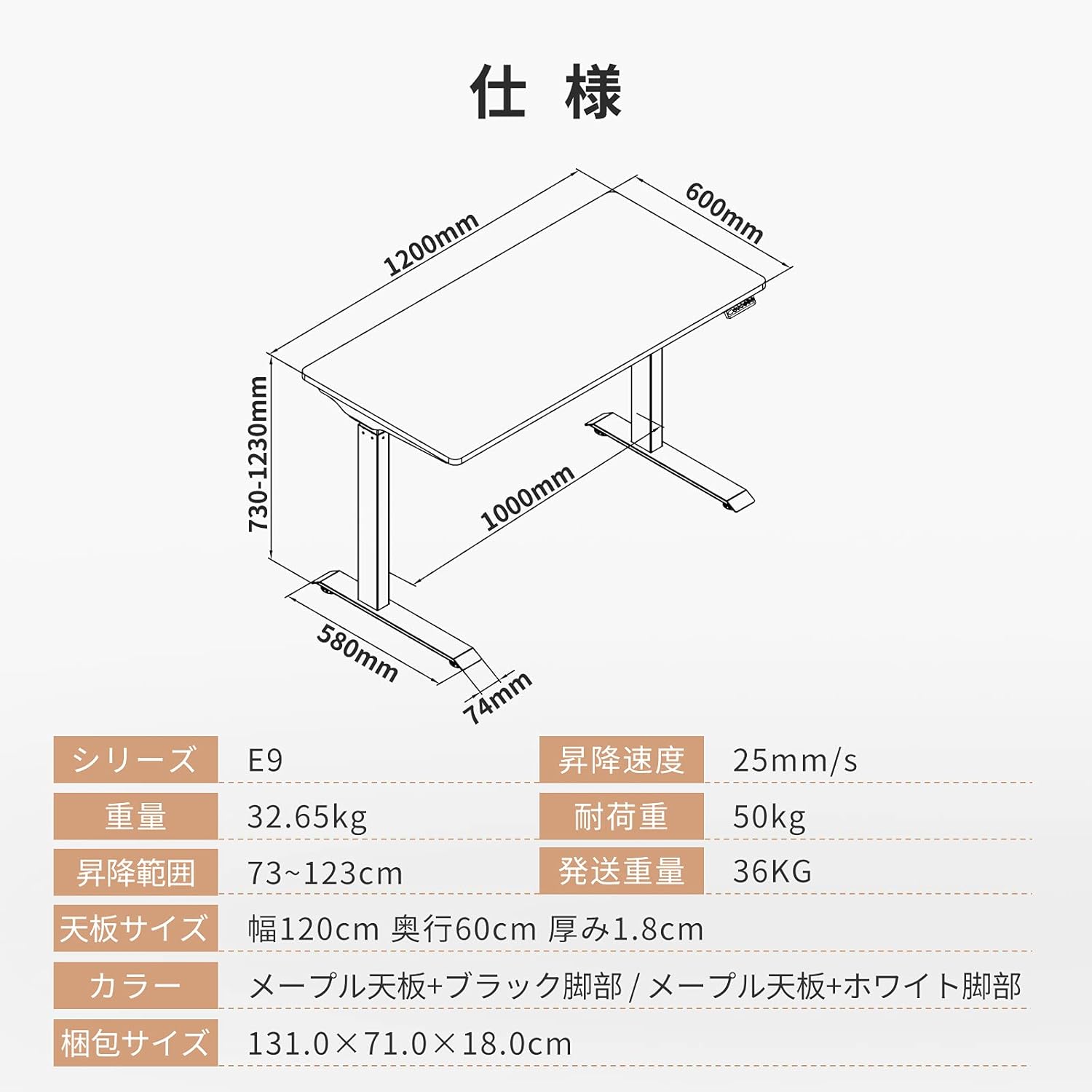
Image: Technical drawing with key dimensions: 1200mm width, 600mm depth, 730-1230mm height range, 1000mm base width, 580mm base depth, 74mm foot height.
| Trekk | Detalj |
|---|---|
| Merke | FLEXISPOT |
| Modell | E9 |
| Skrivebordstype | Computer Desk, Electric Standing Desk |
| Produktdimensjoner (D x B x H) | 60 cm x 120 cm x 73-123 cm |
| Høydejusteringsområde | 73 cm til 123 cm |
| Height Adjustment Speed | 25 mm/s |
| Maximum Recommended Weight Capacity | 50 kg |
| Bordplate størrelse | 120 cm (Width) x 60 cm (Depth) x 1.8 cm (Thickness) |
| Bordplate materiale | Maple (Finish: Paint) |
| Grunnmateriale | Wood (Legs: Black) |
| Montering påkrevd | Ja |
| Recommended Persons for Assembly | 1 |
| Spesielle funksjoner | Height Adjustment Function, Anti-Collision Sensor |
| Varevekt | 35.9 kg |
| Fraktvekt | 36 kg |
| GTIN / UPC | 810072794987 |
7. Garanti og støtte
FLEXISPOT provides a free long-term manufacturer's warranty for the E9 Electric Standing Desk. This warranty includes unlimited support responses during the warranty period, offering complete peace of mind.
FLEXISPOT has established a dedicated support system in Japan, including a call center, to ensure excellent after-sales service for our customers. In the event that you require support, our team will assist you in Japanese, eliminating any language concerns.
For warranty claims, technical assistance, or any other inquiries, please contact FLEXISPOT customer service through the official webnettstedet eller kontaktinformasjonen som følger med kjøpet.