
Introduksjon
This manual provides comprehensive instructions for the Allimity AH59-02530A replacement remote control. This remote is designed to be compatible with various Samsung Blu-ray Home Entertainment System models, including HT-H4200R, HT-F4500, HT-FM45/ZA, HT-H4500R, HT-H4550R, HT-J4500, HT-J5500W, HT-JM41, and HT-J4100. No programming or setup is required; simply insert batteries to begin operation.
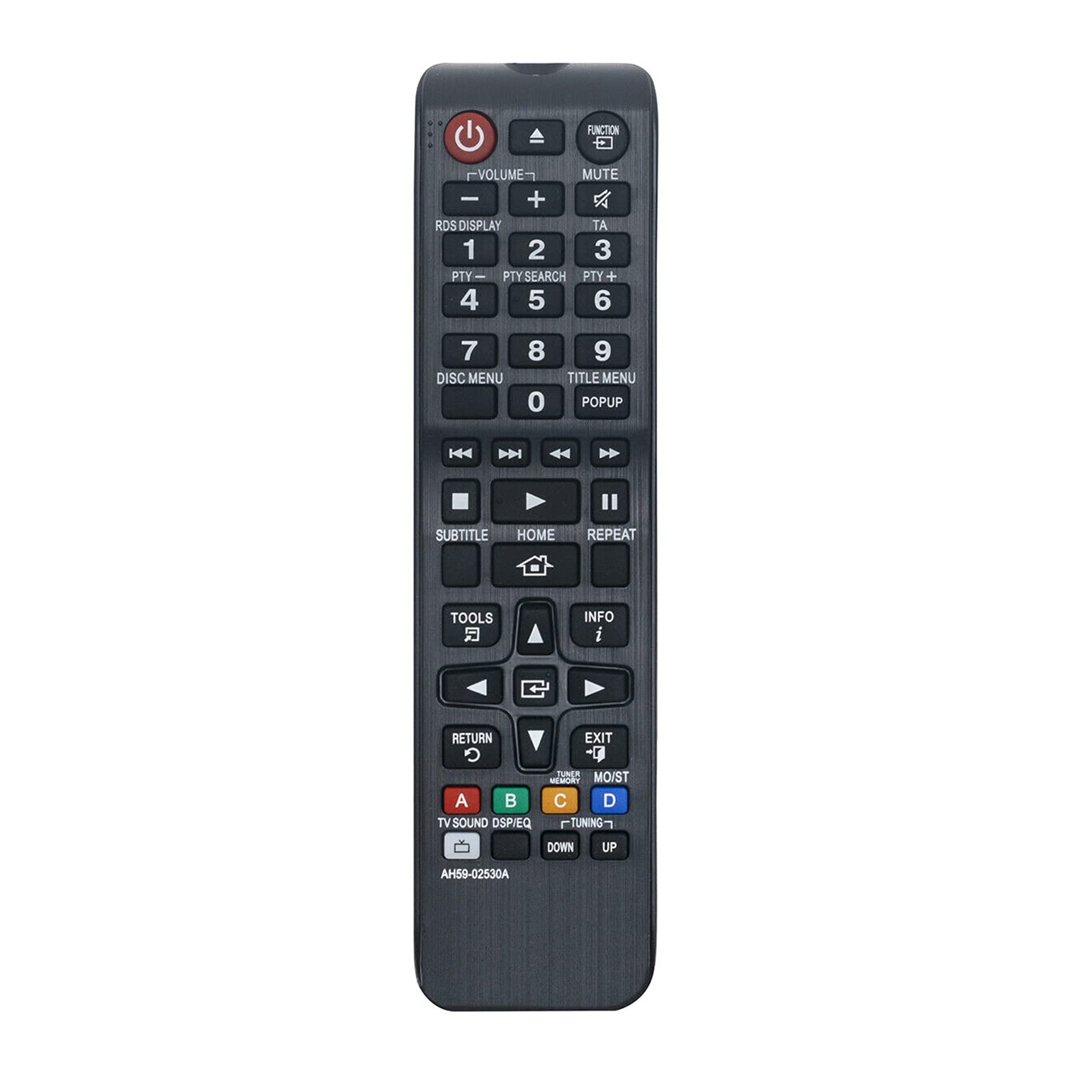
Figur 1: Vinklet view of the Allimity AH59-02530A remote control, showcasing its layout and buttons.
Oppsett
Installasjon av batteri
The Allimity AH59-02530A remote control requires two AAA alkaline batteries (not included) for operation. Follow these steps to install the batteries:
- Finn batteriromdekselet på baksiden av fjernkontrollen.
- Trykk ned på fliken og skyv dekselet nedover for å åpne rommet.
- Insert two new AAA alkaline batteries, ensuring the positive (+) and negative (-) terminals match the diagrams inside the compartment.
- Skyv batteridekselet tilbake på plass til det klikker ordentlig.

Figur 2: Bak view på fjernkontrollen med batterirommet åpent, som viser sporene for to AAA-batterier.
Once batteries are installed, the remote is ready for use with your compatible Samsung Home Entertainment System.
Bruksanvisning
This remote control is designed to replicate the functions of your original Samsung remote. Point the remote directly at your Samsung Home Entertainment System for optimal performance. Below is a general guide to common button functions:

Figur 3: Foran view of the remote control, highlighting the various function buttons.
- På-knapp (⏻): Turns the home entertainment system on or off.
- Funksjonsknapp: Cycles through available input sources or functions.
- Volum (+/-): Justerer lydvolumnivået.
- Demp-knapp: Silences or restores the audio.
- Tallknapper (0-9): Used for direct input, such as track selection or menu navigation.
- Disc Menu / Title Menu / POPUP: Accesses disc-specific menus or pop-up menus.
- Playback Controls (Play, Pause, Stop, Fast Forward, Rewind, Skip): Styrer medieavspilling.
- HJEM-knapp: Returns to the main home screen or menu of the system.
- Navigasjonstastatur (opp, ned, venstre, høyre, enter): Used to navigate through menus and confirm selections.
- RETURN-knapp: Går tilbake til forrige skjermbilde eller meny.
- EXIT-knapp: Går ut av gjeldende meny eller funksjon.
- TOOLS-knapp: Gir tilgang til hurtiginnstillinger eller verktøymenyen.
- INFO -knapp: Displays information about the current content or system status.
- Fargede knapper (A, B, C, D): These buttons (Red, Green, Yellow, Blue) provide access to specific functions depending on the content or menu displayed on your screen.
For specific functions related to your Samsung Home Entertainment System model, refer to your system's original user manual.
Vedlikehold
Batteribytte
Replace batteries when the remote control's response becomes sluggish or inconsistent. Always replace both AAA batteries at the same time with new alkaline batteries. Do not mix old and new batteries, or different types of batteries.
Rengjøring
For å rengjøre fjernkontrollen, tørk den forsiktig med en myk, tørr klut. Ikke bruk flytende rengjøringsmidler, spray eller slipende materialer, da disse kan skade fjernkontrollens overflate eller interne komponenter.
Lagring
When not in use for extended periods, it is recommended to remove the batteries to prevent leakage, which could damage the remote control.
Feilsøking
- Fjernkontrollen svarer ikke:
- Sørg for at batteriene er satt inn riktig med riktig polaritet (+/-).
- Bytt ut gamle batterier med nye AAA alkaliske batterier.
- Ensure there are no obstructions between the remote control and the home entertainment system's infrared receiver.
- Confirm the remote is pointed directly at the system.
- Begrenset driftsområde:
- The maximum effective range is approximately 33 feet (10 meters). Ensure you are within this range.
- Bright light sources, such as direct sunlight or strong fluorescent lights, can interfere with the infrared signal. Try to minimize such interference.
- Spesifikke funksjoner fungerer ikke:
- Verify that your Samsung Home Entertainment System model is listed as compatible.
- Some advanced functions might be specific to the original remote or require specific system settings.
Spesifikasjoner
| Merke | ALLIMITET |
| Modellnummer | AH59-02530A |
| Tilkoblingsteknologi | Infrarød |
| Kompatible enheter | Samsung Blu-ray Home Entertainment Systems (HT-H4200R, HT-F4500, HT-FM45/ZA, HT-H4500R, HT-H4550R, HT-J4500, HT-J5500W, HT-JM41, HT-J4100) |
| Batteritype | 2 x AAA alkaliske batterier (ikke inkludert) |
| Maksimal rekkevidde | 33 fot (10 meter) |
| Farge | Svart |
| Varedimensjoner (L x B x H) | 6"L x 2"W x 0.5"H (approximately) |
| Varevekt | 2 Ounces (approximately) |
Garantiinformasjon
Specific warranty details for the Allimity AH59-02530A remote control are typically provided by the seller or manufacturer at the time of purchase. Please refer to your product packaging, purchase receipt, or contact the seller directly for information regarding warranty coverage and terms.
Støtte
For technical assistance, troubleshooting beyond this manual, or inquiries about your Allimity AH59-02530A remote control, please contact the seller or manufacturer directly. Contact information can usually be found on the product packaging or the platform where the item was purchased.