
1. Introduksjon
Thank you for choosing the A4tech FG1112 Fstyler Wireless Keyboard and Mouse Set. This compact and efficient combo provides a reliable 2.4GHz wireless connection, offering convenience and comfort for your daily computing needs. The keyboard features a Q Turkish layout with FN multimedia keys, while the mouse offers precise 1200 DPI optical tracking. This manual will guide you through the setup, operation, and maintenance of your new device.
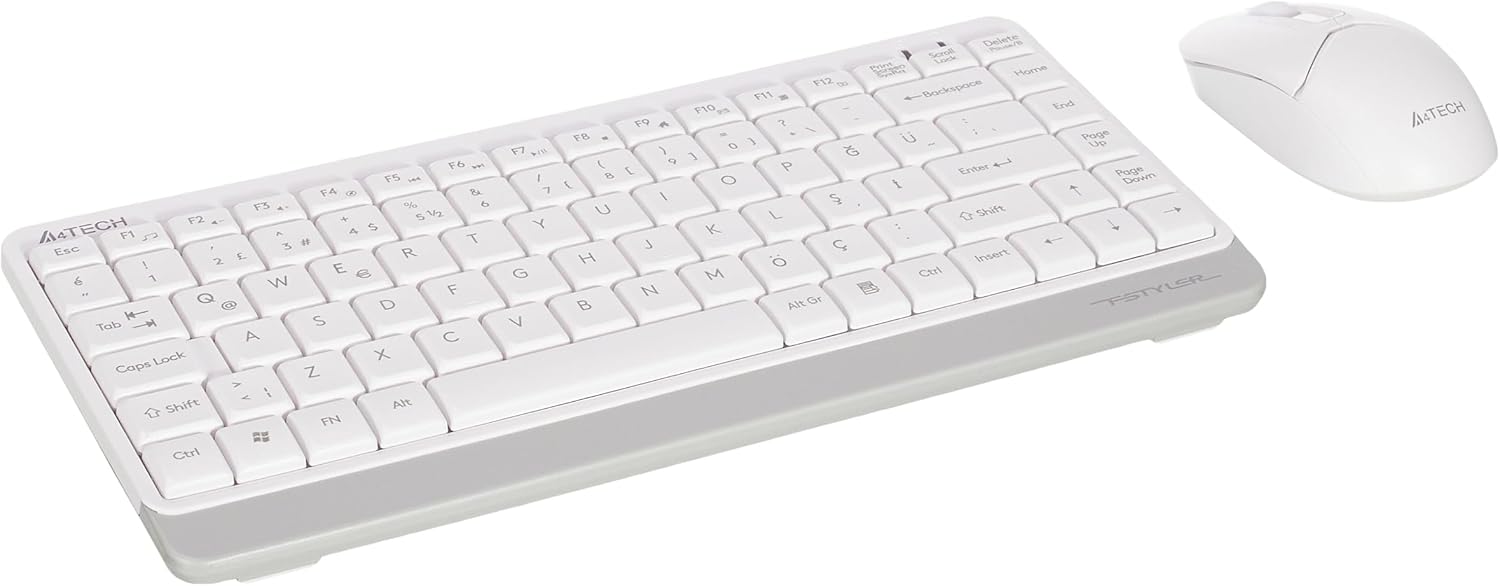
Image 1.1: A4tech FG1112 Fstyler Wireless Keyboard and Mouse Set (White)
2. Pakkens innhold
Vennligst sjekk innholdet i pakken for å sikre at alle varene er til stede:
- 1 x A4tech FG1112 Wireless Keyboard
- 1 x A4tech Fstyler Wireless Mouse
- 1 x USB Nano-mottaker
- 2 x AAA-batterier (til tastatur)
- 1 x AA Battery (for mouse, typically included)
- 1 x brukerhåndbok (dette dokumentet)
3. Installasjonsinstruksjoner
- Sett inn batterier:
- For the keyboard: Open the battery compartment cover on the underside of the keyboard. Insert two AAA batteries, ensuring correct polarity (+/-). Close the cover.
- For the mouse: Open the battery compartment cover on the underside of the mouse. Insert one AA battery, ensuring correct polarity (+/-). Close the cover.

Image 3.1: Mouse bottom view showing battery compartment and power switch.
- Koble til USB Nano-mottaker: Locate the USB Nano Receiver, typically stored inside the mouse's battery compartment or packaged separately. Plug the receiver into an available USB port on your computer.
- Strøm på:
- For the keyboard: Ensure the keyboard is powered on. There might be a power switch on the top right or underside.
- For the mouse: Slide the power switch on the underside of the mouse to the "ON" position.
- Automatisk tilkobling: Datamaskinen din skal automatisk oppdage og installere de nødvendige driverne for tastaturet og musen. Denne prosessen kan ta noen få minutter. Når den er fullført, er enhetene dine klare til bruk.
Video 3.1: A short demonstration of the A4tech Fstyler Wireless Keyboard and Mouse Set, showing its compact design and wireless connectivity. This video illustrates the product's features and ease of use.
4. Bruksanvisning
4.1 Bruk av tastatur
The A4tech FG1112 keyboard features a compact design with a Q Turkish layout. It is designed for comfortable and quiet typing.

Bilde 4.1: Topp view of the A4tech FG1112 Wireless Keyboard, highlighting its Q Turkish layout.
Multimedia and Function Keys:
The keyboard includes 12 multimedia and internet function keys integrated into the F1-F12 keys. To activate these functions, press the FN tasten samtidig med ønsket F-tast.
- FN + F1: Mediaspiller
- FN + F2: Volum ned
- FN + F3: Volum opp
- FN + F4: Demp
- FN + F5: Forrige spor
- FN + F6: Neste spor
- FN + F7: Spill av/pause
- FN + F8: Stoppe
- FN + F9Hjemmeside
- FN + F10: E-post
- FN + F11: Datamaskinen min
- FN + F12: Kalkulator

Image 4.2: Illustration of FN key functionality for multimedia controls.
4.2 Bruk av mus
The A4tech Fstyler mouse provides precise 1200 DPI optical tracking for smooth and accurate cursor movement.

Bilde 4.3: Topp view of the A4tech Fstyler Wireless Mouse.
Grunnleggende funksjoner:
- Venstre klikk: Primary function, used for selecting items, opening files, etc.
- Høyreklikk: Secondary function, typically opens context menus.
- Rullehjul: Used for scrolling documents and web pages vertically. Can also function as a middle click button.
5. Vedlikehold
- Rengjøring: Bruk en myk, tørr klut til å rengjøre tastaturet og musen. For gjenstridig smuss, bruk en litt tørr klut.amp cloth can be used, but ensure no liquid enters the devices.
- Batteribytte: When the keyboard or mouse becomes unresponsive or exhibits delayed input, it's time to replace the batteries. Follow the "Insert Batteries" steps in the Setup section.
- Lagring: When not in use for extended periods, turn off the mouse to conserve battery life. Store the devices in a cool, dry place.
6. Feilsøking
| Problem | Mulig løsning |
|---|---|
| Tastatur/mus svarer ikke |
|
| Delayed or intermittent response |
|
| Multimedietastene fungerer ikke |
|
7. Spesifikasjoner
| Trekk | Detalj |
|---|---|
| Merke | A4tech |
| Modell | FG1112 |
| Tilkoblingsteknologi | 2.4GHz Wireless |
| Tastaturoppsett | Q Turkish |
| Tastaturtype | Multimedia Membrane |
| Mus DPI | 1200 DPI optisk |
| Keyboard Power Source | 2 x AAA batterier |
| Mouse Power Source | 1 x AA Battery (typical) |
| Spesielle funksjoner | Wireless, Mini, Multimedia Keys, Optical Mouse, Laser Printed Keys, Water-resistant design (with drainage channels) |
| Produktvekt | 0.62 Kilograms (Set) |
| Dimensjoner (tastatur) | Approx. 315mm (Width) x 146mm (Depth) x 25mm (Height) |
| Dimensjoner (mus) | Approx. 64mm (Width) x 108mm (Depth) x 35mm (Height) |

Image 7.1: Dimensions of the A4tech FG1112 Keyboard and Mouse.
8. Garanti og støtte
This A4tech FG1112 Fstyler Wireless Keyboard and Mouse Set comes with a 2 års garanti fra kjøpsdatoen. Vennligst ta vare på kjøpsbeviset for garantikrav.
For technical support, troubleshooting assistance, or warranty inquiries, please contact A4tech customer service through their official webnettstedet eller din lokale distributør.
Du finner mer informasjon og støtteressurser på A4tech Store on Amazon.