
Introduksjon
Thank you for choosing the SOMIC MS300 Over-Ear Wireless Bluetooth Headphones. This manual provides essential information for setting up, operating, and maintaining your headphones to ensure optimal performance and longevity. Please read this manual thoroughly before using the product.
Pakkeinnhold
- SOMIC MS300 Over-Ear Wireless Bluetooth Headphones
- USB ladekabel
- 3.5 mm lydkabel
- Brukerhåndbok (dette dokumentet)
Produkt overview
Familiarize yourself with the various components and controls of your SOMIC MS300 headphones.
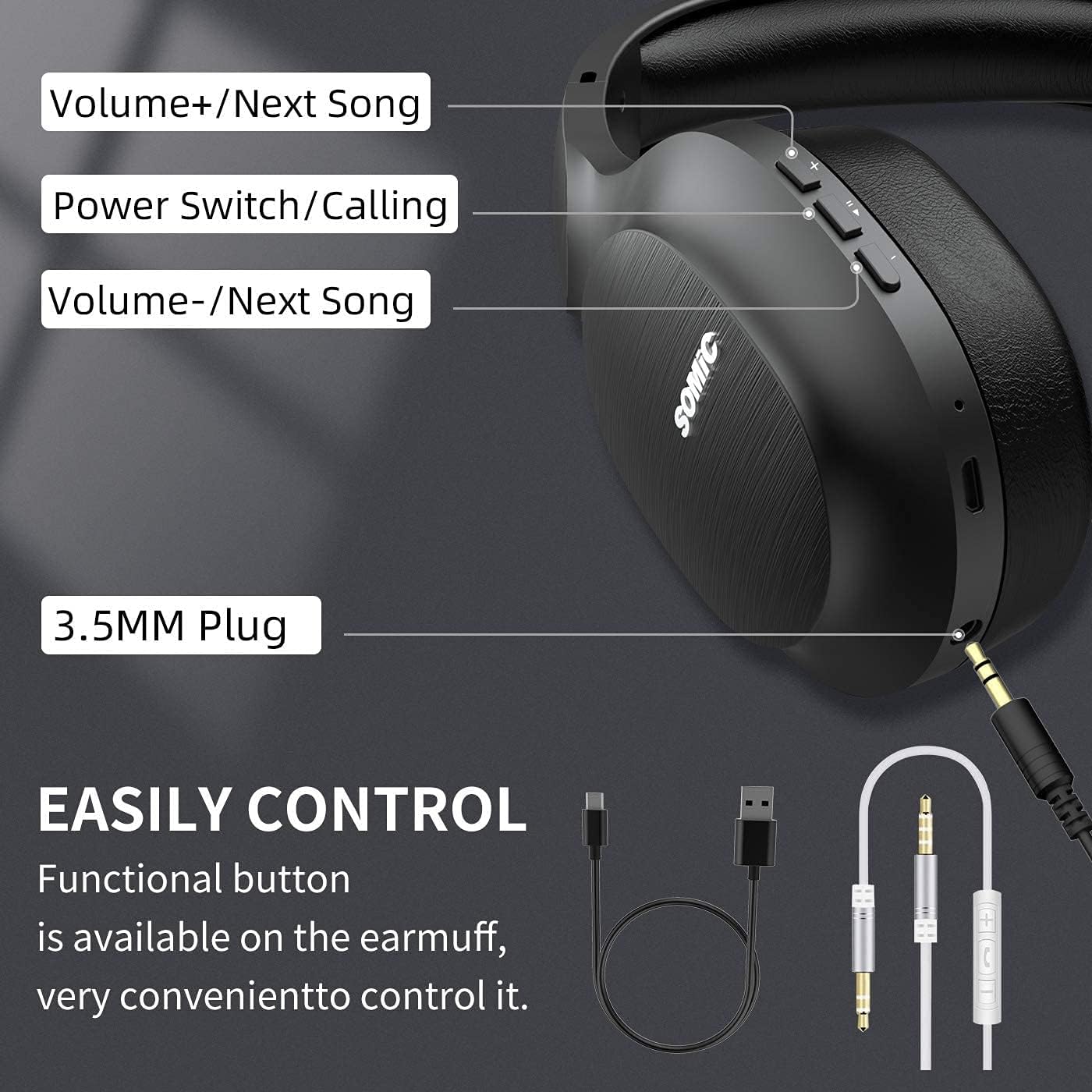
Bilde: Overview of the SOMIC MS300 headphone controls, including volume buttons, power switch, and 3.5mm audio jack.
Kontroller og porter
- Volum + / Neste sang: Press briefly to increase volume, press and hold to skip to the next song.
- Power Switch / Calling: Press and hold to power on/off. Briefly press to play/pause music. During a call, press to answer/end a call.
- Volum - / Forrige sang: Press briefly to decrease volume, press and hold to go to the previous song.
- 3.5 mm lydkontakt: For kablet tilkobling med den medfølgende 3.5 mm lydkabelen.
- USB-ladeport: For charging the headphones using the included USB cable.
- Mikrofon: Innebygd for håndfri telefoni.
Oppsett
Lader hodetelefonene

Bilde: The SOMIC MS300 headphones illustrating the fast charging capability: 5 minutes of charge provides 2 hours of playback.
- Koble den lille enden av USB-ladekabelen til USB-ladeporten på hodetelefonene.
- Koble den større enden av USB-ladekabelen til en USB-strømadapter (ikke inkludert) eller en datamaskins USB-port.
- LED-indikatoren viser ladestatus (f.eks. rød for lading, blå for fulladet).
- A full charge takes approximately 2-3 hours. For quick use, a 5-minute charge provides up to 2 hours of playtime.

Bilde: The SOMIC MS300 headphones highlighting their strong endurance with up to 72 hours of playtime on a single charge.
Slår på/av
- For å slå på: Press and hold the Power Switch button for approximately 3 seconds until the LED indicator flashes blue.
- Slik slår du av: Press and hold the Power Switch button for approximately 3 seconds until the LED indicator turns off.
Bluetooth-paring
- Sørg for at hodetelefonene er slått av.
- Trykk og hold inne strømbryterknappen i omtrent 5–7 sekunder til LED-indikatoren blinker rødt og blått vekselvis, noe som indikerer paringsmodus.
- Aktiver Bluetooth på enheten din (smarttelefon, nettbrett, datamaskin) og søk etter tilgjengelige enheter.
- Select "SOMIC MS300" from the list of devices.
- Når den er tilkoblet, blinker LED -indikatoren sakte blått.
Wired Connection (3.5mm Audio Cable)

Bilde: The SOMIC MS300 headphones demonstrating their versatility with both wireless Bluetooth connectivity and a wired option via a 3.5mm audio cable.
The SOMIC MS300 headphones can also be used with a wired connection, even if the battery is depleted.
- Koble den ene enden av 3.5 mm lydkabelen til 3.5 mm lydkontakten på hodetelefonene.
- Koble den andre enden av 3.5 mm lydkabelen til lydutgangsporten på enheten din.
- Hodetelefonene vil automatisk bytte til kablet modus. Bluetooth-funksjonaliteten vil bli deaktivert.
Bruksanvisning
Musikkavspilling
- Spill av/pause: Briefly press the Power Switch button.
- Volum opp: Briefly press the Volume + button.
- Volum ned: Briefly press the Volume - button.
- Neste spor: Trykk og hold inne Volum + -knappen.
- Forrige spor: Trykk og hold inne Volum-knappen.
Telefonsamtaler
- Svar/avslutt samtale: Briefly press the Power Switch button.
- Avvis anrop: Press and hold the Power Switch button for 2 seconds.
- Ring siste nummer på nytt: Double-press the Power Switch button.
Dobbel enhetstilkobling
The SOMIC MS300 headphones support connecting to two Bluetooth devices simultaneously.
- Koble hodetelefonene til den første enheten som beskrevet i avsnittet «Bluetooth-paring».
- Deaktiver Bluetooth på den første enheten. Hodetelefonene vil gå inn i paringsmodus på nytt.
- Koble hodetelefonene til den andre enheten.
- Re-enable Bluetooth on the first device. The headphones should automatically reconnect to both devices.
- Audio will play from the device that is actively playing media or receiving a call.
Noise Cancellation (CVC 8.0)

Bilde: A person wearing SOMIC MS300 headphones in a public setting, demonstrating the effectiveness of CVC Noise Cancelling Technology in reducing ambient noise.
The SOMIC MS300 headphones feature CVC 8.0 noise cancelling technology, which helps reduce ambient noise during calls for clearer communication. This feature is automatically active when using the built-in microphone.
Vedlikehold
Rengjøring
- Tørk av hodetelefonene med en myk, tørr og lofri klut.
- Ikke bruk slipende rengjøringsmidler, løsemidler eller sprayrengjøringsmidler.
- Unngå å få fuktighet inn i noen åpninger.
Lagring
- Oppbevar hodetelefonene på et kjølig og tørt sted, unna ekstreme temperaturer og direkte sollys.
- Når de ikke er i bruk over lengre tid, bør du lade hodetelefonene minst én gang hver tredje måned for å spare batterilevetid.
Batteripleie
- Do not attempt to replace the battery yourself. Contact customer support for battery-related issues.
- Unngå å utlade batteriet helt ofte, da dette kan redusere den totale levetiden.
Feilsøking
| Problem | Mulig løsning |
|---|---|
| Hodetelefonene slår seg ikke på. | Sørg for at hodetelefonene er ladet. Koble til en strømkilde med USB-kabelen. |
| Kan ikke pares med en enhet. | Ensure headphones are in pairing mode (LED flashing red and blue). Turn off and on Bluetooth on your device. Move headphones closer to the device. |
| Ingen lyd eller lavt volum. | Check volume levels on both headphones and the connected device. Ensure headphones are properly paired or the 3.5mm cable is fully inserted. |
| Lydkvaliteten er dårlig. | Move closer to the connected device to avoid interference. Ensure there are no obstacles between the headphones and the device. |
| Mikrofonen virker ikke. | Ensure the headphones are connected via Bluetooth. Check microphone settings on your device. |
Spesifikasjoner

Bilde: En eksploderte view of the 40mm dynamic driver and the Qualcomm QCC Bluetooth 5.0 chip, highlighting the audio technology within the SOMIC MS300 headphones.
| Trekk | Detalj |
|---|---|
| Modell | MS300 |
| Merke | SOMIC |
| Tilkobling | Wireless (Bluetooth 5.0), Wired (3.5mm Audio Jack) |
| Bluetooth-brikke | Qualcomm QCC Bluetooth 5.0 |
| Driverstørrelse | 40 mm dynamiske drivere |
| Støykontroll | CVC 8.0 Støyreduksjon |
| Batterikapasitet | 1000mAh |
| Spilletid | Opptil 72 timer |
| Rask lading | 5 minutters lading gir 2 timers spilletid |
| Øreputer Materiale | Memory Foam Protein |
| Vekt | 208 g |
| Farge | Svart |
| Vannmotstand | Ikke vannbestandig |
Garanti og støtte
Garantiinformasjon
SOMIC products are designed and manufactured to the highest quality standards. This product is covered by a limited warranty from the date of purchase. Please refer to the warranty card included in your package for specific terms and conditions. Keep your proof of purchase for warranty claims.
Kundestøtte
If you encounter any issues or have questions regarding your SOMIC MS300 headphones, please contact our customer support team. Contact details can typically be found on the warranty card or the official SOMIC website. Please have your model number (MS300) and purchase information ready when contacting support.