
1. Introduksjon
The OREI HD-1016 is a professional 1x16 HDMI Splitter designed to distribute a single HDMI source to sixteen HDMI displays simultaneously. It supports Full HD 1080P and 3D content, making it suitable for various residential and commercial applications.
Pakkeinnhold:
- 1 x OREI HD-1016 HDMI Splitter
- 1 x DC Power Adapter (100-240V, US Plug)
- 1 x brukerhåndbok
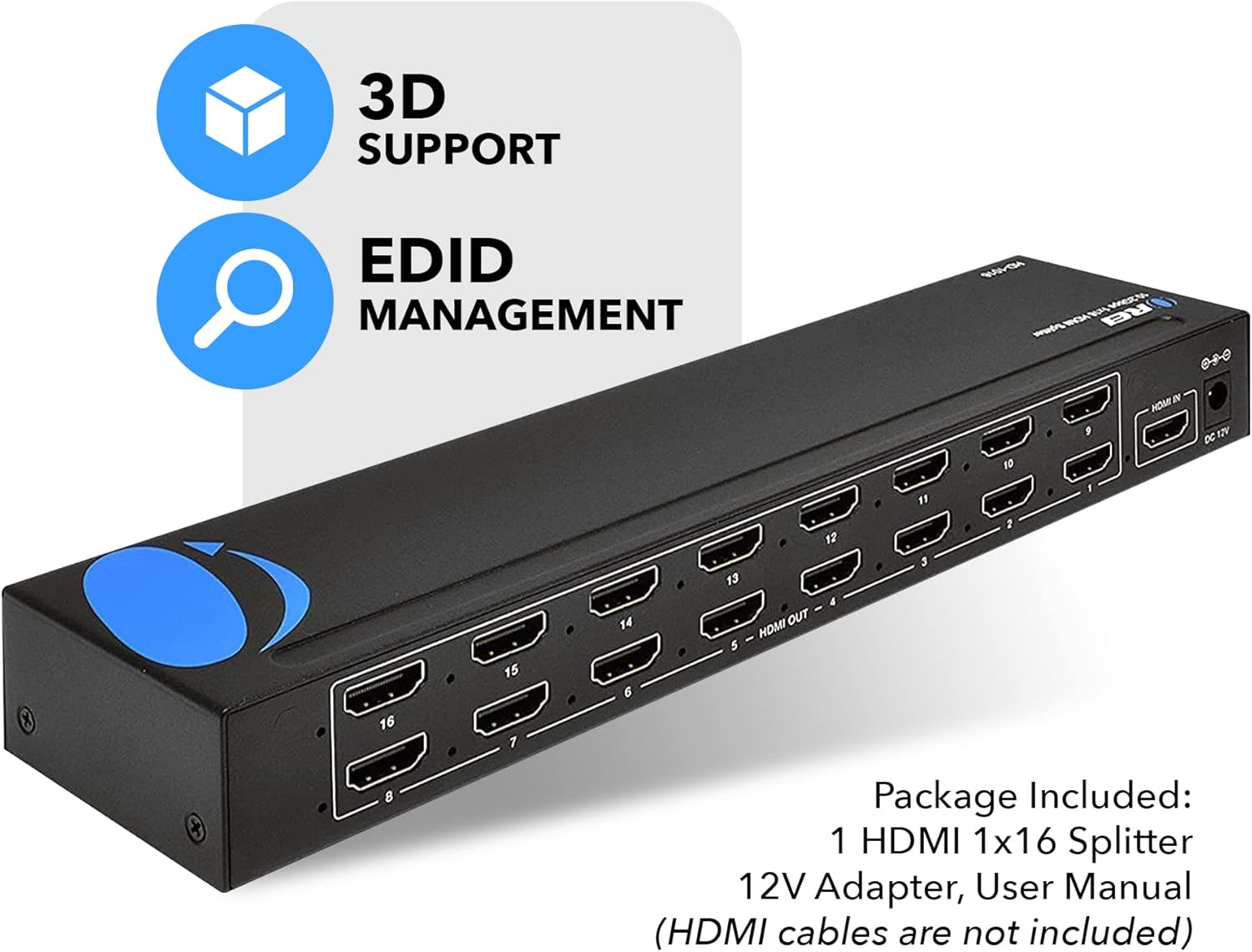
Image: OREI HD-1016 HDMI Splitter and its included accessories.
2. Nøkkelfunksjoner
- 1 Input to 16 Outputs: Connects one HDMI source to sixteen HDMI displays.
- Full HD 1080P & 3D Support: Compatible with 480i/576i/480p/576p/720p/1080i/1080p resolutions and 3D content.
- Buffering and Amplifying: Splits the HDMI signal completely without loss, with built-in signal buffering and amplifikasjonsevner.
- Heavy-Duty Metal Enclosure: Slitesterkt metall casing provides protection and aids in heat dissipation.
- Plug and Play: Simple setup with no software or drivers required.
- EDID-administrasjon: Features EDID management for optimal display compatibility.
- Bred kompatibilitet: Works with various HDMI devices such as Xbox, PS4, PS3, Fire Stick, Blu-Ray players, and Apple TV.
Image: The OREI HD-1016 HDMI Splitter supports Full HD 1080P and 3D content.
3. Installasjonsinstruksjoner
Follow these steps to set up your OREI HD-1016 HDMI Splitter:
- Koble til HDMI-kilde: Connect your HDMI source device (e.g., Blu-Ray player, game console) to the 'HDMI IN' port on the splitter using a high-quality HDMI cable.
- Koble til HDMI-skjermer: Connect up to sixteen HDMI displays (e.g., TVs, monitors, projectors) to the 'HDMI OUT' ports (1-16) on the splitter using high-quality HDMI cables. For optimal performance, it is recommended to use HDMI cables that are 30 feet or shorter.
- Koble til strømadapter: Plug the included DC Power Adapter into the 'DC 12V' port on the splitter and then into a power outlet.
- Strøm på: Ensure all connected devices and the splitter are powered on. The splitter will automatically detect the input signal and distribute it to all connected displays.

Image: Connection diagram for the OREI HD-1016 HDMI Splitter.
4. Bruksanvisning
The OREI HD-1016 HDMI Splitter is designed for simple plug-and-play operation. Once all connections are made and devices are powered on, the splitter will automatically duplicate the single HDMI input signal to all sixteen connected displays.
EDID-administrasjon:
The splitter features EDID (Extended Display Identification Data) management. This allows the splitter to communicate with the connected displays and the source device to ensure optimal resolution and audio settings are used across all outputs. Refer to the EDID switch settings on the device for specific configurations if needed.

Image: EDID Management feature icon.
Offisiell produktvideo:
Video: This video demonstrates the functionality of an HDMI splitter, showing one input signal being distributed to multiple outputs. It provides a visual guide to the core operation of the device.
5. Spesifikasjoner
| Trekk | Detalj |
|---|---|
| Modellnummer | HD-1016 |
| Inngangsporter | 1 x HDMI |
| Utgangsporter | 16 x HDMI |
| Støttede oppløsninger | 480i/576i/480p/576p/720p/1080i/1080p |
| 3D-støtte | Ja |
| Produktdimensjoner | 14.02 x 7.99 x 2.01 tommer |
| Varevekt | 1 pund |
| Farge | Svart |
| Koblingstype | HDMI til HDMI |
| Strømforsyning | DC 12V (Adapter Included) |

Image: Technical specifications and dimensions of the OREI HD-1016 HDMI Splitter.
6. Feilsøking
If you encounter issues with your OREI HD-1016 HDMI Splitter, please refer to the following common troubleshooting steps:
- Ikke noe signal på skjermen:
- Ensure all HDMI cables are securely connected to both the source, splitter, and displays.
- Verify that the power adapter is correctly connected and the splitter is powered on.
- Check if the input source is active and outputting a signal.
- Try connecting the HDMI source directly to a single display to confirm the source and display are working correctly.
- Test with different HDMI cables, especially if they are longer than 30 feet.
- Dårlig bildekvalitet eller flimring:
- Ensure you are using high-quality HDMI cables.
- Reduce the length of HDMI cables if possible.
- Check the resolution settings on your source device to ensure compatibility with all connected displays.
- Verify EDID settings on the splitter are configured correctly for your displays.
- Lydproblemer:
- Confirm that your displays support the audio format being sent by the source.
- Check audio settings on both the source device and the displays.
7. Garanti og støtte
OREI HD-1016 HDMI-splitteren leveres med en 1 års produsentgaranti. OREI also offers Lifetime OREI Tech Support for their products.
For teknisk assistanse eller garantikrav, vennligst kontakt OREIs kundestøtte gjennom deres offisielle webnettstedet eller kontaktinformasjonen som er oppgitt på produktemballasjen.