
1. Introduksjon
Takk for kjøpetasing the Acctim Delaware 71682 Radio Controlled LCD Digital Alarm Clock. This manual provides essential information for setting up, operating, and maintaining your new alarm clock. Please read these instructions carefully before use and retain them for future reference.
2. Produktet er overview
The Acctim Delaware 71682 is a radio-controlled digital alarm clock featuring a large LCD display with a green backlight, dual alarms, calendar, and indoor temperature display. Its radio-controlled function ensures accurate timekeeping in the UK and Ireland.
2.1. Komponenter og skjerm
Familiarize yourself with the clock's buttons and display elements.
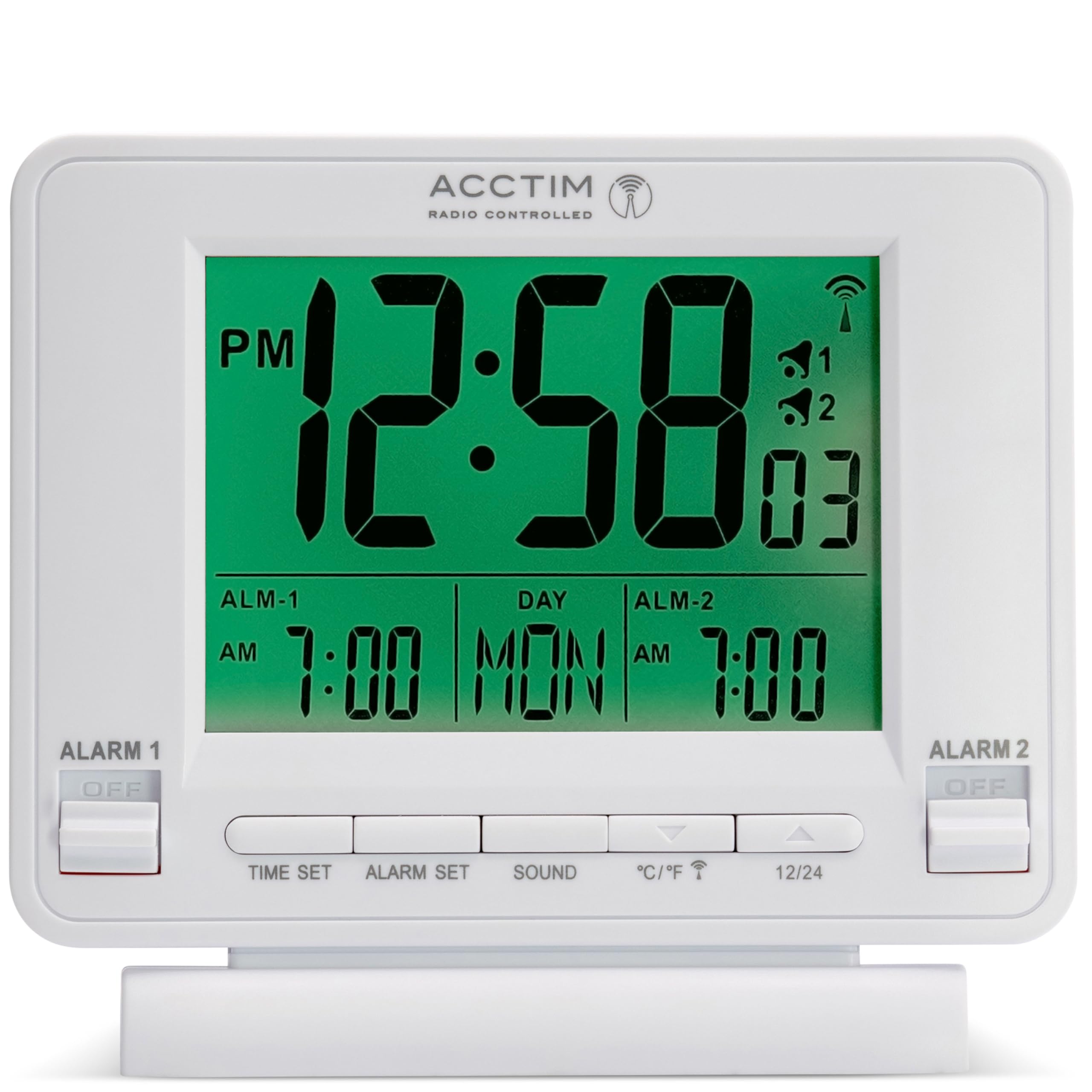
Bilde 1: Front view of the Acctim Delaware 71682 Radio Controlled LCD Digital Alarm Clock. The display shows time, day, date, and alarm settings. Control buttons are visible at the bottom, and alarm switches on the sides.
Kontroller på frontpanelet:
- TIDEN SATT: Brukes til å gå inn i tidsinnstillingsmodus.
- ALARM SETT: Used to enter alarm setting mode.
- LYD: Used to select alarm sound, and typically functions as the Snooze/Backlight button.
- °C/°F: Toggles between Celsius and Fahrenheit for temperature display. Also functions as a 'down' adjustment button in setting modes.
- 12/24: Toggles between 12-hour and 24-hour time format. Also functions as an 'up' adjustment button in setting modes.
Sidepanelkontroller:
- ALARM 1 ON/OFF Switch: Activates or deactivates Alarm 1.
- ALARM 2 ON/OFF Switch: Activates or deactivates Alarm 2.

Bilde 2: Bak view of the Acctim Delaware 71682 Alarm Clock. This image highlights the battery compartment cover and the recessed RESET button.
Kontroller på bakpanelet:
- Batterirom: Holds the required AA batteries.
- Nullstillknapp: A small, recessed button to reset the clock to factory defaults.
3. Oppsett
3.1. Installasjon av batteri
- Åpne batteridekselet på baksiden av klokken.
- Insert 2 new AA batteries, ensuring the correct polarity (+ and -).
- Lukk batteridekselet godt.
Merk: Batterier er ikke inkludert. Bruk alltid nye batterier for optimal ytelse.
3.2. Initial Setup and Radio Control Synchronization
Upon battery installation, the clock will automatically attempt to synchronize with the radio-controlled time signal (MSF signal for UK and Ireland). This process may take several minutes to a few hours, depending on your location and signal strength. During synchronization, a radio signal icon will flash on the display.
- Place the clock near a window for better signal reception.
- Unngå å plassere den i nærheten av elektroniske enheter som kan forårsake forstyrrelser.
- Once synchronized, the radio signal icon will appear solid on the display, and the time will be set automatically.
If the clock fails to synchronize, you may need to set the time manually.
4. Bruksanvisning
4.1. Stille inn tid og dato manuelt
If radio control is unavailable or you prefer manual setting:
- Trykk og hold inne TIDEN SATT knappen til timesifrene begynner å blinke.
- Bruk 12/24 (opp og ° C / ° F (down) buttons to adjust the hour.
- Pressen TIDEN SATT again to confirm the hour and move to minutes. Adjust minutes using the up/down buttons.
- Fortsett å trykke TIDEN SATT to cycle through and set year, month, and day.
- Pressen TIDEN SATT one last time or wait for 10 seconds for the settings to be saved automatically.
4.2. Stille inn alarmer (Alarm 1 og Alarm 2)
The clock features two independent alarms.
- Trykk og hold inne ALARM SETT button until the Alarm 1 hour digits start flashing.
- Bruk 12/24 (opp og ° C / ° F (down) buttons to adjust the desired Alarm 1 hour.
- Pressen ALARM SETT again to confirm the hour and move to Alarm 1 minutes. Adjust minutes using the up/down buttons.
- Pressen ALARM SETT again to move to Alarm 2 hour setting. Repeat the adjustment process for Alarm 2.
- Pressen ALARM SETT one last time or wait for 10 seconds to save the alarm settings.
4.3. Activating/Deactivating Alarms
Use the physical switches on the sides of the clock:
- Skyv på ALARM 1 PÅ/AV switch to 'ON' to activate Alarm 1. An alarm icon (1) will appear on the display.
- Skyv på ALARM 2 PÅ/AV switch to 'ON' to activate Alarm 2. An alarm icon (2) will appear on the display.
- Slide the switches to 'OFF' to deactivate the respective alarms.

Bilde 3: Front view of the Acctim Delaware 71682 with Alarm 1 activated. The 'ALARM 1' switch is in the 'ON' position, and the corresponding alarm icon is visible on the LCD.
4.4. Using the Alarm and Snooze Function
- Når en alarm lyder, trykk på LYD button (or any other front button, depending on model variation) to activate the snooze function. The alarm will pause and sound again after approximately 5 minutes.
- To stop the alarm completely, slide the corresponding ALARM PÅ / AV switch to 'OFF'.
4.5. Skjerminnstillinger
- 12/24-timers format: Trykk på 12/24 button to switch between 12-hour (with AM/PM indicator) and 24-hour time display.
- Temperaturenhet: Trykk på ° C / ° F button to toggle the indoor temperature display between Celsius and Fahrenheit.
- Bakgrunnsbelysning: Trykk på LYD button (or the top button if present) to activate the green backlight for a few seconds.

Bilde 4: Front view of the Acctim Delaware 71682 with its green backlight activated, illuminating the time, date, and temperature display for enhanced visibility in low light conditions.
5. Vedlikehold
5.1. Rengjøring
To clean the clock, use a soft, dry cloth. Do not use abrasive cleaners or chemical solvents, as these may damage the casing eller skjerm.
5.2. Batteribytte
When the display becomes dim or the clock functions erratically, it's time to replace the batteries. Follow the battery installation steps in Section 3.1. Always replace both batteries at the same time with new ones.
6. Feilsøking
- Ingen skjerm eller svak skjerm:
Ensure batteries are inserted correctly with the correct polarity. Replace with fresh AA batteries. - Feil tidspunkt:
Check if the radio control signal icon is solid. If it's flashing or absent, the clock may not be receiving the signal. Move the clock to a location with better reception (e.g., near a window). If the issue persists, set the time manually as described in Section 4.1. - Alarmen går ikke:
Verify that the respective ALARM ON/OFF switch (Alarm 1 or Alarm 2) is in the 'ON' position. Ensure the alarm time is set correctly. - Baklyset fungerer ikke:
Ensure batteries have sufficient power. The backlight is designed to illuminate for a short period only. - Clock unresponsive:
Remove the batteries, wait for a few minutes, then reinsert them. If the problem persists, use a pointed object (like a paperclip) to press the recessed TILBAKESTILL button on the back of the clock. Note that this will clear all settings.
7. Spesifikasjoner
| Trekk | Detalj |
|---|---|
| Modellnummer | 71682 |
| Merke | Acctim |
| Visningstype | Digital LCD |
| Spesielle funksjoner | Radio Controlled (UK & Ireland), Dual Alarm, Snooze, Calendar, Indoor Temperature, Backlight |
| Strømkilde | Battery (2 x AA required) |
| Dimensjoner (H x B x D) | 10.1 x 10.2 x 4 cm |
| Vekt | 0.14 kg |
| Farge | Hvit |
8. Garantiinformasjon
This Acctim product comes with a 24 måneders garanti from the date of purchase. Please retain your proof of purchase for any warranty claims. The warranty covers manufacturing defects but does not cover damage caused by misuse, accidents, unauthorized repairs, or normal wear and tear.
9. Kundestøtte
For further assistance, troubleshooting, or warranty inquiries, please contact Acctim customer support through their official webnettstedet eller forhandleren der produktet ble kjøpt. Ha modellnummeret (71682) og kjøpsbeviset klart.