
Cabletech URZ0336B
Cabletech URZ0336B DVB-T2 H.265 HEVC Digital Tuner
Brukerveiledning
1. Introduksjon
This manual provides comprehensive instructions for the installation, operation, and maintenance of your Cabletech URZ0336B DVB-T2 H.265 HEVC Digital Tuner. Please read this manual thoroughly before using the device to ensure proper functionality and to prevent damage.
2. Sikkerhetsinformasjon
Always observe the following safety precautions to avoid electric shock, fire, or damage to the device:
- Ikke utsett enheten for regn eller fuktighet.
- Ikke åpne c-enasing. Overlat all service til kvalifisert personell.
- Ensure proper ventilation around the device. Do not block ventilation openings.
- Bruk kun strømadapteren som følger med enheten.
- Hold enheten unna varmekilder og direkte sollys.
- Disconnect the power plug from the wall outlet if the device will not be used for a long period.
3. Pakkens innhold
Vennligst sjekk pakken for følgende varer:
- Cabletech URZ0336B DVB-T2 H.265 HEVC Digital Tuner
- Fjernkontroll
- AAA-batterier (2x)
- Strømadapter
- Brukerhåndbok (dette dokumentet)
4. Produktet er overview
Familiarize yourself with the main components and connections of your Cabletech URZ0336B tuner.
4.1. Enhet og fjernkontroll
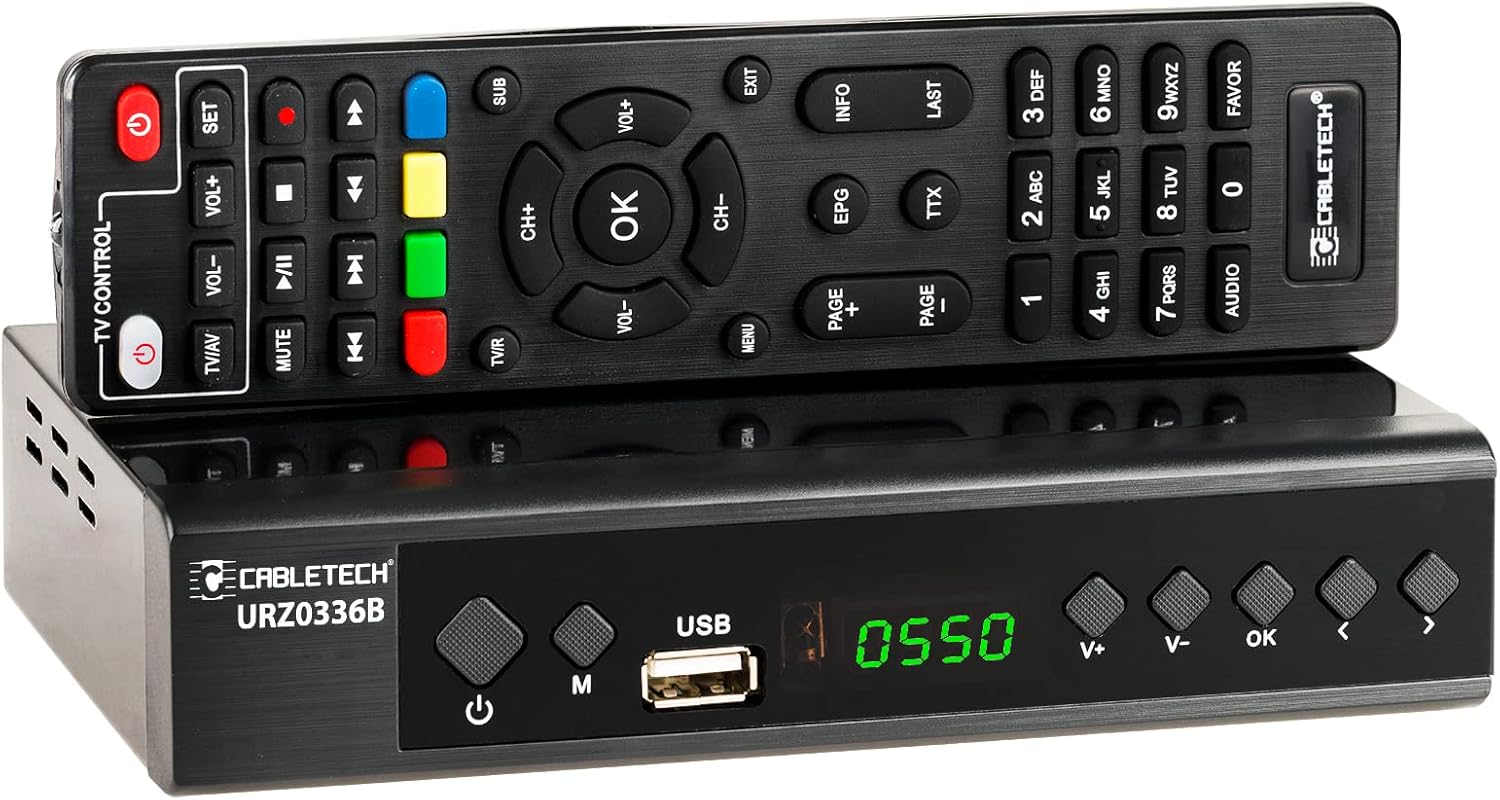
Image: The Cabletech URZ0336B DVB-T2 H.265 HEVC Digital Tuner shown with its accompanying remote control. The tuner is a compact black box, and the remote is also black with various control buttons.
4.2. Frontpanel
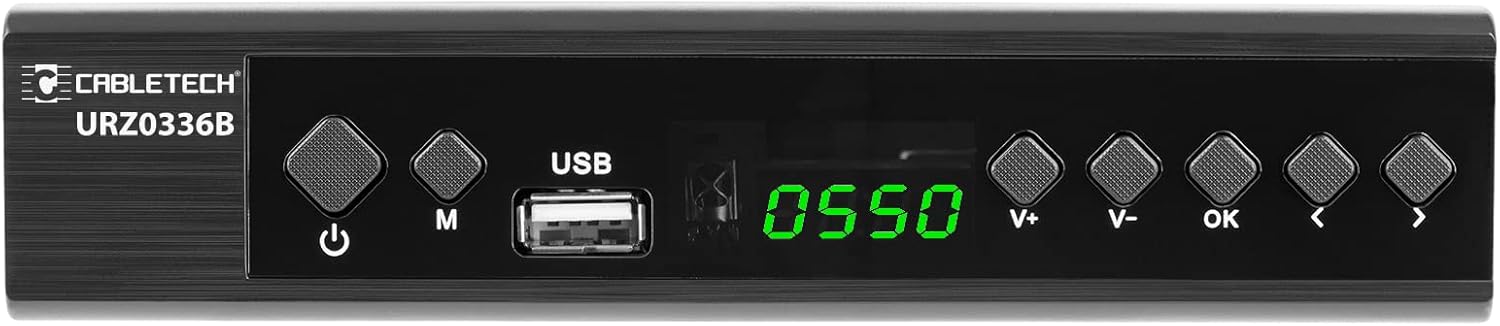
Image: Close-up of the Cabletech URZ0336B front panel, featuring a power button, menu button (M), USB 2.0 port, LED display showing "0550", and navigation/volume buttons (V+, V-, OK, <, >).
- Strømknapp: Turns the device on/off or to standby.
- M-knapp (Meny): Får tilgang til hovedmenyen.
- USB 2.0-port: For software updates, PVR recording, and media playback.
- LED display: Viser kanalnummer eller tid.
- V+/V- Buttons: Justerer volumet.
- OK -knapp: Bekrefter valg.
- </> Buttons: Navigates through menus or changes channels.
4.3. Tilkoblinger på bakpanelet

Image: The rear panel of the Cabletech URZ0336B, showing various input and output ports: ANT IN (IEC socket), COAXIAL, USB, HD OUT (HDMI), SCART, and the power input (110-240V~ 50/60Hz).
- MAUR I: Connects to your DVB-T/T2 antenna.
- KOAKSIELL: Digital lydutgang.
- USB: Additional USB 2.0 port for external devices.
- HD OUT (HDMI): Connects to your TV for high-definition video and audio.
- SCART: Connects to older TVs or VCRs.
- Strøminngang: Kobles til strømadapteren.
4.4. Fjernkontrolloppsett

Bilde: Detaljert view of the Cabletech URZ0336B remote control, showing buttons for power, TV/AV, volume, channel, mute, playback controls, EPG, TTX, INFO, numeric keypad, and special function buttons.
The remote control provides full functionality for operating your tuner. Insert 2x AAA batteries into the battery compartment before first use.
5. Oppsett
5.1. Connecting the Tuner
- Koble til antennen: Connect your DVB-T/T2 antenna cable to the MAUR INN port on the rear panel of the tuner.
- Koble til TV:
- For HD TVs: Connect an HDMI cable from the HD OUT (HDMI) port on the tuner to an HDMI input on your TV.
- For older TVs: Connect a SCART cable from the SCART port on the tuner to the SCART input on your TV.
- Koble til strøm: Connect the power adapter to the tuner's power input and then plug it into a wall outlet.
- Sett inn batterier: Open the battery compartment on the remote control and insert 2x AAA batteries, observing polarity.
5.2. First-Time Installation and Channel Scan
- Turn on your TV and select the correct HDMI or SCART input source that the tuner is connected to.
- Power on the Cabletech URZ0336B tuner using the power button on the front panel or remote control.
- The first-time installation wizard should appear on your TV screen. Follow the on-screen prompts.
- Select your preferred language and country.
- Initiate an Automatisk søk for channels. The tuner will scan for all available DVB-T/T2 channels in your area. This process may take several minutes.
- Once the scan is complete, the tuner will save the found channels and display the first channel.
Note: If you experience poor signal quality, adjust your antenna position or consider using a signal amplivligere.
6. Bruksanvisning
6.1. Grunnleggende funksjoner
- Slå på/av: Trykk på MAKT knappen på fjernkontrollen.
- Kanalendring: Bruk CH + / CH- buttons or the numeric keypad to enter a channel number.
- Volumkontroll: Bruk VOL + / VOL- knapper.
- Stum: Trykk på STUM -knappen for å midlertidig dempe lyden.
- Meny: Trykk på MENY button to access the main menu for settings and features.
- OK: Confirms selections in menus or displays the channel list.
- EXIT: Går ut av gjeldende meny eller skjerm.
6.2. Electronic Program Guide (EPG)
The 7-day EPG provides a schedule of current and upcoming programs.
- Trykk på EPG knappen på fjernkontrollen.
- Navigate through channels and program times using the arrow buttons.
- Pressen OK til view details about a selected program.
6.3. PVR (Program Recording) and Timeshift
Connect a USB storage device (e.g., USB flash drive or external hard drive) to one of the USB 2.0 ports to use PVR and Timeshift functions.
- PVR-opptak:
- Trykk på REC button (red circle) on the remote to start immediate recording of the current program. Press STOPPE (square) to end recording.
- Schedule recordings via the EPG: Select a program in the EPG and press OK, then choose the record option.
- Tidsforskyvning:
- Mens du ser på et program, trykker du på PAUSE button. The tuner will begin recording the live broadcast to the USB device.
- Du kan da SPILLE, SPOLE FREM, eller SPOLE within the buffered content.
- Pressen STOPPE to exit Timeshift and return to live TV.
6.4. Medieavspilling
The tuner supports playback of various media files fra en tilkoblet USB-lagringsenhet.
- Connect your USB device to a USB port on the tuner.
- Go to the main menu and select "Media" or "USB".
- Naviger til ønsket file type (MP3, WMA, JPEG, BMP, AVI) and select the file å spille.
6.5. Supported Applications
The tuner supports various online applications when connected to the internet via an external MT7601 Wi-Fi adapter (not included).
- Vær: View lokale værmeldinger.
- IPTV: Access Internet Protocol Television streams.
- YouTube: Watch videos from YouTube.
- RSS: Read RSS news feeds.
Note: An external MT7601 Wi-Fi adapter is required for internet connectivity and access to these applications.
6.6. Foreldrekontroll
Set up parental control to restrict access to certain channels or programs based on age ratings.
- Access the "Parental Control" section in the main menu.
- Enter your PIN (default is usually 0000 or 1234, check your device for specifics).
- Configure age restrictions or lock specific channels.
6.7. Timerfunksjon
The timer function allows you to schedule the tuner to turn on/off at specific times or to switch to a particular channel.
- Navigate to the "Timer" section in the main menu.
- Set the event type (e.g., Power On, Power Off, Record), time, and duration.
7. Vedlikehold
7.1. Rengjøring
To clean the device, disconnect it from the power supply and wipe the exterior with a soft, dry cloth. Do not use liquid or aerosol cleaners.
7.2. Programvare oppdatering
Software updates can improve performance and add new features. Updates are performed via the USB port.
- Last ned den nyeste fastvaren file from the official Cabletech support webnettsted (hvis tilgjengelig).
- Kopier fastvaren file til rotkatalogen på en USB-minnepinne.
- Connect the USB flash drive to the tuner's USB port.
- Go to the "System" or "Tools" menu, then select "Software Update" or "Upgrade by USB".
- Follow the on-screen instructions to complete the update. Do not power off the device during the update process.
8. Feilsøking
If you encounter issues with your tuner, refer to the following common problems and solutions:
| Problem | Mulig årsak | Løsning |
|---|---|---|
| Ingen bilde eller lyd | Incorrect TV input selected; Loose cable connections; Tuner not powered on. | Select correct TV input (HDMI/SCART); Check all cable connections; Ensure tuner is powered on. |
| Meldingen «Ingen signal» | Antenna not connected; Poor antenna signal; No channels scanned. | Connect antenna properly; Adjust antenna position; Perform an automatic channel scan. |
| Fjernkontrollen virker ikke | Batteries are dead or inserted incorrectly; Obstruction between remote and tuner. | Replace batteries; Check battery polarity; Remove any obstructions; Point remote directly at the tuner. |
| Kan ikke ta opp til USB | USB device not connected or formatted incorrectly; Insufficient storage space. | Ensure USB device is connected; Format USB device to FAT32 or NTFS; Free up space on USB device. |
| No internet access for apps | No MT7601 Wi-Fi adapter connected; Network configuration issues. | Connect a compatible MT7601 Wi-Fi adapter; Check network settings in the tuner's menu. |
9. Spesifikasjoner
| Trekk | Detalj |
|---|---|
| Modellnummer | URZ0336B |
| CPU | GX6702S5 |
| Internt minne | 32 MB |
| VÆR | 512 MB DDR2 |
| ANT-kontakt | IEC stikkontakt |
| Frekvensområde | VHF: 170–230 MHz, UHF: 470–862 MHz |
| Demodulasjon | QPSK, 16QAM, 64QAM, 256QAM |
| Båndbredde | 7 MHz, 8 MHz |
| Dekoding | MPEG-1, MPEG-2, MPEG-4, H.264, H.265, AAC, HE-AAC, AC-3, DD+ |
| Innganger/utganger | 2x USB 2.0, HDMI, SCART, COAXIAL |
| Aspektforhold | Auto, 16:9 WS, 16:9 PB, 16:9 PS; 4:3 LB, 4:3 PS, 4:3 Full |
| Støttede formater | MP3, WMA, JPEG, BMP, AVI |
| Skjermoppløsning | 480i, 480p, 576i, 576p, 720p, 1080i, 1080p |
| Videooppløsning | 1920 x 1080 piksler |
| Lyddekoding | MPEG-1 LayerI/II, Dolby-Downmix 2-Channel (License), AAC LC, HE-AAC v1/V2, PCM-Downmix, IEC958 SPDIF |
| File System | FAT32, NTFS |
| Kompatibilitet | Fully compatible with DVB-T2/DVB-T |
| Fjernkontroll | Requires 2x AAA batteries |
| Strømforbruk | Max. 6 W (Operating), Max. 50/60 Hz (Standby) |
| Dimensjoner (B x H) | 168 mm x 36 mm |
| Wi-Fi-støtte | Requires external MT7601 chip adapter |
| Tuner Bit Depth | 10 bit |
10. Garanti og støtte
This product comes with a standard manufacturer's warranty. For specific warranty terms and conditions, please refer to the documentation included with your purchase or contact Cabletech customer support.
For technical assistance, troubleshooting beyond this manual, or warranty claims, please contact your retailer or the official Cabletech support channels.
Ask a question about this manual
Ask about setup, troubleshooting, compatibility, parts, safety, or missing instructions. Manuals+ will review the question and use this page’s manual context to help answer it.