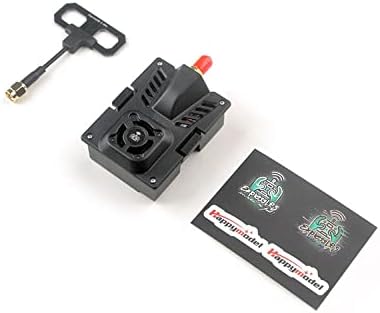
The HappyModel ES24TX Pro is an advanced 2.4GHz ExpressLRS (ELRS) Micro TX module designed for remote control transmitters. It offers a maximum output power of 1000mW, ensuring robust signal transmission. This module features a built-in cooling fan to maintain optimal operating temperatures during high-power use and an RGB LED for status indication. It is compatible with most OpenTX radio transmitters equipped with a Micro JR bay, including popular models like the TX16S, QX7, TX12, and X9D. The module comes pre-installed with ExpressLRS firmware for plug-and-play functionality.
Image 1: HappyModel ES24TX Pro Micro TX Module with antenna connector.
2. Produktfunksjoner
Høy utgangseffekt: Up to 1000mW for extended range and signal reliability.
Integrert kjølevifte: Ensures stable performance by preventing overheating during high-power operation.
RGB LED Module: Provides visual status feedback.
Bred kompatibilitet: Supports OpenTX radio transmitters with a Micro JR bay (e.g., TX16S, QX7, TX12, X9D).
Pre-installed ExpressLRS Firmware: Ready for immediate use upon installation.
Compact Micro TX Form Factor: Designed for easy integration into compatible radio transmitters.
3. Hva er i esken
Pakken inneholder vanligvis følgende komponenter:
HappyModel ES24TX Pro Micro TX Module
Antenne
Stickers (may vary)
Image 2: Contents of the HappyModel ES24TX Pro package, including the module, antenna, and stickers.
4. Spesifikasjoner
Trekk
Spesifikasjon
Modellnummer
ES24TX Pro
Maksimal utgangseffekt
1000mW
Hyppighet
2.4GHz (ExpressLRS)
Avkjøling
Innebygd kjølevifte
Statusindikator
RGB LED-modul
Kompatibilitet
OpenTX radio transmitters with Micro JR bay (e.g., TX16S, QX7, TX12, X9D)
Pre-installed Firmware
ExpressLRS
Varevekt
3.2 unser
Pakkedimensjoner
5.63 x 4.37 x 2.44 tommer
5. Installasjonsinstruksjoner
5.1 Fysisk installasjon
Sørg for at radiosenderen din er slått av.
Locate the Micro JR bay on the back of your compatible OpenTX radio transmitter (e.g., TX16S, QX7, TX12, X9D).
Carefully insert the ES24TX Pro module into the JR bay, ensuring it is seated firmly.
Attach the provided antenna to the SMA connector on the module. Hand-tighten only; do not overtighten.
Image 3: The ES24TX Pro module correctly installed in the JR bay of a compatible radio transmitter.
5.2 Radio Transmitter Configuration
Power on your radio transmitter.
Navigate to the Model Setup menu in OpenTX/EdgeTX.
Scroll to the "External RF" section.
Set the External RF mode to "CRSF" (Crossfire) as ExpressLRS uses the CRSF protocol.
Ensure the internal RF module is turned off if you are using the external ELRS module exclusively.
5.3 Firmware Flashing (Advanced Users)
While the module comes with pre-installed ExpressLRS firmware, advanced users may wish to update or flash custom firmware. This typically involves:
Accessing internal switches: Some users report needing to open the module casing to access internal switches for flashing. Refer to community resources or HappyModel documentation for specific instructions for your module version.
Connecting via USB-C: The module features a USB-C port for firmware updates.
Using the ExpressLRS Configurator: Download the latest ExpressLRS Configurator software to compile and flash firmware.
Bilde 4: Internt view of the ES24TX Pro module, showing the heatsink and potential access points for advanced configuration.
6. Bruksanvisning
6.1 Binding to a Receiver
To establish a connection between the ES24TX Pro module and an ExpressLRS receiver:
Ensure both the TX module and the receiver are powered on.
Put the receiver into binding mode (typically by cycling power three times or pressing a bind button). The receiver's LED will usually flash rapidly.
On your radio transmitter, navigate to the ExpressLRS LUA script (usually found in the Tools menu).
Select the "Bind" option within the LUA script. The TX module's RGB LED will indicate binding status.
Once bound, the receiver's LED should become solid, and the TX module's LED will indicate a successful connection.
6.2 Justering av effekt
The ES24TX Pro supports adjustable power output up to 1000mW. Adjusting power is crucial for optimal performance and to prevent overheating.
Access the ExpressLRS LUA script on your radio transmitter.
Locate the "Power" or "TX Power" setting.
Select the desired power level (e.g., 10mW, 25mW, 100mW, 250mW, 500mW, 1000mW).
For indoor flying or short ranges, lower power settings (e.g., 100mW) are often sufficient.
For outdoor flying or longer ranges, higher power settings (e.g., 250mW or above) may be used.
Viktig: When using higher power settings, ensure the built-in cooling fan is active to prevent overheating. The fan can usually be enabled or configured within the LUA script.
6.3 RGB LED Status Indicators
The RGB LED on the module provides visual feedback on its operational status. Refer to the official ExpressLRS documentation for a complete list of LED patterns and their meanings. Common indications include:
Helt grønt: Tilkoblet og fungerer normalt.
Blinker grønt: Binding mode or waiting for connection.
Helt rødt: Error or fault condition.
Blinker rødt: Overheating warning or low voltage.
7. Vedlikehold
Hold rent: Regularly clean the module and its connectors with a soft, dry cloth. Avoid using liquids or harsh chemicals.
Antennepleie: Ensure the antenna is securely attached before each use. Avoid bending or stressing the antenna excessively.
Kjølevifte: Periodically check the cooling fan for dust or obstructions. A blocked fan can lead to overheating.
Lagring: Store the module in a dry, cool place away from direct sunlight and extreme temperatures.
Fastvareoppdateringer: While not strictly maintenance, keeping the firmware updated can improve performance and add new features. Refer to the ExpressLRS project for the latest firmware and update procedures.
8. Feilsøking
8.1 Module Not Powering On / No LED
Sjekk tilkoblingen: Ensure the module is fully seated in the JR bay of your radio transmitter.
Radiokraft: Verify that your radio transmitter is powered on and has sufficient battery charge.
Radio Configuration: Confirm that the external RF module is enabled in your radio's model settings.
Module Fault: If the module previously worked and now shows no signs of life, it might be faulty.
8.2 Unable to Bind to Receiver
Firmware Mismatch: Ensure both the TX module and the receiver are running compatible ExpressLRS firmware versions. It is recommended to use the same major version.
Bindende frase: If using a binding phrase, ensure it is identical on both the TX module and the receiver.
Bindende prosedyre: Double-check that you are following the correct binding procedure for both the receiver and the TX module (e.g., power cycling the receiver correctly).
Nærhet: Keep the receiver close to the TX module during the binding process.
8.3 Module Overheating
Enable Fan: Ensure the built-in cooling fan is enabled and operating, especially when using higher power output settings (250mW and above). This can usually be configured via the ExpressLRS LUA script.
Luftstrøm: Ensure the fan intake and exhaust vents are not obstructed.
Strøminnstilling: Reduce the TX power output if overheating persists, especially in warm environments or during prolonged use.
8.4 Intermittent Connection / Range Issues
Antennesjekk: Verify that the antenna is securely connected to the module and is not damaged.
Mottakerplassering: Ensure the receiver antenna(s) on your drone/aircraft are properly positioned and not obstructed by carbon fiber or other components.
Strømutgang: Increase the TX power output if operating at longer ranges, ensuring the cooling fan is active.
Miljø: Be aware of potential interference from Wi-Fi, other 2.4GHz devices, or physical obstructions in your flying area.
9. Garanti og støtte
For warranty information and technical support, please refer to the official HappyModel website or contact your retailer. Specific warranty terms may vary by region and point of purchase. It is recommended to retain your proof of purchase for any warranty claims.
For general ExpressLRS information, firmware, and community support, visit the official ExpressLRS project webnettstedet.
Ask about setup, troubleshooting, compatibility, parts, safety, or missing instructions. Manuals+ will review the question and use this page’s manual context to help answer it.