
Senicare ZH027
Brukerhåndbok for digital vekkerklokke
Brand: Senicare | Model: ZH027
Introduksjon
Takk for kjøpetasing the Senicare Digital Alarm Clock. This alarm clock is designed to provide clear time display, customizable night lighting, and convenient charging options for your devices. Its large LED display ensures readability from a distance, making it suitable for all ages. This manual provides detailed instructions for setup, operation, and maintenance to ensure optimal performance and longevity of your device.

Figure 1: Senicare Digital Alarm Clock Overview
Pakkeinnhold
Sjekk innholdet i pakken når du pakker ut for å sikre at alle varene er til stede:
- 1 x Senicare Digital Alarm Clock (Model: ZH027)
- 1 x strømadapter
- 1 x USB Power Cable (approx. 59.06 inches / 1.5 meters)
- 1 x brukerhåndbok (dette dokumentet)

Figur 2: Inkludert pakkeinnhold
Oppsett
Follow these steps to set up your Senicare Digital Alarm Clock:
- Strømtilkobling: Connect the provided USB power cable to the "INPUT 5V===2A" port on the back of the alarm clock. Plug the other end into the power adapter, and then plug the adapter into a standard electrical outlet (100-240V AC). The display will light up.
- Batteribackup (valgfritt): For power failure memory, insert 2 x AAA batteries (not included) into the battery compartment on the bottom of the clock. This feature ensures that time and alarm settings are retained during a power outage, though the screen will go blank.
- Innstilling av opprinnelig tid:
- Trykk på TIDEN SATT button on the back of the clock. The hour digits will start flashing.
- Bruk TIME og MIN buttons on the top of the clock to adjust the hour and minute respectively.
- Pressen TIDEN SATT igjen for å bekrefte tiden.
- 12/24-timers format: Trykk på 12/24H button on the back to switch between 12-hour (with AM/PM indicator) and 24-hour time formats.

Figure 3: Power Failure Memory Feature

Figur 4: Viktige funksjoner overview
Bruksanvisning
Stille inn alarmen
- Trykk på AL SET knappen på baksiden av klokken. Alarmtimene vil blinke.
- Bruk TIME og MIN knappene øverst for å stille inn ønsket alarmtid.
- Pressen AL SET igjen for å bekrefte alarmtidspunktet.
- For å aktivere eller deaktivere alarmen, bruk ALARM PÅ / AV slider switch on the back of the clock. When the alarm is active, an alarm icon will appear on the display.
Snooze-funksjon
Når alarmen går, trykker du på den store SNOOZE-LYS button on the top of the clock to activate the snooze function. The alarm will pause for 9 minutes and then sound again. You can repeat this process multiple times.

Figure 5: Snooze Function
Justering av alarmvolum
The alarm volume can be adjusted to High (HI), Medium (MI), or Low (LO) using the VOLUM slider switch located on the back of the clock.

Figure 6: Volume and Alarm Controls
Nattlysfunksjon
The clock features a 7-color soft night light. Tap the large SNOOZE-LYS button on the top of the clock to cycle through the different colors or turn the night light off. This provides a gentle illumination for your room.

Figure 7: 7-Color Soft Night Light

Figure 8: Night Light Color Options
Automatisk dimmer
The clock is equipped with a photosensitive sensor that automatically adjusts the display brightness (0-100%) to a comfortable level based on ambient light conditions, ensuring clear visibility day and night without being too bright in the dark.

Figure 9: Auto Dimmer Display Brightness

Figure 10: Automatic Brightness Adjustment
Dual USB-ladelåser
The back of the alarm clock features two 5V 1A USB charging ports (USB1, USB2) and one Type-C output port (5V 1A). These ports allow you to conveniently charge your smartphone, tablet, or other USB-powered devices directly from the alarm clock, eliminating the need for extra wall adapters.
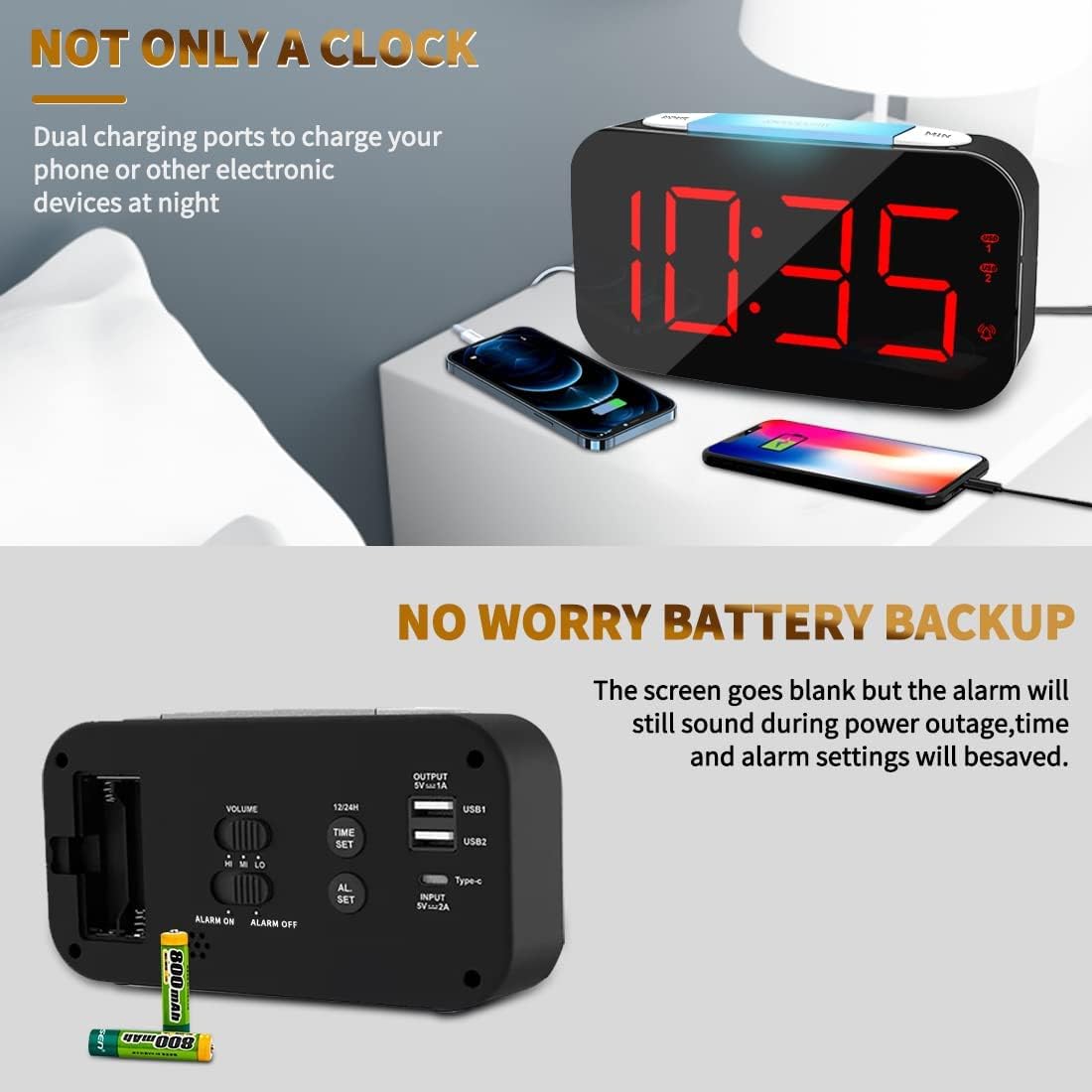
Figur 11: Doble USB-ladeporter i bruk

Figure 12: USB and Type-C Output Ports
Vedlikehold
To ensure the longevity and proper functioning of your Senicare Digital Alarm Clock, please follow these simple maintenance guidelines:
- Rengjøring: Use a soft, dry cloth to wipe the surface of the clock. Do not use abrasive cleaners, waxes, or solvents as they may damage the finish.
- Plassering: Plasser klokken på en stabil, flat overflate, unna direkte sollys, varmekilder og overdreven fuktighet.
- Makt: Always use the original power adapter and cable provided with the device.
- Batteribytte: If using the battery backup feature, replace the AAA batteries annually or when the power failure memory function becomes unreliable.
Feilsøking
If you encounter any issues with your alarm clock, please refer to the following common problems and solutions:
| Problem | Mulig årsak | Løsning |
|---|---|---|
| Skjermen er tom eller lyser ikke. | Ingen strømtilkobling eller strømutgangtage. | Ensure the power adapter is securely plugged into both the clock and a working electrical outlet. Check if there's a power outage in your area. If using battery backup, the display will be blank during an outage, but settings are saved. |
| Alarmen lyder ikke. | Alarmen er ikke aktivert, volumet er for lavt, eller feil alarmtid er angitt. | Sjekk ALARM PÅ / AV switch on the back to ensure it's in the "ON" position. Adjust the VOLUM slider to a higher setting. Verify that the alarm time is set correctly. |
| Display digits flicker or go blank partially. | Internal component issue or power fluctuation. | Try unplugging the clock for a few minutes and then plugging it back in. If the issue persists, contact customer support for assistance. |
| USB-ladeportene fungerer ikke. | Device not properly connected or power issue. | Ensure your device's USB cable is fully inserted into the clock's USB port. Verify the clock is powered on. Try a different USB port or cable. |
Spesifikasjoner
| Trekk | Detalj |
|---|---|
| Merke | Senicare |
| Modellnummer | ZH027 |
| Farge | Svart |
| Visningstype | Digital LED |
| Spesielle funksjoner | Adjustable Brightness, Charging Station, Large Display, Snooze, 7-Color Night Light |
| Produktdimensjoner | 6.65 cm B x 8.5 cm H (ca. 16.9 cm B x 3.35 cm H) |
| Strømkilde | Ledningsbasert elektrisk (100–240 V AC) |
| Batterisikkerhetskopiering | 2 x AAA Batteries (Not Included) for settings memory |
| USB-utgang | Dual USB-A (5V 1A), One Type-C (5V 1A) |
| Materiale | Plast |
| Varevekt | 0.63 Pounds / 10.1 ounces (approx. 286g) |
Garanti og støtte
Senicare offers a hassle-free 18 måneders garanti for this Digital Alarm Clock. We are committed to providing high-quality products and excellent customer service.
For any questions, concerns, or warranty claims, please contact our friendly customer service team through the platform where you purchased the product. Please have your order number and product model (ZH027) ready for faster assistance.
We also offer an easy return policy. Refer to the retailer's return guidelines for more details.