
1. Introduksjon
Thank you for choosing the Karaca BakeXL Bread Maker. This versatile appliance is designed to simplify your baking experience, allowing you to prepare fresh bread, knead dough, make jam, and even yogurt with ease. Your bread maker also comes with a booklet containing 45 different recipes to get you started. Please read this manual thoroughly before first use to ensure safe operation and optimal performance. Keep this manual for future reference.
2. Viktige sikkerhetsinstruksjoner
- Sørg alltid for at apparatet er koblet fra strømnettet før rengjøring eller når det ikke er i bruk.
- Ikke senk apparatet, ledningen eller pluggen i vann eller annen væske.
- Hold hender og redskaper unna bevegelige deler under bruk for å unngå skader.
- Do not touch hot surfaces. Use oven mitts when removing the bread pan or handling hot bread.
- Dette apparatet er kun til husholdningsbruk. Ikke bruk utendørs.
- Sørg for at apparatet er plassert på en stabil, varmebestandig overflate, unna brennbare materialer.
- Nøye tilsyn er nødvendig når et apparat brukes av eller i nærheten av barn.
- Ikke bruk noe apparat med en skadet ledning eller støpsel, eller etter at apparatet ikke fungerer eller har blitt skadet på noen måte.
- Ikke bruk tilbehør som ikke er anbefalt av produsenten, da dette kan forårsake skader.
3. Produktet er overview
Familiarize yourself with the components of your Karaca BakeXL Bread Maker:

Figur 3.1: Ytre view of the Karaca BakeXL Bread Maker. This image shows the sleek black and silver design of the appliance from an angled perspective, highlighting its compact form.

Figur 3.2: Bread Maker with lid open. This view reveals the interior cavity where the bread pan is placed, along with the heating element and the mechanism for the kneading paddles.

Figur 3.3: Bread Maker with the bread pan removed. This image displays the main unit alongside the removable bread pan, illustrating how it detaches for easy cleaning and ingredient loading.
Kontrollpanelfunksjoner:

Figur 3.4: Close-up of the control panel. This image provides a clear view of the digital display and various buttons for program selection, loaf size, crust color, and start/stop functions.
- MENY: Selects the desired program (e.g., Basic Bread, Whole Wheat, Jam, Yogurt).
- LOAF STØRRELSE: Adjusts the loaf weight (e.g., 1000g, 1250g, 1500g).
- FARGE: Sets the crust darkness (Light, Medium, Dark).
- DELAY TIMER (+/-): Sets a delayed start time for baking.
- START STOPP: Initiates or cancels the selected program.
4. Oppsett og første gangs bruk
- Unpack the bread maker and all accessories. Remove any packaging materials.
- Tørk av utsiden av apparatet med adamp klut.
- Wash the bread pan and kneading paddles with warm, soapy water. Rinse thoroughly and dry completely.
- Insert the kneading paddles onto the shafts at the bottom of the bread pan.
- Place the bread pan into the baking chamber, ensuring it clicks securely into place.
- Position the bread maker on a stable, flat, and heat-resistant surface, ensuring adequate ventilation around the unit.
- For the first use, it is recommended to run the "Bake" program (usually program 12 or similar) for 10 minutes without ingredients to burn off any manufacturing residues. Allow the unit to cool completely afterward.
5. Bruksanvisning
General Baking Steps:
- Ensure the kneading paddles are correctly installed in the bread pan.
- Add liquid ingredients first, followed by dry ingredients. Make sure yeast is added last and does not come into direct contact with liquid or salt. Refer to your recipe booklet for precise ingredient order.
- Place the bread pan into the bread maker and close the lid.
- Plug in the appliance. The default program will display.
- Trykk på MENY button to select your desired program.
- Trykk på LØP STØRRELSE button to select the desired loaf weight (e.g., 1000g, 1250g, 1500g).
- Trykk på FARGE button to select your preferred crust darkness (Light, Medium, Dark).
- If desired, use the FORSINKELSE TIMER buttons to set a delayed start.
- Trykk på START/STOPP button to begin the program. The machine will beep, and the timer will start counting down.
- Once the program is complete, the machine will beep multiple times. Unplug the appliance.
- Using oven mitts, carefully remove the bread pan by twisting and lifting it out.
- Invert the pan onto a wire rack to release the bread. If the kneading paddles remain in the bread, remove them carefully with a non-metallic utensil.
- La brødet avkjøles på rist i minst 20–30 minutter før du skjærer det i skiver.

Figur 5.1: A user selecting settings on the control panel. This image shows a hand pressing one of the control buttons, demonstrating the interactive nature of the bread maker's interface.
Spesifikke programnotater:
- Bread Programs (Basic, French, Whole Wheat, Sweet, Rapid): These programs handle the entire process from kneading to baking. Follow the recipe booklet for specific ingredient ratios.
- Dough Program: This program kneads and allows the dough to rise, but does not bake it. Ideal for pizza dough, rolls, or pastries that will be baked in a conventional oven.
- Jam Program: Use this program for making homemade jams. Ensure fruits are chopped and sugar is added according to a suitable recipe.
- Yogurt Program: This program maintains a consistent temperature for fermenting yogurt. Follow specific yogurt recipes for best results.
6. Vedlikehold og rengjøring
Regular cleaning ensures the longevity and hygiene of your bread maker.
- Trekk alltid ut støpselet og la det avkjøles helt før rengjøring.
- Brødform og eltepadler: Remove the bread pan and paddles. Wash them with warm, soapy water using a soft sponge. Do not use abrasive cleaners or metal scouring pads, as this can damage the non-stick coating. Rinse and dry thoroughly.
- Ytre: Tørk av utsiden av brødbakemaskinen med en myk klutamp klut. Ikke bruk sterke kjemikalier eller skurende rengjøringsmidler.
- Lokk: Lokket kan tørkes rent med en advarselamp cloth. Ensure no water enters the ventilation slots.
- Bakekammer: Bruk en myk, damp cloth to wipe the inside of the baking chamber. Remove any crumbs or residue.
- Senk aldri hovedenheten i vann eller annen væske.
7. Feilsøking
| Problem | Mulig årsak | Løsning |
|---|---|---|
| Brødet hever seg ikke. | Expired yeast, incorrect water temperature, too much salt/sugar, yeast in direct contact with liquid/salt. | Check yeast expiry. Use lukewarm water (38-43°C). Ensure ingredients are added in the correct order as per recipe. |
| Brødet er for tett. | For mye mel, for lite væske, utilstrekkelig elting. | Measure ingredients precisely. Ensure correct program is selected. |
| Brødet kollapser i midten. | For mye væske, for mye gjær, høy luftfuktighet. | Reduce liquid slightly. Ensure correct yeast amount. |
| Eltepadler sitter fast i brød. | Vanlig forekomst. | Remove carefully with a non-metallic utensil after bread has cooled. |
| Maskinen starter ikke. | Ikke koblet til, lokket ikke ordentlig lukket, program ikke valgt. | Check power connection. Ensure lid is fully closed. Select a program and press START/STOP. |
8. Spesifikasjoner
- Merke: ROE
- Modellnummer: 000001000018219001
- Farge: Svart
- Produktdimensjoner: 30 cm (dybde) x 36 cm (bredde) x 46 cm (høyde)
- Vekt: 7.22 kilo
- Kapasitet: 1500 gram
- Strøm/Wattage: 850 watt
- Materiale: Plast
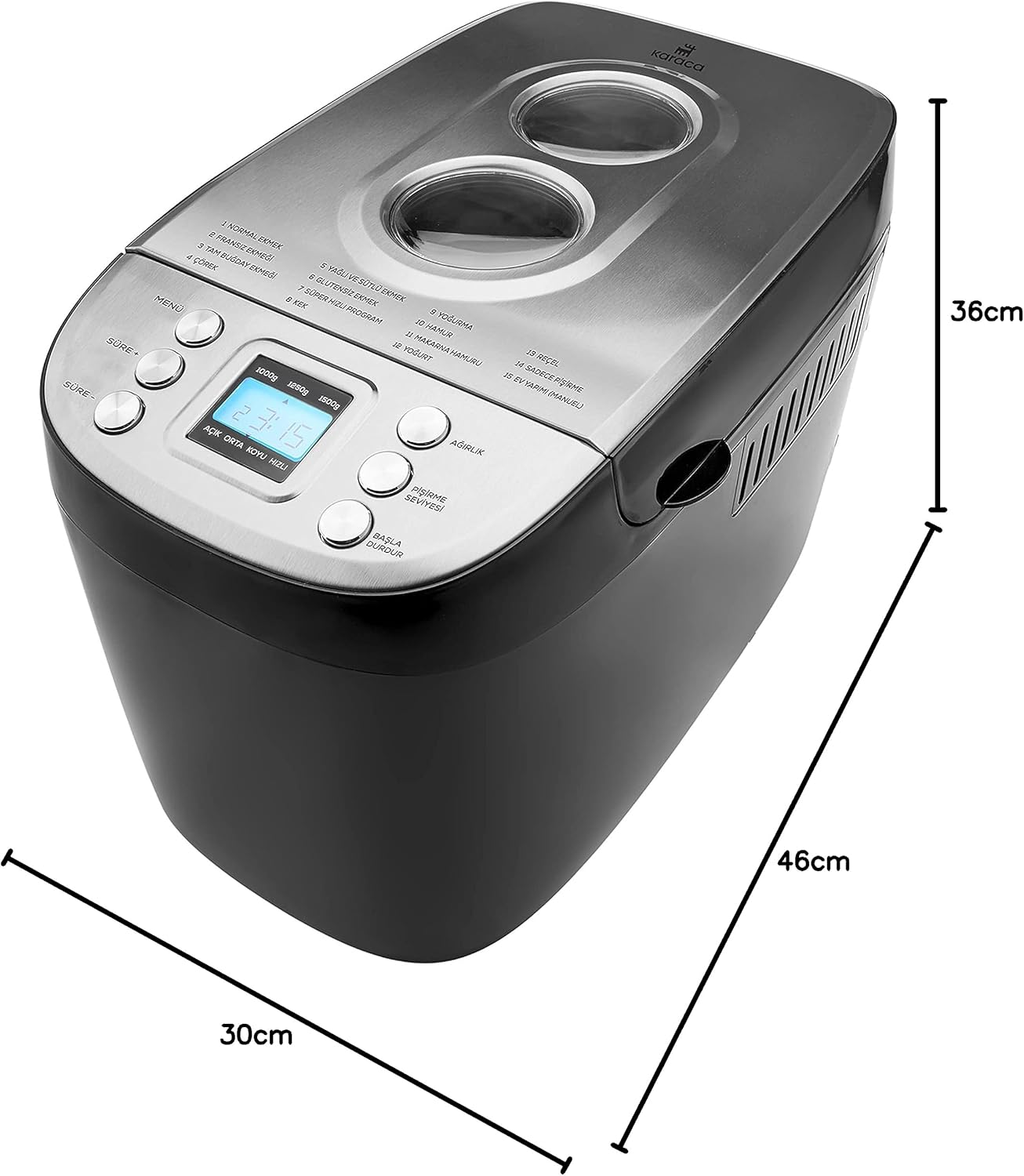
Figur 8.1: Dimensions of the Karaca BakeXL Bread Maker. This image visually represents the depth (30cm), width (36cm), and height (46cm) of the appliance.
9. Garanti og støtte
For warranty information, technical support, or service inquiries, please refer to the warranty card included with your product or visit the official KARACA website. Do not attempt to repair the appliance yourself, as this will void the warranty and may pose safety risks.
Du finner mer informasjon og kontaktinformasjon på KARACA Store on Amazon.