
Explore One B09W2DV1PM
Explore One 4K WiFi Action Camera User Manual
Your comprehensive guide to setting up, operating, and maintaining your Explore One 4K WiFi Action Camera.
1. Produktet er overview
The Explore One 4K WiFi Action Camera is designed for capturing high-quality video and photos in various environments, from everyday adventures to extreme sports. Its compact and durable design, combined with 4K resolution and Wi-Fi connectivity, makes it an ideal companion for documenting your experiences.

Image: The Explore One 4K WiFi Action Camera and its included accessories, displayed on its retail packaging.
2. Pakkens innhold
Vennligst kryss av i boksen for følgende elementer:
- Explore One 4K WiFi Action Camera
- Vanntett etui
- Oppladbart batteri
- USB ladekabel
- Various Mounting Accessories (e.g., helmet mount, bike mount, adhesive mounts)
- Stativ
- Brukerhåndbok
- Micro SD-kort (32 GB)
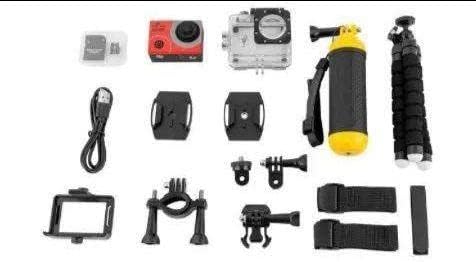
Image: All accessories and the camera included in the Explore One 4K WiFi Action Camera package.
3. Oppsettveiledning
3.1 Installasjon av batteri
- Åpne batteridekselet på undersiden av kameraet.
- Insert the rechargeable battery, ensuring the correct polarity.
- Lukk batteridekselet godt.
3.2 Innsetting av Micro SD-kort
- Locate the micro SD card slot on the side of the camera.
- Insert the micro SD card with the gold contacts facing the back of the camera until it clicks into place.
- For å ta ut, skyv kortet forsiktig inn til det spretter ut.
3.3 Bruk av det vanntette etuiet
The waterproof case allows the camera to be submerged up to 30 meters. Ensure the camera is securely placed inside the case and the latch is firmly closed before use in water.

Image: The action camera inside its waterproof case, attached to a flexible tripod.
4. Bruksanvisning
4.1 Strøm på/av
- Strøm på: Press and hold the Power/Mode button on the front of the camera for 3 seconds.
- Slå av: Trykk og hold inne av/på-/modusknappen i 3 sekunder.
4.2 Modusbytte
Press the Power/Mode button repeatedly to cycle through different modes: Video, Photo, Playback, and Settings.
4.3 Ta opp video
- Bytt til videomodus.
- Press the Shutter/OK button on top of the camera to start recording. A red indicator light will blink.
- Press the Shutter/OK button again to stop recording.
4.4 Ta bilder
- Bytt til fotomodus.
- Trykk på utløser/OK-knappen for å ta et bilde.
4.5 Wi-Fi-tilkobling
The camera features Wi-Fi connectivity, allowing you to control it remotely and view Lev footage on your smartphone or tablet. Download the dedicated app (refer to the manual for app name) from your device's app store.
- Turn on the camera's Wi-Fi from the settings menu.
- On your smartphone, go to Wi-Fi settings and connect to the camera's Wi-Fi network (SSID and password will be displayed on the camera screen).
- Open the app to control the camera and view Lev footage.

Image: Live view from the action camera displayed on a smartphone via Wi-Fi connection.
5. Monteringsalternativer
The Explore One 4K WiFi Action Camera comes with a variety of mounts to suit different activities and perspectives. These include mounts for helmets, bicycles, and flat surfaces, as well as a flexible tripod for stable shots or vlogging.

Image: Children using the action camera mounted on their helmets while cycling.
6. Vedlikehold og stell
- Rengjøring: Use a soft, dry cloth to clean the camera body. For the lens, use a specialized lens cleaning cloth. Do not use harsh chemicals.
- Vanntett etui: After use in saltwater, rinse the waterproof case with fresh water and let it air dry. Ensure no sand or debris is trapped in the seals.
- Batteripleie: Store the battery in a cool, dry place. If not used for extended periods, charge and discharge the battery periodically to maintain its life.
- Lagring: Store the camera and accessories in a dry, dust-free environment away from direct sunlight and extreme temperatures.
7. Feilsøking
- Kameraet slår seg ikke på: Sørg for at batteriet er fulladet og riktig satt inn.
- Kan ikke ta opp/bilder: Check if the micro SD card is inserted correctly and has sufficient free space. The card might need to be formatted (this will erase all data).
- Problemer med Wi-Fi-tilkobling: Sørg for at Wi-Fi er aktivert på kameraet og smarttelefonen din. Prøv å starte begge enhetene på nytt.
- Dårlig videokvalitet: Check the resolution settings in the camera menu. Ensure the lens is clean.
If problems persist, please refer to the full user manual or contact customer support.
8. Tekniske spesifikasjoner
| Trekk | Spesifikasjon |
|---|---|
| Merke | Explore One |
| Videoopptaksoppløsning | 4K |
| Skjermstørrelse | 2 tommer |
| Flash-minnetype | Micro SD-kort |
| Tilkoblingsteknologi | Wi-Fi |
| Trekk | Lett |
| Vanntett dybde | Opptil 30 meter (med vanntett etui) |
9. Garanti og støtte
Your Explore One 4K WiFi Action Camera is covered by a limited warranty. Please refer to the warranty card included in your package for specific terms and conditions. For technical support, troubleshooting assistance, or warranty claims, please contact the retailer or manufacturer's customer service department. Contact information can typically be found on the product packaging or the official brand webnettstedet.
Ask a question about this manual
Ask about setup, troubleshooting, compatibility, parts, safety, or missing instructions. Manuals+ will review the question and use this page’s manual context to help answer it.