
Shargeek STM2E-1
Shargeek STORM2 Slim Portable Charger User Manual
Modell: STM2E-1
Introduksjon
This manual provides comprehensive instructions for the safe and efficient use of your Shargeek STORM2 Slim Portable Charger. Please read this manual thoroughly before operating the device and retain it for future reference.
The Shargeek STORM2 Slim is a high-capacity portable power bank featuring a unique transparent design and an IPS display screen. It offers 130W max output with 100W USB-C and 30W USB-A ports, suitable for charging various devices including laptops, tablets, and smartphones.

Image: The Shargeek STORM2 Slim portable charger, showcasing its transparent design that reveals internal components and the included yellow USB-C to USB-C cables.
Produktfunksjoner
- Gjennomsiktig design: The see-through casing reveals the internal battery and circuit layout, highlighting the device's engineering.
- IPS Display Screen: A clear screen provides real-time information on battery life, output distribution, temperature, operation hours, and active ports.
- Høy kapasitet: 20000mAh battery capacity, capable of multiple charges for various devices.
- Rask lading: Features a 100W USB-C PD port and a 30W USB-A port, supporting 130W max output for rapid charging.
- Universal kompatibilitet: Charges laptops, phones, tablets, and other devices with USB-C or USB ports.

Bilde: En detaljert view of the Shargeek STORM2 Slim's IPS LCD screen, showing various data points such as input/output wattage, voltage, current, battery level, and temperatures.
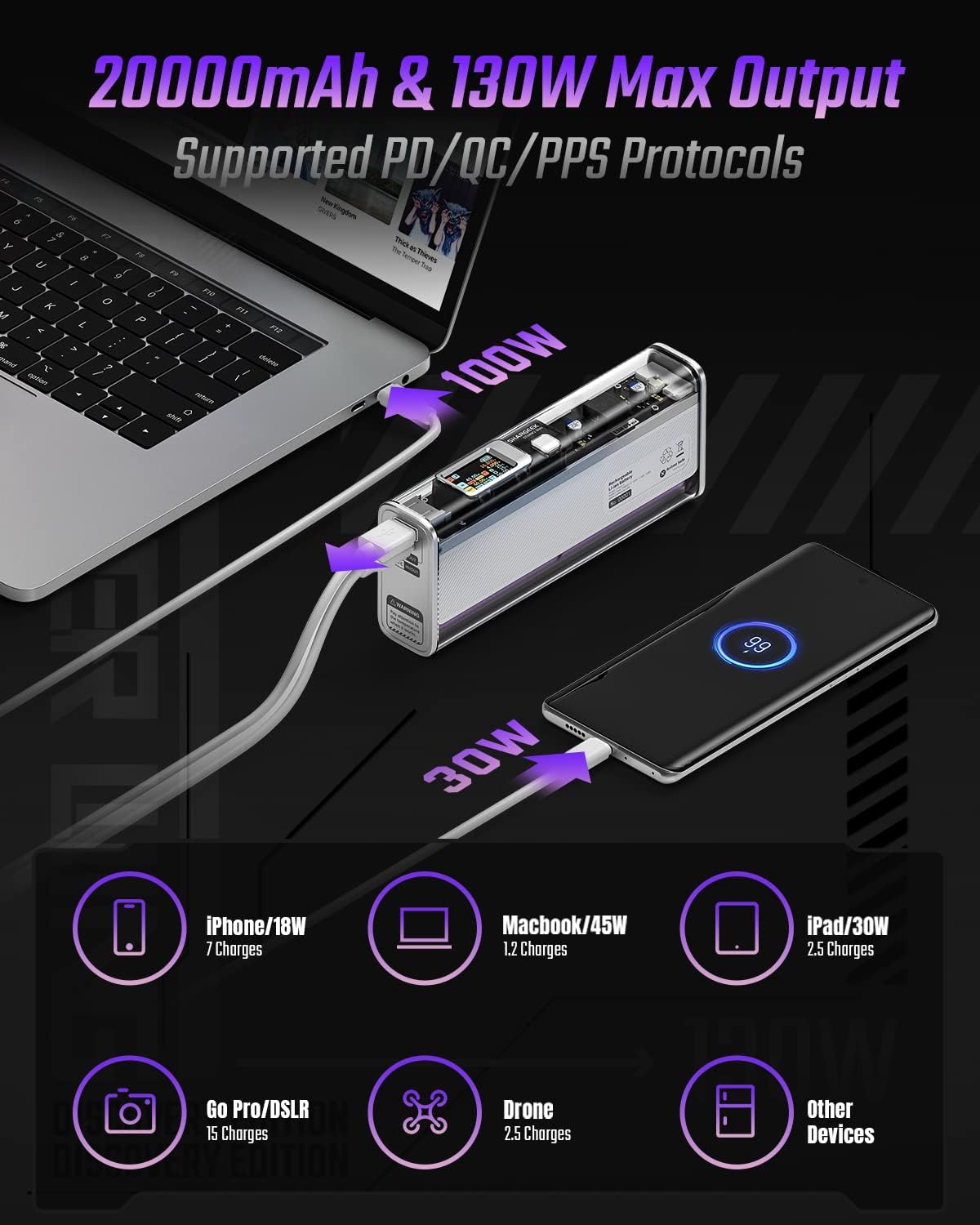
Image: The Shargeek STORM2 Slim connected via USB-C to a laptop for 100W charging and via USB-A to a smartphone for 30W charging, demonstrating its dual-port capability.
Oppsett og første gangs bruk
Pakkeinnhold:
- Shargeek STORM2 Slim Portable Charger
- USB-C til USB-C-kabel
- Brukerhåndbok (dette dokumentet)
Første lading:
- Before first use, fully charge your STORM2 Slim.
- Connect the provided USB-C to USB-C cable to the USB-C port on the STORM2 Slim.
- Connect the other end of the cable to a compatible USB-C power adapter (not included) with a minimum of 100W output for fastest charging.
- The IPS screen will display charging status and battery percentage. The device is fully charged when the screen indicates 100%.
- A full recharge typically takes approximately 90 minutes with a 100W power adapter.
Bruksanvisning
Ladeenheter:
- Identify the appropriate charging cable for your device (USB-C to USB-C or USB-A to device-specific cable).
- Connect one end of the cable to your device and the other end to the corresponding port (USB-C or USB-A) on the STORM2 Slim.
- The IPS screen will automatically activate and display the charging output (watts, volts, amps) for the connected device(s).
- The STORM2 Slim can charge two devices simultaneously using both the USB-C and USB-A ports.
Understanding the IPS Screen:
The IPS screen provides detailed real-time information. Use the physical button on the side of the power bank to navigate through different display modes or access settings.
- Input/Output Dashboard: Shows power input (IN) when charging the power bank and power output (OUT) when charging devices, including wattage, voltage, and current for each port.
- Batterinivå: Viser gjenværende batteriprosenttage and a visual icon.
- Voltage & gjeldende: Detailed readings for the internal battery cells.
- Temperatur: Shows the internal circuit board and battery temperatures.
- Kjøretid: A resettable timer indicating the duration of current operation.
To access menus: Long-press the button. For å navigere: Short-press. Å velge: Long-press.
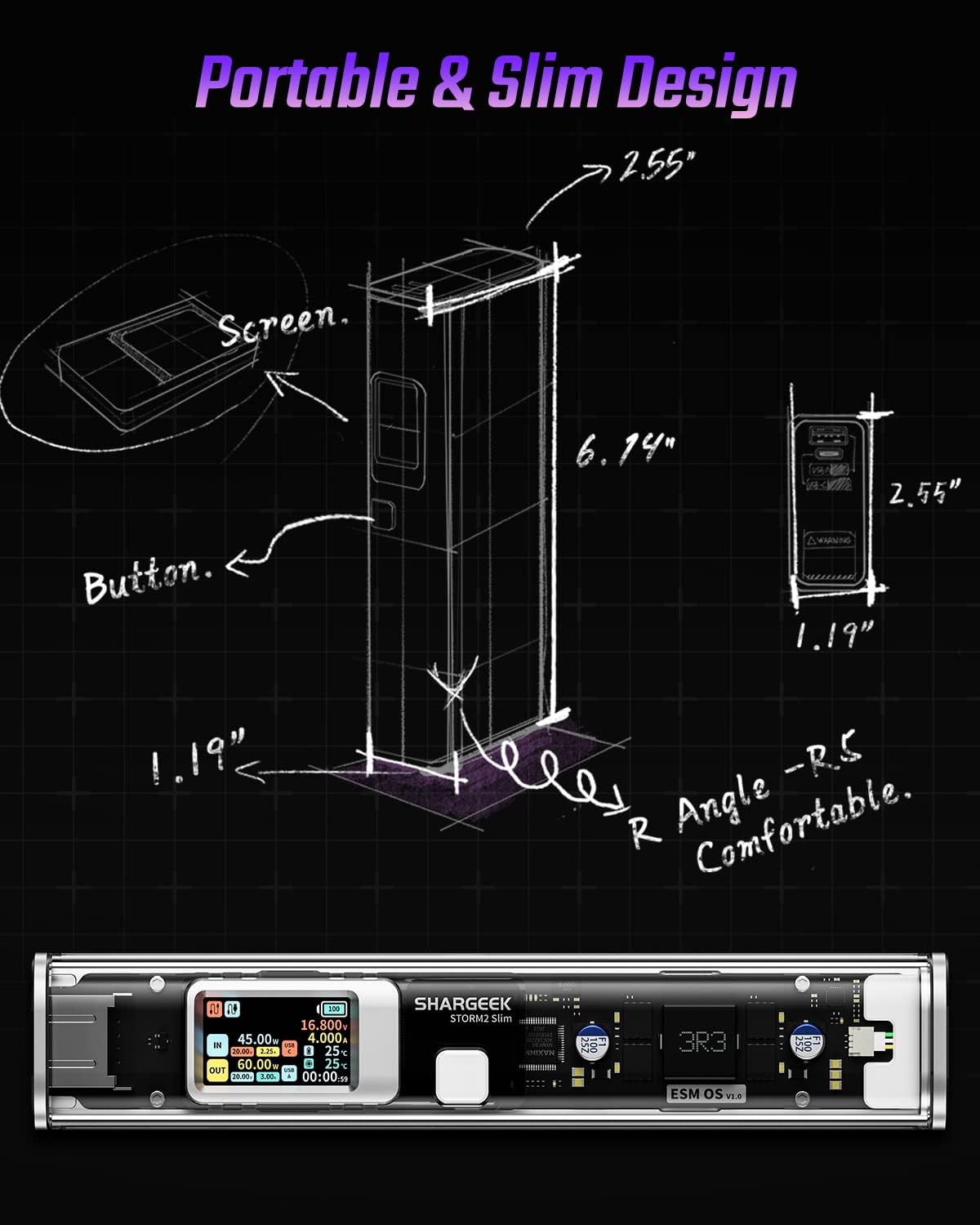
Image: A technical drawing illustrating the dimensions of the Shargeek STORM2 Slim and pointing out the screen and button locations.
Vedlikehold
- Rengjøring: Bruk en myk, tørr klut til å rengjøre utsiden av powerbanken. Unngå bruk av sterke kjemikalier eller slipende materialer.
- Lagring: Oppbevar enheten på et kjølig og tørt sted, unna direkte sollys, ekstreme temperaturer og høy luftfuktighet.
- Batteripleie: For å forlenge batterilevetiden, unngå å utlade powerbanken helt ofte. Lad den opp når batterinivået er lavt. Hvis den oppbevares over lengre tid, lad den opp til omtrent 50–70 % hver 3.–6. måned.
- Unngå dråper: While designed with an aluminum alloy frame for durability, avoid dropping the device as it may damage internal components or the transparent casing.
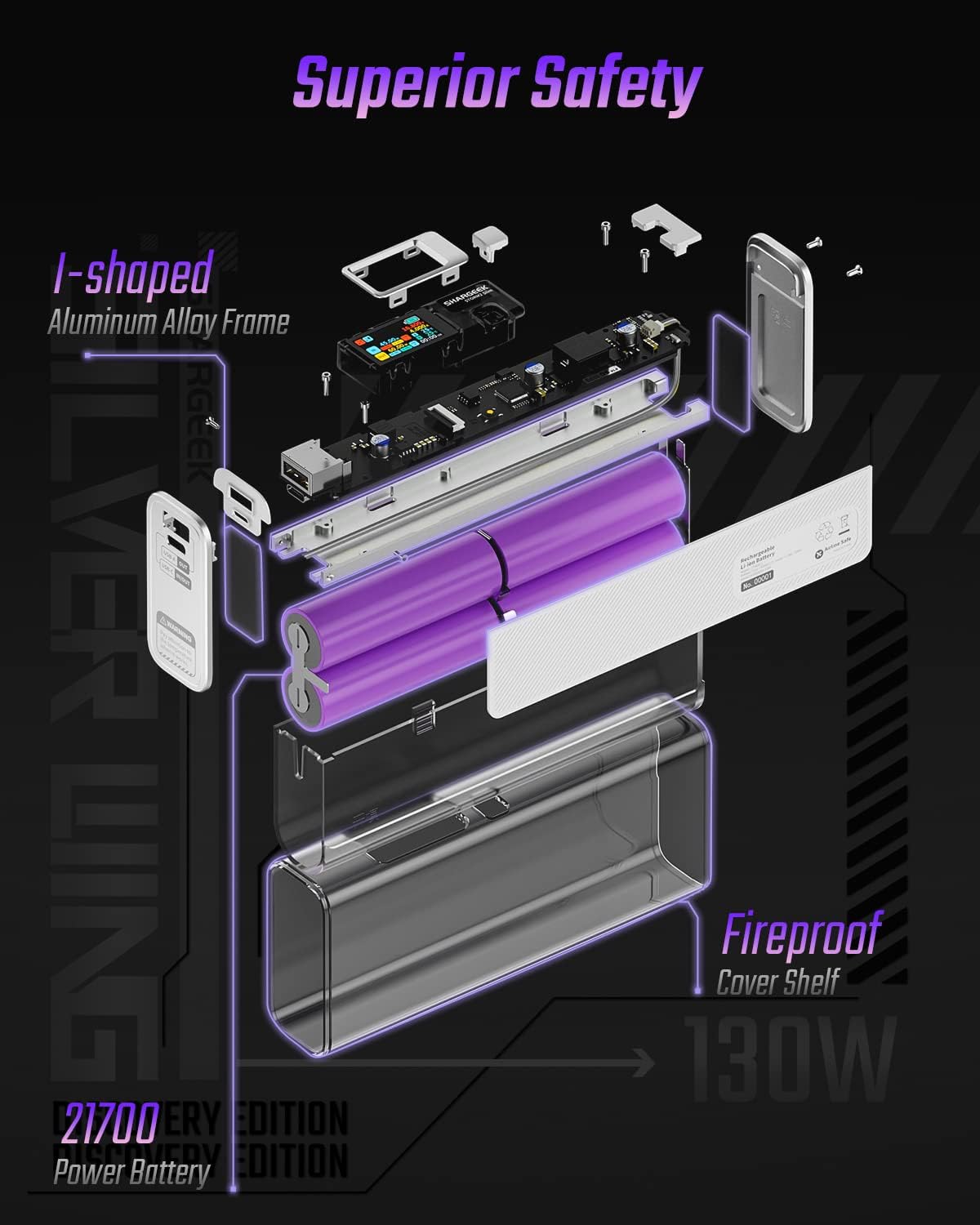
Image: An exploded diagram of the Shargeek STORM2 Slim, illustrating its internal structure including the I-shaped aluminum alloy frame, fireproof cover shelf, and 21700 power batteries, highlighting its robust construction.
Feilsøking
| Problem | Mulig årsak | Løsning |
|---|---|---|
| Enheten lader ikke fra powerbanken. | Low power bank battery; incompatible cable; device not properly connected; device requires more power than available. | Recharge the STORM2 Slim. Ensure cable is fully inserted and compatible. Check device power requirements against power bank output. Try a different cable or port. |
| Powerbanken lader ikke. | Charging cable or adapter faulty; power bank port damaged. | Try a different USB-C cable and power adapter. Ensure the adapter meets the recommended power output (e.g., 100W). If problem persists, contact support. |
| IPS screen is blank or unresponsive. | Power bank is off; temporary software glitch. | Press the button to activate the screen. If unresponsive, try connecting a device to charge or connecting the power bank to a charger to see if it activates. If problem persists, contact support. |
| Sakte lading. | Kabelen støtter ikke hurtiglading; enheten støtter ikke hurtiglading; flere enheter tilkoblet. | Ensure you are using a high-quality USB-C PD cable. Verify your device supports fast charging. Charging multiple devices simultaneously may reduce individual charging speeds. |
Spesifikasjoner
- Modellnummer: STM2E-1
- Batterikapasitet: 20000mAh
- Maks utgang: 130W
- USB-C-utgang: Opptil 100 W strømforsyning (PD)
- USB-A-utgang: Opptil 30W
- Inndata: USB-C (up to 100W PD)
- Utstilling: IPS-skjerm
- Dimensjoner: 3 x 6.5 x 15.59 cm (omtrent 1.18 x 2.56 x 6.14 tommer)
- Vekt: Omtrent 689 g (1.52 lbs)
- Batteritype: Litiumion
Garanti og støtte
Garantiinformasjon:
Shargeek products are covered by a limited warranty against defects in materials and workmanship. Please refer to the warranty card included with your purchase or visit the official Shargeek webnettstedet for detaljerte garantivilkår.
Kundestøtte:
For technical assistance, troubleshooting, or warranty claims, please contact Shargeek customer support through their official webnettstedet eller kontaktinformasjonen som er oppgitt på produktemballasjen.
Official Shargeek Store Link: Shargeek Official Store
Sikkerhetsinformasjon
- Ikke utsett enheten for vann, fuktighet eller ekstreme temperaturer.
- Ikke demonter, modifiser eller forsøk å reparere enheten selv. Dette vil ugyldiggjøre garantien og kan forårsake skade på person eller personskade.
- Oppbevares utilgjengelig for barn.
- Bruk kun sertifiserte og kompatible ladekabler og adaptere.
- Unngå å miste eller utsette enheten for sterke støt.
- Dispose of the device responsibly according to local regulations for electronic waste.
Ask a question about this manual
Ask about setup, troubleshooting, compatibility, parts, safety, or missing instructions. Manuals+ will review the question and use this page’s manual context to help answer it.