
1. Introduksjon
This manual provides essential information for the safe and efficient use of your Konka 32 Inch HD Standard TV, model KE32MS314. Please read these instructions thoroughly before operating the television and retain them for future reference.
2. Sikkerhetsinformasjon
- Strømforsyning: Ensure the TV is connected to an AC 100-240V, 50/60Hz power supply.
- Ventilasjon: Ikke blokker ventilasjonsåpningene. Sørg for tilstrekkelig plass rundt TV-en for riktig luftstrøm.
- Vann og fuktighet: Ikke utsett TV-en for regn eller fuktighet. Ikke plasser gjenstander fylt med væske, som for eksempel vaser, oppå TV-en.
- Varmekilder: Hold TV-en unna varmekilder som radiatorer, varmeventiler, ovner eller andre apparater (inkludert ampløftere) som produserer varme.
- Rengjøring: Trekk støpselet til TV-en ut av stikkontakten før rengjøring. Bruk en myk, tørr klut. Ikke bruk flytende rengjøringsmidler eller sprayrengjøringsmidler.
- Lyn: Trekk ut støpselet til TV-en under tordenvær eller når den ikke brukes over lengre tid.
- Service: Ikke prøv å utføre service på dette produktet selv. Henvis all service til kvalifisert servicepersonell.
3. Pakkens innhold
Bekreft at alle varene er til stede i pakken:
- Konka KE32MS314 32-Inch HD LED TV
- Fjernkontroll
- Strømledning
- Brukerhåndbok (dette dokumentet)
- Desktop Stand (if included)
4. Oppsett
4.1 Utpakking
Carefully remove the TV and all accessories from the packaging. Keep the packaging materials for future transport or storage.
4.2 Montering av stativ (valgfritt)
If you are using the desktop stand, attach it securely to the bottom of the TV using the provided screws. Ensure the stand is stable before placing the TV on a flat surface.
4.3 Veggmontering (valgfritt)
If you plan to wall-mount the TV, refer to the instructions provided with your wall-mount bracket. Ensure the bracket is compatible with the TV's VESA mounting pattern and is installed by qualified personnel.
4.4 Koble til enheter
The TV offers various connection ports for external devices. Refer to the image below for port identification and connect your devices accordingly.
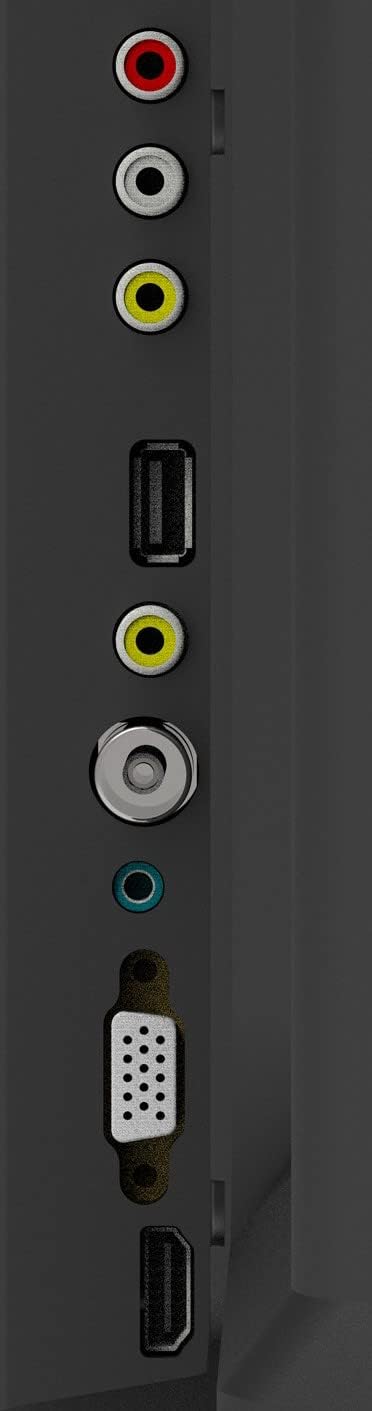
Figure 1: TV Connection Ports
- Antenneinngang: Connect your aerial or cable TV signal to this port.
- HDMI-innganger (2): Connect devices such as Blu-ray players, game consoles, or set-top boxes. One HDMI input supports Audio Return Channel (ARC).
- VGA-inngang: Koble til en datamaskin for bruk som skjerm.
- Mini Component / AV Input: Connect older devices using component (YPbPr) or composite (AV) cables.
- USB Inputs (2): Koble til USB-lagringsenheter for medieavspilling.
- Hodetelefonkontakt: Koble til hodetelefoner for privat lytting.
5. Drift
5.1 Fjernkontroll
The included remote control allows you to operate all functions of your TV. Insert two AAA batteries (not included) into the battery compartment, ensuring correct polarity.

Figur 2: Fjernkontrollens oppsett
- MAKT: Slår TV-en på eller av.
- INNGANG: Selects the input source (HDMI, AV, VGA, etc.).
- Tallknapper (0-9): Velg kanaler direkte.
- VOL +/-: Justerer volumnivået.
- PROG +/-: Bytter kanal.
- MENY: Får tilgang til hovedmenyen.
- Navigasjonsknapper (opp/ned/venstre/høyre): Naviger gjennom menyalternativer.
- TAST INN: Bekrefter valg.
- EXIT: Går ut av gjeldende meny eller funksjon.
- INFO: Displays channel information.
- STUM: Demper eller slår på lyden.
5.2 Første oppsett
Upon first power-on, the TV will guide you through an initial setup process. This typically includes selecting your language, country, and performing an automatic channel scan for available broadcasts.
5.3 Grunnleggende funksjoner
- Slå på/av: Press the POWER button on the remote or the TV's control panel.
- Valg av inngangskilde: Press the INPUT button repeatedly to cycle through available input sources, or use the menu to select.
- Volumjustering: Bruk VOL +/- knappene.
- Kanalvalg: Use the PROG +/- buttons or the number buttons.
5.4 Menynavigasjon
Press the MENU button to access the main menu. Use the navigation buttons to move between options and ENTER to select. Adjust settings such as picture mode, sound mode, and channel settings. Press EXIT to close the menu.
5.5 Lydmoduser
The TV features 5 audio modes to optimize sound for different content types:
- Standard
- Musikk
- Film
- Sport
- User (customizable settings)
6. Vedlikehold
6.1 Rengjøring av skjermen
Tørk forsiktig av skjermen med en myk, lofri klut. For gjenstridige merker, tørk littampen the cloth with water or a specialized screen cleaner (ensure it's safe for LED screens) and wipe gently. Do not apply pressure or use abrasive materials.
6.2 Rengjøring av skapet
Wipe the TV cabinet with a soft, dry cloth. Avoid using strong detergents or solvents, as they may damage the finish.
7. Feilsøking
Hvis du støter på problemer med TV-en, kan du se følgende vanlige problemer og løsninger:
| Problem | Mulig løsning |
|---|---|
| Ingen strøm | Sjekk om strømledningen er ordentlig koblet til TV-en og stikkontakten. Sørg for at stikkontakten fungerer. |
| Ikke noe bilde, men det er lyd | Kontroller at riktig inngangskilde er valgt. Kontroller kabeltilkoblingene til eksterne enheter. |
| Ingen lyd, men bildet er der | Check the volume level and ensure the TV is not muted. Verify audio settings in the menu. |
| Fjernkontrollen virker ikke | Skift batterier. Sørg for at det ikke er noen hindringer mellom fjernkontrollen og TV-ens IR-sensor. |
| Dårlig bildekvalitet | Check antenna connection or source device cables. Adjust picture settings in the TV menu. |
8. Spesifikasjoner
Detailed specifications for the Konka KE32MS314 TV:
| Trekk | Detalj |
|---|---|
| Modellnummer | KE32MS314 |
| Skjermstørrelse | 32 tommer |
| Skjermteknologi | LED |
| Oppløsning | 720p (HD) |
| Oppdateringsfrekvens | 60 Hz |
| Viewing vinkel | 178 grader |
| Lydsystem | 2 x 8W Stereophonic |
| Lydmoduser | Standard, Music, Movie, Sport, User |
| Tilkobling | 2 HDMI (including ARC), 2 USB, VGA, Mini Component/AV, Antenna Input, Headphone Jack, Ethernet |
| Spesielle funksjoner | Flat Display, D3 Image Noise Reduction, Automatic Volume Level Maintenance |
| Støttede Internett-tjenester | YouTube |
| Produktmål (med stativ) | 73.2W x 20.7D x 47.9H cm (approx.) |
| Produktvekt | 4.5 kg |
9. Garanti og støtte
For warranty information and technical support, please refer to the warranty card included with your product or contact Konka customer service. Keep your purchase receipt as proof of purchase for warranty claims.