
1. Introduksjon
The JJC EF-EOS R Drop-in Filter Mount Adapter is designed to allow the use of Canon EF or EF-S mount lenses on Canon EOS R series mirrorless digital cameras. This adapter maintains full electronic communication between the lens and camera, supporting autofocus and image stabilization functions. It also features a convenient drop-in filter system, including a Variable ND filter, a Circular Polarizer (CPL) filter, and a Clear filter.
2. Produktet er overview
2.1 Pakkeinnhold
- EF-EOS R Adapter Mount x1
- Drop-in CPL Filter x1
- Drop-in Variable ND Filter x1 (ND3-ND500)
- Drop-in Clear Filter x1
- Front & Rear Lens Cap x1
- Oppbevaringspose x1

Image: The package contents laid out, showing the adapter, three drop-in filters (CPL, VND, UV), front and rear caps, and a storage pouch.
2.2 Nøkkelfunksjoner
- Full Electronic Communication: Retains autofocus and image stabilization capabilities.
- Optisk kvalitet: Contains no optical components, preserving the original optical quality of the mounted lens.
- Drop-in Filter System: Includes Variable ND (ND3-ND500), Circular Polarizer (CPL), and Clear filters to prevent dust or light leaks when filters are not in use.
- Slitesterk konstruksjon: Made of high-quality metal with a non-glare interior to prevent reflections.
- Avtakbart stativfeste: Features a 1/4"-20 screw for stable mounting of heavier lenses on a tripod.

Image: Close-up of the adapter's electronic contacts and icons representing autofocus, image stabilization, and EXIF information transfer.

Image: Displays the three included drop-in filters (UV, CPL, Variable ND) and visual examples of their effects on photographs.

Bilde: Detaljert views highlighting the drop-in filter slot, lens release button, metal electronic contacts, and the 1/4"-20 tripod socket hole on the adapter.
3. Oppsett og installasjon
3.1 Attaching the Adapter to the Camera
- Ensure both your camera and the adapter are clean and free of dust.
- Align the white dot on the adapter with the red dot on your Canon EOS R series camera body.
- Insert the adapter into the camera mount and rotate clockwise until it clicks securely into place.
3.2 Attaching an EF/EF-S Lens to the Adapter
- Align the red dot on your Canon EF/EF-S lens with the red dot on the JJC adapter.
- Insert the lens into the adapter and rotate clockwise until it clicks securely into place.
3.3 Inserting Drop-in Filters
- Locate the filter slot on the side of the adapter.
- Gently slide the desired drop-in filter (CPL, Variable ND, or Clear) into the slot until it is fully seated.
- Ensure a filter is always inserted to prevent dust entry and light leaks onto the camera sensor.
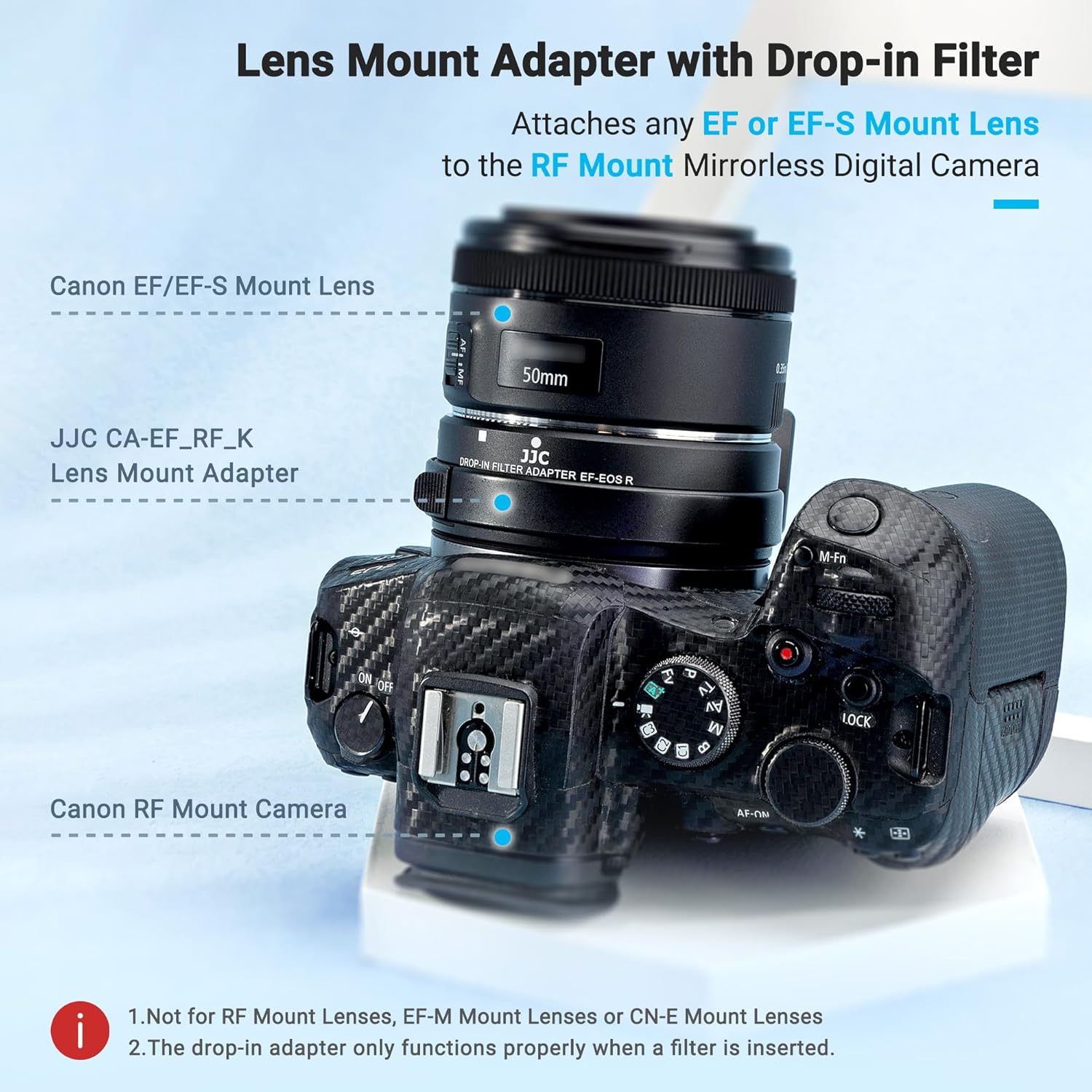
Image: The JJC EF-EOS R Lens Mount Adapter with a drop-in filter attached to a Canon RF mount camera and an EF lens.
4. Drift
4.1 Autofocus and Image Stabilization
The adapter fully supports the autofocus and image stabilization features of your Canon EF/EF-S lenses when used with compatible Canon EOS R series cameras. No additional settings are required for these functions to operate.
4.2 Using Drop-in Filters
- Circular Polarizer (CPL) Filter: Rotate the outer ring of the CPL filter to adjust the polarization effect, reducing reflections and enhancing color saturation.
- Variable ND (ND3-ND500) Filter: Rotate the outer ring of the VND filter to adjust the light density from ND3 to ND500 (equivalent to 1.5 to 9 f-stops), allowing for slower shutter speeds or wider apertures in bright conditions.
- Clear Filter: Use the clear filter when no other filter effect is desired, to protect the camera sensor from dust and maintain optical integrity.
Video: A demonstration of the JJC EF-EOS R Adapter with Drop-in Variable ND/CPL Filter, showing how to insert and adjust the filters on a camera.
5. Vedlikehold
- Keep the adapter and filters clean and free from dust and moisture. Use a soft, lint-free cloth for cleaning.
- When not in use, store the adapter with both front and rear caps attached, and keep filters in their protective cases or the provided storage pouch.
- Avoid touching the electronic contacts on both the adapter and your lenses. If cleaning is necessary, use a clean, dry microfiber cloth.
- The adapter is not water-resistant. Avoid exposure to rain or excessive humidity.
6. Feilsøking
- Lens not recognized / Autofocus not working: Ensure the adapter and lens are securely mounted and clicked into place. Check that the electronic contacts are clean. Restart the camera.
- Light leaks / Dust on sensor: Always ensure a drop-in filter (even the clear one) is properly inserted into the adapter's slot.
- Adapteren føles løs: Verify that the adapter is fully rotated and locked onto the camera body.
7. Spesifikasjoner
| Merke | JJC |
| Modell | EF-EOS R Adapter w/ Drop-in Filter |
| Objektivkompatibilitet | Canon EF/EF-S Mount Lenses |
| Kamerakompatibilitet | Canon EOS R100, R50, R50 V, R7, R8, R10, R5C, R3, R5, R1, Mark II, R6, R6 Mark II, RP and R cameras |
| Fokusmodus | Autofokus |
| Støtte | IS Image Stabilization / EXIF Information Transfer |
| Materiale | Aluminium |
| Beleggbeskrivelse | Flerlagsbelegg |
| Effekttype for fotofilter | Neutral Dens, Polarizer, Ultraviolet |
| Vannmotstandsnivå | Ikke vannbestandig |
| Varevekt | 13.7 unser |
| Pakkedimensjoner | 4.61 x 4.57 x 3.7 tommer |

Image: Technical drawing showing the dimensions of the adapter in millimeters and inches.
8. Garanti og støtte
For warranty information or technical support, please refer to the official JJC website or contact your retailer. You can find more information at www.jjc.cc.