
1. Introduksjon
Thank you for choosing the ICON Morpheus GX 66 Wired Gaming Mouse. This manual provides essential information for setting up, operating, and maintaining your new gaming mouse. Please read this guide thoroughly to ensure optimal performance and longevity of your device.
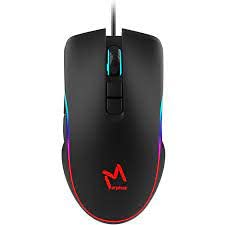
The ICON Morpheus GX 66 is a high-performance wired gaming mouse featuring customizable LED lighting and a precise 7200 DPI optical sensor, designed for an optimal gaming experience. It offers a modern style and ambidextrous design, compatible with Windows 7, Windows XP, and Linux operating systems.
2. Produktfunksjoner
- Høypresisjonssensor: Equipped with a 7200 DPI optical sensor for accurate tracking and responsiveness.
- Tilpassbar LED-belysning: Dynamic LED illumination enhances your gaming setup.
- 7 programmerbare knapper: Offers extensive customization for various gaming commands.
- Kablet tilkobling: Ensures a stable and lag-free connection.
- Ambidextrous design: Comfortable for both left and right-handed users.
- Slitesterk konstruksjon: Designed for long-lasting use in intense gaming sessions.
- Bred kompatibilitet: Supports Windows 7, Windows XP, and Linux operating systems.

3. Oppsett
- Pakk ut musen: Carefully remove the ICON Morpheus GX 66 mouse from its packaging.
- Koble til datamaskin: Locate an available USB port on your computer. Plug the USB connector of the mouse firmly into the USB port.
- Driverinstallasjon: The mouse is plug-and-play. Your operating system (Windows 7, Windows XP, or Linux) should automatically detect and install the necessary drivers. This process may take a few moments.
- Testfunksjonalitet: Once installed, move the mouse and click the buttons to ensure it is working correctly.
4. Bruksanvisning
4.1 Grunnleggende funksjoner
- Venstre klikk: Primær handling, valg, aktivering.
- Høyreklikk: Kontekstmeny, sekundære handlinger.
- Rullehjul: Scroll up/down, middle click for specific functions.
4.2 DPI-justering
The mouse features a dedicated DPI button (often located behind the scroll wheel) to cycle through different sensitivity levels. Press this button to adjust the DPI (Dots Per Inch) to your preferred setting for various tasks or games. The LED lighting may change color to indicate the current DPI level.
4.3 LED belysning
The ICON Morpheus GX 66 features dynamic LED lighting. The lighting patterns and colors are typically pre-programmed and may change based on the selected DPI setting or cycle automatically. There are no user-configurable software controls for the LED lighting on this model.

5. Vedlikehold
- Rengjøring: Bruk en myk, tørr klut til å tørke av overflaten på musen. For gjenstridig smuss, tørk littampSkyll kluten med vann. Unngå bruk av sterke kjemikalier eller slipende materialer.
- Sensorrengjøring: Occasionally, dust or debris may accumulate around the optical sensor. Use a cotton swab or compressed air to gently clean the sensor area on the underside of the mouse.
- Kabelpleie: Avoid sharp bends or excessive pulling on the mouse cable to prevent damage. Store the cable neatly when not in use.
- Lagring: Når musen ikke er i bruk over lengre tid, bør den oppbevares på et rent og tørt sted, unna direkte sollys og ekstreme temperaturer.

6. Feilsøking
- Musen svarer ikke:
- Sørg for at USB-kabelen er ordentlig koblet til datamaskinens USB-port.
- Prøv å koble musen til en annen USB-port.
- Start datamaskinen på nytt.
- Uregelmessig markørbevegelse:
- Rengjør den optiske sensoren på undersiden av musen.
- Sørg for at du bruker musen på en ren, ikke-reflekterende og jevn overflate. Unngå glass eller svært reflekterende overflater.
- LED Lighting Not Working:
- Sjekk USB-tilkoblingen.
- The LED lighting is typically powered directly via USB. If the mouse functions but LEDs do not, contact support.
- Knapper fungerer ikke:
- Sørg for at musen er riktig tilkoblet.
- Test musen på en annen datamaskin for å utelukke programvareproblemer.
7. Spesifikasjoner
| Produsent | IKONET |
| Modell | Morpheus GX 66 |
| ASIN | B0B5PLWQXC |
| Spesielle funksjoner | LED belysning |
| Bevegelsesdeteksjonsteknologi | Optisk |
| DPI | 7200 |
| Håndorientering | Ambidekstrøs |
| Anbefalt bruk | Gaming |
| Operativsystemkompatibilitet | Linux, Windows 7, Windows XP |
| Stil | Moderne |
| Finish Type | Matte |
| Strømkilde | Elektrisk med ledning (USB) |
| Farge | Flerfarget |
8. Garanti og støtte
The ICON Morpheus GX 66 Wired Gaming Mouse comes with a standard manufacturer's warranty. For specific warranty terms and conditions, please refer to the warranty card included with your product or visit the official ICON webnettstedet.
For technical support, troubleshooting assistance, or to inquire about replacement parts, please contact ICON customer service through their official support channels. Keep your purchase receipt and product model information (GX 66) handy when contacting support.