
1. Introduksjon
Thank you for choosing the Karlsson LED Mirror Alarm Clock. This digital alarm clock features a modern design with a clear LED display integrated into a silver mirror surface, showing time and temperature. This manual provides essential information for the safe and efficient use of your device.
Hva er i esken:
- Karlsson LED Mirror Alarm Clock
- USB strømkabel

Figur 1: Front view of the Karlsson LED Mirror Alarm Clock, showing the time (15:08) and temperature (19°C) on its reflective display.
2. Sikkerhetsinformasjon
- Ikke utsett enheten for vann eller overdreven fuktighet.
- Unngå ekstreme temperaturer, direkte sollys eller støvete omgivelser.
- Oppbevares utilgjengelig for barn.
- Use only the provided USB cable or a compatible power adapter.
- When inserting batteries, ensure correct polarity (+/-).
- Ikke bland gamle og nye batterier, eller forskjellige typer batterier.
- Ta ut batteriene hvis enheten ikke skal brukes over en lengre periode.
3. Produktet er overview
Familiarize yourself with the components and controls of your alarm clock.
Frontskjerm:
- Tidsvisning: Viser gjeldende tid i 12-timers eller 24-timers format.
- Temperaturvisning: Viser omgivelsestemperatur i Celsius eller Fahrenheit.
Bakre kontroller:
- SET -knapp: Used to enter setting modes (time, alarm).
- OPP -knapp: Brukes til å øke verdier eller navigere i menyer.
- NED -knapp: Brukes til å redusere verdier eller navigere i menyer.
- MODE/V Button: Used to switch display modes or activate voice control (if available).
- Nullstillknapp: Tilbakestiller enheten til fabrikkinnstillinger.
- DC 5V-inngang: For tilkobling av USB-strømkabelen.
- Batterirom: Holds 3 x AAA batteries for backup power.
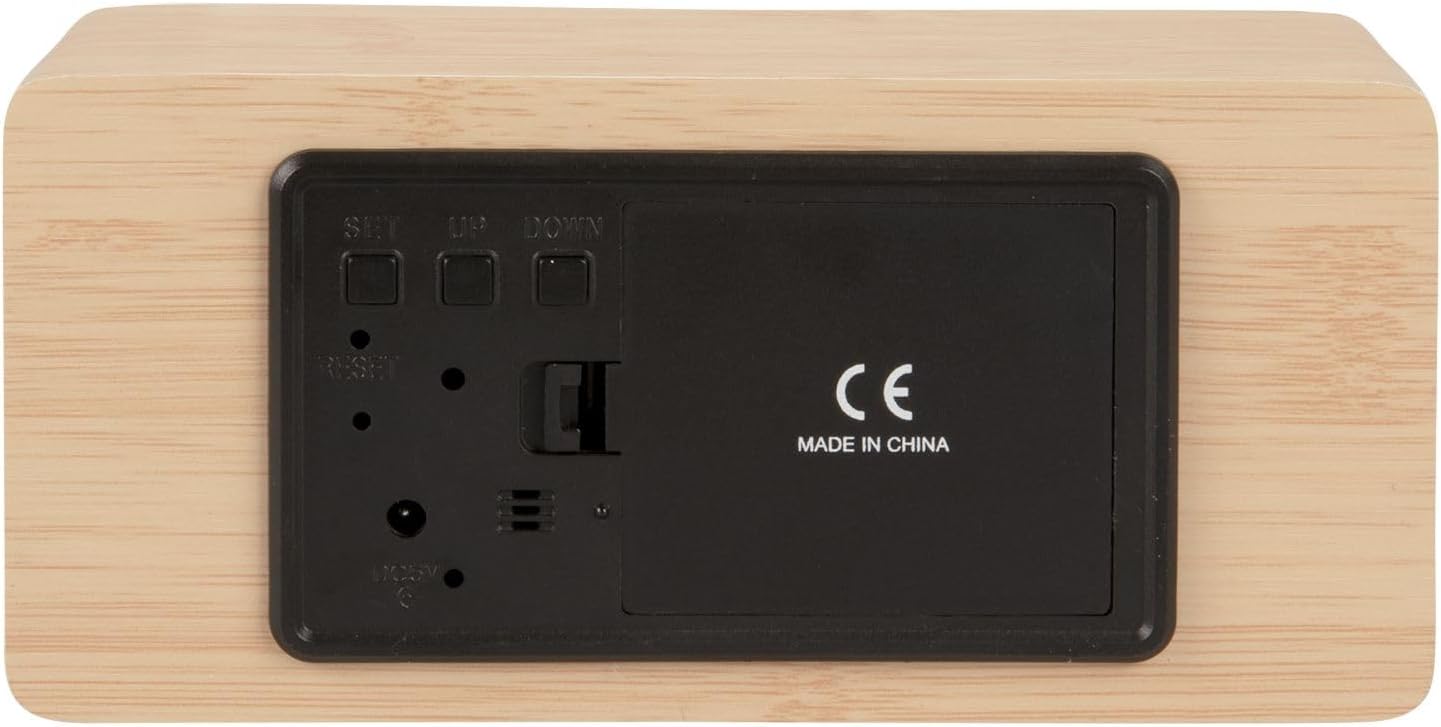
Figur 2: Bak view of the alarm clock, highlighting the SET, UP, DOWN buttons, power input, and battery compartment.
4. Oppsett
Slå på enheten:
The alarm clock can be powered via the included USB cable or by 3 x AAA batteries (not included) for backup.
- USB-strøm: Connect the small end of the USB cable to the DC 5V input port on the back of the alarm clock. Connect the other end to a USB power adapter (not included) or a powered USB port.
- Reserve batteri: Open the battery compartment cover on the back of the clock. Insert 3 x AAA batteries, ensuring correct polarity. Close the cover securely. Batteries are primarily for backup and may not power the display continuously.

Figur 3: The USB power cable provided for connecting the alarm clock to a power source.
5. Bruksanvisning
Stille inn tiden:
- Trykk og hold inne SETT knappen til timesifrene begynner å blinke.
- Bruk UP or NED knapper for å justere timen.
- Pressen SETT igjen for å bekrefte timen og gå videre til minuttinnstilling.
- Bruk UP or NED knapper for å justere minuttene.
- Pressen SETT to confirm the minutes and exit time setting mode.
Stille inn alarmen:
- Trykk på SETT button once (do not hold) to cycle through display modes until 'AL' or an alarm icon appears.
- Trykk og hold inne SETT button again until the alarm hour digits flash.
- Bruk UP or NED knappene for å stille inn ønsket alarmtime.
- Pressen SETT to confirm the alarm hour and move to alarm minute setting.
- Bruk UP or NED knappene for å stille inn ønskede alarmminutter.
- Pressen SETT for å bekrefte og avslutte alarminnstillingsmodus.
- For å aktivere/deaktivere alarmen, trykk på UP button while in normal time display mode. An alarm icon will appear/disappear on the display.
Switching Display Modes (12/24 Hour, Temperature Unit):
- I normal tidsvisningsmodus, trykk på UP button to switch between 12-hour and 24-hour formats.
- Trykk på NED -knappen for å veksle mellom temperaturenhetene Celsius (°C) og Fahrenheit (°F).
6. Vedlikehold
- Clean the alarm clock with a soft, dry cloth.
- Do not use abrasive cleaners, solvents, or harsh chemicals, as these may damage the mirror surface or casing.
- Sørg for at enheten er koblet fra og at batteriene er tatt ut før rengjøring.
7. Feilsøking
- Displayet er tomt: Check if the USB cable is securely connected to a power source. If using batteries, ensure they are inserted correctly and are not depleted.
- Alarmen lyder ikke: Verify that the alarm is set and activated (alarm icon visible on display). Check the alarm volume if adjustable (this model may not have adjustable volume).
- Incorrect time/settings: Trykk på TILBAKESTILL button on the back of the unit using a thin object (e.g., a paperclip) to restore factory settings, then re-set the time and alarm.
- Temperaturavlesningen virker unøyaktig: Ensure the clock is placed in a location away from direct heat sources or drafts that could affect ambient temperature readings.
8. Spesifikasjoner
| Modellnummer | PTG-KA5879WD |
| Materiale | Trefiner |
| Dimensjoner (L x B x H) | 15 cm x 7 cm x 4.5 cm (omtrent 5.9 x 2.76 x 1.77 tommer) |
| Vekt | 245 g (omtrent 0.54 lbs) |
| Farge | Light wood casing, silver mirror display |
| Visningstype | Digital LED |
| Spesialfunksjon | Alarm |
| Strømkilde | USB powered (cable included), 3 x AAA batteries (not included) for backup |
9. Garanti og støtte
This product is manufactured by Karlsson. For any support inquiries, warranty information, or service requests, please refer to the retailer where the product was purchased or visit the official Karlsson website for contact details. Please retain your proof of purchase for warranty claims.