
Baseus Bowie WM02
Baseus Bowie WM02 TWS Bluetooth Earbuds
Brukerhåndbok
Introduksjon
Thank you for choosing the Baseus Bowie WM02 TWS Bluetooth Earbuds. These ultra-compact and lightweight earbuds are designed for comfortable, long-term wear, offering a seamless audio experience with advanced Bluetooth 5.3 technology and an impressive 25-hour battery life (with charging case). This manual will guide you through the setup, operation, and maintenance of your new earbuds.

Image: Baseus Bowie WM02 TWS Bluetooth Earbuds in white, with their charging case.
Oppsett
1. Utpakking og komponenter
Before first use, please ensure all components are present in the package:
- Baseus Bowie WM02 TWS Earbuds
- Ladeetui
- USB-C ladekabel
- Ørespisser i flere størrelser (S, M, L)
- Brukerhåndbok
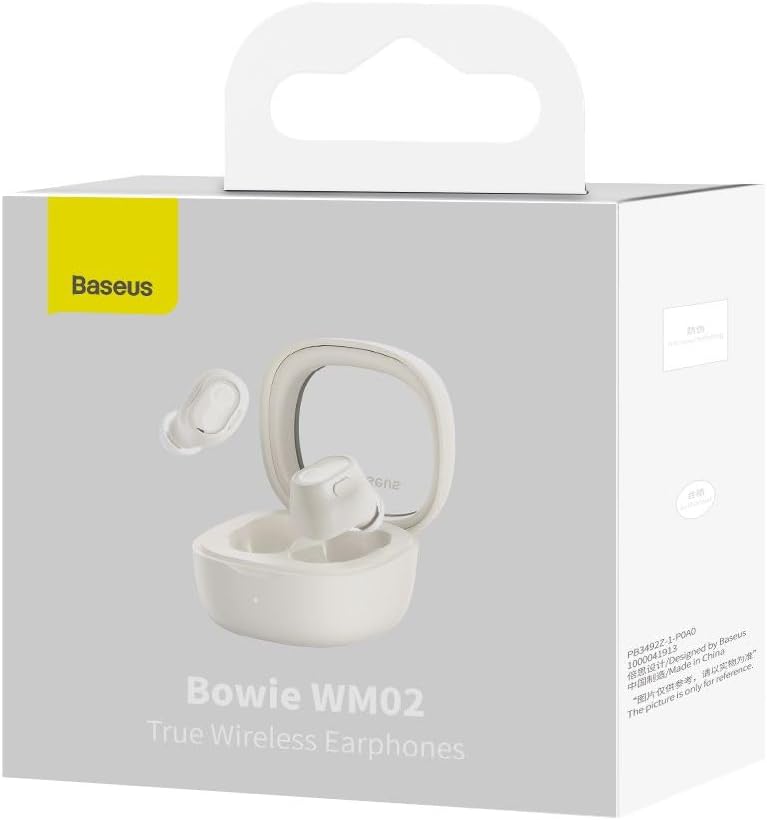
Image: The Baseus Bowie WM02 earbuds, charging case, USB-C cable, and ear tips laid out with the product packaging.
2. Lade øreproppene og etuiet
For optimal performance, fully charge the earbuds and charging case before first use.
- Plasser øreproppene i ladeetuiet. Sørg for at de sitter riktig i de respektive sporene.
- Koble USB-C-ladekabelen til ladeporten på etuiet og den andre enden til en USB-strømkilde (f.eks. datamaskin, veggadapter).
- The indicator light on the charging case will show the charging status. Once fully charged, the light will typically turn solid or turn off.
A 10-minute quick charge provides approximately 2 hours of listening time, and a full charge offers up to 5 hours of continuous use, extending to 25 hours with the charging case.

Image: Graphic illustrating the 25-hour battery life of the Baseus Bowie WM02 earbuds and charging case.
3. Bluetooth-paring
Follow these steps to pair your earbuds with a Bluetooth-enabled device:
- Åpne ladeetuiet. Øreproppene vil automatisk gå inn i paringsmodus (indikatorlampene vil blinke).
- Gå til Bluetooth-innstillingene på enheten din (smarttelefon, nettbrett, bærbar PC) og aktiver Bluetooth.
- Søk etter available devices and select "Baseus Bowie WM02" from the list.
- Once connected, the earbud indicator lights will typically turn off or show a steady light.
Øreproppene har Bluetooth 5.3 for stabil og effektiv tilkobling.

Image: A visual representation of the Wireless 5.3 chip, highlighting fast and smooth connection.
4. Baseus App Integration
Enhance your experience by downloading the official Baseus app. The app allows you to:
- Locate your earbuds.
- Check real-time battery levels.
- Tilpass berøringskontroller.
- Få tilgang til tilleggsfunksjoner og oppdateringer.

Image: Screenshot of the Baseus app interface, demonstrating features like earbud location and battery status.
Bruksanvisning
1. Bruk av øreproppene
The Baseus Bowie WM02 earbuds are designed for a comfortable and secure fit, even for smaller ears. They weigh only 3.8g per earbud and have a 108-degree elevation angle for ergonomic wear.
- Velg ørepropper som gir best forsegling og komfort for ørene dine.
- Før forsiktig hver ørepropp inn i øregangen og vri litt for å feste dem.

Image: A woman demonstrating the comfortable and seamless fit of the Baseus Bowie WM02 earbuds.
2. Trykk på Kontroller
The earbuds feature intuitive touch controls. You can customize these controls via the Baseus app.
| Handling | Kontroll |
|---|---|
| Spill av/pause | Ett trykk på begge øreproppene |
| Neste spor | Dobbelttrykk på høyre øreplugg |
| Forrige spor | Dobbelttrykk på venstre øreplugg |
| Besvar/avslutt samtale | Ett trykk på begge øreproppene |
| Avvis anrop | Langt trykk på begge øreproppene |
| Aktiver stemmeassistent | Trippeltrykk på en av øreproppene |
| Toggle Low Latency Mode (Gaming Mode) | Long press on either earbud (check app for specific gesture) |
3. Slå på/av
- Strøm på: Åpne ladeetuiet, så slår øreproppene seg automatisk på og kobler seg til den sist parede enheten.
- Slå av: Plasser øreproppene tilbake i ladeetuiet og lukk lokket. De vil automatisk koble fra og slå seg av.
4. Gaming Mode (Low Latency)
The Bowie WM02 features a 60ms low-latency mode, ideal for gaming, ensuring instant response and synchronized audio. Activate this mode via the touch controls or the Baseus app for an immersive gaming experience.
Vedlikehold
1. Rengjøring
Regelmessig rengjøring bidrar til å opprettholde lydkvalitet og hygiene.
- Bruk en myk, tørr og lofri klut til å tørke av øreproppene og ladeetuiet.
- For ear tips, remove them and clean with mild soap and water, then dry thoroughly before reattaching.
- Rengjør forsiktig ladekontaktene på både øreproppene og etuiet med en tørr bomullspinne.
- Avoid using abrasive cleaners, alcohol, or solvents.
2. Oppbevaring
Når de ikke er i bruk, oppbevar øreproppene i ladeetuiet for å beskytte dem mot støv og skader.
3. Batteripleie
- Unngå å utsette øreproppene og etuiet for ekstreme temperaturer (varme eller kalde).
- Do not leave the battery completely drained for extended periods. Charge them regularly.
Feilsøking
If you encounter any issues with your Baseus Bowie WM02 earbuds, please refer to the following common solutions:
| Problem | Mulig løsning |
|---|---|
| Øreplugger kan ikke pares | Sørg for at øreproppene er ladet. Slå av og på enhetens Bluetooth. Glem enheten i Bluetooth-innstillingene og par den på nytt. |
| Ingen lyd fra én øreplugg | Check battery level of both earbuds. Place both earbuds back in the case, close the lid, then open again. Re-pair if necessary. |
| Ladeproblemer | Sørg for at ladekabelen er ordentlig tilkoblet. Prøv en annen USB-port eller lader. Rengjør ladekontaktene på øreproppene og etuiet. |
| Lavt volum eller dårlig lydkvalitet | Adjust volume on your device. Ensure ear tips provide a good seal. Clean earbud mesh to remove debris. |
| Berøringskontrollene reagerer ikke | Ensure your fingers are clean and dry. Try resetting the earbuds (refer to Baseus app or online support for specific reset instructions). |
If the problem persists, please contact Baseus customer support.
Spesifikasjoner
| Trekk | Detalj |
|---|---|
| Modellnavn | Bowie WM02 |
| Produsentens modellnummer | NGTW180002 |
| Tilkoblingsteknologi | Trådløs (Bluetooth) |
| Trådløs kommunikasjonsteknologi | Bluetooth 5.3 |
| Earbud Form Factor | In-Ear |
| Støykontroll | Ingen |
| Produktvekt | 60 gram |
| Frekvensområde | 20 Hz–20 000 Hz |
| Impedans | 140 Ohm |
| Average Battery Life (Earbuds) | 5 timer |
| Total batterilevetid (med etui) | Opptil 25 timer |
| Ladetid | Ca. 1.5 timer (for full lading) |
| Ladeport | USB Type-C |
| Spesielle funksjoner | Fast Charging, Low Latency Mode (60ms) |
| Kompatible enheter | Bluetooth-enabled devices such as smartphones, tablets, laptops, and desktop computers. |
Garanti og støtte
Garantiinformasjon
The Baseus Bowie WM02 TWS Bluetooth Earbuds come with a 12-month manufacturer's warranty from the official Baseus Brazil store. Please retain your proof of purchase for warranty claims.
Kundestøtte
For further assistance, technical support, or warranty inquiries, please contact Baseus customer support through the official Baseus website or the Baseus app. You can also visit the Baseus-butikken på Amazon for mer informasjon.