
Sharp 32FG6EA
Sharp 32FG6EA 32-inch HD Android TV User Manual
Model: 32FG6EA
1. Introduksjon
This manual provides essential information for the proper setup, operation, and maintenance of your Sharp 32FG6EA 32-inch HD Android TV. The Sharp 32FG6EA offers a wide range of connection options and features the Android TV operating system, providing a modern and intuitive television experience. It functions as an all-in-one entertainment hub, integrating Google Assistant for a smarter viewing experience. Users can quickly access entertainment, control smart devices, and obtain on-screen information using voice commands.
2. Sikkerhetsinformasjon
Les alle sikkerhetsinstruksjoner nøye før du bruker TV-en. Ta vare på denne håndboken for senere referanse.
- Strømforsyning: Ensure the TV is connected to a power source with the correct voltage. Ikke overbelast stikkontakter.
- Ventilasjon: Ikke blokker ventilasjonsåpningene. Sørg for tilstrekkelig plass rundt TV-en for riktig luftstrøm for å forhindre overoppheting.
- Vann og fuktighet: Do not expose the TV to rain, moisture, or excessive humidity. Avoid placing objects filled with liquids on or near the TV.
- Rengjøring: Unplug the TV before cleaning. Use a soft, dry cloth. Do not use liquid cleaners or aerosol sprays.
- Plassering: Place the TV on a stable, level surface. If wall-mounting, ensure the mount is securely installed and can support the TV's weight.
- Service: Ikke forsøk å utføre service på TV-en selv. Overlat all service til kvalifisert servicepersonell.
3. Pakkens innhold
Kontroller at alle varene er tilstede i emballasjen:
- Sharp 32FG6EA 32-inch HD Android TV
- Fjernkontroll (med 2 AAA-batterier)
- Stand Type Base
- Bruksanvisning
- Strømkabel
4. Oppsett
4.1 Utpakking
Carefully remove the TV and all accessories from the packaging. Retain the packaging materials for future transport or servicing.
4.2 Feste stativet
If you are not wall-mounting the TV, attach the included stand base:
- Plasser TV-skjermen med ned på en myk, flat overflate for å unngå skade.
- Juster stativbasen med monteringshullene på undersiden av TV-en.
- Fest stativet med de medfølgende skruene. Sørg for at stativet er godt festet.
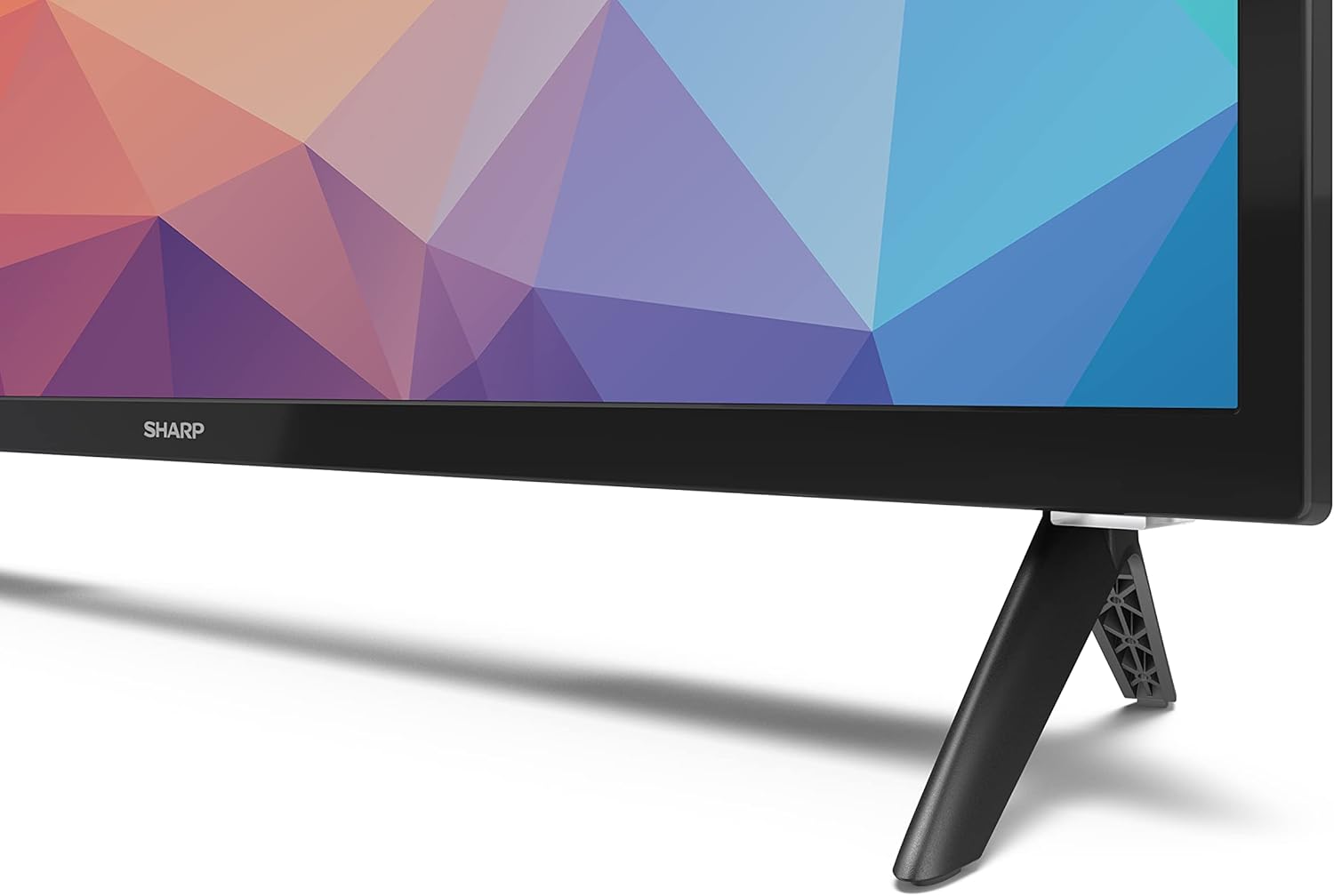
Image: Close-up of the TV stand attachment.
4.3 Veggmontering
The Sharp 32FG6EA supports VESA wall mounts with dimensions of 75 x 75 mm. Wall mount hardware is not included. Follow the instructions provided with your wall mount kit.
4.4 Koble til eksterne enheter
Your TV features multiple ports for connecting various devices:
- HDMI: Connect Blu-ray players, game consoles, or set-top boxes to the 2 HDMI ports.
- USB: Connect USB storage devices for media playback to the 2 USB ports.
- Antenne/kabel: Koble til en antenne eller kabel-TV-kilde for kringkastingskanaler.
- Ethernet: For en kablet internettforbindelse.
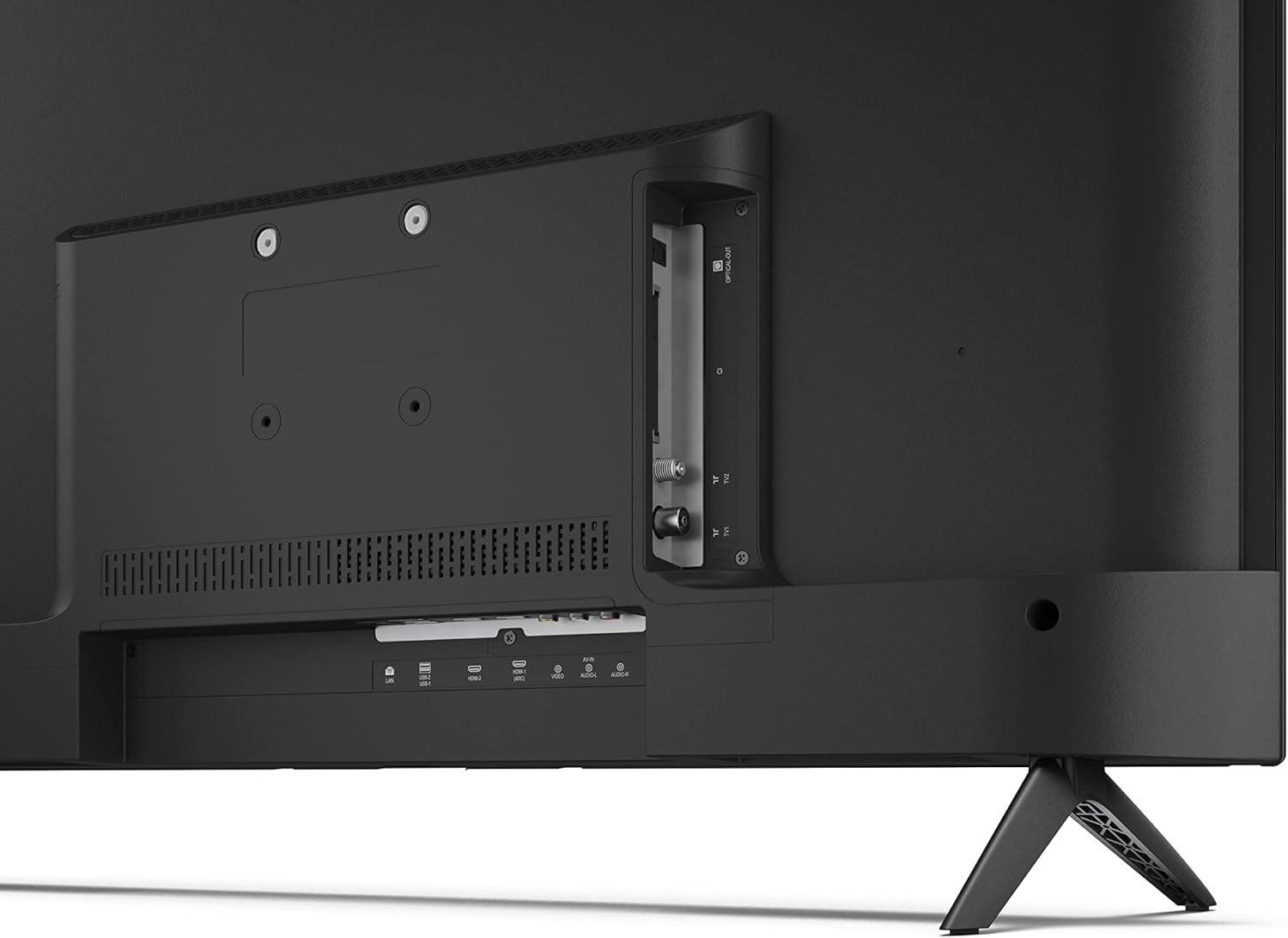
Bilde: Bak view av TV-en med tilkoblingsporter.
4.5 Strømtilkobling
After connecting all necessary devices, plug the power cable into the TV and then into a wall outlet.
4.6 Veiviser for førstegangsoppsett
Når TV-en slås på for første gang, vil den veilede deg gjennom en innledende konfigurasjonsprosess. Dette inkluderer:
- Valg av språk.
- Nettverkstilkobling (Wi-Fi eller Ethernet).
- Google account sign-in (required for full Android TV features).
- Kanalskanning.
5. Drift
5.1 Fjernkontroll overview
The included remote control allows you to navigate the TV's features. Insert the 2 AAA batteries into the remote control before use.
- Strømknapp: Slår TV-en på eller av.
- Retningstast (D-Pad) og OK-knapp: Naviger i menyer og bekreft valg.
- Tilbake-knapp: Går tilbake til forrige skjermbilde.
- Hjem-knapp: Åpner Android TV-startskjermen.
- Volum opp/ned: Justerer lydvolumet.
- Kanal opp/ned: Endrer TV-kanaler.
- Google Assistant-knapp: Aktiverer stemmekontroll.
- Snarveisknapper for apper: Dedicated buttons for popular streaming services like Netflix, Prime Video, and YouTube.
5.2 Android TV-grensesnittnavigasjon
The Android TV home screen provides access to your installed apps, recommended content, and settings. Use the directional pad on your remote to navigate through the interface.
5.3 Google -assistent
Press the Google Assistant button on your remote and speak into the microphone to:
- Søk etter filmer, serier eller informasjon.
- Kontroller smarthjemenheter.
- Åpne applikasjoner.
- Juster TV-innstillingene.
5.4 Chromecast innebygd
The TV includes Chromecast built-in, allowing you to cast content from compatible apps on your smartphone, tablet, or computer directly to the TV screen.
5.5 Bluetooth-tilkobling
Connect Bluetooth devices such as headphones or speakers to your TV for a personalized audio experience. Navigate to the TV's settings menu to pair new Bluetooth devices.
5.6 Lydinnstillinger
The TV supports Dolby Audio with 2 x 6 W RMS speakers. You can adjust audio settings, including sound modes and equalizer, through the TV's settings menu.
6. Vedlikehold
6.1 Rengjøring av TV-en
Slik rengjør du TV-skjermen og kabinettet:
- Trekk ut strømledningen fra stikkontakten.
- Use a soft, lint-free cloth to gently wipe the screen and surfaces.
- For gjenstridige merker, litt dampSkyll kluten med vann eller et spesialisert skjermrensemiddel (påfør på kluten, ikke direkte på skjermen).
- Ikke bruk slipende rengjøringsmidler, voks eller løsemidler.
6.2 Programvareoppdateringer
Your Android TV may receive periodic software updates to improve performance and add new features. Ensure your TV is connected to the internet to receive these updates. You can check for updates manually in the TV's settings menu.
7. Feilsøking
Hvis du støter på problemer med TV-en, kan du se følgende vanlige problemer og løsninger:
- Ingen strøm: Sørg for at strømkabelen er ordentlig koblet til både TV-en og en fungerende stikkontakt. Prøv en annen stikkontakt.
- Ikke noe bilde/lyd: Check that the correct input source is selected. Verify all cables (HDMI, antenna) are properly connected.
- Fjernkontrollen fungerer ikke: Sjekk batteriene og sørg for at de er satt inn riktig. Rett fjernkontrollen direkte mot TV-ens IR-sensor.
- Dårlig bildekvalitet: Check antenna/cable connections. Adjust picture settings in the TV menu. For streaming content, ensure a stable internet connection.
- Ingen Internett-tilkobling: Verify Wi-Fi password or Ethernet cable connection. Restart your router and the TV.
- Apper som ikke fungerer: Ensure the TV's software is up to date. Try clearing the app's cache or reinstalling the app.
If problems persist, consult the Sharp support webnettstedet eller kontakt kundeservice.
8. Spesifikasjoner
| Trekk | Spesifikasjon |
|---|---|
| Modellnummer | 32FG6EA |
| Merke | Skarp |
| Skjermstørrelse | 32 tommer (81 cm diagonalt) |
| Skjermteknologi | LED |
| Oppløsning | 720p (1366 x 768 piksler) |
| Aspektforhold | 16:9 |
| Oppdateringsfrekvens | 50 Hz |
| Operativsystem | Android TV 11 |
| Spesielle funksjoner | Android TV, Google Assistant, Chromecast built-in |
| Lyd utgang | 2 x 6 W RMS, Dolby Audio |
| HDMI-porter | 2 |
| USB-porter | 2 |
| Tilkobling | Wi-Fi, Bluetooth, Ethernet |
| VESA veggfeste | 75 x 75 mm |
| Dimensjoner med stativ (B x H x D) | 731 x 486 x 177 mm |
| Mål uten stativ (B x H x D) | 731 x 433 x 68 mm |
| Produktdimensjoner (D x B x H) | 16 x 73 x 46.4 cm (omtrentlig, med stativ) |
| Vekt | 3.9 kg |
| Energieffektivitetsklasse | E |

Image: TV dimensions diagram.

Image: Energy Label. For more details, visit EPREL-database.
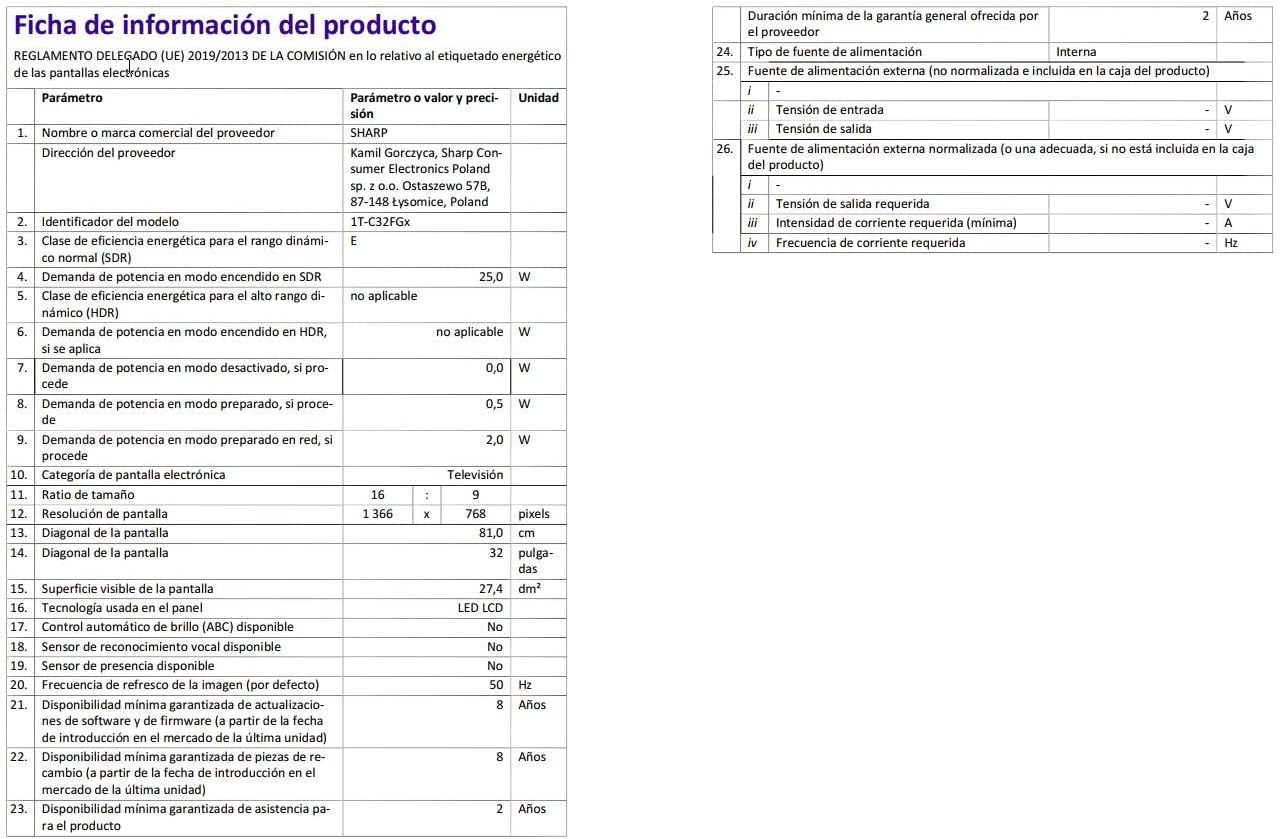
Image: Detailed product information sheet.
9. Garanti og støtte
The Sharp 32FG6EA television comes with a minimum general warranty duration of 2 years from the provider.
For technical support, warranty claims, or further assistance, please refer to the contact information provided with your purchase documentation or visit the official Sharp support webnettsted for din region.