
Introduksjon
The Xiaomi Redmi Pad L83 is a WiFi-only tablet designed for entertainment and productivity. It features a 10.61-inch display, an Octa-Core MediaTek Helio G99 processor, and a large 8000mAh battery. This manual provides essential information to help you set up, operate, and maintain your device.
Hva er i esken
Upon unboxing your Xiaomi Redmi Pad, you should find the following items:
- 1 x Xiaomi Redmi Pad L83 Tablet
- 1 x billader
- 1 x USB-kabel
Video: Unboxing and First Review of the Xiaomi Redmi Pad. This video demonstrates the contents of the product packaging and initial impressions of the device.
Oppsett
- Strøm på: Press and hold the Power button located on the top edge of the tablet until the Xiaomi logo appears.
- Innledende konfigurasjon: Følg instruksjonene på skjermen for å velge språk og region, og koble til et Wi-Fi-nettverk.
- Google-kontooppsett: Logg på med Google-kontoen din, eller opprett en ny for å få tilgang til Google-tjenester og Play-butikken.
- Skjerm lås: Set up a screen lock method (Pattern, PIN, Password, or Face Unlock) for security. Note that Face Unlock is less secure than other methods.
- Programvareoppdateringer: Ensure your tablet is running the latest software by checking for updates in the Settings menu.
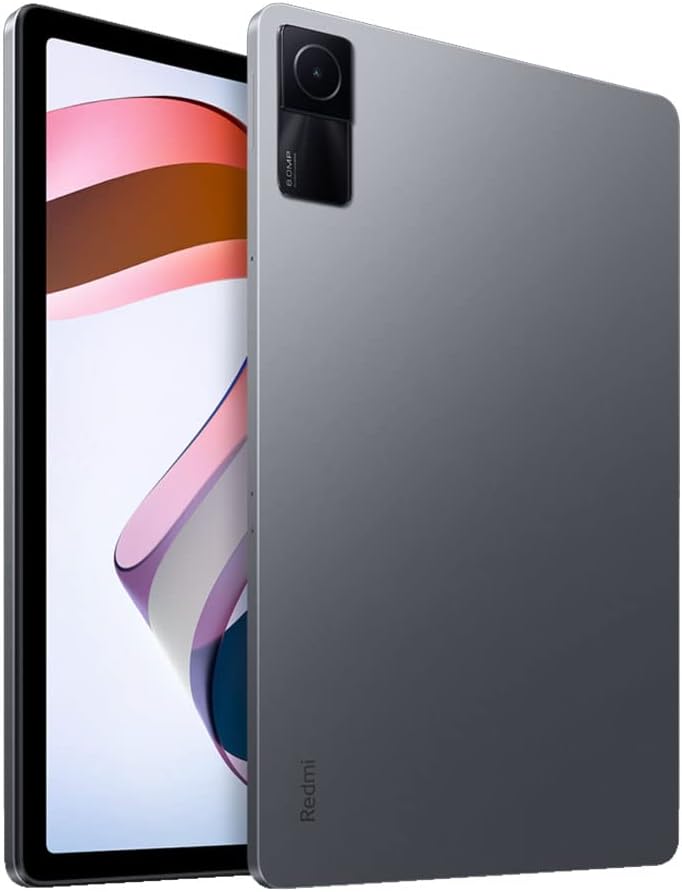
Bilde: Foran view of the Xiaomi Redmi Pad, showing the display and the location of the SIM/microSD card tray on the side.
Bruksanvisning
Skjerm og lyd
The Redmi Pad features a 10.61-inch IPS display with a resolution of 2000x1200 pixels and a 90Hz refresh rate, offering a smooth visual experience. It supports Dolby Atmos audio through its quad speakers, providing immersive sound for media consumption.
- Utstilling: 10.61-inch, 2000x1200 resolution, 90Hz refresh rate, 400 nits (typ) brightness.
- Lyd: Quad speakers with Dolby Atmos support for rich sound.
Video: En omfattende revurderingview of the Xiaomi Redmi Pad, highlighting its display quality, audio performance, and overall user experience.
Ytelse og spilling
Powered by the MediaTek Helio G99 Octa-core processor, the Redmi Pad delivers smooth performance for daily tasks and medium-graphic gaming. It is available with 3GB, 4GB, or 6GB of RAM and 64GB or 128GB of storage, expandable via microSD card.
- Prosessor: MediaTek Helio G99 Octa-core.
- VÆR: 3GB, 4GB, or 6GB options.
- Lagring: 64GB or 128GB, expandable via microSD.
Video: A detailed comparison between the Redmi Pad and Samsung Galaxy Tab S6 Lite 2022, focusing on performance, display, and overall value for money.
Software & Updates
The tablet runs MIUI 13 based on Android 12. Xiaomi promises two major Android updates and three years of security updates, ensuring your device remains up-to-date and secure.
- Operativsystem: Android 12 with MIUI 13.
- Oppdateringer: Two major Android updates and three years of security updates.
Kamera
The Redmi Pad is equipped with an 8MP rear camera and an 8MP front camera (105° FOV with FocusFrame). Both cameras are suitable for casual photography, video calls, and document scanning.
- Bakre kamera: 8MP, Full HD Video Recording.
- Frontkamera: 8MP (FOV - 105°), ideal for video calls.

Bilde: Bakside view of the Xiaomi Redmi Pad, showcasing the single 8MP rear camera module.
Batterilevetid
With an 8000mAh battery, the Redmi Pad offers extended usage times, making it suitable for long commutes or entertainment sessions. It supports 18W fast charging.
- Batterikapasitet: 8000mAh.
- Lader: 18W fast charging.
Vedlikehold
- Rengjøring: Bruk en myk, lofri klut til å rengjøre skjermen og kabinettet. Unngå sterke kjemikalier.
- Programvareoppdateringer: Se etter og installer systemoppdateringer regelmessig for å sikre optimal ytelse og sikkerhet.
- Lagringsadministrasjon: Fjern unødvendige ting med jevne mellomrom files and apps to free up storage space and improve device speed.
- Batteripleie: Avoid extreme temperatures and fully draining the battery frequently to prolong its lifespan.
Feilsøking
- Enheten svarer ikke: If the tablet becomes unresponsive, press and hold the Power button for about 10 seconds to force a restart.
- Problemer med Wi-Fi-tilkobling: Try restarting your Wi-Fi router and the tablet. If the issue persists, forget the network in Wi-Fi settings and reconnect.
- Appkrasj: Clear the cache and data of the problematic app in Settings > Apps. If it continues, uninstall and reinstall the app.
- Langsom ytelse: Close background apps, clear cache, and ensure sufficient free storage. Consider a factory reset as a last resort (back up your data first).
- Kontakt kundestøtte: For persistent issues, refer to the Xiaomi support webnettstedet eller kontakt kundeservice.
Produktspesifikasjoner
| Trekk | Spesifikasjon |
|---|---|
| Merke | XIAOMI |
| Modellnavn | Redmi Pad |
| Modellnummer | L83 |
| Skjermstørrelse | 10.61 tommer |
| Skjermoppløsning | 2000x1200 |
| Vis oppdateringsfrekvens | 90 Hz |
| Prosessor | MediaTek Helio G99 Octa-core (2.2 GHz) |
| RAM-minne | 4 GB (available in 3GB, 4GB, 6GB variants) |
| Lagringskapasitet | 128 GB (tilgjengelig i varianter på 64 GB og 128 GB) |
| Operativsystem | Android 12 (MIUI 13) |
| Bakre kamera | 8 MP |
| Frontkamera | 8 MP (105° synsfelt) |
| Batterikapasitet | 8000 mAh |
| Tilkobling | Wi-Fi 5, Bluetooth v5.3, USB-C |
| Lyd | Fire høyttalere, støtte for Dolby Atmos |
Garanti og støtte
The Xiaomi Redmi Pad L83 comes with a limited warranty. For detailed warranty terms and conditions, please refer to the warranty card included in the box or visit the official Xiaomi support webnettstedet.
For teknisk støtte, feilsøkingshjelp eller serviceforespørsler, vennligst kontakt Xiaomis kundestøtte via deres offisielle kanaler.


