
1. Introduksjon
This manual provides essential instructions for the setup, operation, maintenance, and troubleshooting of your White Shark GK-2102 LEGIONNAIRE-X RGB USB Keyboard. Please read this manual thoroughly before using the product to ensure proper functionality and longevity.

Bilde 1.1: Topp view of the White Shark GK-2102 LEGIONNAIRE-X RGB USB Keyboard, showcasing dens fulle layout og RGB-belysning.
2. Oppsett
Follow these steps to connect your White Shark GK-2102 LEGIONNAIRE-X RGB USB Keyboard to your computer.
- Pakk ut tastaturet: Ta tastaturet og USB-kabelen forsiktig ut av emballasjen.
- Koble til USB-kabelen: Insert the USB connector of the keyboard into an available USB port on your computer.

Image 2.1: Close-up of the USB connector, which is used to connect the keyboard to a computer.
- Driverinstallasjon: Tastaturet er plug-and-play. Operativsystemet ditt skal automatisk oppdage og installere de nødvendige driverne. Ingen ekstra programvareinstallasjon er vanligvis nødvendig.
- Juster tastaturføttene: For ergonomic comfort, you may extend the adjustable feet located on the underside of the keyboard.

Bilde 2.2: View of the adjustable feet on the keyboard's underside, allowing users to modify the typing angle.
3. Bruksanvisning
The White Shark GK-2102 LEGIONNAIRE-X is a standard USB keyboard with RGB lighting features. Below are general operating guidelines.
3.1 Grunnleggende tastaturfunksjoner
The keyboard functions as a standard QWERTY layout device. All keys perform their indicated character or function when pressed. Special function keys (F1-F12) may require the 'Fn' key to be held down simultaneously for their secondary functions, depending on your operating system and specific keyboard model configuration.
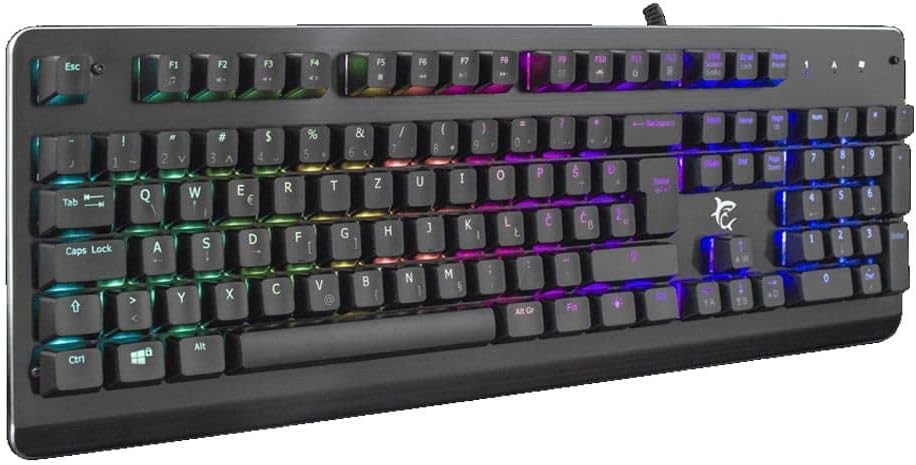
Bilde 3.1: Vinklet view of the keyboard, highlighting the key layout and illuminated RGB backlighting.
3.2 RGB-lyskontroll
This keyboard features RGB lighting. Specific key combinations, often involving the 'Fn' key and other designated keys (e.g., arrow keys, Ins, Home, PgUp, Del, End, PgDn), are typically used to cycle through lighting modes, adjust brightness, or change colors. Refer to the quick start guide or manufacturer's website for detailed RGB control commands specific to this model.
4. Vedlikehold
Riktig vedlikehold sikrer tastaturets levetid og ytelse.
- Rengjøring: Disconnect the keyboard from your computer before cleaning. Use a soft, dry cloth to wipe the surface. For stubborn dirt, a slightly damp En klut med mild såpe kan brukes, slik at det ikke kommer væske inn i tastaturet. Trykkluft kan brukes til å fjerne støv og rusk mellom tastene.
- Unngå væsker: Do not spill liquids on the keyboard. Liquid damage can cause permanent malfunction.
- Lagring: Oppbevar tastaturet på et kjølig og tørt sted, unna direkte sollys og ekstreme temperaturer når det ikke er i bruk over lengre tid.
5. Feilsøking
Hvis du støter på problemer med tastaturet, kan du prøve følgende løsninger:
- Tastaturet svarer ikke:
- Sørg for at USB-kabelen er ordentlig koblet til både tastaturet og datamaskinen.
- Prøv å koble tastaturet til en annen USB-port på datamaskinen.
- Test the keyboard on another computer to determine if the issue is with the keyboard or the computer's port/drivers.
- Start datamaskinen på nytt.
- Taster fungerer ikke:
- Sjekk om det er noen fysiske hindringer under tastehettene.
- Rengjør tastaturet som beskrevet i vedlikeholdsdelen.
- RGB-belysning fungerer ikke/feil:
- Sørg for at tastaturet er riktig tilkoblet og får strøm.
- Refer to the manufacturer's specific instructions for RGB control key combinations.
6. Spesifikasjoner
Below are the technical specifications for the White Shark GK-2102 LEGIONNAIRE-X RGB USB Keyboard:

Bilde 6.1: Sideprofffile of the keyboard, illustrating its physical dimensions and keycap height.
| Trekk | Detalj |
|---|---|
| Merke | Hvithai |
| Modell | GK-2102 LEGIONNAIRE-X |
| Tilkobling | USB |
| Produktdimensjoner | 50 x 50 x 28 cm |
| Vekt | 1.06 kg |
| Materiale | Plast |
| Spesielle funksjoner | RGB belysning |
| Batterier påkrevd | Ingen |
7. Garantiinformasjon
For detailed warranty information regarding your White Shark GK-2102 LEGIONNAIRE-X RGB USB Keyboard, please refer to the warranty card included with your product or visit the official White Shark webGarantivilkårene kan variere avhengig av region og forhandler.
8. Støtte
If you require further assistance or have questions not covered in this manual, please contact White Shark customer support through their official website or the contact information provided with your purchase. Please have your product model (GK-2102 LEGIONNAIRE-X) and purchase details ready when contacting support.