
Introduksjon
This manual provides instructions for the Beyution RC877S replacement infrared remote control. This remote is designed to be a direct replacement for various Onkyo Audio Soundbar and Home Theater Systems, including models LS-T10, LS-B50, LSB50, LST10, 24140877, RC-877S, and RC877. It operates using infrared technology and typically requires no programming or setup for compatible devices.
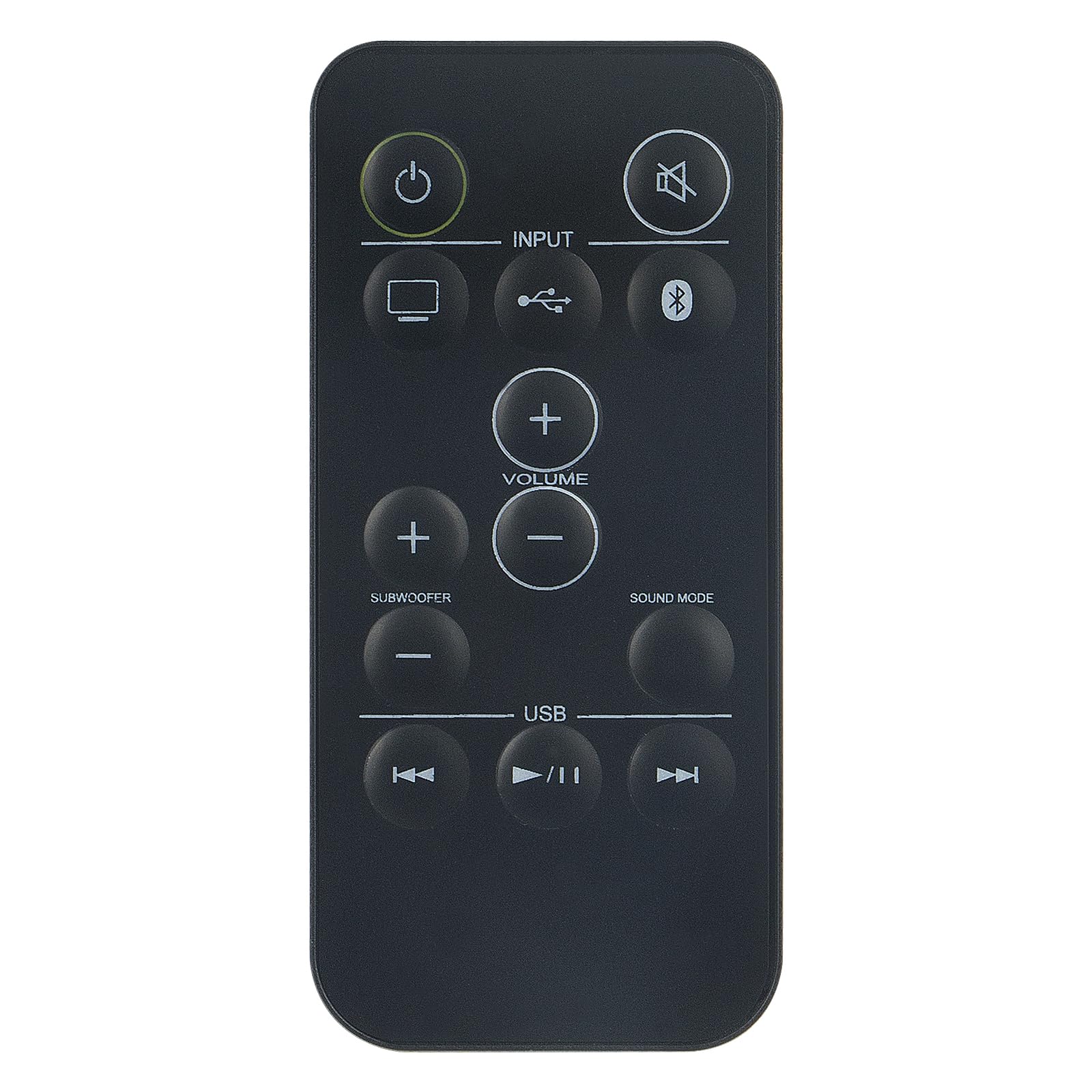
Bilde: Foran view of the Beyution RC877S remote control, showing all buttons clearly labeled.
Oppsett
Installasjon av batteri
The RC877S remote control requires two AAA batteries for operation. Follow these steps to install the batteries:
- Finn batteriromdekselet på baksiden av fjernkontrollen.
- Skyv dekselet nedover eller trykk på låsen (hvis den finnes) for å åpne rommet.
- Sett inn to AAA-batterier, og sørg for at de positive (+) og negative (-) polene er riktig justert med merkingene inni batterirommet.
- Sett på batteridekselet ved å skyve det tilbake på plass til det klikker ordentlig.
Note: This remote control is designed to work immediately with compatible devices without any additional programming. If the remote does not respond, ensure batteries are installed correctly and have sufficient charge.

Bilde: Vinklet view of the Beyution RC877S remote control, highlighting its ergonomic design.
Bruksanvisning
Point the remote control directly at your Onkyo audio soundbar or home theater system. The maximum effective operating distance is approximately 10 meters (33 feet).
Knappefunksjoner:
- Effekt (⏻): Slår enheten på eller av.
- Demp (🔇): Demper eller slår på lydutgangen.
- Inndata: Cycles through available input sources (e.g., TV, USB, Bluetooth).
- Volum (+/-): Increases or decreases the main volume level.
- Subwoofer (+/-): Justerer subwooferens volumnivå.
- Lydmodus: Changes the audio sound mode or preset.
- USB: Selects the USB input source.
- Forrige spor (⏮): Skips to the beginning of the current track or the previous track during media playback.
- Play/Pause (⏸/⏸): Spiller av eller setter avspilling av media på pause.
- Neste spor (⏭): Skips to the next track during media playback.

Image: A person comfortably using the remote control to operate a home theater system, demonstrating typical usage.
Vedlikehold
For å sikre at fjernkontrollen din holder lenge og har optimal ytelse, bør du følge disse vedlikeholdsretningslinjene:
- Rengjøring: Tørk av fjernkontrollen med en myk, tørr klut. For gjenstridig smuss, tørk litt avampSkyll kluten med vann eller et mildt rengjøringsmiddel, og tørk deretter av umiddelbart. Unngå bruk av slipende rengjøringsmidler eller løsemidler.
- Batteribytte: Replace batteries when the remote's response becomes sluggish or it stops functioning. Always replace both batteries at the same time with new ones of the same type (AAA).
- Lagring: Oppbevar fjernkontrollen på et kjølig og tørt sted, unna direkte sollys, ekstreme temperaturer og høy luftfuktighet. Hvis fjernkontrollen ikke skal brukes over lengre tid, må du ta ut batteriene for å forhindre lekkasje.
- Unngå dråper: Beskytt fjernkontrollen mot fysiske støt, da fall kan skade interne komponenter.
Feilsøking
If you experience issues with your RC877S remote control, refer to the following common solutions:
- Fjernkontrollen svarer ikke:
- Check if the batteries are installed correctly with the correct polarity (+/-).
- Bytt ut gamle batterier med nye AAA-batterier.
- Ensure there is a clear line of sight between the remote control and the device's infrared receiver. Obstructions can block the signal.
- Sørg for at du er innenfor det effektive driftsområdet (omtrent 10 meter).
- Spesifikke knapper fungerer ikke:
- Rengjør fjernkontrollen, spesielt rundt knappene, for å fjerne smuss eller rusk som kan blokkere den.
- If only certain buttons are unresponsive, the remote might be damaged.
- Device not compatible:
- Verify that your Onkyo audio system model is listed as compatible (LS-T10, LS-B50, LSB50, LST10, 24140877, RC-877S, RC877).
- This remote is an infrared replacement and does not require programming. If your original remote used a different technology (e.g., RF), this replacement may not be suitable.
Hvis disse trinnene ikke løser problemet, kan du se delen om garanti og støtte for ytterligere hjelp.
Spesifikasjoner
| Merke | Beyution |
| Modellnavn | RC877S |
| Modellnummer | WY-RC877S-US |
| Tilkoblingsteknologi | Infrarød |
| Maksimal rekkevidde | 10 meter (33 fot) |
| Antall batterier som kreves | 2 |
| Batteritype | AAA alkalisk |
| Materiale | ABS plast |
| Farge | Svart |
| Varedimensjoner (L x B x H) | 5 cm x 1 cm x 0.5 cm |
Garanti og støtte
Garantiinformasjon
This Beyution RC877S remote control comes with a 1 års garanti fra kjøpsdatoen. Denne garantien dekker produksjonsfeil og sikrer at produktet fungerer som tiltenkt ved normal bruk. Vennligst ta vare på kjøpsbeviset for garantikrav.
Kundestøtte
For any questions, concerns, or issues regarding your remote control, including damage or malfunction, please contact our customer service team. We are committed to providing a satisfactory solution within 24 hours.
Kontakt: Please refer to the seller's contact information on your purchase platform for direct assistance.